

本文详解在微信小程序中引入第三方库Underscore.js的方法。由于小程序运行环境未定义exports和module,直接调用会失败。通过修改源码注释原有导出逻辑并强制使用module.exports = _,可实现兼容。
引言与背景
前言
Underscore.js是一个轻量级工具库,压缩后体积仅4KB。它提供了超过100个辅助函数,涵盖map、filter、invoke等常用操作,以及函数绑定、模板引擎、快速索引和强类型相等测试等专业功能。该库有效弥补了原生JavaScript标准库的不足,显著提升了开发效率。
小程序模块加载限制
在微信小程序中,无法直接通过require('underscore.js')来加载和使用该库。
微信小程序模块化机制
微信小程序模块化机制
微信小程序的运行环境基于CommonJS模块化规范。开发者通过module.exports暴露对象,并利用require函数获取所需模块。
微信小程序Quick Start utils/util.js
function formatTime(date) {
 var year = date.getFullYear()
 var month = date.getMonth() + 1
 var day = date.getDate()

 var hour = date.getHours()
 var minute = date.getMinutes()
 var second = date.getSeconds();


 return [year, month, day].map(formatNumber).join('/') + ' ' + [hour, minute, second].map(formatNumber).join(':')
}

function formatNumber(n) {
 n = n.toString()
 return n[1] ? n : '0' + n
}

module.exports = {
 formatTime: formatTime
}
pages/log/log.js
var util = require('../../utils/util.js')
Page({
 data: {
 logs: []
 },
 onLoad: function () {
 this.setData({
 logs: (wx.getStorageSync('logs') || []).map(function (log) {
 return util.formatTime(new Date(log))
 })
 })
 }
})
兼容性问题分析
原因分析
Underscore库的CommonJS模块导出代码逻辑如下:
// Export the Underscore object for **Node.js**, with
// backwards-compatibility for the old `require()` API. If we're in
// the browser, add `_` as a global object.
if (typeof exports !== 'undefined') {
 if (typeof module !== 'undefined' && module.exports) {
 exports = module.exports = _;
 }
 exports._ = _;
} else {
 root._ = _;
}
测试发现,微信小程序运行环境中并未定义exports和module变量。因此,原有的导出逻辑无法执行,导致模块导出失败。
//index.js

//获取应用实例
var app = getApp();

Page({

 onLoad: function () {
 console.log('onLoad');
 var that = this;

 console.log('typeof exports: ' + typeof exports);
 console.log('typeof module: ' + typeof exports);

 var MyClass = function() {

 }

 module.exports = MyClass;

 console.log('typeof module.exports: ' + typeof module.exports);
 }
})
解决方案与代码修改
解决方法
需修改Underscore源码,注释掉原有的模块导出判断语句,改为使用module.exports = _ 进行强制导出。
 /*
 // Export the Underscore object for **Node.js**, with
 // backwards-compatibility for the old `require()` API. If we're in
 // the browser, add `_` as a global object.
 if (typeof exports !== 'undefined') {
 if (typeof module !== 'undefined' && module.exports) {
 exports = module.exports = _;
 }
 exports._ = _;
 } else {
 root._ = _;
 }
 */

 module.exports = _;
 /*
 // AMD registration happens at the end for compatibility with AMD loaders
 // that may not enforce next-turn semantics on modules. Even though general
 // practice for AMD registration is to be anonymous, underscore registers
 // as a named module because, like jQuery, it is a base library that is
 // popular enough to be bundled in a third party lib, but not be part of
 // an AMD load request. Those cases could generate an error when an
 // anonymous define() is called outside of a loader request.
 if (typeof define === 'function' && define.amd) {
 define('underscore', [], function() {
 return _;
 });
 }
 */
库的使用示例
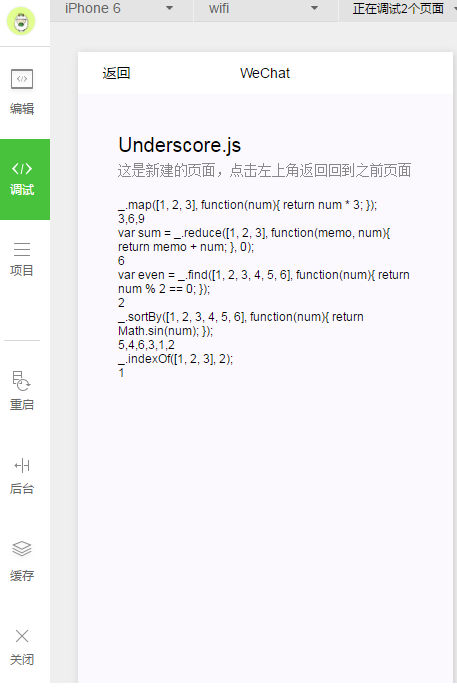
使用Underscore.js
//index.js

var _ = require( '../../libs/underscore/underscore.modified.js' );

//获取应用实例
var app = getApp();


Page( {

 onLoad: function() {
 //console.log('onLoad');
 var that = this;

 var lines = [];

 lines.push( "_.map([1, 2, 3], function(num){ return num * 3; });" );
 lines.push( _.map( [ 1, 2, 3 ], function( num ) { return num * 3; }) );

 lines.push( "var sum = _.reduce([1, 2, 3], function(memo, num){ return memo + num; }, 0);" );
 lines.push( _.reduce( [ 1, 2, 3 ], function( memo, num ) { return memo + num; }, 0 ) );

 lines.push( "var even = _.find([1, 2, 3, 4, 5, 6], function(num){ return num % 2 == 0; });" );
 lines.push( _.find( [ 1, 2, 3, 4, 5, 6 ], function( num ) { return num % 2 == 0; }) );

 lines.push( "_.sortBy([1, 2, 3, 4, 5, 6], function(num){ return Math.sin(num); });" );
 lines.push( _.sortBy( [ 1, 2, 3, 4, 5, 6 ], function( num ) { return Math.sin( num ); }) );

 lines.push( "_.indexOf([1, 2, 3], 2);" );
 lines.push( _.indexOf([1, 2, 3], 2) );

 this.setData( {
  text: lines.join( '\n' )
 })
 }
})
总结
总结
以上介绍了在微信小程序中使用第三方库Underscore.js的完整流程。希望本文内容能对您的学习或工作有所帮助,如有疑问欢迎留言交流。