

本文介绍如何利用jQuery.autocomplete函数实现输入框的模糊提示功能。通过定义数据数组并绑定到输入框,即可快速实现自动补全效果,操作简便且实用性强。
jQuery输入框模糊提示功能实现
javascript input输入框模糊提示功能的实现
该功能主要依赖于jQuery.autocomplete函数,只需预先定义好一个数据数组,即可启用此功能,使用过程非常便捷。
<!doctype html>
<html>
<head>
 <meta charset="utf-8">
 <link rel="stylesheet" href="//code.jquery.com/ui/1.11.4/themes/smoothness/jquery-ui.css" rel="external nofollow" >
 <script src="https://code.jquery.com/jquery-1.10.2.js"></script>
 <script src="https://code.jquery.com/ui/1.11.4/jquery-ui.js"></script>
 <script>
 $(function() {
  var availableTags = [
   "James",
   "Kobe",
   "Jordan"
  ];
  $( "#tags" ).autocomplete({
   source: availableTags
  });
 });
 </script>
</head>
<body>

<div class="ui-widget">
 <label for="tags">Tags: </label>
 <input id="tags">
</div>

</body>
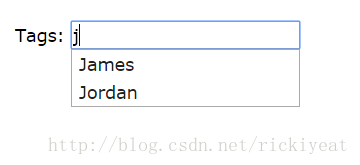
具体效果展示如下:
如有疑问请留言或者到本站社区交流讨论,感谢阅读,希望能帮助到大家,谢谢大家对本站的支持!