
本文详解如何将 Three.js 渲染管线与 ammo.js 物理引擎结合,通过双系统并行与帧驱动位姿同步,实现真实的 3D 重力下落、刚体碰撞与物理状态映射。

当前位置:首页 > JavaScript 项目实战 > 正文
Three.js 结合 ammo.js 实现 3D 物体碰撞与重力同步
作者:微光
时间:2026-11-03
浏览:238
文章目录
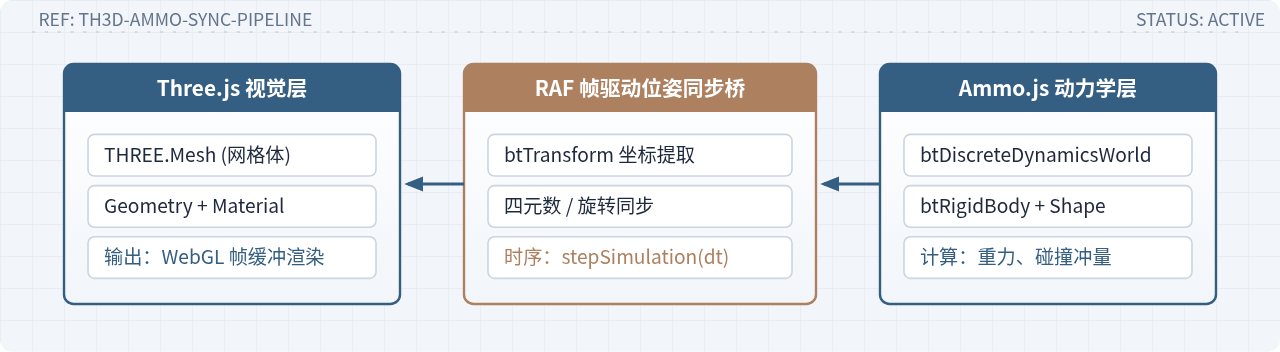
在基于浏览器的三维应用开发中,Three.js 专精于场景图组织、材质渲染与三维投影,但其内核不包含质量、加速度、弹性阻尼及碰撞体积等动力学计算逻辑;ammo.js 是开源物理引擎 Bullet Physics 的 WebAssembly/JavaScript 端口,能够精准模拟刚体动力学与连续碰撞。实现两者的核心方案是双世界并行演进与帧驱动位姿同步:在内存中分别维护 Three.js 的视觉场景树与 ammo.js 的物理世界,物理世界在后台按时间步长(Delta Time)求解重力加速度与刚体接触力,渲染主循环则逐帧读取刚体的空间变换矩阵,并精确赋予对应的三维网格模型(Mesh)。
一、双系统协同架构与运行原理
在物理模拟中,不能直接把物理引擎挂载到 Mesh 属性上。因为 Three.js 网格的变换中心位于本地坐标系的原点,而物理引擎的刚体(btRigidBody)是基于质心(Center of Mass)及包围碰撞体(btCollisionShape)建立运动微分方程的。两个系统具有完全不同的对象抽象与内存生命周期。
实现碰撞与重力同步的总体架构分为三大层级:
- 物理动力学层(ammo.js):通过
btDiscreteDynamicsWorld维护全局重力场(如 -9.8 m/s²)、宽相位碰撞检测轴对齐包围盒树(AABB Tree)以及冲量约束求解器。每个物体抽象为刚体,包含质量、惯性张量、碰撞形状和当前速度。 - 网桥状态映射层(Data Bridge):维护一个键值对或对象数组(如
rigidBodies = []),将每个 Three.js 的THREE.Mesh与其对应的Ammo.btRigidBody建立强引用配对。在循环中通过复用单一的Ammo.btTransform临时对象提取位姿。 - 视觉呈现层(Three.js):接收同步过来的世界坐标(Position)和四元数(Quaternion),更新网格的局部变换矩阵,并由渲染器(WebGLRenderer)光栅化输出到 Canvas。
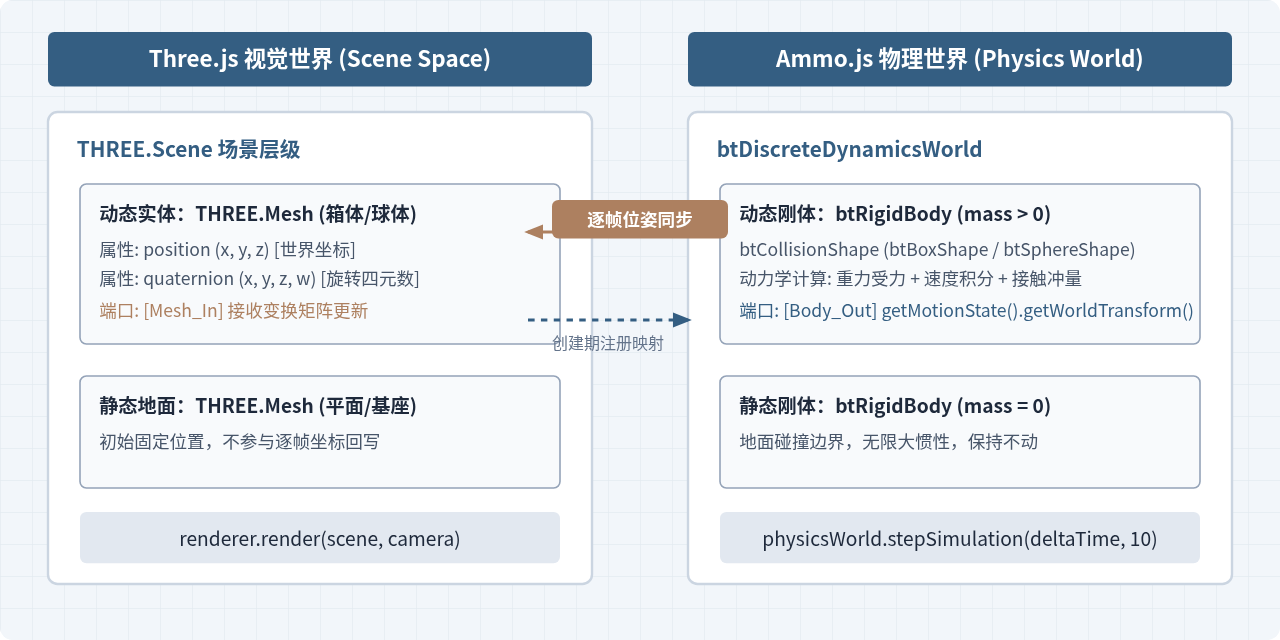
二、步骤一:Ammo.js 物理世界初始化
Ammo.js 采用 WebAssembly 模块编译封装,必须在异步完成实例化后才能安全调用其内部类。物理引擎的核心调度中枢是 btDiscreteDynamicsWorld(离散动力学世界),初始化该世界需要组装五个标准 Bullet 基础设施对象:
- 碰撞配置(
btDefaultCollisionConfiguration):负责分配碰撞检测算法所需的内存池,管理各种形状间的碰撞算法分发。 - 碰撞分发器(
btCollisionDispatcher):处理狭相位(Narrowphase)碰撞测试,精准计算两个几何体是否发生穿插及接触点。 - 粗测阶段空间结构(
btDbvtBroadphase):基于动态边界体积树(Dynamic Bounding Volume Tree),利用物体的轴对齐包围盒过滤掉绝大多数未接触物体,大幅削减碰撞运算开销。 - 约束求解器(
btSequentialImpulseConstraintSolver):逐次冲量求解器,用于解决物体碰撞冲量传递、接触法向反作用力及关节约束。 - 动力学世界(
btDiscreteDynamicsWorld):将上述四个组件合并,并设置重力加速度矢量。在标准物理场景中,重力矢量通常设为(0, -9.8, 0)。
以下为完整的物理世界构建代码:
let physicsWorld;
let transformAux; // 全局复用的变换暂存器,避免在渲染循环中产生垃圾回收负担

Ammo().then((AmmoLib) => {
  // 1. 碰撞配置
  const collisionConfiguration = new Ammo.btDefaultCollisionConfiguration();
  // 2. 碰撞分发器
  const dispatcher = new Ammo.btCollisionDispatcher(collisionConfiguration);
  // 3. 宽相位粗测算法 (动态包围盒树)
  const broadphase = new Ammo.btDbvtBroadphase();
  // 4. 序列冲量求解器
  const solver = new Ammo.btSequentialImpulseConstraintSolver();

  // 5. 实例化离散动力学物理世界
  physicsWorld = new Ammo.btDiscreteDynamicsWorld(
    dispatcher,
    broadphase,
    solver,
    collisionConfiguration
  );

  // 设置物理世界重力加速度矢量 (x=0, y=-9.8 m/s^2, z=0)
  physicsWorld.setGravity(new Ammo.btVector3(0, -9.8, 0));

  // 创建一个全局复用的 btTransform 对象
  transformAux = new Ammo.btTransform();

  // 初始化完成,随后调用场景初始化与渲染循环
  initGraphicsAndScene();
});
三、步骤二:构建刚体并建立与 Mesh 的绑定
在 Ammo.js 中,刚体(btRigidBody)区分静态物体与动态物体。区分二者的关键是质量(Mass):
- 静态物体(质量 = 0):例如地面、墙体、不可移动的障碍物。静态物体在受力时不会产生加速度或位移,其转动惯量(Inertia)设为零向量
(0, 0, 0)。 - 动态物体(质量 > 0):例如下落的方块、滚动的球体。在创建时必须根据形状几何体由引擎计算出局部转动惯量(Local Inertia),受重力和外力冲量驱动。
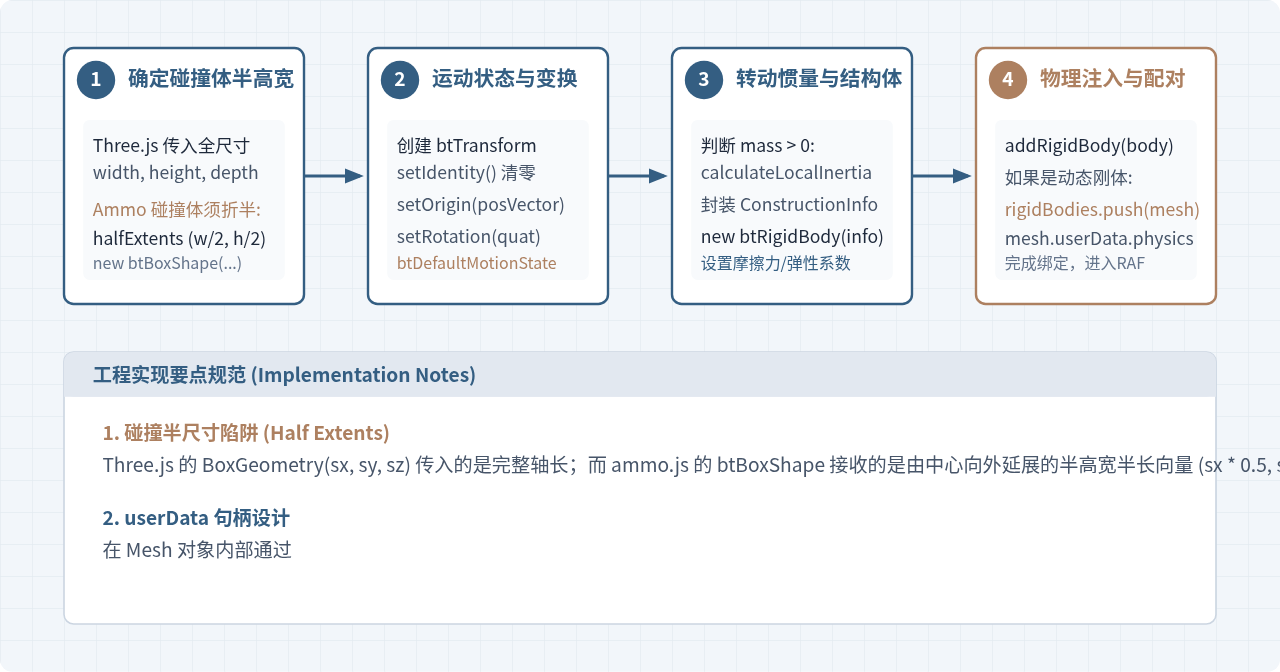
在编写构建函数时,需要将 Three.js 的几何与变换数据转换为 Ammo 格式。以下是创建长方体刚体并建立绑定的典型实现:
const rigidBodies = []; // 保存需要逐帧同步的动态网格

function createBox(sx, sy, sz, mass, pos, quat, material) {
  // 1. 创建 Three.js 视觉网格
  const geometry = new THREE.BoxGeometry(sx, sy, sz);
  const mesh = new THREE.Mesh(geometry, material);
  mesh.position.copy(pos);
  mesh.quaternion.copy(quat);
  scene.add(mesh);

  // 2. 创建 Ammo.js 物理碰撞几何体 (注意除以 2 传入半高宽)
  const halfExtents = new Ammo.btVector3(sx * 0.5, sy * 0.5, sz * 0.5);
  const shape = new Ammo.btBoxShape(halfExtents);
  Ammo.destroy(halfExtents); // 创建完成后可立即销毁临时向量

  // 3. 设置初始变换 (Position + Quaternion)
  const startTransform = new Ammo.btTransform();
  startTransform.setIdentity();

  const origin = new Ammo.btVector3(pos.x, pos.y, pos.z);
  startTransform.setOrigin(origin);
  Ammo.destroy(origin);

  const rotation = new Ammo.btQuaternion(quat.x, quat.y, quat.z, quat.w);
  startTransform.setRotation(rotation);
  Ammo.destroy(rotation);

  const motionState = new Ammo.btDefaultMotionState(startTransform);
  Ammo.destroy(startTransform);

  // 4. 计算转动惯量
  const localInertia = new Ammo.btVector3(0, 0, 0);
  if (mass > 0) {
    shape.calculateLocalInertia(mass, localInertia);
  }

  // 5. 组装刚体结构体并实例化
  const rbInfo = new Ammo.btRigidBodyConstructionInfo(
    mass,
    motionState,
    shape,
    localInertia
  );
  const body = new Ammo.btRigidBody(rbInfo);
  Ammo.destroy(rbInfo);
  Ammo.destroy(localInertia);

  // 设置物理材质摩擦力与弹力恢复系数
  body.setFriction(0.5);
  body.setRestitution(0.3);

  // 6. 添加到物理世界
  physicsWorld.addRigidBody(body);

  // 7. 若是动态物体,注册进同步列表,同时在网格上保留物理引用
  if (mass > 0) {
    mesh.userData.physicsBody = body;
    rigidBodies.push(mesh);
  }

  return mesh;
}
四、步骤三:时间步长迭代与位姿逐帧同步
驱动物理世界演进的关键是每帧调用 physicsWorld.stepSimulation(deltaTime, maxSubSteps, fixedTimeStep)。该函数负责在连续时间轴上对微分方程进行数值积分。
读者需要特别关注该函数的三个参数含义:
deltaTime(实际流逝时间):由 Three.js 的THREE.Clock.getDelta()测算出的上一帧到当前帧的时间差(秒)。maxSubSteps(最大子步数):当单帧时间较长(例如由于掉帧导致 deltaTime 达到 0.05 秒)时,引擎最多允许拆分多少个微步进行平滑积分,通常设为10,防止出现“穿模”或“时间跳跃”。fixedTimeStep(固定积分步长):内部物理模拟的固定离散时间步长,默认值是1 / 60(约 0.01667 秒)。物理引擎只有在恒定的时间步长下才能保证碰撞解算的确定性。
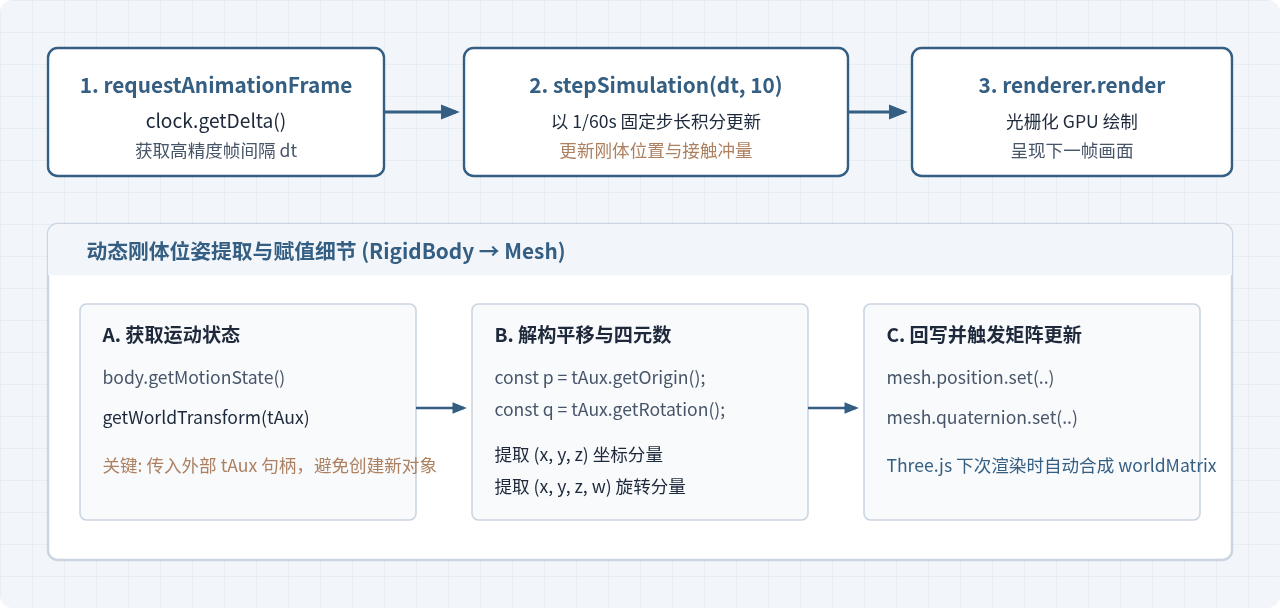
在物理推进后,遍历 rigidBodies 数组。核心代码如下:
const clock = new THREE.Clock();

function updatePhysics(deltaTime) {
  // 1. 步进物理世界 (上限 10 个子步,基准 1/60 秒)
  physicsWorld.stepSimulation(deltaTime, 10);

  // 2. 遍历所有动态网格对象,将刚体位姿同步至 Mesh
  for (let i = 0, len = rigidBodies.length; i < len; i++) {
    const objThree = rigidBodies[i];
    const objPhys = objThree.userData.physicsBody;
    const ms = objPhys.getMotionState();

    if (ms) {
      // 复用全局 transformAux 对象提取当前世界变换
      ms.getWorldTransform(transformAux);

      const p = transformAux.getOrigin();
      const q = transformAux.getRotation();

      // 将物理位姿同步给 Three.js 网格
      objThree.position.set(p.x(), p.y(), p.z());
      objThree.quaternion.set(q.x(), q.y(), q.z(), q.w());
    }
  }
}

function animate() {
  requestAnimationFrame(animate);

  const deltaTime = clock.getDelta();
  updatePhysics(deltaTime);

  renderer.render(scene, camera);
}
五、步骤四:碰撞交互与冲量施加
物体掉落到地面或其他物体表面后,碰撞发生并由 Ammo.js 的物理约束求解器自动计算接触反弹。但读者经常需要对物体施加主动力(例如鼠标点击推动、跳跃爆炸冲量),或者监听两个物体是否产生了碰撞事件。
1. 主动施加物理冲量
在 Ammo.js 中,改变刚体运动状态不能直接修改 mesh.position,否则会导致物理世界中的刚体“瞬移”脱离动力学计算;正确做法是对刚体施加冲量(Impulse)或线速度(Linear Velocity)。
function applyImpulseToMesh(mesh, impulseVector) {
  const body = mesh.userData.physicsBody;
  if (!body) return;

  // 唤醒可能已处于休眠状态的刚体
  body.activate();

  const impulse = new Ammo.btVector3(
    impulseVector.x,
    impulseVector.y,
    impulseVector.z
  );
  // 向刚体质心施加瞬间冲量
  body.applyCentralImpulse(impulse);
  Ammo.destroy(impulse);
}
注意刚体休眠(Deactivation)机制
Ammo.js 默认启用了静止物体休眠策略:当物体落地静止一定时间后,其状态会切换为 ISLAND_SLEEPING,引擎不再对其进行重力与运动更新以节约算力。如果需要外力唤醒它,必须先调用 body.activate();若需要该物体永远保持活跃(如玩家控制角色),可设置 body.setActivationState(4);(4 代表 DISABLE_DEACTIVATION)。
2. 检测碰撞接触点(Contact Manifolds)
如果需要在代码中捕获两个物体“何时发生了碰撞”,可以通过调度器查询当前的碰撞流形流(Manifolds)。引擎在每一帧物理步进后,都会把产生接触的刚体对放入 dispatcher 的列表中:
function checkCollisions() {
  const numManifolds = physicsWorld.getDispatcher().getNumManifolds();

  for (let i = 0; i < numManifolds; i++) {
    const manifold = physicsWorld.getDispatcher().getManifoldByIndexInternal(i);
    const body0 = Ammo.castObject(manifold.getBody0(), Ammo.btRigidBody);
    const body1 = Ammo.castObject(manifold.getBody1(), Ammo.btRigidBody);

    const numContacts = manifold.getNumContacts();
    for (let j = 0; j < numContacts; j++) {
      const pt = manifold.getContactPoint(j);
      // 距离小于 0 说明产生了几何相交或受压接触
      if (pt.getDistance() <= 0) {
        // 捕获到 body0 与 body1 发生碰撞
        // 可读取接触点位置: pt.getPositionWorldOnA()
        break;
      }
    }
  }
}
六、内存管控与关键避坑指南
Ammo.js 底层是 Emscripten 编译生成的 C++ 堆内存环境。JavaScript 的 V8 引擎垃圾回收器(Garbage Collector)无法自动回收通过 new Ammo.xxx() 分配的内存。如果使用不当,轻则引起掉帧卡顿,重则耗尽 WebAssembly 线性堆空间导致页面崩溃。
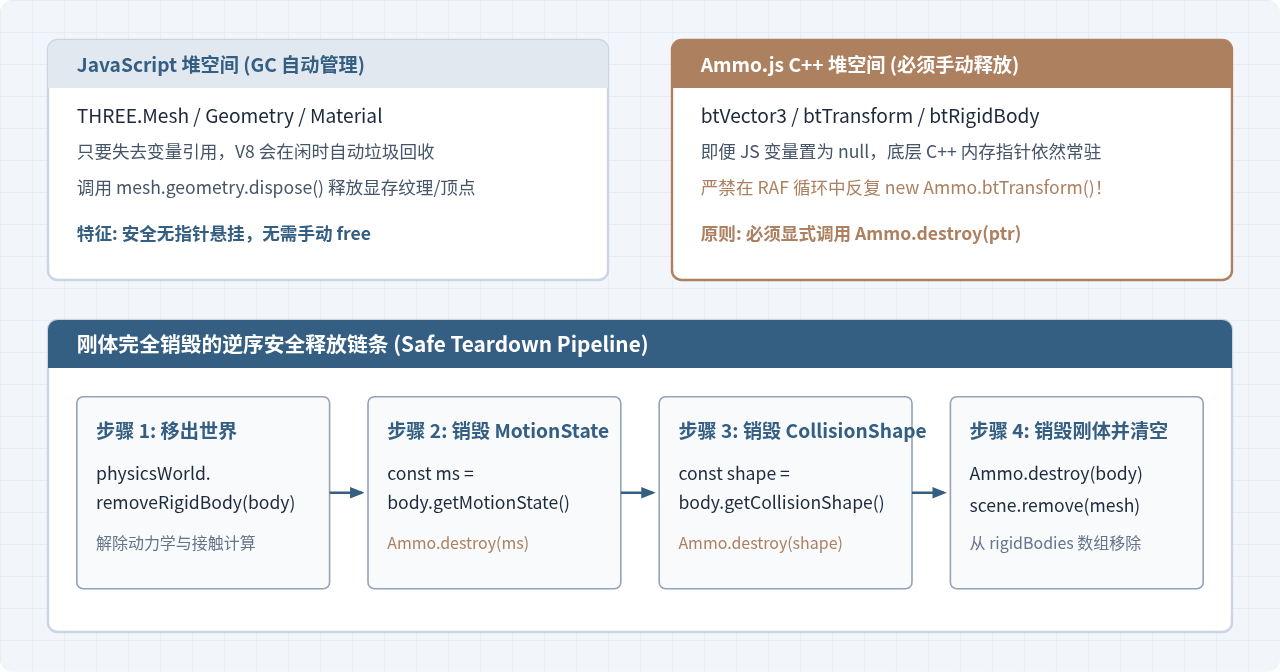
常见问题与排查表
| 常见异常现象 | 具体诱发根因 | 精准处理方案 |
|---|---|---|
| 物体悬空发生碰撞 | 创建 btBoxShape 时传入了全尺寸,导致实际碰撞箱为视觉尺寸的 2 倍(体积 8 倍)。 |
确保 btBoxShape 传入的是 sx * 0.5, sy * 0.5, sz * 0.5。 |
| 高速下落穿透地面(隧道效应) | 离散时间步内物体位移超过了地面薄度,未在单步内检测到接触。 | 为地面设置一定厚度(如厚度 2 以上),或启用连续碰撞检测 body.setCcdMotionThreshold(1)。 |
| 旋转角度剧烈跳变或倒置 | 同步时错误使用了欧拉角(Euler),或未按 (x, y, z, w) 顺序完整赋值四元数。 |
始终使用四元数 quaternion.set(q.x(), q.y(), q.z(), q.w()) 同步旋转。 |
| 运行一段时间后页面崩溃或卡顿 | 在主循环的 animate() 中每次都 new Ammo.btTransform(),导致 WASM 堆内存耗尽。 |
在全局初始化一个单例 transformAux,主循环中仅通过传参复用。 |
七、完整可执行代码框架
以下代码整合了上述所有步骤,提供了从初始化场景、加载 Ammo.js 模块、创建刚体到逐帧同步的闭环脚本:
import * as THREE from 'three';

let scene, camera, renderer, clock;
let physicsWorld, transformAux;
const rigidBodies = [];

// 1. 入口:等待 Ammo 异步就绪
Ammo().then((AmmoLib) => {
  initPhysics();
  initGraphics();
  createSceneObjects();
  animate();
});

function initPhysics() {
  const collisionConfiguration = new Ammo.btDefaultCollisionConfiguration();
  const dispatcher = new Ammo.btCollisionDispatcher(collisionConfiguration);
  const broadphase = new Ammo.btDbvtBroadphase();
  const solver = new Ammo.btSequentialImpulseConstraintSolver();

  physicsWorld = new Ammo.btDiscreteDynamicsWorld(
    dispatcher,
    broadphase,
    solver,
    collisionConfiguration
  );
  physicsWorld.setGravity(new Ammo.btVector3(0, -9.8, 0));

  transformAux = new Ammo.btTransform();
}

function initGraphics() {
  clock = new THREE.Clock();
  scene = new THREE.Scene();
  scene.background = new THREE.Color(0xf2f6fa);

  camera = new THREE.PerspectiveCamera(60, window.innerWidth / window.innerHeight, 0.1, 500);
  camera.position.set(0, 15, 25);
  camera.lookAt(0, 2, 0);

  const ambientLight = new THREE.AmbientLight(0xffffff, 0.6);
  scene.add(ambientLight);

  const dirLight = new THREE.DirectionalLight(0xffffff, 0.8);
  dirLight.position.set(10, 20, 10);
  scene.add(dirLight);

  renderer = new THREE.WebGLRenderer({ antialias: true });
  renderer.setSize(window.innerWidth, window.innerHeight);
  document.body.appendChild(renderer.domElement);
}

function createSceneObjects() {
  // 创建静态地面 (mass = 0, 尺寸: 40 x 2 x 40, 位于 y = -1)
  const groundPos = new THREE.Vector3(0, -1, 0);
  const groundQuat = new THREE.Quaternion(0, 0, 0, 1);
  const groundMaterial = new THREE.MeshStandardMaterial({ color: 0x345e82 });
  createRigidBox(40, 2, 40, 0, groundPos, groundQuat, groundMaterial);

  // 创建若干动态箱体 (mass = 1)
  const boxMaterial = new THREE.MeshStandardMaterial({ color: 0xad8060 });
  for (let i = 0; i < 5; i++) {
    const pos = new THREE.Vector3((Math.random() - 0.5) * 4, 10 + i * 3, (Math.random() - 0.5) * 4);
    const quat = new THREE.Quaternion(0, 0, 0, 1);
    createRigidBox(2, 2, 2, 1, pos, quat, boxMaterial);
  }
}

function createRigidBox(sx, sy, sz, mass, pos, quat, material) {
  // 视觉网格
  const mesh = new THREE.Mesh(new THREE.BoxGeometry(sx, sy, sz), material);
  mesh.position.copy(pos);
  mesh.quaternion.copy(quat);
  scene.add(mesh);

  // 物理刚体
  const halfExtents = new Ammo.btVector3(sx * 0.5, sy * 0.5, sz * 0.5);
  const shape = new Ammo.btBoxShape(halfExtents);
  Ammo.destroy(halfExtents);

  const startTransform = new Ammo.btTransform();
  startTransform.setIdentity();

  const origin = new Ammo.btVector3(pos.x, pos.y, pos.z);
  startTransform.setOrigin(origin);
  Ammo.destroy(origin);

  const rotation = new Ammo.btQuaternion(quat.x, quat.y, quat.z, quat.w);
  startTransform.setRotation(rotation);
  Ammo.destroy(rotation);

  const motionState = new Ammo.btDefaultMotionState(startTransform);
  Ammo.destroy(startTransform);

  const localInertia = new Ammo.btVector3(0, 0, 0);
  if (mass > 0) {
    shape.calculateLocalInertia(mass, localInertia);
  }

  const rbInfo = new Ammo.btRigidBodyConstructionInfo(mass, motionState, shape, localInertia);
  const body = new Ammo.btRigidBody(rbInfo);
  Ammo.destroy(rbInfo);
  Ammo.destroy(localInertia);

  body.setFriction(0.5);
  body.setRestitution(0.4);

  physicsWorld.addRigidBody(body);

  if (mass > 0) {
    mesh.userData.physicsBody = body;
    rigidBodies.push(mesh);
  }

  return mesh;
}

function animate() {
  requestAnimationFrame(animate);

  const deltaTime = clock.getDelta();
  if (physicsWorld) {
    physicsWorld.stepSimulation(deltaTime, 10);

    for (let i = 0, len = rigidBodies.length; i < len; i++) {
      const objThree = rigidBodies[i];
      const objPhys = objThree.userData.physicsBody;
      const ms = objPhys.getMotionState();
      if (ms) {
        ms.getWorldTransform(transformAux);
        const p = transformAux.getOrigin();
        const q = transformAux.getRotation();
        objThree.position.set(p.x(), p.y(), p.z());
        objThree.quaternion.set(q.x(), q.y(), q.z(), q.w());
      }
    }
  }

  renderer.render(scene, camera);
}
实用工具推荐
电子包浆
使用 ›绿化、压缩、噪点和虚拟水印,自由调节做旧程度。
图片压缩
使用 ›选择画质和输出格式,预览压缩前后的大小。
作者最新文章
相关文章