

本文深入解析TypeScript类型系统,对比强弱类型与静态动态类型的差异,阐述TypeScript如何解决JavaScript类型安全痛点。详细介绍Flow静态检查工具的安装与原理,并系统梳理TypeScript中的原始类型、数组、元组、枚举、函数、接口及泛型等核心类型定义与使用规范。
TypeScript是一种构建于JavaScript之上的编程语言,其核心目标在于解决JavaScript缺乏严格类型约束的问题。
引入TypeScript能够显著提升代码的可靠性与可维护性。
类型系统
强类型与弱类型(类型安全)
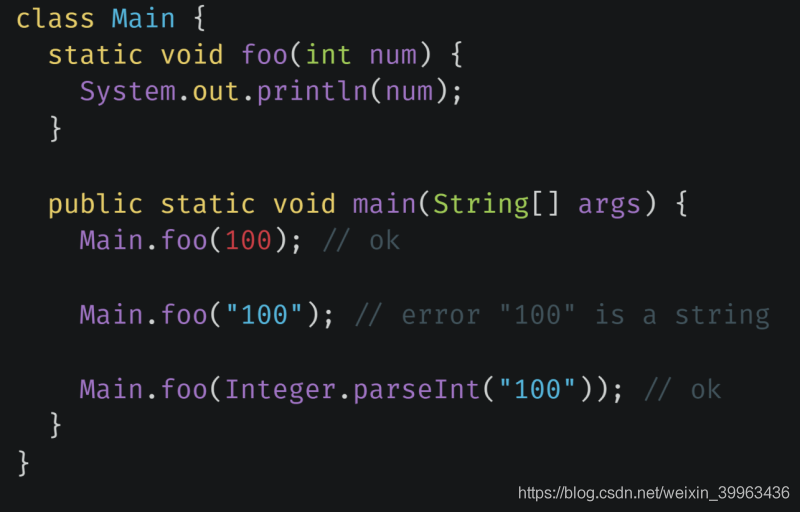
强类型语言在语言层面强制要求函数实参的类型必须与形参类型保持一致。
弱类型语言在语言层面不对实参类型进行严格限制。
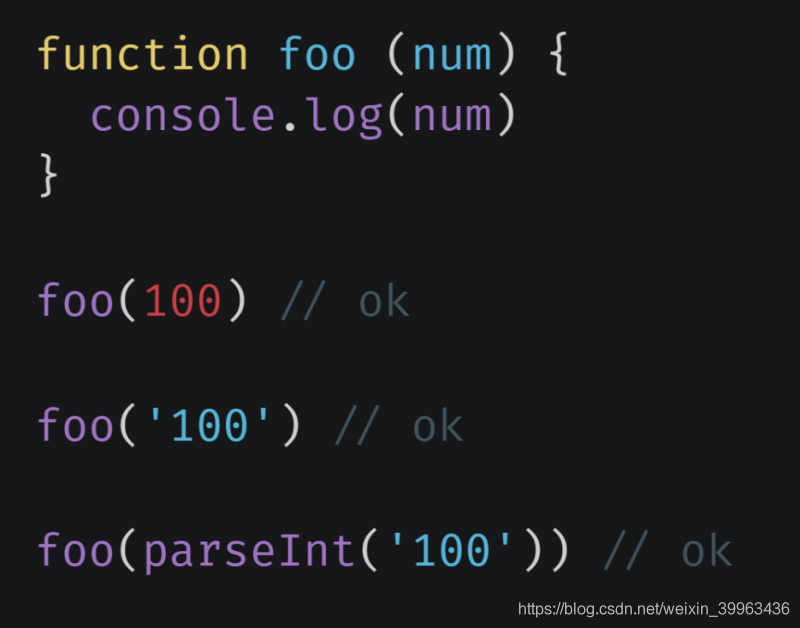
由于强弱类型的划分并非由单一权威机构定义,导致后续理解存在细节分歧。但总体而言,共识在于强类型具有更强的类型约束力,而弱类型的约束几乎可以忽略不计。
在强类型语言中,不允许进行任意的隐式类型转换;而在弱类型语言中,则允许任意数据进行隐式类型转换。
强类型语言禁止随意的隐式类型转换,弱类型语言则允许此类操作。
变量类型在运行过程中是否允许改变,并非区分强弱类型的标准。
静态类型与动态类型(类型检查)
- 静态类型指变量在声明时类型即已确定,且声明后类型不可更改。
- 动态类型指变量类型需在运行阶段才能确定。在动态类型语言中,变量本身没有类型,只有变量所存储的值具有类型。
JavaScript属于动态类型语言,且变量的类型可以随时发生改变。
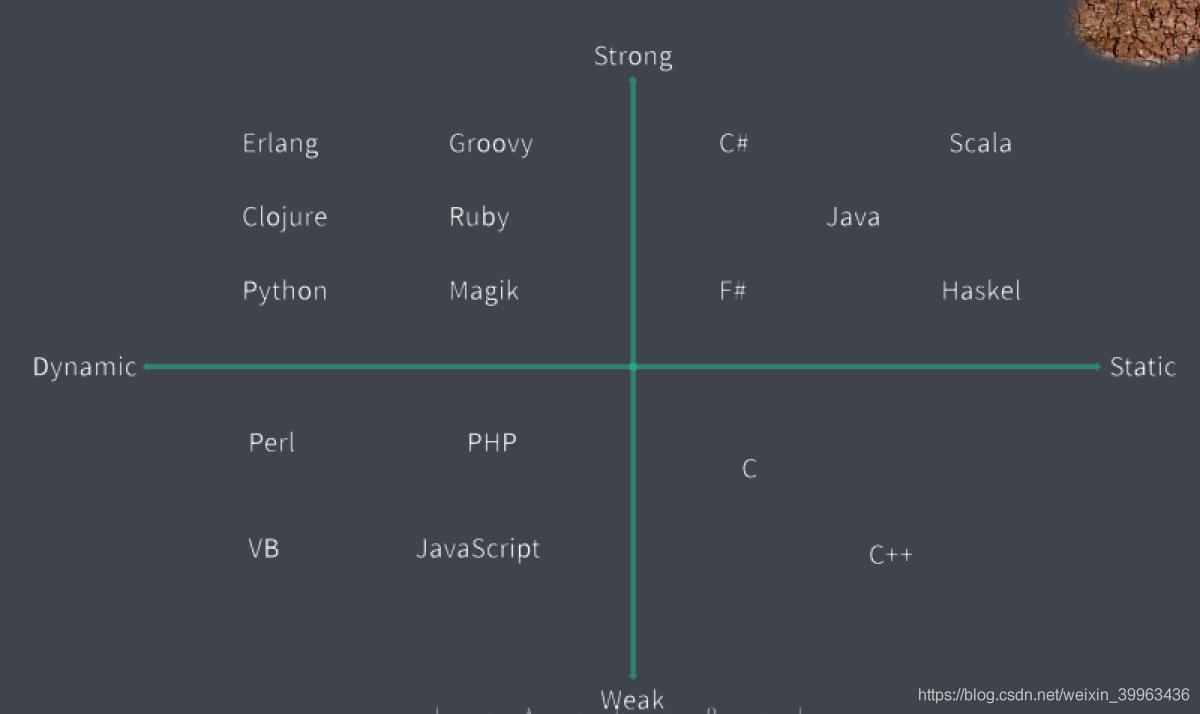
常用编程语言类型对比
JavaScript自由类型系统的问题
JavaScript兼具弱类型与动态类型特征,甚至可视为无类型语言。其特点是“任性”且“不靠谱”,缺乏类型系统带来的可靠性保障。
JavaScript执行过程中没有编译环节。
在大规模应用开发中,弱类型和动态类型的优势反而会成为短板。
弱类型依赖开发者自觉约定,存在隐患;强类型则通过强制要求提供保障。
强类型的优势
- 错误能够更早暴露。
- 代码更具智能性,编码更加准确。
- 重构过程更加安全可靠。
- 减少不必要的类型判断逻辑。
Flow静态类型检查方案
- Flow是JavaScript的静态类型检查器。
- 它弥补了JavaScript的不足,为JavaScript提供了更完善的类型系统支持。
- 其工作原理是在代码中添加类型注解,以标记变量或参数应具备的类型。
//@flow
function sum(a: number, b: number) {
    return a + b
}
console.log(sum(10, 20));
console.log(sum('10', '20'));
Flow仅作为一个辅助工具使用。
安装flow-bin
通过编译移除注解
- 1. 安装flow-remove-types依赖包。
- 2. 使用JavaScript编译工具Babel配合Flow插件进行处理。
Flow开发者工具:flow language support
类型注解
function add(a:number,b:number){
	return a+b
}
let num:number = 90
function foo():void{}
Flow原始类型
const a: string = 'foobar'
const b: number = Infinity // NaN // 100
const c: boolean = false // true
const d: null = null
const e: void = undefined
const f: symbol = Symbol()
Flow数组类型
const arr1: Array<number> = [1, 2, 3]
const arr2: number[] = [1, 2, 3]
// 元组
const foo: [string, number] = ['foo', 100]
Flow对象类型
const obj1: { foo: string, bar: number } = { foo: 'string', bar: 100 }
const obj2: { foo?: string, bar: number } = { bar: 100 }
const obj3: { [string]: string } = {}
obj3.key1 = 'value1'
obj3.key2 = 'value2'
Flow函数类型
 //@flow
function foo (callback: (string, number) => void) {
  callback('string', 100)
}
foo(function (str, n) {
  // str => string
  // n => number
})
Flow特殊类型
// 字面量类型
const a: 'foo' = 'foo'
const type: 'success' | 'warning' | 'danger' = 'success'
// ------------------------
// 声明类型
type StringOrNumber = string | number
const b: StringOrNumber = 'string' // 100
// ------------------------
// Maybe 类型
const gender: ?number = undefined
任意类型 Mixed与any
//@flow
// string | number | boolean | ....
function passMixed (value: mixed) {
  if (typeof value === 'string') {
    value.substr(1)
  }
  if (typeof value === 'number') {
    value * value
  }
}
passMixed('string')
passMixed(100)
// ---------------------------------
function passAny (value: any) {
  value.substr(1)
  value * value
}
passAny('string')
passAny(100)
TypeScript语言规范与基本应用
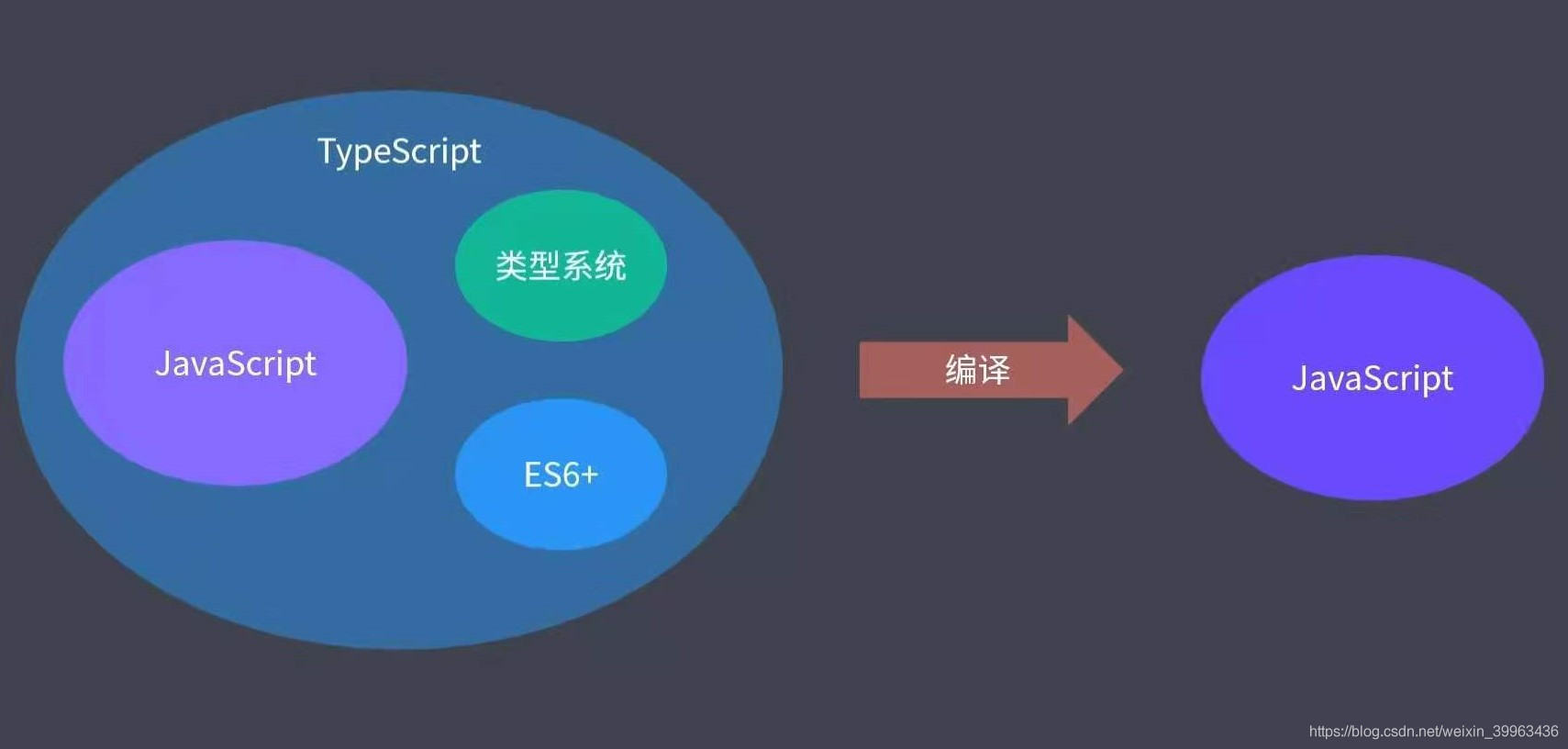
TypeScript兼容所有JavaScript运行环境,具备更强大的功能与更健全完善的生态系统。
TypeScript是JavaScript的超集。
微软自研的开发工具对TypeScript提供了极佳的支持。
TypeScript(渐进式)被视为前端领域的第二语言。
TypeScript的缺点
- 语言本身引入了更多概念。
- 在项目初期,使用TypeScript会增加一定的开发成本。
使用TypeScript前必须先安装相关依赖。
标准库对应内置对象的类型声明。
显示中文错误信息:执行yarn tsc --locale zh-CN,或在VS Code中设置locale为中文。
TypeScript作用域
可以通过立即执行函数或export导出模块来创建独立的作用域。
//立即执行函数
(function () {
    const a = 9
})()
//模块导出
export aa = {
    a: 23
}
TypeScript原始类型
//原始数据类型
const a: string = 'foo'
const b: number = 100  //NaN/Infinity
const c: boolean = true  //false
const d: boolean = null
const e: void = undefined
const f: null = null
const g: undefined = undefined
const h: symbol = Symbol()
TypeScript Object类型
Object类型不仅指普通对象,还泛指所有非原始类型,包括对象、数组和函数。
//Object类型
const aa: object = function () { }  //[]//{}
const obj: { foo: number, bar: string } = { foo: 123, bar: 'aaa' }
更专业的做法是使用接口(Interface)。
TypeScript数组类型
数组类型有两种定义方式:
- 使用Array泛型。
- 使用元素类型加方括号[]。
//数组类型
const arr: Array<number> = [1, 2, 3]
const arr1: number[] = [1, 2, 3]
TypeScript元组类型(Tuple)
元组是一种特殊的数据结构,即明确元素数量且每个元素类型已知的数组,各元素类型不必完全相同。定义方式包括字面量方式。
//元组类型
//元组(tuple)
export { }  //确保跟其他示例没有成员冲突
const tuple: [number, string] = [10, 'rock']
console.log(tuple[0]);  //10
console.log(tuple[1]);  //rock
//解构赋值
const [num, age] = tuple
Object.entries({
    foo: 123,
    zar: 432
})
TypeScript枚举类型(Enum)
enum Status {
    Draft = 'aaa',
    Unpulished = 'bbb',
    Published = 'ccc'
}
若确认代码中不会使用索引器访问枚举,可使用常量枚举。
//常量枚举
const post = {
    title: 'Hello',
    content: 'TypeScript',
    status: 'ok'
}
枚举类型会侵入运行时代码,影响编译结果。TypeScript中大多数类型在编译后会被移除,仅用于编译期检查,但枚举类型会转换为双向键值对对象保留在运行时。
TypeScript函数类型
JavaScript中有两种函数定义方式:
函数声明。
//函数声明方式
// function func1(a: number, b?: number): string {
// function func1(a: number, b: number=90): string {
function func1(a: number, ...rest: number[]): string {
    return 'hello'
}
func1(12, 34)
func1(30)
使用参数可选、参数默认值及剩余参数时,需将它们放在参数列表的最后一个位置。
函数表达式。
//函数表达式
const func2 = (a: number, b: number) => string = function (a: number, b: number): string {
    return 'func2'
}
TypeScript任意类型
由于any属于弱类型且为动态类型,TypeScript不会对any进行类型检查,因此存在类型安全隐患,建议避免轻易使用。
function stringify(value: any) {
    return JSON.stringify(value)
}
stringify('string')
stringify(123)
stringify(true)
let foo: any = 'string'
foo = 100
foo.bar()
隐式类型判断
若未通过类型注解标注变量,TypeScript会根据变量的使用情况推断其类型。
//隐式类型推断
let age = 10 //number
// age = 'aaa'
let foo;
foo = 45
foo = 'aaa'
虽然定义变量时不指定类型且无初始值,TypeScript会自动将其注解为any类型,但仍建议在定义时明确注明类型。
TypeScript类型断言
在TypeScript无法推断变量类型的特殊情况下,开发者可根据代码使用情况明确知道变量类型。类型断言方式如下:
- 使用as关键字。
- 在变量前使用<>(注意:JSX中不能使用此语法)。
const nums = [12, 34, 56]
const res = nums.find(i => i > 10)
//断言方式一--as关键字
const num1 = res as number
//断言方式二---泛型
const num2 = <number>res
类型断言并非类型转换。类型转换是运行时的概念,而类型断言是编译时的概念。代码编译完成后,断言即消失。
TypeScript接口(Interface)
接口是一种规范或契约,用于约定对象的结构。使用接口必须遵守其所有约定。
interface Post {
    title: string
    content: string
}
function printPost(post: Post) {
    console.log(post.title);
    console.log(post.content);
}
printPost({
    title: 'hello',
    content: 'welcome'
})
//hello
//welcome
TypeScript中的接口仅用于对结构化数据进行类型约束,在实际运行阶段无实际意义。
- 可选成员
- 只读成员
- 动态成员
interface Post {
    title: string
    subtitle?: string   //可选成员
    content: string
    readonly summary: string  //只读成员
}
TypeScript类(Class)
类的特征:描述一类具体事物的抽象特征。
类可用于描述一类具体对象的抽象成员。
在ES6之前,JavaScript通过函数加原型模拟实现类;ES6开始,JavaScript引入了专门的class语法。
TypeScript增强了class的相关语法。
class Person {
    name: string
    age: number
    constructor(name: string, age: number) {
        this.name = name
        this.age = age
    }
    sayHi(msg: string): void {
        console.log((`I am ${this.name}, ${msg}`));
    }
}
类的访问修饰符(默认是public修饰符)。
class Person {
  public name: string // = 'init name'
  private age: number
  protected gender: boolean
  constructor (name: string, age: number) {
    this.name = name
    this.age = age
    this.gender = true
  }
  sayHi (msg: string): void {
    console.log(`I am ${this.name}, ${msg}`)
    console.log(this.age)
  }
}
class Student extends Person {
  private constructor (name: string, age: number) {
    super(name, age)
    console.log(this.gender)
  }
  static create (name: string, age: number) {
    return new Student(name, age)
  }
}

const tom = new Person('tom', 18)
console.log(tom.name)
// console.log(tom.age)
// console.log(tom.gender)
const jack = Student.create('jack', 18)
类的只读属性readonly。
protected readonly gender:boolean
类与接口
接口用于封装共同特征。
interface EatAndRun {
    eat(food: string): void
    run(distance: number): void
}
class Person implements EatAndRun {
    eat(food: string): void {
        console.log(`美美的吃:${food}`);
    }
    run(distance: number) {
        console.log(`直立行走:${distance}`);
    }
}
class Animal implements EatAndRun {
    eat(food: string): void {
        console.log(`美美的吃:${food}`);
    }
    run(distance: number) {
        console.log(`直立行走:${distance}`);
    }
}
一个接口仅约束一种能力,而一个类型可实现多个接口。
interface Eat {
    eat(food: string): void
}
interface Run {
    run(distance: number): void
}
class Person implements Eat, Run {
    eat(food: string): void {
        console.log(`美美的吃:${food}`);
    }
    run(distance: number) {
        console.log(`直立行走:${distance}`);
    }
}
class Animal implements Eat, Run {
    eat(food: string): void {
        console.log(`美美的吃:${food}`);
    }
    run(distance: number) {
        console.log(`直立行走:${distance}`);
    }
}
TypeScript抽象类
抽象类与接口类似,均可用于约束子类必须拥有某些成员。
但抽象类可包含具体实现,而接口仅包含成员抽象,不包含具体实现。
抽象类不能使用new关键字实例化,只能被继承。
abstract class Animal {
    eat(food: string): void {
        console.log(`咕噜咕噜吃:${food}`);
    }
    abstract run(distance: number): void
}
class Dog extends Animal {
    run(distance: number): void {
        console.log(`四肢爬行:${distance}`);
    }
}
const d = new Dog()
d.eat('肉')
d.run(200)
TypeScript泛型
泛型指在定义函数、接口或类时未指定具体类型,使用时再指定具体类型的特征。
function CreateNumberArray(length: number, value: number): number[] {
    const arr = Array<number>(length).fill(value)
    return arr
}
function CreateStringArray(length: number, value: string): string[] {
    const arr = Array<string>(length).fill(value)
    return arr
}
function CreateArray<T>(length: number, value: T): T[] {
    const arr = Array<T>(length).fill(value)
    return arr
}
const res = CreateArray<string>(3, 'foo')
TypeScript类型声明
当成员定义时未声明类型,可在使用时单独为其做出明确声明。
import { camelCase } from 'lodash'
import qs from 'query-string'
qs.parse('?key=value&key2=value2')
declare function camelCase(input: string): string
const res = camelCase('hello')
以上为TypeScript类型系统Flow静态检查基本规范的详细内容,更多关于TypeScript类型Flow静态检查的资料请关注本站其它相关文章!