

本文介绍React拖拽排序组件的升级方案,通过引入codeKey实现Data与Model解耦,并基于value数据在拖拽释放时判断uId,区分内部排序与外部复制逻辑,提供完整API与源码参考。
组件属性改造与解耦设计
在实现复制功能之前,对原有拖拽排序组件的属性进行了调整。
- 去除了value中的content属性,改为通过拖拽组件暴露的render函数来渲染内部子组件,这一设计参考了Ant Design中部分组件的实现方式。
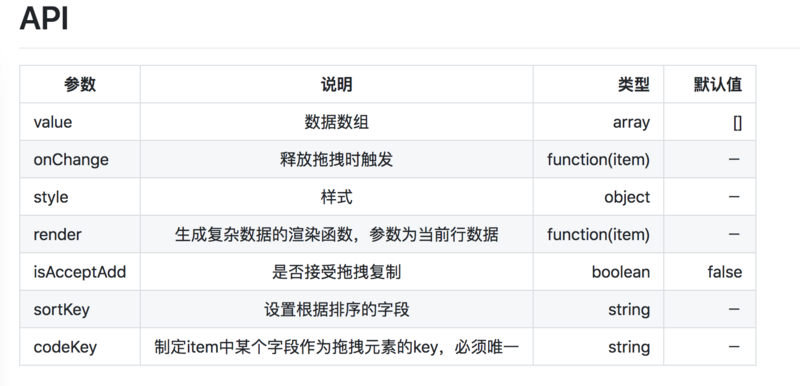
- 为实现Data与Model的解耦,组件新增了codeKey属性,其作用类似于sortKey。
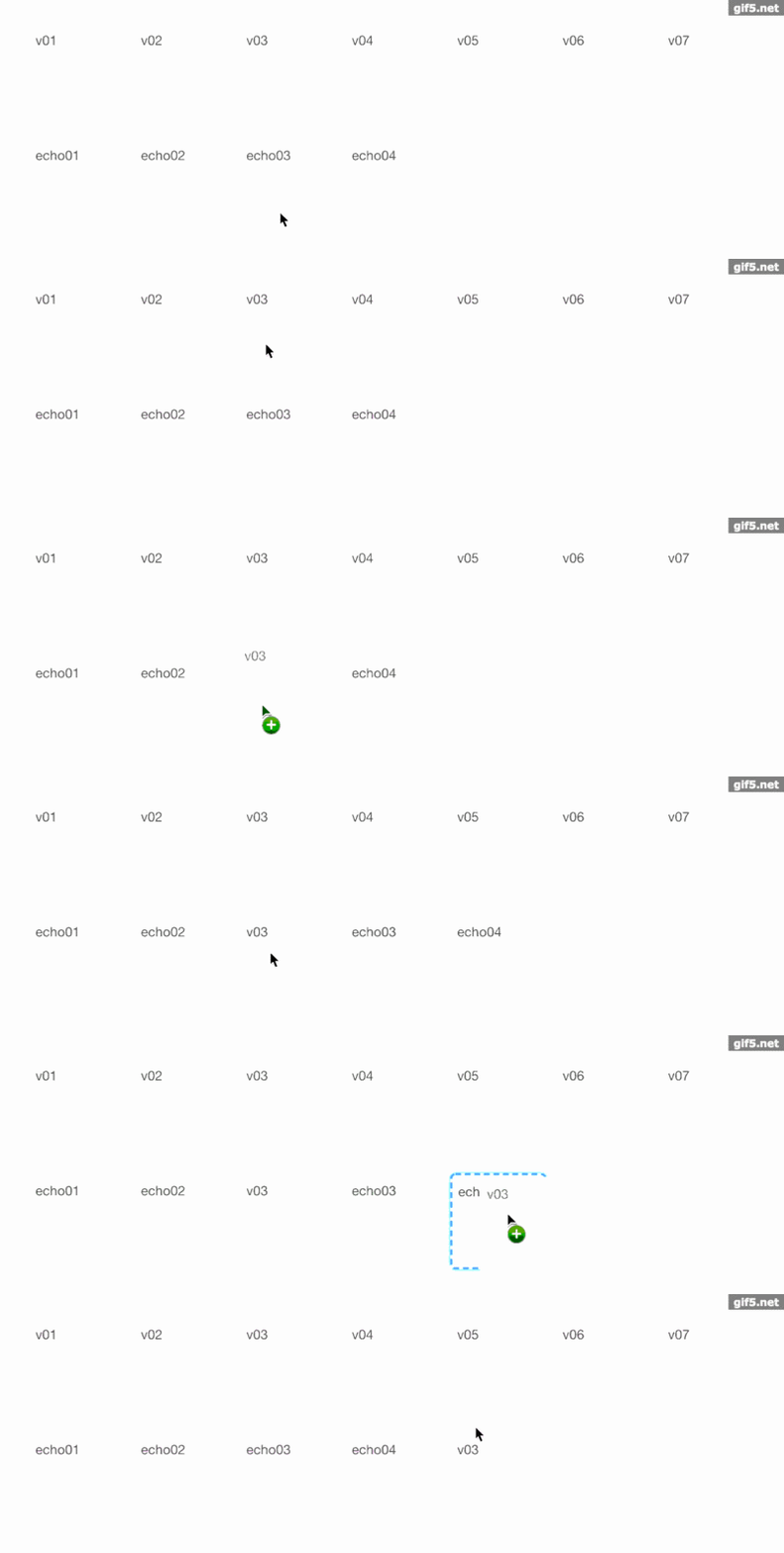
拖拽复制的效果如下:
拖拽复制核心逻辑实现
由于组件核心逻辑是根据value数据渲染页面,因此实现拖拽复制只需在“拖拽释放”事件中,将被拖拽方的数据插入到当前目标所在的value数组中。
具体实现代码如下:
// 当一个元素或是选中的文字被拖拽释放到一个有效的释放目标位置时
 drop(dropedSort, data, sortKey, dropedUid, codeKey, ee) {
  ee.preventDefault();
  const code = ee.dataTransfer.getData("code");
  const uId = ee.dataTransfer.getData("uId");
  const dragedItem = ee.dataTransfer.getData("item");
  const sort = ee.dataTransfer.getData("sort");
  if (uId === dropedUid) {
   if (sort < dropedSort) {
    data.map(item => {
     if (item[codeKey] === code) {
      item[sortKey] = dropedSort;
     } else if (item[sortKey] > sort && item[sortKey] < dropedSort + 1) {
      item[sortKey]--;
     }
     return item;
    });
   } else {
    data.map(item => {
     if (item[codeKey] === code) {
      item[sortKey] = dropedSort;
     } else if (item[sortKey] > dropedSort - 1 && item[sortKey] < sort) {
      item[sortKey]++;
     }
     return item;
    });
   }
  } else if (this.props.isAcceptAdd) {
   let objDragedItem = JSON.parse(dragedItem);
   if (data.filter(item => item[codeKey] === objDragedItem[codeKey]).length === 0) {
    const maxSort = Math.max.apply(Math, data.map(citem => citem[sortKey]));
    data.map(item => {
     if (dropedSort === maxSort) {
      objDragedItem[sortKey] = dropedSort + 1;
     } else {
      if (item.sort > dropedSort) {
       objDragedItem[sortKey] = dropedSort + 1;
       item[sortKey]++
      }
     }
     return item
    });
    data.push(objDragedItem)
   }
  }
  this.props.onChange(data)
  if (ee.target.className.indexOf('droppingContent') !== -1) {
   ee.target.className = styles.droppedcontent;
  }
 }
关键实现细节说明
这里需要注意两点:
第一点,通过this.props.isAcceptAdd属性判断当前组件是否允许接收拖拽复制的元素。
第二点,在内存中维护一个“uId”,该ID在每个拖拽组件初始化时生成。通过比较uId,可以判断被拖拽到目标区域的元素是组件内部元素还是外部元素:若为内部元素则执行排序,若为外部元素则执行复制逻辑。
组件API与源码参考
组件API:
GitHub地址:https://github.com/VicEcho/VDraggable
以上就是本文的全部内容,希望对大家的学习有所帮助,也希望大家多多支持本站。