

本文深入解析JavaScript中精确倒计时的实现原理,对比setInterval、setTimeout与requestAnimationFrame的性能差异。通过计算时间差值(diffTime)修正累积误差,并提供基于React Hooks的完整封装方案,解决后台运行与精度丢失问题,适用于高频面试与实际业务场景。
正值招聘旺季,求职者需着手准备技术面试。本文将重点探讨一个高频面试题:倒计时功能的实现。该功能不仅常见于面试考核,也是实际业务开发中的常见需求,因此掌握其最佳实践至关重要。
实现倒计时需核心关注三个维度:准确性、稳定性与性能。下文将逐步演示如何构建一个高精度的定时器。
setInterval
首先,我们尝试使用基础方法实现一个简单的倒计时函数:
function example1(leftTime){
	let t = leftTime;
  setInterval(() => {
    t = t - 1000;
    console.log(t);
  }, 1000);
}

example1(10);
代码显示仅使用setInterval即可运行,但其精度是否可靠?参考MDN文档说明如下:
若代码逻辑执行耗时可能超过定时器设定的间隔,建议使用具名函数递归调用setTimeout。例如,使用 setInterval() 以5秒间隔轮询服务器时,网络延迟或服务器无响应可能导致请求无法在指定时间内完成。
简言之,由于JavaScript单线程特性,若前方存在阻塞任务,setInterval的回调可能会延迟执行,导致倒计时不准。因此,建议用setTimeout替代setInterval以提升稳定性。
setTimeout
根据上述建议,将setInterval替换为setTimeout后,代码如下:
function example2(leftTime) {
  let t = leftTime;
  setTimeout(() => {
    t = t - 1000;
    if (t > 0) {
			console.log(t);
      example2(t);
    }
    console.log(t);
  }, 1000);
}
MDN指出,多种因素(如嵌套超时、非活动标签页节流、脚本节流等)可能导致setTimeout回调执行时间晚于预期。详情可查阅developer.mozilla.org/zh-CN/docs/Web/API/setTimeout。总体而言,setTimeout与setInterval均存在延迟执行的风险,那么如何进一步提升倒计时的准确性?
requestAnimationFrame
此处引入一个新方法requestAnimationFrame。这是一个浏览器API,允许以60帧/秒(FPS)的频率请求回调,且不阻塞主线程。通过调用该方法,浏览器会在下一次重绘前执行指定函数,确保回调在每帧间得到适时更新。
结合requestAnimationFrame与setTimeout,我们对前文代码进行优化:
function example3(leftTime) {
  let t = leftTime;
  function start() {
    requestAnimationFrame(() => {
      t = t - 1000;
      setTimeout(() => {
        console.log(t);
        start();
      }, 1000);
    });
  }
  start();
}
此举保证了倒计时的稳定性。此外,requestAnimationFrame的优势在于:当用户息屏或切换至后台时,该API不会继续调用函数;而若仅使用setTimeout或setInterval,它们仍会在后台持续执行。显然,requestAnimationFrame能显著降低性能开销。
然而,在实际测试切后台或息屏场景后发现,虽然性能提升,但准确性出现偏差:当用户回到页面时,倒计时从切后台时的剩余时间继续执行,这显然不符合预期。
diffTime
解决上述问题的方案是:通过计算时间差值,每次进行对比修正。
function example4(leftTime) {
  const now = new Date().getTime();
  function start() {
    requestAnimationFrame(() => {
      const diff = leftTime - (new Date().getTime() - now);
      setTimeout(() => {
        console.log(diff);
        start();
      }, 1000);
    });
  }
  start();
}
上述代码思路在实际业务中已能满足大部分场景,但若在面试中追求更优表现,仍有优化空间。具体如何优化?
finally
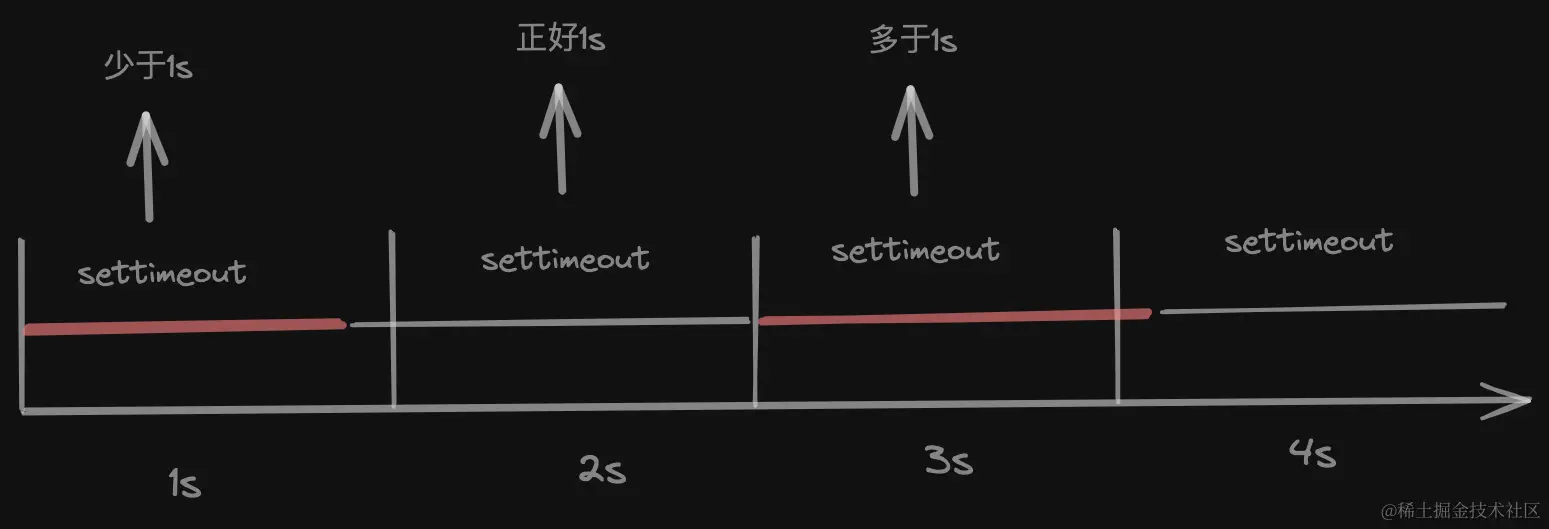
深入分析上图可知,每次setTimeout真正执行的时间并非精确的一秒,可能多也可能少。长期累积后,最终时间与实际时间必然产生误差。虽在秒级单位下不易察觉,但若采用毫秒级单位,误差便会显现。应如何处理?
最终实现思路简洁明了:每次执行setTimeout时,不固定设置为1000ms,而是计算本次setTimeout中函数实际消耗的时间,根据该实际耗时推算下次setTimeout的等待时间。具体计算逻辑可通过图表寻找规律,假设下图展示了每次setTimeout的执行时间分布:
| Time时间 | executionTime实际执行时间 | diffTime差值 | nextTime下次执行时间 |
|---|---|---|---|
| 0 | 1200 | 200 | 1000 |
| 1000 | 900 | 100 | 900 |
| 2000 | 900 | 0 | 1000 |
| 3000 | 800 | 200 | 1200 |
| 4000 | 1300 | 100 | 900 |
| … | … | … | … |
通过图表分析可得出规律:nextTime = executionTime > nextTime ? 1000 - diffTime : 1000 + diffTime。
此外需注意,实际业务中后端返回的剩余时间字段通常非整秒。因此,首次执行setTimeout时的初始等待时间需特殊处理,这将在倒计时结束时大幅减少最终的时间误差。
基于上述思路,以下是最终封装的React Hooks代码:
const useCountDown = ({ leftTime, ms = 1000, onEnd }) => {
  const countdownTimer = useRef();
  const startTimer = useRef();
  const startTimeRef = useRef(new Date().getTime());
  const nextTimeRef = useRef(leftTime % ms);

  const [count, setCount] = useState(leftTime);

  const clearTimer = () => {
    countdownTimer.current && clearTimeout(countdownTimer.current);
    startTimer.current && clearTimeout(startTimer.current);
  };

  const startCountDown = () => {
    clearTimer();
    const currentTime = new Date().getTime();
    // 每次实际执行的时间
    const executionTime = currentTime - startTimeRef.current;

    // 实际执行时间大于上一次需要执行的时间,说明执行时间多了,差值为多出来的时间,否则为少了的时间
    const diffTime =
      executionTime > nextTimeRef.current
        ? executionTime - nextTimeRef.current
        : nextTimeRef.current - executionTime;

    // 剩余时间减去应该执行的时间
    setCount((count) => {
      const c = count - (count % ms === 0 ? ms : count % ms);
      if (c <= 0) return 0;
      return c;
    });

    // 算出下一次的时间 思路:本次的实际执行时间>下一次执行的时间 ?1000 - diffTime : 1000 + diffTime;
    nextTimeRef.current =
      executionTime > nextTimeRef.current ? ms - diffTime : ms + diffTime;

    // 重置初始时间
    startTimeRef.current = new Date().getTime();

    countdownTimer.current = setTimeout(() => {
      requestAnimationFrame(startCountDown);
    }, nextTimeRef.current);
  };

  useEffect(() => {
    setCount(leftTime);
    startTimer.current = setTimeout(
      startCountDown,
      nextTimeRef.current,
    );
    return () => {
      clearTimer();
    };
  }, [leftTime]);

  useEffect(() => {
    if (count <= 0) {
      clearTimer();
      onEnd && onEnd();
    }
  }, [count]);

  return count;
};

export default useCountDown;
除上述优化思路外,欢迎提出更多改进建议并共同探讨。
至此,关于JS面试中如何实现精确倒计时的介绍完毕。如需了解更多JS倒计时相关内容,请搜索本站历史文章或继续浏览后续文章,感谢支持。