

深入解析如何在 Vue 3 与 React 18 项目中规范、高效地集成 animate.js(anime.js)。涵盖 DOM 引用绑定、生命周期时序控制、组件卸载清理、状态响应式联动、封装自定义 Composable/Hook 以及常见避坑指南。
怎么在 Vue 或 React 项目中正确集成 animate.js
作者:流萤
时间:2026-11-05
浏览:134
文章目录
前端架构 / 动画工程
技术栈:Vue 3 (Composition API) & React 18 (Hooks)
核心库:animejs / animate.js
在 Vue 或 React 项目中集成 animate.js(通常指社区广泛采用的高性能动画库 anime.js 或基于 requestAnimationFrame 的命令式动画脚本)的核心原则,是将命令式动画生命周期与框架的组件生命周期严格对齐。通过模板引用(Vue 的
ref)或容器句柄(React 的 useRef)捕获真实 DOM,在组件挂载完成后初始化动画,并在组件卸载时彻底注销实例与终止帧循环,即可在保持声明式状态驱动优势的同时,兼顾流畅细腻的动效控制。
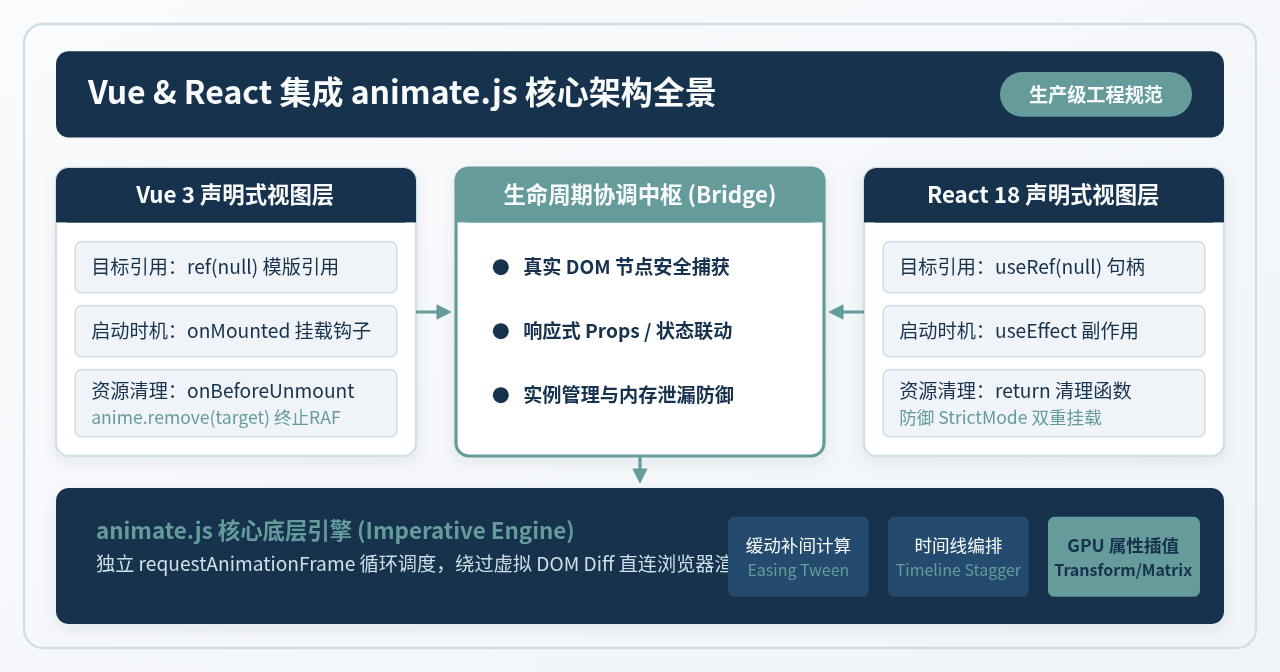
一、理解集成本质:声明式 UI 与命令式动画的协同
在传统页面开发中,调用动画库通常简单直白:通过 document.querySelector('.card') 选中元素,随后传入动画属性即可。然而在以 Vue 3 和 React 18 为代表的现代单页面架构中,直接使用全局选择器会导致不可预期的缺陷:
- 组件复用导致的类名/选择器冲突:如果页面中存在多个同一组件的实例,全局
querySelector无法准确限定范围,容易误伤或同时触发其他实例上的 DOM 节点。 - 虚拟 DOM 渲染时机的异步性:组件初始化时,真实 DOM 节点尚未被创建并挂载到文档树中。此时立即查询 DOM 必然返回
null,抛出Cannot read property of null异常。 - 单页面路由切换的内存泄漏:原生动画引擎依托浏览器的
requestAnimationFrame持续运转。若组件已卸载而动画未被主动销毁,引擎将持续在后台计算补间并尝试操作“孤儿 DOM 节点”,导致内存泄漏并拖慢主线程。
因此,正确集成的核心任务在于建立“生命周期双轨协调”通道:框架负责声明式管理组件的存在与数据更新,而 animate.js 仅在受控的 DOM 引用和生命周期窗口期内执行视觉变换。
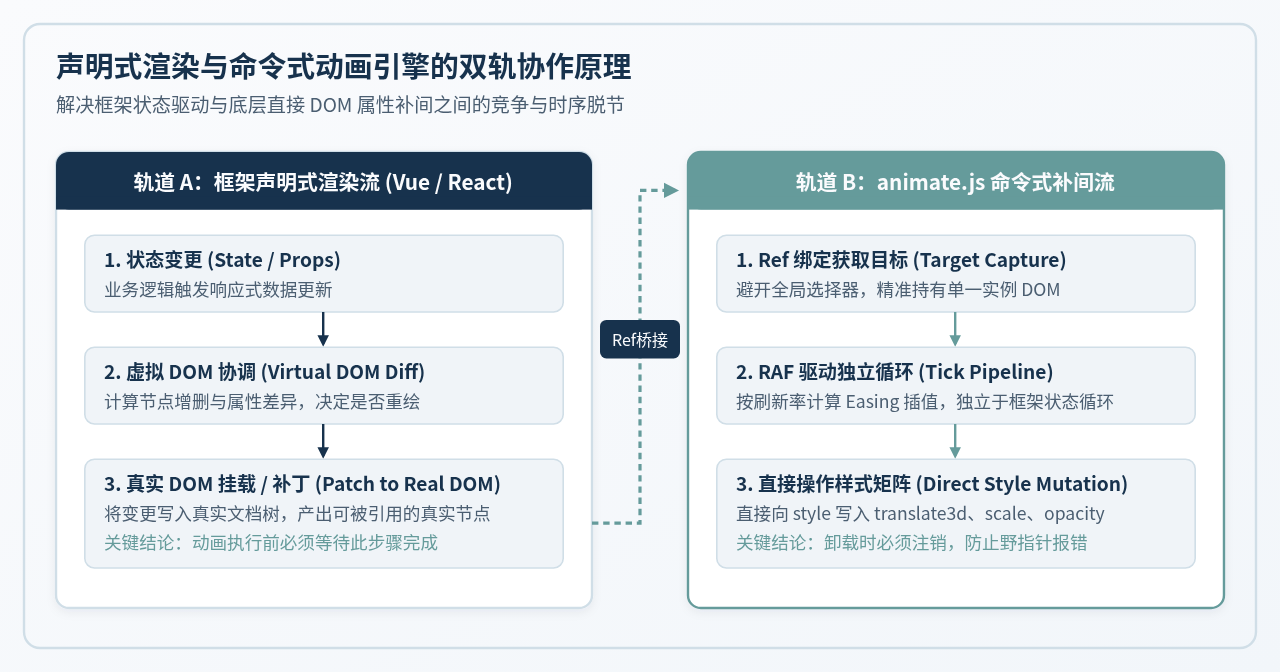
二、依赖准备与模块化安装规范
在主流包管理器生态中,该动画库通常以 animejs 登记发版。无论是 Vite、Webpack 还是基于 Rollup 的打包管线,均原生支持 ES Module 导入。
BASH终端执行
# 使用 npm 安装
npm install animejs

# 若使用 TypeScript,补充安装社区维护的类型声明文件
npm install @types/animejs -D
在代码文件中,推荐采用默认导入或按需导入形式引入:
TYPESCRIPT / JAVASCRIPT模块导入规范
import anime from 'animejs';

// 验证导入是否成功
console.log('animate.js 版本:', anime.version);
服务端渲染(SSR)特别提醒
在 Nuxt 3 或 Next.js 等服务端同构渲染环境中,Node.js 服务端不具备浏览器特有的 window 和 document 对象。由于 animejs 内部会探测全局环境,切勿在模块全局作用域或服务端生命周期顶层直接执行动画调用;确保一切动画调度均被收敛在仅客户端执行的挂载钩子中。
三、Vue 3 项目中的标准集成实践
在 Vue 3 的 Composition API(<script setup>)体系下,集成过程高度清晰。核心遵循三步走:
- 使用
ref(null)声明元素引用,并在模板标签中绑定ref特性。 - 在
onMounted生命周期钩子中获取boxRef.value并启动anime({...})。 - 在
onBeforeUnmount生命周期钩子中调用anime.remove(boxRef.value)彻底注销动画。
1. 完整单文件组件示例(含进入与交错列表动效)
以下为一个包含入场缩放、交错(stagger)动效及交互触发的完整 Vue 3 组件实现:
VUE 3CardAnimator.vue
<template>
  <div class="animation-container">
    <!-- 顶部控制栏 -->
    <div class="controls">
      <button @click="replayAnimation">重新播放</button>
      <button @click="toggleActive">切换缩放状态</button>
    </div>

    <!-- 动画目标容器,使用 template ref 建立专属绑定 -->
    <div ref="containerRef" class="cards-wrapper">
      <div v-for="item in items" :key="item.id" class="card-item">
        {{ item.title }}
      </div>
    </div>
  </div>
</template>

<script setup lang="ts">
import { ref, onMounted, onBeforeUnmount, watch } from 'vue';
import anime from 'animejs';

interface CardItem {
  id: number;
  title: string;
}

const items = ref<CardItem[]>([
  { id: 1, title: '模块 01:架构拆分' },
  { id: 2, title: '模块 02:状态编排' },
  { id: 3, title: '模块 03:渲染管线' },
  { id: 4, title: '模块 04:性能自检' }
]);

const isActive = ref(false);
const containerRef = ref<HTMLElement | null>(null);
let animationTimeline: anime.AnimeTimelineInstance | null = null;

// 初始化入场交错动画
const initEntranceAnimation = () => {
  if (!containerRef.value) return;

  // 选中当前组件实例范围内的卡片子元素,避免全局污染
  const cards = containerRef.value.querySelectorAll('.card-item');

  // 构建独立时间线
  animationTimeline = anime.timeline({
    easing: 'easeOutCubic',
    duration: 650
  });

  animationTimeline.add({
    targets: cards,
    opacity: [0, 1],
    translateY: [24, 0],
    scale: [0.94, 1],
    delay: anime.stagger(90) // 列表交错延时
  });
};

// 响应交互与状态联动:当 isActive 变化时执行补间
watch(isActive, (newVal) => {
  if (!containerRef.value) return;

  // 状态更新前先移除当前节点上的运行中补间,杜绝数值打架
  anime.remove(containerRef.value);

  anime({
    targets: containerRef.value,
    scale: newVal ? 1.03 : 1,
    duration: 400,
    easing: 'easeInOutQuad'
  });
});

const replayAnimation = () => {
  if (animationTimeline) {
    animationTimeline.restart();
  }
};

const toggleActive = () => {
  isActive.value = !isActive.value;
};

onMounted(() => {
  initEntranceAnimation();
});

onBeforeUnmount(() => {
  // 核心清理:在组件销毁前注销所有相关 DOM 节点上的动画实例
  if (containerRef.value) {
    const cards = containerRef.value.querySelectorAll('.card-item');
    anime.remove(cards);
    anime.remove(containerRef.value);
  }
  if (animationTimeline) {
    animationTimeline.pause();
    animationTimeline = null;
  }
});
</script>

<style scoped>
.animation-container {
  padding: 20px;
  background: #FAFBFD;
  border-radius: 8px;
}
.controls {
  margin-bottom: 16px;
  display: flex;
  gap: 12px;
}
button {
  padding: 8px 16px;
  background: #17324D;
  color: #FAFBFD;
  border: none;
  border-radius: 4px;
  cursor: pointer;
}
.cards-wrapper {
  display: grid;
  grid-template-columns: repeat(2, 1fr);
  gap: 12px;
  transition: transform 0.2s ease-out;
}
.card-item {
  padding: 16px;
  background: #FFFFFF;
  border: 1px solid #D0DEE7;
  border-radius: 6px;
  opacity: 0; /* 配合初始入场动画 */
}
</style>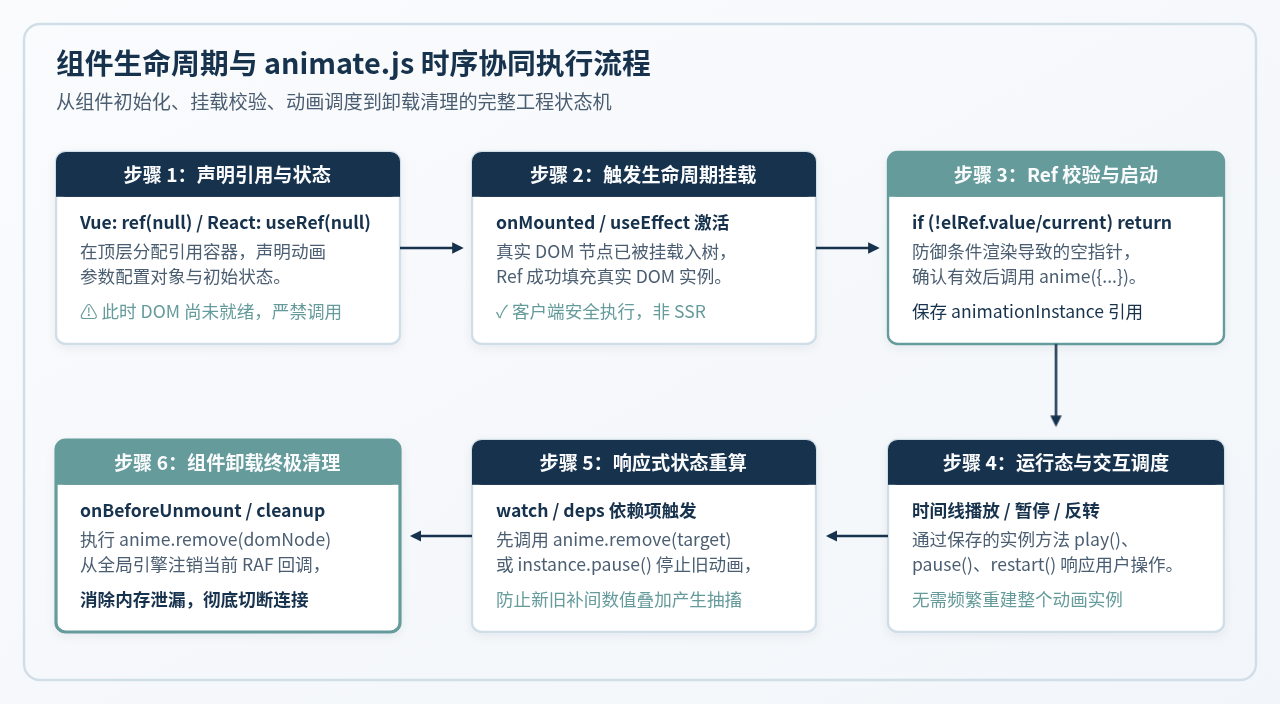
2. 封装高可用 Vue 3 Composable(useAnimate)
在大型项目中,为避免在每个组件中重复编写 onMounted 和 onBeforeUnmount 样板代码,建议将动画绑定与回收逻辑抽象为通用的 Composable:
TYPESCRIPTcomposables/useAnimate.ts
import { ref, onMounted, onBeforeUnmount, type Ref } from 'vue';
import anime, { type AnimeParams, type AnimeInstance } from 'animejs';

export function useAnimate(options: Omit<AnimeParams, 'targets'>) {
  const targetRef = ref<HTMLElement | null>(null);
  const instance = ref<AnimeInstance | null>(null);

  onMounted(() => {
    if (targetRef.value) {
      instance.value = anime({
        targets: targetRef.value,
        ...options
      });
    }
  });

  onBeforeUnmount(() => {
    if (targetRef.value) {
      anime.remove(targetRef.value);
    }
    if (instance.value) {
      instance.value.pause();
      instance.value = null;
    }
  });

  const play = () => instance.value?.play();
  const pause = () => instance.value?.pause();
  const restart = () => instance.value?.restart();

  return {
    targetRef,
    instance,
    play,
    pause,
    restart
  };
}
四、React 18 项目中的标准集成实践
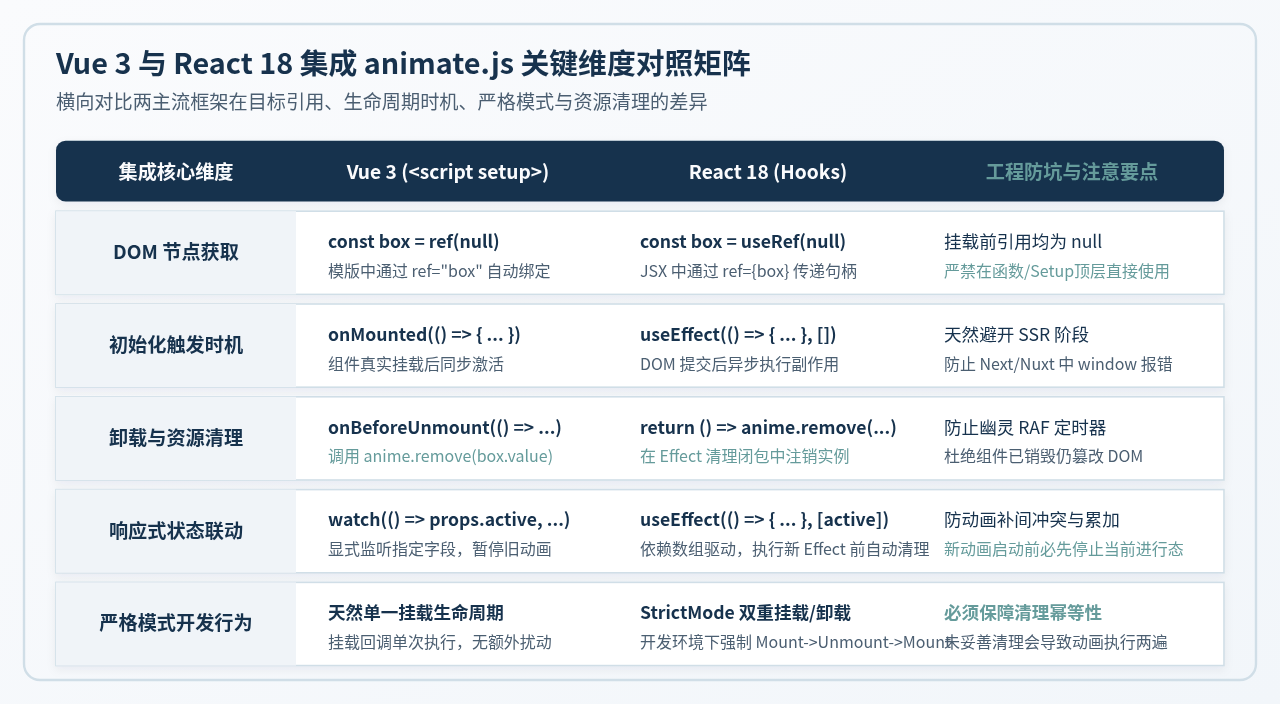
在 React 18 体系中,动画集成依托于 useRef 与 useEffect。值得特别注意的是,React 18 在开发模式开启 <React.StrictMode> 时会执行双重挂载(Mount -> Unmount -> Mount),以帮助开发者排查未清理的副作用。如果未在 Effect 清理函数中注销动画,开发阶段将观察到动画触发两次或补间重复叠加的异常现象。
1. 完整函数组件示例
TSX / REACTDrawerAnimation.tsx
import React, { useRef, useEffect, useState, useCallback } from 'react';
import anime from 'animejs';

interface DrawerProps {
  isOpen: boolean;
  onClose: () => void;
  children: React.ReactNode;
}

export const DrawerAnimation: React.FC<DrawerProps> = ({ isOpen, onClose, children }) => {
  const drawerRef = useRef<HTMLDivElement | null>(null);
  const backdropRef = useRef<HTMLDivElement | null>(null);
  const timelineRef = useRef<anime.AnimeTimelineInstance | null>(null);

  // 初始化时间线
  useEffect(() => {
    if (!drawerRef.current || !backdropRef.current) return;

    // 创建抽屉进出场时间线,默认暂停
    timelineRef.current = anime.timeline({
      autoplay: false,
      easing: 'easeOutQuart',
      duration: 450
    });

    timelineRef.current
      .add({
        targets: backdropRef.current,
        opacity: [0, 0.6],
        duration: 300,
        easing: 'linear'
      })
      .add({
        targets: drawerRef.current,
        translateX: ['100%', '0%'],
        duration: 450
      }, '-=200');

    // 核心清理:Effect 卸载或重新执行时清理 DOM 节点动画
    return () => {
      if (drawerRef.current) anime.remove(drawerRef.current);
      if (backdropRef.current) anime.remove(backdropRef.current);
      if (timelineRef.current) {
        timelineRef.current.pause();
        timelineRef.current = null;
      }
    };
  }, []);

  // 响应 isOpen 属性驱动动画正向或反向播放
  useEffect(() => {
    const tl = timelineRef.current;
    if (!tl) return;

    if (isOpen) {
      tl.direction = 'normal';
      tl.play();
    } else {
      tl.direction = 'reverse';
      tl.play();
    }
  }, [isOpen]);

  return (
    <div className="drawer-portal-root" style={{ display: isOpen ? 'block' : 'none' }}>
      <div
        ref={backdropRef}
        className="drawer-backdrop"
        onClick={onClose}
        style={{
          position: 'fixed',
          top: 0,
          left: 0,
          width: '100vw',
          height: '100vh',
          backgroundColor: '#17324D',
          opacity: 0,
          zIndex: 99
        }}
      />
      <aside
        ref={drawerRef}
        className="drawer-panel"
        style={{
          position: 'fixed',
          top: 0,
          right: 0,
          width: '360px',
          height: '100vh',
          backgroundColor: '#FFFFFF',
          transform: 'translateX(100%)',
          zIndex: 100,
          boxShadow: '-4px 0 16px rgba(23, 50, 77, 0.1)',
          padding: '24px'
        }}
      >
        {children}
      </aside>
    </div>
  );
};
2. 封装 React 自定义 Hook(useAnimate)
为实现优雅的命令式动效解耦,可将动画实例的管理抽象为自定义 Hook:
TYPESCRIPThooks/useAnimate.ts
import { useRef, useEffect, useCallback } from 'react';
import anime, { AnimeParams, AnimeInstance } from 'animejs';

export function useAnimate<T extends HTMLElement>(
  params: Omit<AnimeParams, 'targets'>,
  deps: React.DependencyList = []
) {
  const elementRef = useRef<T | null>(null);
  const instanceRef = useRef<AnimeInstance | null>(null);

  useEffect(() => {
    if (!elementRef.current) return;

    instanceRef.current = anime({
      targets: elementRef.current,
      ...params
    });

    return () => {
      if (elementRef.current) {
        anime.remove(elementRef.current);
      }
      if (instanceRef.current) {
        instanceRef.current.pause();
        instanceRef.current = null;
      }
    };
  }, deps);

  const play = useCallback(() => instanceRef.current?.play(), []);
  const pause = useCallback(() => instanceRef.current?.pause(), []);
  const restart = useCallback(() => instanceRef.current?.restart(), []);

  return { elementRef, instanceRef, play, pause, restart };
}
五、高频踩坑场景与排障指南
在实际生产部署中,开发者常遇到以下典型边界问题,需要采取防御式编程进行针对性规避:
1. CSS 初始样式与 animate.js Transform 冲突
现象:元素在 CSS 中设置了 transform: translate(-50%, -50%) 用于屏幕绝对居中,但在执行 anime({ targets: el, translateX: 100 }) 时,元素突然发生剧烈位移,纵向的 -50% 居中样式瞬间丢失。
根本原因:animate.js 在对 transform 单一分量(如 translateX)赋值时,会直接重写元素的行内 transform 属性。如果 CSS 中定义了未经声明的复合变换,原有的变换矩阵将被直接覆盖。
解决方案:采用“父子容器分离”架构。外层父容器仅负责 CSS 的 translate(-50%, -50%) 布局定位,内层专门包裹一个动画容器由 animate.js 独占操作 translateX 和 scale,两层关注点彻底解耦。
2. 条件渲染导致 Ref 为空(v-if 与短路表达式)
现象:在 Vue 的 v-if="visible" 或 React 的 {visible && <Box />} 场景下,尝试在点击事件中直接触发动画,控制台报错 target is null。
根本原因:状态切换后,虚拟 DOM 的 Diff 与真实 DOM 的插入需要经过一个微任务周期的异步协调。在触发事件的同一同步时序中,DOM 节点尚未渲染。
解决方案:在 Vue 中配合 nextTick() 使用;在 React 中将动画触发延迟到由 visible 驱动的 useEffect 内部执行,确保执行时节点已就绪。
TYPESCRIPTVue 3 nextTick 确保 DOM 挂载时序
import { nextTick } from 'vue';

const showAndAnimate = async () => {
  isVisible.value = true;
  // 等待虚拟 DOM 完成 Patch 并将节点挂载到文档树
  await nextTick();
  if (boxRef.value) {
    anime({
      targets: boxRef.value,
      opacity: [0, 1],
      translateY: [-20, 0]
    });
  }
};
六、集成决策与最佳实践总结
核心集成自检闭环
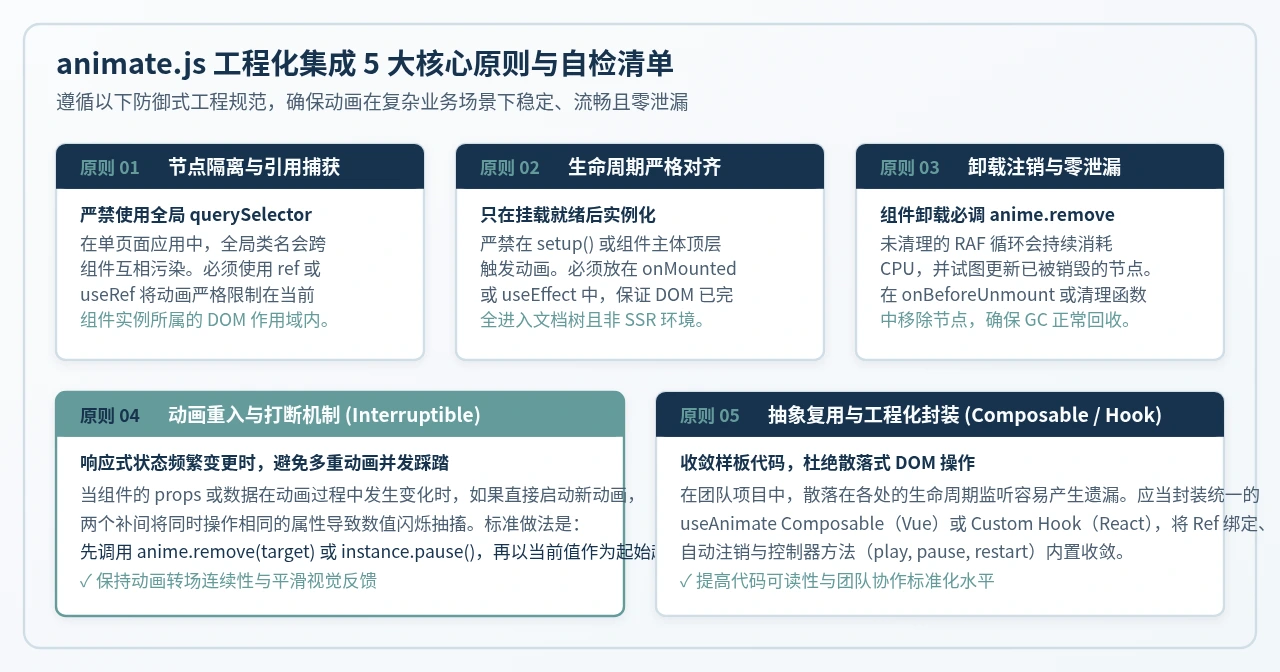
- 隔离性:组件内所有动画目标必须由
ref/useRef显式指定,严禁全局字符串选择器。 - 时序性:确保动画执行点严格限制在
onMounted/useEffect或nextTick之后。 - 清洁性:组件卸载前(
onBeforeUnmount/ 清理回调)必须显式调用anime.remove(target),避免孤儿动画。 - 幂等性:在响应式状态反复切换时,先打断旧补间或重设起始点,防止数值累加引发视觉跳动。
- 复用性:优先使用封装后的
useAnimate统一生命周期管理,降低业务代码的样板冗余。
实用工具推荐
电子包浆
使用 ›绿化、压缩、噪点和虚拟水印,自由调节做旧程度。
图片压缩
使用 ›选择画质和输出格式,预览压缩前后的大小。
作者最新文章
相关文章