

深入对比基于原生JavaScript实现弹幕的DOM与Canvas两种核心技术路线,分析其渲染管线开销、轨道碰撞防追尾算法、生命周期管理,并提供两套完整可运行的工程级代码实现与技术选型建议。
原生JS实现弹幕:DOM与Canvas方案对比及代码示例
作者:竹影
时间:2026-10-30
浏览:434
文章目录
实现网页视频或互动直播弹幕,核心有两条原生技术路线:一是基于 DOM 节点 与 CSS/动画属性构建,二是基于 HTML5 Canvas 2D 上下文 进行像素级逐帧重绘。本文将剖析两种架构的底层渲染管线、轨道调度与防追尾机制,并提供生产可用的原生 JS 完整代码,最后给出明确的量化选型指标。

缩略图:DOM 节点树分层与 Canvas 像素缓冲流双引擎对比
一、方案原理:浏览器底层如何渲染这两种弹幕
弹幕的本质是大量单向移动的文本块。虽然表面上看都是文字自右向左平移,但两种方案在浏览器内核中的计算过程和资源消耗存在根本区别。
1. DOM 方案的渲染机制
DOM 方案为每条弹幕创建独立的 HTML 元素(如 <div>),通过绝对定位 position: absolute 将其置于播放器容器之上。位移动画通常借助 CSS 的 transform: translate3d(x, 0, 0) 或 requestAnimationFrame 逐帧更新样式来实现。
在此管线下,每个弹幕元素都是 DOM 树中的真实节点。当弹幕数量增多时,浏览器需要为其维护样式计算(Recalculate Style)、图层分层(Layerize)及合成(Composite)。即使开启了硬件加速,过多的独立合成层也会占用大量 GPU 显存,导致复合层树膨胀与微卡顿。
2. Canvas 方案的渲染机制
Canvas 方案仅在页面中保留一个透明的 <canvas> 容器,DOM 树中没有任何文字节点。所有弹幕数据均保存在 JavaScript 内存数组中,通过 requestAnimationFrame 驱动的循环不断执行三个操作:ctx.clearRect() 清空画布、更新弹幕 X 坐标、ctx.fillText() 绘制文本。
由于只涉及一块共享的离屏缓冲区,浏览器无需做 DOM 树差异对比,也不产生任何重排(Reflow)。无论屏幕上同时飘过 50 条还是 1000 条文字,GPU 都仅需合成单层 Canvas 位图,渲染性能极高且帧率极其平稳。
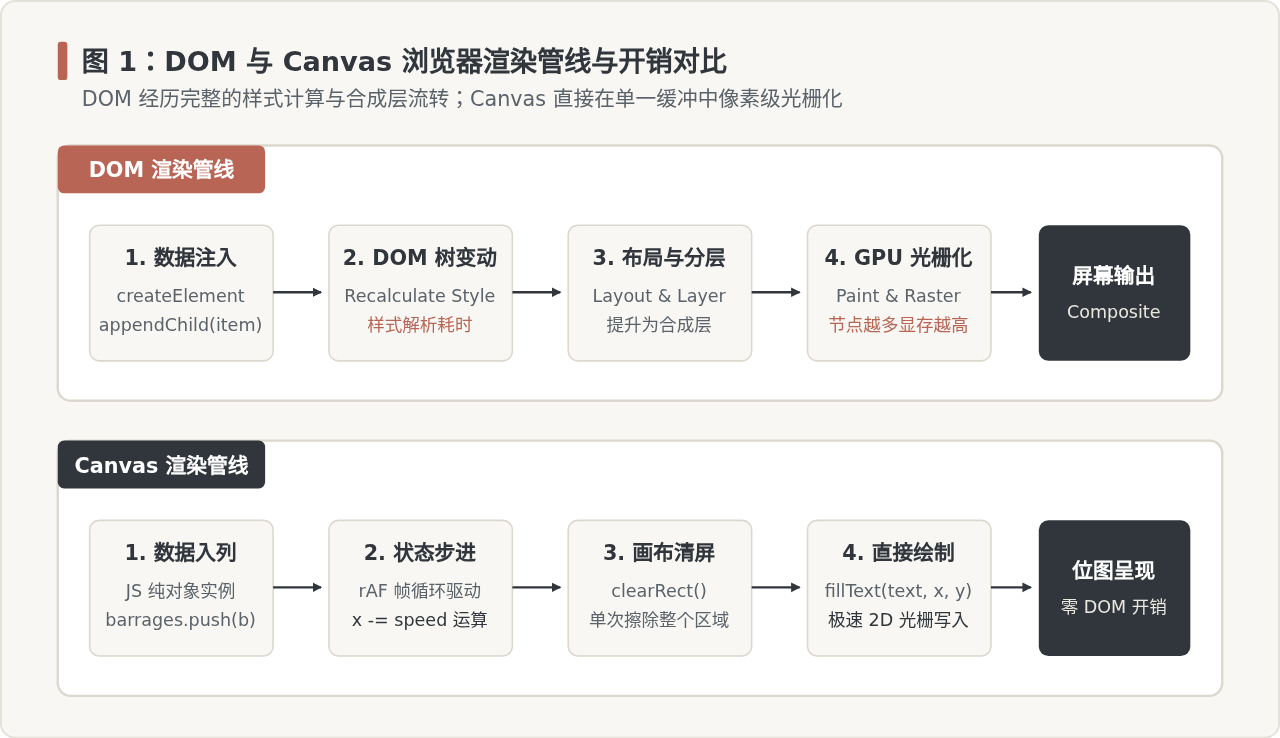
图 1:DOM 与 Canvas 浏览器渲染管线与开销对比
二、弹幕系统的共性基础:轨道划分与防碰撞调度
无论采用 DOM 还是 Canvas,要做出观感自然的弹幕系统,首要解决的是重叠与追尾问题。如果只是随机给弹幕赋予垂直高度,文字极易相互遮挡,导致完全不可读。
1. 垂直轨道划分
假设弹幕容器高度为 H,弹幕字号为 16px,加上下内边距与行间距后,每条轨道高度 trackHeight 设为 32px。容器可容纳的固定轨道总数为:
const totalTracks = Math.floor(containerHeight / trackHeight);2. 防追尾与安全发射算法
当一条新弹幕准备发射时,它需要寻找一条“安全轨道”。一条轨道能够容纳新弹幕发射,必须同时满足两个物理条件:
- 入口安全条件:该轨道上最后一条弹幕(前弹幕 A)的尾部已经完全进入屏幕,且离开屏幕右边缘至少保留了一段安全距离(如
safetyGap = 20px)。 - 追尾预防条件:若新弹幕 B 的移动速度大于前弹幕 A,新弹幕在穿越屏幕的过程中可能会追上前弹幕。计算追上时前弹幕的位置,必须保证此时前弹幕已经滑出屏幕左边缘。
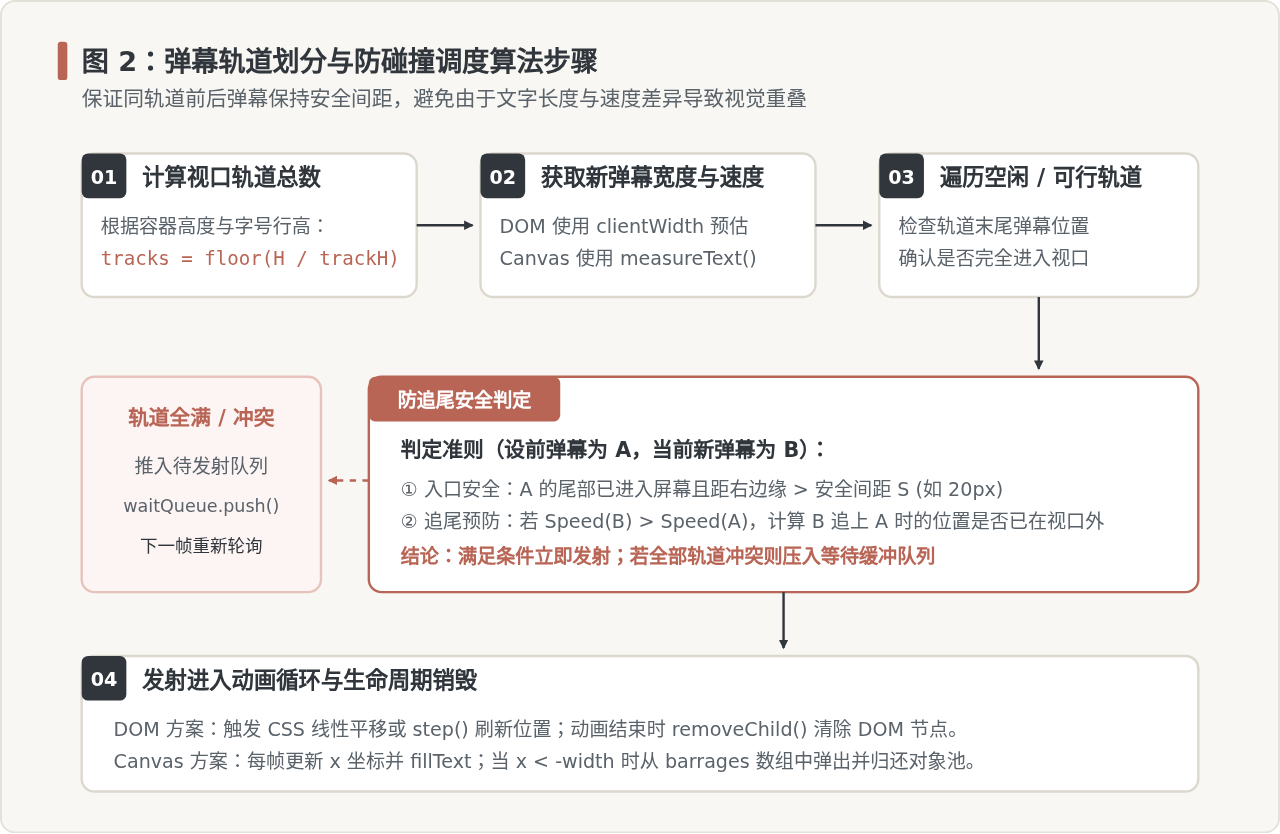
图 2:弹幕轨道划分与防碰撞调度算法步骤
三、DOM 弹幕方案:实现细节与完整代码
DOM 方案的最大优势在于开发便捷与丰富的富文本交互能力。通过常规 CSS,我们可以直接为文字添加发光阴影、渐变边框、用户头像或徽章,并能轻易监听 mouseenter(暂停平移)、mouseleave(恢复平移)与 click(点赞或举报)事件。
完整原生 JS DOM 弹幕代码
以下代码包含了轨道管理、CSS 硬件加速位移、鼠标悬停暂停及自动销毁逻辑,可直接保存并在浏览器中运行:
<!DOCTYPE html>
<html lang="zh-CN">
<head>
  <meta charset="UTF-8">
  <style>
    .danmaku-stage {
      position: relative;
      width: 800px;
      height: 450px;
      background: #1e1e1e;
      overflow: hidden;
      margin: 20px auto;
      border-radius: 8px;
    }
    .danmaku-item {
      position: absolute;
      white-space: nowrap;
      user-select: none;
      font-size: 16px;
      font-weight: 500;
      color: #ffffff;
      text-shadow: 1px 1px 2px #000000;
      will-change: transform;
      cursor: pointer;
      display: flex;
      align-items: center;
      gap: 6px;
      padding: 2px 6px;
      border-radius: 4px;
    }
    .danmaku-item:hover {
      background: rgba(255, 255, 255, 0.2);
      border: 1px solid #B96555;
    }
  </style>
</head>
<body>

<div id="stage" class="danmaku-stage"></div>

<script>
class DomDanmaku {
  constructor(container, options = {}) {
    this.container = container;
    this.trackHeight = options.trackHeight || 36;
    this.totalTracks = Math.floor(container.clientHeight / this.trackHeight);
    // 记录每个轨道当前最后一条弹幕的元信息
    this.tracks = new Array(this.totalTracks).fill(null);
    this.queue = [];
    this.isPaused = false;
  }

  // 发送单条弹幕
  send(text, options = {}) {
    const bullet = {
      text,
      color: options.color || '#FFFFFF',
      speed: options.speed || (1.5 + Math.random() * 1.0), // 像素/帧
      avatar: options.avatar || null
    };
    this.dispatch(bullet);
  }

  // 轨道调度核心
  dispatch(bullet) {
    const stageWidth = this.container.clientWidth;
    let chosenTrack = -1;

    for (let i = 0; i < this.totalTracks; i++) {
      const last = this.tracks[i];
      if (!last) {
        chosenTrack = i;
        break;
      }
      // 判定前弹幕是否留出了入口空间
      const lastRect = last.el.getBoundingClientRect();
      const containerRect = this.container.getBoundingClientRect();
      const lastTailX = lastRect.right - containerRect.left;

      if (lastTailX < stageWidth - 24) {
        // 若新弹幕速度更快,检查是否会发生中途相撞
        if (bullet.speed <= last.speed) {
          chosenTrack = i;
          break;
        } else {
          // 计算追赶距离与时间
          const catchTime = (stageWidth - lastTailX) / (bullet.speed - last.speed);
          if (catchTime * bullet.speed > stageWidth) {
            chosenTrack = i;
            break;
          }
        }
      }
    }

    // 若无合适轨道则推入缓冲队列
    if (chosenTrack === -1) {
      this.queue.push(bullet);
      setTimeout(() => {
        if (this.queue.length > 0) {
          this.dispatch(this.queue.shift());
        }
      }, 300);
      return;
    }

    this.renderBullet(bullet, chosenTrack);
  }

  renderBullet(bullet, trackIndex) {
    const el = document.createElement('div');
    el.className = 'danmaku-item';
    el.style.color = bullet.color;
    el.style.top = `${trackIndex * this.trackHeight + 6}px`;

    if (bullet.avatar) {
      const img = document.createElement('img');
      img.src = bullet.avatar;
      img.style.width = '18px';
      img.style.height = '18px';
      img.style.borderRadius = '50%';
      el.appendChild(img);
    }
    const textNode = document.createElement('span');
    textNode.textContent = bullet.text;
    el.appendChild(textNode);

    this.container.appendChild(el);

    const elWidth = el.offsetWidth;
    const stageWidth = this.container.clientWidth;
    let posX = stageWidth;
    let paused = false;

    // 记录轨道最后节点
    this.tracks[trackIndex] = { el, speed: bullet.speed };

    // 悬停互动支持
    el.addEventListener('mouseenter', () => { paused = true; });
    el.addEventListener('mouseleave', () => { paused = false; });
    el.addEventListener('click', () => {
      alert(`点击了弹幕:${bullet.text}`);
    });

    // 帧驱动运动
    const step = () => {
      if (!paused) {
        posX -= bullet.speed;
        el.style.transform = `translate3d(${posX}px, 0, 0)`;
      }

      if (posX < -elWidth) {
        // 移出屏幕时清理 DOM
        if (this.tracks[trackIndex] && this.tracks[trackIndex].el === el) {
          this.tracks[trackIndex] = null;
        }
        this.container.removeChild(el);
      } else {
        requestAnimationFrame(step);
      }
    };

    // 设置初始偏移并启动
    el.style.transform = `translate3d(${posX}px, 0, 0)`;
    requestAnimationFrame(step);
  }
}

// 使用示例
const stage = document.getElementById('stage');
const domDanmaku = new DomDanmaku(stage);
for (let i = 1; i <= 15; i++) {
  setTimeout(() => {
    domDanmaku.send(`DOM 弹幕测试 #${i} 文本内容`, {
      color: i % 2 === 0 ? '#B96555' : '#FFFFFF'
    });
  }, i * 200);
}
</script>
</body>
</html>
四、Canvas 弹幕方案:实现细节与完整代码
Canvas 方案专为高吞吐量、海量并发而生。在直播带货或大型赛事等高密度场景下,同一时刻画面中可能存在上千条弹幕。如果使用 DOM 方案,浏览器主线程的样式计算与重排会导致帧率从 60FPS 骤降至 15FPS 以下;而 Canvas 依然能保持丝滑运行。
1. 核心实现挑战
- 文本宽度计算:无法依赖 CSS,必须在绘制前调用
ctx.measureText(text).width精确度量。 - 高分屏清晰度(Retina 适配):Canvas 画布的物理像素必须乘以
window.devicePixelRatio,否则在高清屏上文字会发生毛边模糊。 - 点击交互命中检测:文字不再是元素,若要实现点击弹幕,需监听 Canvas 的
click事件,将鼠标点击的坐标(e.offsetX, e.offsetY)与屏幕上所有活跃弹幕的包围盒(Bounding Box)进行几何包含判定。
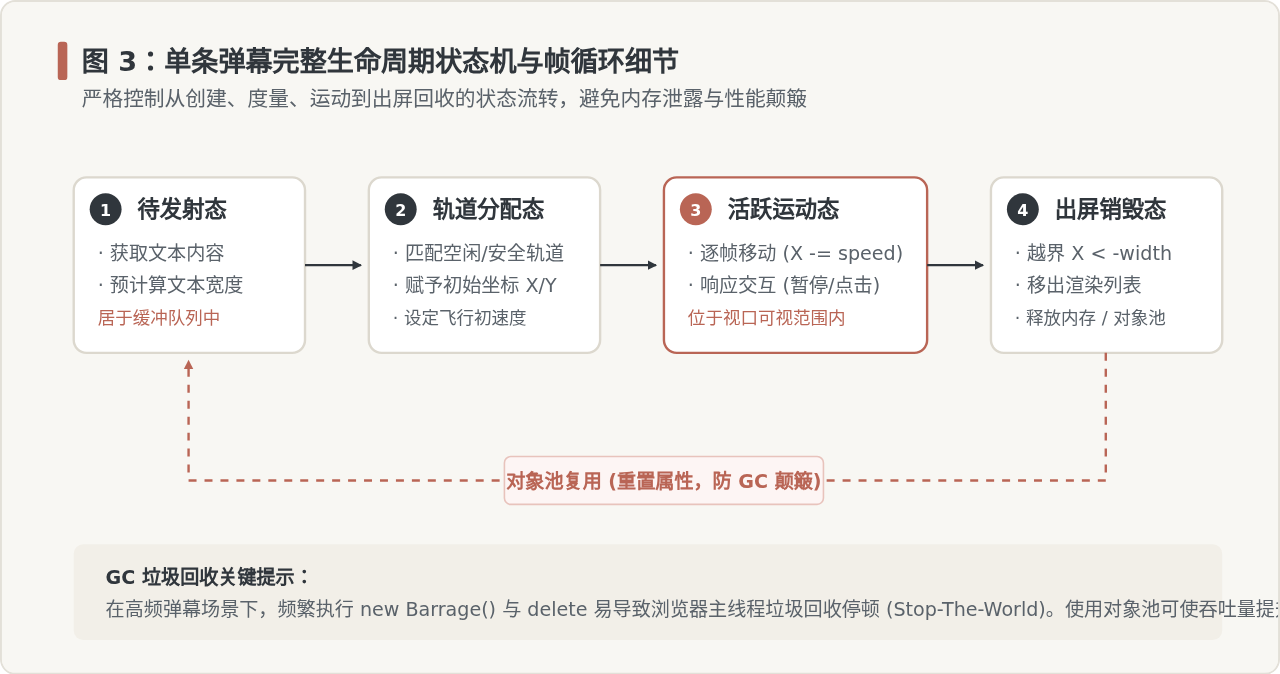
图 3:单条弹幕完整生命周期状态机与帧循环细节
完整原生 JS Canvas 弹幕代码
以下代码提供单 Canvas 实例、DPR 自动适配、文本描边、对象生命周期回收及点击拾取支持:
<!DOCTYPE html>
<html lang="zh-CN">
<head>
  <meta charset="UTF-8">
  <style>
    .stage-box {
      position: relative;
      width: 800px;
      height: 450px;
      background: #111111;
      margin: 20px auto;
      border-radius: 8px;
      overflow: hidden;
    }
    canvas {
      display: block;
      width: 100%;
      height: 100%;
    }
  </style>
</head>
<body>

<div class="stage-box" id="box">
  <canvas id="danmakuCanvas"></canvas>
</div>

<script>
class CanvasDanmaku {
  constructor(canvas, options = {}) {
    this.canvas = canvas;
    this.ctx = canvas.getContext('2d');
    this.trackHeight = options.trackHeight || 34;
    this.fontSize = options.fontSize || 16;
    this.barrages = [];
    this.dpr = window.devicePixelRatio || 1;

    this.initCanvasSize();
    this.totalTracks = Math.floor(this.height / this.trackHeight);
    this.tracks = new Array(this.totalTracks).fill(null);

    this.bindEvents();
    this.startLoop();
  }

  initCanvasSize() {
    const rect = this.canvas.getBoundingClientRect();
    this.width = rect.width;
    this.height = rect.height;

    // 适配高清屏幕,防止字体模糊
    this.canvas.width = this.width * this.dpr;
    this.canvas.height = this.height * this.dpr;
    this.ctx.scale(this.dpr, this.dpr);
    this.ctx.font = `600 ${this.fontSize}px system-ui, sans-serif`;
    this.ctx.textBaseline = 'middle';
  }

  // 接收并发射弹幕
  send(text, options = {}) {
    this.ctx.font = `600 ${this.fontSize}px system-ui, sans-serif`;
    const textWidth = this.ctx.measureText(text).width;
    const speed = options.speed || (1.6 + Math.random() * 0.8);
    const color = options.color || '#FFFFFF';

    // 寻找可用轨道
    let selectedTrack = -1;
    for (let i = 0; i < this.totalTracks; i++) {
      const prev = this.tracks[i];
      if (!prev) {
        selectedTrack = i;
        break;
      }
      // 前弹幕末端已入屏且预留 20px 间隙
      const prevTail = prev.x + prev.width;
      if (prevTail < this.width - 20) {
        if (speed <= prev.speed) {
          selectedTrack = i;
          break;
        } else {
          const chaseDistance = (this.width - prevTail);
          const time = chaseDistance / (speed - prev.speed);
          if (time * speed > this.width) {
            selectedTrack = i;
            break;
          }
        }
      }
    }

    if (selectedTrack === -1) {
      // 轨道满载时随机选择下部轨道或延迟发送
      selectedTrack = Math.floor(Math.random() * this.totalTracks);
    }

    const y = selectedTrack * this.trackHeight + (this.trackHeight / 2);
    const bullet = {
      text,
      x: this.width,
      y,
      width: textWidth,
      height: this.fontSize,
      speed,
      color,
      track: selectedTrack
    };

    this.barrages.push(bullet);
    this.tracks[selectedTrack] = bullet;
  }

  // 主循环
  startLoop() {
    const render = () => {
      // 1. 清屏
      this.ctx.clearRect(0, 0, this.width, this.height);

      // 2. 状态更新与绘制
      for (let i = this.barrages.length - 1; i >= 0; i--) {
        const b = this.barrages[i];
        b.x -= b.speed;

        // 绘制文字轮廓描边增强对比度
        this.ctx.strokeStyle = 'rgba(0, 0, 0, 0.7)';
        this.ctx.lineWidth = 3;
        this.ctx.strokeText(b.text, b.x, b.y);

        // 填充文字主体
        this.ctx.fillStyle = b.color;
        this.ctx.fillText(b.text, b.x, b.y);

        // 3. 越界销毁与轨道状态解绑
        if (b.x < -b.width) {
          if (this.tracks[b.track] === b) {
            this.tracks[b.track] = null;
          }
          this.barrages.splice(i, 1);
        }
      }

      requestAnimationFrame(render);
    };

    requestAnimationFrame(render);
  }

  // 鼠标点击命中拾取
  bindEvents() {
    this.canvas.addEventListener('click', (e) => {
      const rect = this.canvas.getBoundingClientRect();
      const clickX = e.clientX - rect.left;
      const clickY = e.clientY - rect.top;

      for (let i = this.barrages.length - 1; i >= 0; i--) {
        const b = this.barrages[i];
        const halfH = b.height / 2;
        // 判定点击坐标是否位于文本矩形包围盒内
        if (
          clickX >= b.x &&
          clickX <= b.x + b.width &&
          clickY >= b.y - halfH &&
          clickY <= b.y + halfH
        ) {
          alert(`Canvas 拾取命中弹幕: "${b.text}"`);
          break;
        }
      }
    });
  }
}

// 使用示例
const cvs = document.getElementById('danmakuCanvas');
const canvasDanmaku = new CanvasDanmaku(cvs);

for (let i = 1; i <= 30; i++) {
  setTimeout(() => {
    canvasDanmaku.send(`Canvas 高性能弹幕流 #${i} 60FPS 测试`, {
      color: i % 3 === 0 ? '#B96555' : '#FFFFFF'
    });
  }, i * 150);
}
</script>
</body>
</html>
五、核心指标横向对比与技术选型指南
在实际工程选型中,不能简单评价哪个方案“更好”,而是要依据具体的业务并发规模、UI 呈现需求以及维护成本做出权衡:
| 对比维度 | DOM 节点方案 | Canvas 画布方案 |
|---|---|---|
| 渲染性能与吞吐量 | 并发量小于 80 条时表现良好;超过 150 条后易发生掉帧与内存激增。 | 极高吞吐量。同时运行 1000+ 条弹幕依然能稳定维持 60FPS。 |
| CSS 样式与富文本 | 原生支持 HTML/CSS。徽章、渐变色、阴影、图文混排开发成本极低。 | 样式完全依赖 2D API 绘制。混排图文需要手动加载 Image 并算准坐标。 |
| 事件交互与交互拾取 | 直接挂载 click、hover、contextmenu,逻辑天然解耦。 |
无事件冒泡。需在主画布监听全局事件并通过几何包围盒算法反向拾取。 |
| 内存占用与垃圾回收 | 频繁创建与注销 DOM 节点会导致高内存占用与页面重排。 | 仅占用单一 Canvas 缓冲区。结合对象池(Object Pool)几乎无 GC 颠簸。 |
| 实现复杂度 | 入门快,少量代码即可成型,维护直观。 | 中高。需自行处理 DPI 缩放、文本度量、字体加载状态等细节。 |
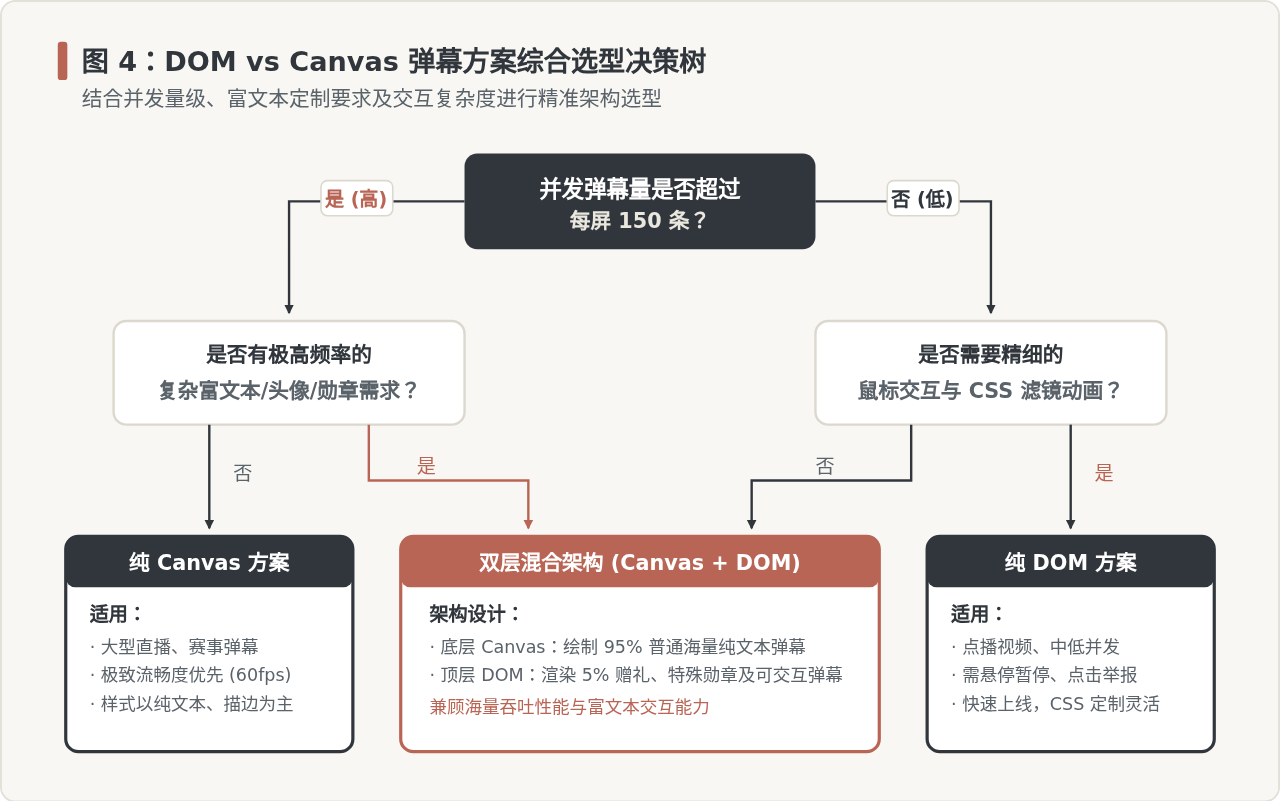
图 4:DOM vs Canvas 弹幕方案综合选型决策树
六、生产环境避坑与性能调优要点
1. 解决高分屏(Retina)字体发虚问题
在移动端或高清显示器上,直接给 Canvas 设置样式宽高会导致绘制模糊。必须将 Canvas 的宽高属性(物理像素)放大 window.devicePixelRatio 倍,并通过 ctx.scale(dpr, dpr) 同步缩放坐标系,最后用 CSS 限制视觉展示宽高。
2. 对象池模式(Object Pool)消除 GC 卡顿
在高密度 Canvas 弹幕中,每秒产生数百条弹幕如果反复执行 new Barrage()并在出屏后由垃圾回收器释放,会导致 JavaScript 引擎频繁触发 Major GC 暂停。应维护一个固定大小的对象池:
class BarragePool {
  constructor(size = 300) {
    this.pool = [];
    for (let i = 0; i < size; i++) {
      this.pool.push({ text: '', x: 0, y: 0, speed: 0, active: false });
    }
  }
  acquire(text, x, y, speed) {
    let item = this.pool.find(b => !b.active) || {};
    item.text = text;
    item.x = x;
    item.y = y;
    item.speed = speed;
    item.active = true;
    return item;
  }
  release(item) {
    item.active = false;
  }
}
3. DOM 方案强制开启硬件加速
如果采用 DOM 方案,必须使用 transform: translate3d(x, 0, 0) 代替传统的 style.left,并且在 CSS 中声明 will-change: transform。这样可以让浏览器为弹幕分配独立的合成上下文,避免每一次像素位移都引起父容器的重新排版(Reflow)。
4. 页面切入后台时的时钟同步
当用户切换浏览器标签页时,requestAnimationFrame 会被浏览器自动降频甚至完全冻结。如果此时后台仍在源源不断地向队列推入 WebSocket 弹幕,用户切回标签时会在一瞬间积压并同时喷发数千条弹幕,导致页面瞬间假死崩溃。因此必须监听 document.visibilitychange 事件,切出时暂停接收新弹幕或清空积压缓冲。
实用工具推荐
电子包浆
使用 ›绿化、压缩、噪点和虚拟水印,自由调节做旧程度。
图片压缩
使用 ›选择画质和输出格式,预览压缩前后的大小。
作者最新文章
相关文章