

本文深入解析JavaScript数组的join()方法,通过多个代码示例演示如何自定义分隔符拼接元素、实现无缝拼接以及利用该方法高效生成HTML列表结构。同时对比toString()方法,澄清常见使用误区,帮助开发者掌握数组字符串转换的核心技巧。
join()方法的核心功能是将数组中的每个元素转换为字符串,并根据指定的分隔符将它们连接成一个新字符串。
1、使用空字符串进行无缝拼接
<script>
        let s = Array('a','p','p','l','e')
        document.write(s.join(''))
 </script>
运行上述代码后的输出结果为:apple
2、使用空格作为分隔符进行拼接
    <script>
        let s = Array('Apple','is','on','my','table')
        document.write(s.join(' '))
    </script>
运行上述代码后的输出结果为:Apple is on my table
3、不指定分隔符的情况
    <script>
        let s = Array(1,2,3)
        console.log(s)
        console.log(s.join())
    </script>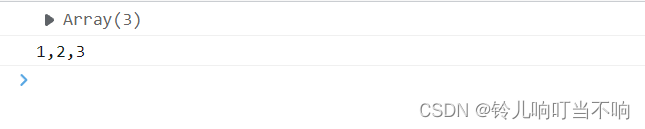
4、利用join()生成页面DOM元素
<!DOCTYPE html>
<html lang="en">
<head>
    <meta charset="UTF-8">
    <meta http-equiv="X-UA-Compatible" content="IE=edge">
    <meta name="viewport" content="width=device-width, initial-scale=1.0">
    <title>Document</title>
</head>
<body>
     <ul id="list"></ul>
     <script>
        let data = ['第一个','第二个','第三个','第四个']
        let list = document.querySelector('#list')
        let content = '<li>' + data.join('</li><li>') + '</li>'
        list.innerHTML = content
     </script>
</body>
</html>
相关案例代码展示如下:
<!DOCTYPE html>
<html lang="en">
<head>
    <meta charset="UTF-8">
    <meta http-equiv="X-UA-Compatible" content="IE=edge">
    <meta name="viewport" content="width=device-width, initial-scale=1.0">
    <title>Document</title>
    <link rel="stylesheet" href="https://stackpath.bootstrapcdn.com/bootstrap/3.4.1/css/bootstrap.min.css" integrity="sha384-HSMxcRTRxnN+Bdg0JdbxYKrThecOKuH5zCYotlSAcp1+c8xmyTe9GYg1l9a69psu" crossorigin="anonymous">
    <script src="https://cdn.bootcdn.net/ajax/libs/jquery/3.6.0/jquery.min.js"></script>
</head>
<body style="padding: 20px;">
<table class="table table-bordered table-hover">
        <thead>
            <tr>
                <th>id</th>
                <th>书名</th>
                <th>作者</th>
                <th>出版社</th>
                <th>操作</th>
            </tr>
        </thead>
        <tbody id="tb">
          <tr>
            <td></td>
            <td></td>
            <td></td>
            <td></td>
            <td></td>
          </tr>
        </tbody>
    </table>

    <script>
      let tb = document.querySelector('#tb')
      data = [
        {id:1, bookname:'红楼梦', author:'曹雪芹', publisher:'河南出版社'},
        {id:2, bookname:'活着', author:'余华', publisher:'海南出版社'},
        {id:3, bookname:'我与地坛', author:'史铁生', publisher:'湖南出版社'}
      ]
      let content = []
      for(i = 0; i < data.length; i++){
       content.push('<tr><td>'+data[i].id+'</td><td>'+data[i].bookname+'</td><td>'+data[i].author+'</td><td>'+data[i].publisher+'</td><td><a href="javascript:;">删除</a></td></tr>')
       tb.innerHTML = content.join('')
      }
    </script>
</body>
</html>
</html>
总结
以上就是关于JavaScript中join()方法的详细介绍。如需了解更多相关技术内容,欢迎查阅本站往期文章或继续浏览后续教程,感谢您的支持!