

本文介绍了一种在前端实现非跳转式弹窗并配合Ajax进行数据交互的技术方案。通过覆盖蒙版屏蔽底层操作,利用绝对定位展示弹窗,并在父窗口中通过特殊标签触发事件。核心逻辑涉及DOM动态插入、事件绑定及Ajax数据提交,旨在提供无需页面刷新即可补充信息的用户体验。
需求背景与实现概述
原计划是满足这样一个需求:当用户在界面触发特定业务操作时,需要补充相关信息。为了保持用户体验的连贯性,不执行页面跳转,而是采用弹窗形式来收集这些信息。虽然最终该方案未被实际采用,但实现过程已验证可行性。
目前提供的代码细节尚显粗糙,主要旨在展示大致的实现逻辑。
核心实现思路与关键细节
核心思路如下:首先在窗口上覆盖一层蒙版,以屏蔽底层原有功能按钮的操作;随后在蒙版上层通过绝对定位技术实现弹窗显示。弹窗内的数据交互通过Ajax方式完成,触发弹窗的动作由onclick事件驱动。
关键细节在于:弹窗与原窗体本质上属于同一页面。为了便于描述,将底层窗体称为父窗体,弹窗称为子窗体。为了实现父子窗体间的数据交互,需要在父窗体中设置特定的标签元素,以便通过选择器定位,并动态插入新的DOM对象。
父窗体与选择器代码实现
首先查看父窗体的代码,其中关键部分已添加注释说明。
<html xmlns="http://www.w3.org/1999/xhtml">
<head>
 <meta http-equiv="Content-Type" content="text/html; charset=utf-8">
 <meta name="viewport" content="initial-scale=1.0, user-scalable=no">
 <meta name="apple-mobile-web-app-capable" content="yes">
 <meta name="apple-mobile-web-app-status-bar-style" content="black">
 <title>测试弹窗</title>

 <script type="text/javascript" src="script/jquery/jquery.js" charset="utf-8"></script>

 <script type="text/javascript" src="script/js/outil.js" charset="utf-8"></script>
 <script charset="utf-8" type="text/javascript" src="script/jquery/jquery.ui.js"></script>
 <link rel="stylesheet" type="text/css" href="script/jquery/themes/ui-lightness/jquery.ui.css">

 <script charset="utf-8" type="text/javascript" src="script/dialog/dialog.js" id="dialog_js"></script>
 <link href="script/dialog/dialog.css" rel="stylesheet" type="text/css">

 <style type="text/css">
  *{
   margin: 0;
   padding: 0;
   text-align: center;
   text-decoration: none;
  }
  body{
   font: 12px/1.5 宋体,Tahoma, Arial,sans-serif;
   font-family: "微软雅黑";
   width:320px;
   height: auto;
   margin:0 auto;
  }
  .content{
   border: #ccc solid 1px;
   margin:60px 10px 10px;
   background:#fff;
   overflow:hidden;
   color:#6b6b6b;
   font-size:14px;
   border-radius:5px;
  }

 </style>

</head>

<body>
 <!-- 选择器是通过ectype="dialog"来进行选择的 -->
 <div class="content">
  <a href="javascript:void(0);" ectype="dialog" dialog_id="dialog_test" dialog_title="对话测试" dialog_width="300" uri="pop_son.html" >
  对话测试
 </a>
 </div>

</body>
</html>
接下来展示选择器部分的代码,即outil.js的实现。此处省略了jQuery及jQuery UI的引入说明,其核心功能在于绑定click事件。
jQuery.extend({
 getCookie : function(sName) {
 var aCookie = document.cookie.split("; ");
 for (var i=0; i < aCookie.length; i++){
  var aCrumb = aCookie[i].split("=");
  if (sName == aCrumb[0]) return decodeURIComponent(aCrumb[1]);
 }
 return '';
 },
 setCookie : function(sName, sValue, sExpires) {
 var sCookie = sName + "=" + encodeURIComponent(sValue);
 if (sExpires != null) sCookie += "; expires=" + sExpires;
 document.cookie = sCookie;
 },
 removeCookie : function(sName) {
 document.cookie = sName + "=; expires=Fri, 31 Dec 1999 23:59:59 GMT;";
 }
});


$(function(){
 /* dialog 选择并绑定一个新的click事件 */
 $('*[ectype="dialog"]').click(function(){
  var id = $(this).attr('dialog_id');
  var title = $(this).attr('dialog_title') ? $(this).attr('dialog_title') : '';
  var url = $(this).attr('uri');
  var width = $(this).attr('dialog_width');
  ajax_form(id, title, url, width);
  return false;
 });

});

function drop_confirm(msg, url){
 if(confirm(msg)){
  window.location = url;
 }
}

/* 显示Ajax表单 */
function ajax_form(id, title, url, width)
{
 if (!width)
 {
  width = 400;
 }
 var d = DialogManager.create(id);
 d.setTitle(title);
 d.setContents('ajax', url);
 d.setWidth(width);
 d.show('center');

 return d;
}

function go(url){
 window.location = url;
}


function set_zindex(parents, index){
 $.each(parents,function(i,n){
  if($(n).css('position') == 'relative'){//alert('relative');
   //alert($(n).css('z-index'));
   $(n).css('z-index',index);
  }
 });
}


function js_success(dialog_id)
{
 DialogManager.close(dialog_id);
 var url = window.location.href;
 url = url.indexOf('#') > 0 ? url.replace(/#/g, '') : url;
 window.location.replace(url);
}

function js_fail(str)
{
 $('#warning').html('<label class="error">' + str + '</label>');
 $('#warning').show();
}

function check_pint(v)
{
 var regu = /^[0-9]{1,}$/;
 if(!regu.test(v))
 {
  alert(lang.only_int);
  return false;
 }
 return true;
}

/* 转化JS跳转中的 & */
function transform_char(str)
{
 if(str.indexOf('&'))
 {
  str = str.replace(/&/g, "%26");
 }
 return str;
}


// 复制到剪贴板
function copyToClipboard(txt) {
 if(window.clipboardData) {
  window.clipboardData.clearData();
  window.clipboardData.setData("Text", txt);
 } else if(navigator.userAgent.indexOf("Opera") != -1) {
  window.location = txt;
 } else if (window.netscape) {
  try {
   netscape.security.PrivilegeManager.enablePrivilege("UniversalXPConnect");
  } catch (e) {
   return false;
  }
 var clip = Components.classes['@mozilla.org/widget/clipboard;1'].createInstance(Components.interfaces.nsIClipboard);
 if (!clip)
  return false;
 var trans = Components.classes['@mozilla.org/widget/transferable;1'].createInstance(Components.interfaces.nsITransferable);
 if (!trans)
  return false;
 trans.addDataFlavor('text/unicode');
 var str = new Object();
 var len = new Object();
 var str = Components.classes["@mozilla.org/supports-string;1"].createInstance(Components.interfaces.nsISupportsString);
 var copytext = txt;
 str.data = copytext;
 trans.setTransferData("text/unicode",str,copytext.length*2);
 var clipid = Components.interfaces.nsIClipboard;
 if (!clip)
  return false;
 clip.setData(trans,null,clipid.kGlobalClipboard);
 }
}
弹窗核心逻辑与子窗体展示
事件绑定的相关代码构成了dialog的核心逻辑(dialog.js)。这部分代码源自网络资源,在此表示感谢,具体代码如下。
__DIALOG_WRAPPER__ = {};

/* IE6有个Bug,如果不给定对话框的宽度的话,在IE6下,对话框将以100%宽度显示 */
DialogManager = {
 'create'  :function(id){
  var d = {};
  if (!__DIALOG_WRAPPER__[id])
  {
   d = new Dialog(id);
   __DIALOG_WRAPPER__[id] = d;
  }
  else
  {
   d = DialogManager.get(id);
  }
  return d;
 },
 'get'   :function(id){
  return __DIALOG_WRAPPER__[id];
 },
 'close'   :function(id){
  if (__DIALOG_WRAPPER__[id].close())
  {
   __DIALOG_WRAPPER__[id] = null;
  }

 },
 'onClose'  :function (){
  return true;
 },
 /* 加载对话框样式 */
 'loadStyle'  :function(){
  var _dialog_js_path = $('#dialog_js').attr('src');
  var _path = _dialog_js_path.split('/');
  var _dialog_css = _path.slice(0, _path.length - 1).join('/') + '/dialog.css';
  $('#dialog_js').after('<link href="' + _dialog_css + '" rel="stylesheet" type="text/css" />');
 }
};
ScreenLocker = {
 'style'  : {
  'position'   : 'absolute',
  'top'    : '0px',
  'left'    : '0px',
  'backgroundColor' : '#000',
  'opacity'   : 0.5,
  'zIndex'   : 999
 },
 'masker' : null,
 'lock'  : function(zIndex){
  if (this.masker !== null)
  {
   this.masker.width($(document).width()).height($(document).height());

   return true;
  }

  this.masker = $('<div></div>');

  /* IE6 Hack */
  if ($.browser.msie)
  {
   $('select').css('visibility', 'hidden');
  }
  //var _iframe = $('<iframe></iframe>').css({'opacity':0, 'width':'100%', 'height':'100%'});
  //this.masker.append(_iframe);

  /* 样式 */
  this.masker.css(this.style);

  if (zIndex)
  {
   this.masker.css('zIndex', zIndex);
  }

  /* 整个文档的宽高 */
  this.masker.width($(document).width()).height($(document).height());

  $(document.body).append(this.masker);
 },
 'unlock' : function(){
  if (this.masker === null)
  {
   return true;
  }
  this.masker.remove();
  this.masker = null;

  /* IE6 Hack */
  if ($.browser.msie)
  {
   $('select').css('visibility', 'visible');
  }
 }
};

Dialog  = function (id){
 /* 构造函数生成对话框代码,并加入到文档中 */
 this.id = id;
 this.init();
};
Dialog.prototype = {
 /* 唯一标识 */
 'id'   : null,
 /* 文档对象 */
 'dom'   : null,
 'lastPos'  : null,
 'status'  : 'complete',
 'onClose'  : function (){
  return true;
 },
 'tmp'   : {},
 /* 初始化 */
 'init'   : function(){
  this.dom = {'wrapper' : null, 'body':null, 'head':null, 'title':null, 'close_button':null, 'content':null};

  /* 创建外层容器 */
  this.dom.wrapper  = $('<div id="dialog_object_' + this.id + '" class="dialog_wrapper"></div>').get(0);

  /* 创建对话框主体 */
  this.dom.body   = $('<div class="dialog_body"></div>').get(0);

  /* 创建标题栏 */
  this.dom.head   = $('<h3 class="dialog_head"></h3>').get(0);

  /* 创建标题文本 */
  this.dom.title   = $('<span class="dialog_title_icon"></span>').get(0);

  /* 创建关闭按钮 */
  //this.dom.close_button = $('<span class="dialog_close_button">close</span>').get(0);

  /* 创建内容区域 */
  this.dom.content  = $('<div class="dialog_content"></div>').get(0);

  /* 组合 */
  $(this.dom.head).append('<div class="dialog_ornament1"></div><div class="dialog_ornament2"></div>').append($('<span class="dialog_title"></span>').append(this.dom.title)).append(this.dom.close_button);
  $(this.dom.body).append(this.dom.head).append(this.dom.content);
  $(this.dom.wrapper).append(this.dom.body).append('<div style="clear:both;display:block;"></div>');

  /* 初始化样式 */
  $(this.dom.wrapper).css({
   'zIndex'   : 9999,
   'display'   : 'none',
   'position'   : 'absolute'
  });
  $(this.dom.body).css({
   'position' : 'relative'
  });
  $(this.dom.head).css({
   'cursor'  : 'move'
  });
  $(this.dom.close_button).css({
   'position' : 'absolute',
   'text-indent': '-9999px',
   'cursor'  : 'pointer',
   'overflow' : 'hidden'
  });
  $(this.dom.content).css({
   'margin'  : '0px',
   'padding' : '0px'
  });

  var self = this;

  /* 初始化组件事件 */
  $(this.dom.close_button).click(function(){
   DialogManager.close(self.id);
  });

  /* 可拖放 */
  $(this.dom.wrapper).draggable({
   'handle' : this.dom.head
  });

  /* 放入文档流 */
  $(document.body).append(this.dom.wrapper);
 },

 /* 隐藏 */
 'hide'   : function(){
  $(this.dom.wrapper).hide();
 },

 /* 显示 */
 'show'   : function(pos){
  if (pos)
  {
   this.setPosition(pos);
  }

  /* 锁定屏幕 */
  ScreenLocker.lock(999);

  /* 显示对话框 */
  $(this.dom.wrapper).show();
 },

 /* 关闭 */
 'close'   : function(){
  if (!this.onClose())
  {
   return false;
  }
  /* 关闭对话框 */
  $(this.dom.wrapper).remove();

  /* 解锁屏幕 */
  ScreenLocker.unlock();

  return true;
 },

 /* 对话框标题 */
 'setTitle'  : function(title){
  $(this.dom.title).html(title);
 },

 /* 改变对话框内容 */
 'setContents' : function(type, options){

  contents = this.createContents(type, options);
  if (typeof(contents) == 'string')
  {
   $(this.dom.content).html(contents);
  }
  else
  {
   $(this.dom.content).empty();
   $(this.dom.content).append(contents);
  }
 },

 /* 设置对话框样式 */
 'setStyle'  : function(style){
  if (typeof(style) == 'object')
  {
   /* 否则为CSS */
   $(this.dom.wrapper).css(style);
  }
  else
  {
   /* 如果是字符串,则认为是样式名 */
   $(this.dom.wrapper).addClass(style);
  }
 },
 'setWidth'  : function(width){
  this.setStyle({'width' : width + 'px'});
 },
 'setHeight'  : function(height){
  this.setStyle({'height' : height + 'px'});
 },

 /* 生成对话框内容 */
 'createContents' : function(type, options){

  var _html = '',
   self = this,
   status= 'complete';
  if (!options)
  {
   /* 如果只有一个参数,则认为其传递的是HTML字符串 */
   this.setStatus(status);
   return type;
  }
  switch(type){
   case 'ajax':
    /* 通过Ajax取得HTML,显示到页面上,此过程是异步的 */
    $.get(options, {ajax:1}, function(data){
     if(data.substr(0,1) == '{' && data.substr(data.length - 1, 1) == '}'){
      var JSON = eval('(' + data + ')');
      if(!JSON.done){
       self.setContents(JSON.msg);
       return;
      }
     }
     self.setContents(data);
     /* 使用上次定位重新定位窗口位置 */
     self.setPosition(self.lastPos);

     //>>addByZZY20160909: 根据后台返回信息决定该窗口是否展示
     /* 依据返回内容的前五位,值为close时候不展示 */
     if(data.substr(0,5) == 'close'){
      self.close();
     }
    });
    /* 先提示正在加载 */
    _html = this.createContents('loading', {'text' : 'loading...'});
   break;
   /* 以下是内置的几种对话框类型 */
   case 'loading':
    _html = '<div class="dialog_loading"><div class="dialog_loading_text">' + options.text + '</div></div>';
    status = 'loading';
   break;
   case 'message':
    var type = 'notice';
    if (options.type)
    {
     type = options.type;
    }
    _message_body = $('<div class="dialog_message_body"></div>');
    _message_contents = $('<div class="dialog_message_contents dialog_message_' + type + '">' + options.text + '</div>');
    _buttons_bar = $('<div class="dialog_buttons_bar"></div>');
    switch (type){
     case 'notice':
     case 'warning':
      var button_name = lang.confirm;
      if (options.button_name)
      {
       button_name = options.button_name;
      }
      _ok_button = $('<input type="button" class="btn1" value="' + button_name + '" />');
      $(_ok_button).click(function(){
       if (options.onclick)
       {
        if(!options.onclick.call())
        {
         return;
        }
       }
       DialogManager.close(self.id);
      });
      $(_buttons_bar).append(_ok_button);
     break;
     case 'confirm':
      var yes_button_name = lang.yes;
      var no_button_name = lang.no;
      if (options.yes_button_name)
      {
       yes_button_name = options.yes_button_name;
      }
      if (options.no_button_name)
      {
       no_button_name = options.no_button_name;
      }
      _yes_button = $('<input type="button" class="btn1" value="' + yes_button_name + '" />');
      _no_button = $('<input type="button" class="btn2" value="' + no_button_name + '" />');
      $(_yes_button).click(function(){
       if (options.onClickYes)
       {
        if (options.onClickYes.call() === false)
        {
         return;
        }
       }
       DialogManager.close(self.id);
      });
      $(_no_button).click(function(){
       if (options.onClickNo)
       {
        if (!options.onClickNo.call())
        {
         return;
        }
       }
       DialogManager.close(self.id);
      });
      $(_buttons_bar).append(_yes_button).append(_no_button);
     break;
    }
    _html = $(_message_body).append(_message_contents).append(_buttons_bar);

   break;
  }
  this.setStatus(status);

  return _html;
 },
 /* 定位 */
 'setPosition' : function(pos){
  /* 上次定位 */
  this.lastPos = pos;
  if (typeof(pos) == 'string')
  {
   switch(pos){
    case 'center':
     var left = 0;
     var top = 0;
     var dialog_width = $(this.dom.wrapper).width();
     var dialog_height = $(this.dom.wrapper).height();


     /* left=滚动条的宽度 + (当前可视区的宽度 - 对话框的宽度 ) / 2 */
     left = $(window).scrollLeft() + ($(window).width() - dialog_width) / 2;

     /* top =滚动条的高度 + (当前可视区的高度 - 对话框的高度 ) / 2 */
     top = $(window).scrollTop() + ($(window).height() - dialog_height) / 2;

     $(this.dom.wrapper).css({left:left + 'px', top:top + 'px'});
    break;
   }
  }
  else
  {
   var _pos = {};
   if (typeof(pos.left) != 'undefined')
   {
    _pos.left = pos.left;
   }
   if (typeof(pos.top) != 'undefined')
   {
    _pos.top = pos.top;
   }
   $(this.dom.wrapper).css(_pos);
  }

 },
 /* 设置状态 */
 'setStatus' : function(code){
  this.status = code;
 },
 /* 获取状态 */
 'getStatus' : function(){
  return this.status;
 },
 'disableClose' : function(msg){
  this.tmp['oldOnClose'] = this.onClose;
  this.onClose = function(){
   if(msg)alert(msg);
   return false;
  };
 },
 'enableClose' : function(){
  this.onClose = this.tmp['oldOnClose'];
  this.tmp['oldOnClose'] = null;
 }
};

//RemoveByZZY20160909: 手动引入样式文件
//DialogManager.loadStyle();
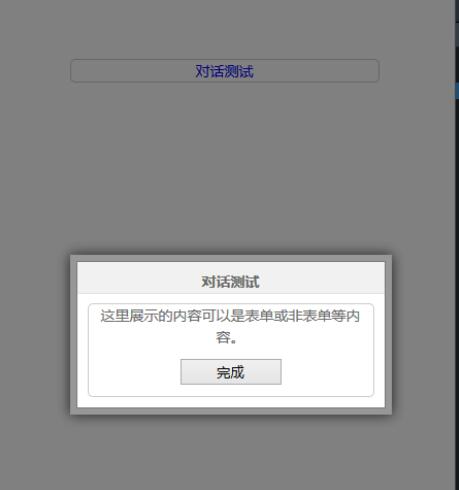
上述内容涵盖了核心逻辑及代码实现,代码本身已清晰解释了整个过程,无需过多文字赘述。此处再次展示子窗体的相关代码。
<style>
 .btn{
  margin:10px 5px;
  width: 100px;
 }
</style>
 <form method="post" action="{$MyAction}" id="popupform">
 <div class="content" style="margin-top:10px;" >
 <p>
  这里展示的内容可以是表单或非表单等内容。
  <input type="hidden" name="ret_url" value="{$ret_url}" />
  </p>
  <input type="submit" class="btn" value="完成" />
 </div>
 </form>
最后展示一张效果图以直观呈现结果。
本文的全部内容如上,希望能为读者提供学习上的帮助,也欢迎大家继续支持本站。