

本文介绍如何利用CSS的position定位、border-radius圆角及transform旋转属性,结合JavaScript的DOM操作与setInterval定时器,从零构建一个动态显示时分秒及日期的网页时钟。
CSS与JavaScript动态时钟实现
本文演示如何使用CSS配合原生JavaScript制作一个简易的动态时钟,最终效果如图所示。
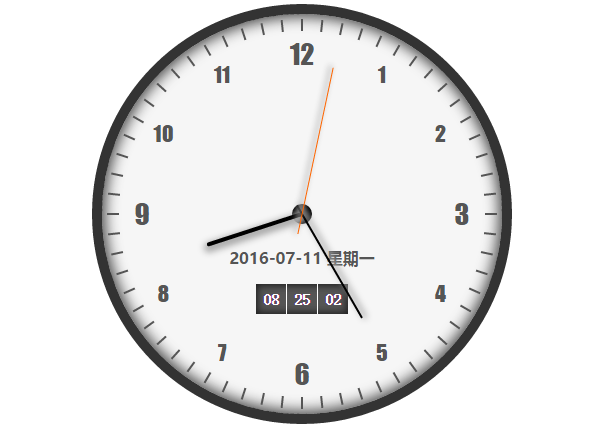
要实现这一功能,主要涉及HTML结构、JavaScript逻辑以及CSS样式三个部分。
HTML结构相对简单,主要定义一个名为clock的div容器,内部包含原点、时、分、秒指针以及日期和时间显示区域。至于钟表上的刻度和数字,由于数量较多,将通过JavaScript动态生成。
<!doctype html>
<html>
<head>
 <meta charset="UTF-8">
 <link rel='stylesheet' href='外部的css文件路径' />
 <title>时钟</title>
</head>
<body>
 <div class="clock" id="clock">
  <!-- 原点 -->
  <div class="origin"></div>

  <!-- 时分秒针 -->
  <div class="clock-line hour-line" id="hour-line"></div>
  <div class="clock-line minute-line" id="minute-line"></div>
  <div class="clock-line second-line" id="second-line"></div>

  <!-- 日期 -->
  <div class="date-info" id="date-info"></div>
  <!-- 时间 -->
  <div class="time-info" >
   <div class="time" id="hour-time"></div>
   <div class="time" id="minute-time"></div>
   <div class="time" id="second-time"></div>
  </div>
 </div>
<script type='text/javascript' src='外部的javascript文件路径'></script>
</body>
</html>
CSS样式关键属性解析
接下来是CSS样式的编写部分。
在编写代码前,需要掌握几个关键的CSS属性,例如定位(position)、边框圆角(border-radius)以及变换(transform)。
关于position属性。
position属性用于规定元素的定位类型,包含五个值:absolute、fixed、relative、static和inherit,默认值为static,即元素按正常文档流显示。本例主要使用absolute和relative。absolute值将元素设置为绝对定位,相对于除static定位外的第一个上级元素进行定位,位置由left、top、right、bottom属性决定;若上级元素均为static定位,则相对于body元素定位。本例中,最外层div clock设为relative,所有子元素设为absolute绝对定位,并通过设置left、top等属性确定其相对于clock的位置。
关于border-radius属性。
border-radius属性用于为元素添加圆角边框,可分别设置四个圆角的大小。本例利用该属性将clock元素设置为圆形。此处提供一个示例:四个宽高均为100px的div元素,在不同border-radius设置下的效果如下。
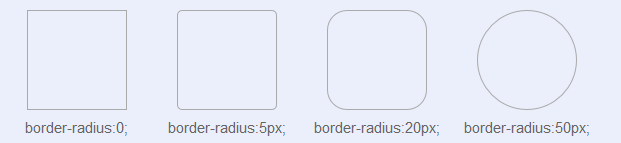
关于transform属性。transform属性用于对元素应用2D或3D旋转,支持旋转、缩放、移动或倾斜操作。本例中,时针、分针、秒针及刻度均通过transform属性设置旋转角度;此外,transform-origin属性可用于设置元素的基点位置。
以下是CSS部分的具体代码。
/* 全局 */
*{
 margin:0;
 padding:0;
}
.clock{
 width:400px;
 height:400px;
 border:10px solid #333;
 box-shadow: 0px 0px 20px 3px #444 inset;
 border-radius:210px;
 position:relative;
 margin:5px auto;
 z-index:10;
 background-color:#f6f6f6;
}
/* 时钟数字 */
.clock-num{
 width:40px;
 height:40px;
 font-size:22px;
 text-align:center;
 line-height:40px;
 position:absolute;
 z-index:8;
 color:#555;
 font-family:fantasy, 'Trebuchet MS';
}
.em_num{
 font-size:28px;
}
/* 指针 */
.clock-line{
 position:absolute;
 z-index:20;
}
.hour-line{width:100px;
 height:4px;
 top:198px;
 left:200px;
 background-color:#000;
 border-radius:2px;
 transform-origin:0 50%;
 box-shadow:1px -3px 8px 3px #aaa;
}
.minute-line{
 width:130px;
 height:2px;
 top:199px;
 left:190px;
 background-color:#000;
 transform-origin:7.692% 50%;
 box-shadow:1px -3px 8px 1px #aaa;
}
.second-line{
 width:170px;
 height:1px;
 top:199.5px;
 left:180px;
 background-color:#f60;
 transform-origin:11.765% 50%;
 box-shadow:1px -3px 7px 1px #bbb;
}
/* 原点 */
.origin{
 width:20px;
 height:20px;
 border-radius:10px;
 background-color:#000;
 position:absolute;
 top:190px;
 left:190px;
 z-index:14;
}

/* 日期 时间 */
.date-info{
 width:160px;
 height:28px;
 line-height:28px;
 text-align:center;
 position:absolute;
 top:230px;
 left:120px;
 z-index:11;
 color:#555;
 font-weight:bold;
 font-family:'微软雅黑';
}
.time-info{
 width:92px;
 height:30px;
 line-height:30px;
 text-align:center;
 position:absolute;
 top:270px;
 left:154px;
 z-index:11;
 background-color:#555;
 padding:0;
 box-shadow:0px 0px 9px 2px #222 inset;
}
.time{
 width:30px;
 height:30px;
 text-align:center;
 float:left;
 color:#fff;
 font-weight:bold;
}
#minute-time{
 border-left:1px solid #fff;
 border-right:1px solid #fff;
}

/* 刻度 */
.clock-scale{
 width:195px;
 height:2px;
 transform-origin:0% 50%;
 z-index:7;
 position:absolute;
 top:199px;
 left:200px;
}
.scale-show{
 width:12px;
 height:2px;
 background-color:#555;
 float:left;
}
.scale-hidden{
 width:183px;
 height:2px;
 float:left;
}
JavaScript逻辑实现
接下来是JavaScript部分的实现。
JavaScript部分主要涉及简单的DOM操作,通过setInterval函数每隔一秒执行一次,更新指针角度及时间显示。具体代码如下。
(function(){
  window.onload=initNumXY(200, 160, 40,40);
  var hour_line = document.getElementById("hour-line");
  var minute_line = document.getElementById("minute-line");
  var second_line = document.getElementById("second-line");
  var date_info = document.getElementById("date-info");
  var week_day = [
   '星期日', '星期一', '星期二', '星期三', '星期四', '星期五', '星期六'
  ];
  var hour_time = document.getElementById("hour-time");
  var minute_time = document.getElementById("minute-time");
  var second_time = document.getElementById("second-time");
  function setTime(){
   var this_day = new Date();
   var hour = (this_day.getHours() >= 12) ?
     (this_day.getHours() - 12) : this_day.getHours();
   var minute = this_day.getMinutes();
   var second = this_day.getSeconds();
   var hour_rotate = (hour*30-90) + (Math.floor(minute / 12) * 6);
   var year = this_day.getFullYear();
   var month = ((this_day.getMonth() + 1) < 10 ) ?
     "0"+(this_day.getMonth() + 1) : (this_day.getMonth() + 1);
   var date = (this_day.getDate() < 10 ) ?
     "0"+this_day.getDate() : this_day.getDate();
   var day = this_day.getDay();
   hour_line.style.transform = 'rotate(' + hour_rotate + 'deg)';
   minute_line.style.transform = 'rotate(' + (minute*6 - 90) + 'deg)';
   second_line.style.transform = 'rotate(' + (second*6 - 90)+'deg)';
   date_info.innerHTML =
    year + "-" + month + "-" + date + " " + week_day[day];
   hour_time.innerHTML = (this_day.getHours() < 10) ?
     "0" + this_day.getHours() : this_day.getHours();
   minute_time.innerHTML = (this_day.getMinutes() < 10) ?
     "0" + this_day.getMinutes() : this_day.getMinutes();
   second_time.innerHTML = (this_day.getSeconds() < 10) ?
     "0" + this_day.getSeconds():this_day.getSeconds();
  }
  setInterval(setTime, 1000);

  function initNumXY(R, r, w, h){
   var numXY = [
    {
     "left" : R + 0.5 * r - 0.5 * w,
     "top" : R - 0.5 * r * 1.73205 - 0.5 * h
    },
    {
     "left" : R + 0.5 * r * 1.73205 - 0.5 * w,
     "top" : R - 0.5 * r - 0.5 * h
    },
    {
     "left" : R + r - 0.5 * w,
     "top" : R - 0.5 * h
    },
    {
     "left" : R + 0.5 * r * 1.73205 - 0.5 * w,
     "top" : R + 0.5 * r - 0.5 * h
    },
    {
     "left" : R + 0.5 * r - 0.5 * w,
     "top" : R + 0.5 * r * 1.732 - 0.5 * h
    },
    {
     "left" : R - 0.5 * w,
     "top" : R + r - 0.5 * h
    },
    {
     "left" : R - 0.5 * r - 0.5 * w,
     "top" : R + 0.5 * r * 1.732 - 0.5 * h
    },
    {
     "left" : R - 0.5 * r * 1.73205 - 0.5 * w,
     "top" : R + 0.5 * r - 0.5 * h
    },
    {
     "left" : R - r - 0.5 * w,
     "top" : R - 0.5 * h
    },
    {
     "left" : R - 0.5 * r * 1.73205 - 0.5 * w,
     "top" : R - 0.5 * r - 0.5 * h
    },
    {
     "left" : R - 0.5 * r - 0.5 * w,
     "top": R - 0.5 * r * 1.73205 - 0.5 * h
    },
    {
     "left" : R - 0.5 * w,
     "top" : R - r - 0.5 * h
    }
   ];
   var clock = document.getElementById("clock");
   for(var i = 1; i <= 12; i++){
    if(i%3 == 0) {
     clock.innerHTML += "<div class='clock-num em_num'>"+i+"</div>";
    } else {
     clock.innerHTML += "<div class='clock-num'>" + i + "</div>";
    }
   }
   var clock_num = document.getElementsByClassName("clock-num");
   for(var i = 0; i < clock_num.length; i++) {
    clock_num[i].style.left = numXY[i].left + 'px';
    clock_num[i].style.top = numXY[i].top + 'px';
   }
   for(var i = 0; i < 60; i++) {
    clock.innerHTML += "<div class='clock-scale'> " +
          "<div class='scale-hidden'></div>" +
          "<div class='scale-show'></div>" +
         "</div>";
   }
   var scale = document.getElementsByClassName("clock-scale");
   for(var i = 0; i < scale.length; i++) {
    scale[i].style.transform="rotate(" + (i * 6 - 90) + "deg)";
   }
  }
})();
以上就是本文的全部内容,希望对大家的学习有所帮助,也希望大家多多支持本站。