

本文提供一款兼容IE6至Opera等浏览器的左侧竖排Tab滑动门JavaScript实现方案。通过简单修改横排代码即可适配竖排布局,包含完整HTML/CSS/JS源码及在线演示地址,适用于需要垂直导航选项卡的网页开发场景。
JS左侧竖排Tab滑动门特效介绍
本文详细介绍了一种使用JavaScript实现的左侧网页Tab滑动门特效代码,供开发者参考借鉴。
该特效为开口向左的竖排滑动门菜单,支持IE6、IE7、Firefox及Opera等主流浏览器。竖排与横排滑动门的底层代码逻辑基本一致,仅需少量调整即可实现,掌握一种布局后可轻松迁移至其他形式。
具体运行效果如下图所示:
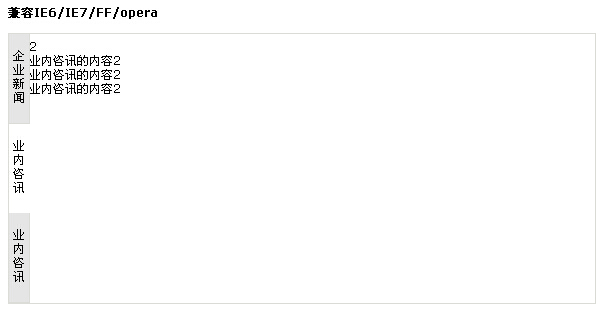
如需查看实际运行效果,可访问以下演示链接:
http://demo.jb51.net/js/2015/js-left-tab-cha-style-codes/
完整代码实现
完整实现代码如下:
<!DOCTYPE html PUBLIC "-//W3C//DTD XHTML 1.0 Transitional//EN"
"http://www.w3.org/TR/xhtml1/DTD/xhtml1-transitional.dtd">
<html xmlns="http://www.w3.org/1999/xhtml">
<head>
<meta http-equiv="Content-Type" content="text/html; charset=gb2312" />
<title>竖排的选项卡</title>
<meta name="keywords" content="" />
<style type="text/css">
body{font-size:12px;font-family:"Lucida Grande",Verdana,Lucida,Arial,Helvetica,宋体,sans-serif;}
a:link,a:visited,a:hover,a:active{text-decoration:none;color:#256bae;}
.warp{width:586px; height:269px !important; height:271px;border:1px solid #dbdcd7;}
.main{width:562px; height:269px !important;height:271px;padding:5px; margin-left:15px;overflow:hidden;float:left;}
.news{position:absolute;z-index:4;width:24px;}
.news ul{list-style:none;padding:0;margin:0;}
.news ul li{ height:84px !important;height:88px;width:20px;margin-bottom:0px;padding-top:5px;text-align:center;cursor:pointer;;vertical-align:middle; background-color:#e5e5e5; border-right:#dbdcd7 solid 1px;border-bottom:#dbdcd7 solid 1px;}
.news ul li.on{background-color:#ffffff; border:#FFFFFF 0px}
.news span{display:block; margin-top:9px !important; margin-top:20px;}
.dis{display:block;}
.undis{display:none;}
</style>
 <script type="text/javascript">
 function g(o){return document.getElementById(o);}
 function HoverLi(m,n,counter){for(var i=1;i<=counter;i++){g('tb_'+m+i).className='';g('tbc_'+m+i).className='undis';}g('tbc_'+m+n).className='dis';g('tb_'+m+n).className='on';}
 </script>
</head>
<body>
<strong>兼容IE6/IE7/FF/opera</strong><br><br>
<div class="warp">
 <div class="news">
  <ul>
   <li class="on" id="tb_11" onmouseover="HoverLi(1,1,3);"><span>企业新闻</span></li>
   <li class="" id="tb_12" onmouseover="HoverLi(1,2,3);"><span>业内咨讯</span></li>
  <li class="" id="tb_13" onmouseover="HoverLi(1,3,3);"><span>业内咨讯</span></li>
  </ul>
 </div>
<div class="dis" id="tbc_11">
  <div class="main">
  1<br>企业新闻的内容1<br>企业新闻的内容1<br>企业新闻的内容1
 </div>
 </div>
 <div class="undis" id="tbc_12">
  <div class="main">
  2<br>业内咨讯的内容2<br>业内咨讯的内容2<br>业内咨讯的内容2<br>
  </div>
 </div>
  <div class="undis" id="tbc_13">
  <div class="main">
  3<br>业内咨讯的内容3<br>业内咨讯的内容3<br>业内咨讯的内容3<br>
  </div>
 </div>
</div>
</body>
</html>
希望本文提供的代码示例能对读者的JavaScript编程工作提供有益帮助。