

本文介绍利用JavaScript实现点击单选按钮后动态改变文本域内容的技术。该方法通过脚本监听用户交互,自动填充或修改输入框内容,旨在减少用户手动输入工作量,提升表单操作的便捷性与用户体验,适用于类似Tab切换的场景。
JavaScript实现单选按钮动态修改文本域内容
本文通过具体实例,详细解析如何使用JavaScript实现点击单选按钮来动态改变输入框中文本域的内容。
该功能旨在通过JavaScript脚本简化用户操作,当用户点击不同的单选按钮时,自动更新文本框内的显示内容。这种机制类似于Tab选项卡的交互逻辑,能够有效减少用户的手动输入负担,提升操作的易用性,同时支持后续的表单提交,具有较高的实用价值。
具体运行效果如下图所示:
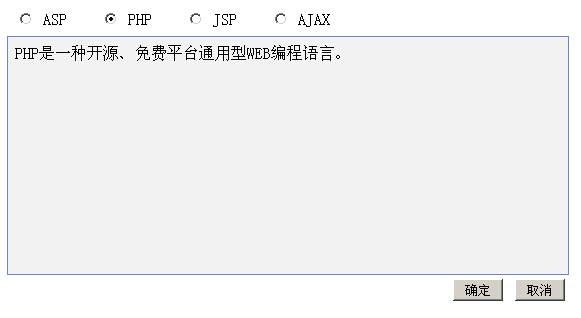
实现该功能的完整代码示例如下:
<html>
<head>
<title>JavaScript点击单选框改变输入框内容</title>
</head>
<body>
<script language=JavaScript>
var defaultValue = ""
function Changes() {
var defaultValue = "changed";
}
ie = document.all?1:0
ns4 = document.layers?1:0
var c = 1
function hideIt(id) {
if (ie) {
document.all[id].style.zIndex = c--;
document.all[id].style.visibility = "hidden";
document.all['hider'].style.visibility = "visible";
}
else if (ns4) {
document.layers[cat].layers[id].zIndex = c--;
document.layers[cat].layers[id].visibility = "hide";
document.layers[cat].layers['hider'].visibility = "show";
}
}
function showIt(id) {
if (ie) {
document.all[id].style.zIndex = c++;
document.all[id].style.visibility = "visible";
}
else if (ns4) {
document.layers[cat].layers[id].zIndex = c++;
document.layers[cat].layers[id].visibility = "show";
}
else {
document.getElementById(id).style.zIndex = c++;
document.getElementById(id).style.visibility = "visible";
}
}
function imgLbl(tab) {
premier = frmWc.elements[tab - 1];
if (premier.checked == 1) {
premier.checked = 0;
} else {
premier.checked = 1;
}
}
</script>
<FORM name=protectForm action="" method=post >
  <TABLE width=560>
  <TR>
 <TD>
  <TABLE cellPadding=2>
  <TR align=left>
  <TD vAlign=top align=left>
  <INPUT
  onclick="showIt( 'off');return true" type=radio value=0
  name=Level checked>
  ASP</TD>
  <TD align=left width=20> </TD>
  <TD vAlign=top align=left><INPUT
  onclick="showIt( 'low');return true" type=radio
  value=25 name=Level>
  PHP</TD>
  <TD align=left width=20> </TD>
  <TD vAlign=top align=left>
  <INPUT
  onclick="showIt( 'high');return true" type=radio value=75 name=Level>
  JSP</TD>
  <TD align=left width=20> </TD>
  <TD vAlign=top align=left><INPUT
  onclick="showIt( 'excl');return true" type=radio
  value=100 name=Level>
  AJAX</TD>
  </TR></TABLE></TD></TR></TABLE>
  <table cellspacing=1 cellpadding=0 width=562 border="0" bgcolor="7285CF" height="240">
  <tr>
  <td colspan=3 height="145" valign="top" bgcolor="F2F2F2">
  <div id=off style="WIDTH: 560px;POSITION: absolute; HEIGHT: 230; z-index: 1; background-color: F2F2F2; layer-background-color: F2F2F2; border: 1px none #000000">
  <table cellspacing=5 cellpadding=2 width="560" border="0">
  <tr>
  <td width="560">ASP是一种微软发明的WEB动态编程语言。</td>
  </tr>
 </table>
 </div>
  <div id=low
  style="WIDTH: 560px;POSITION: absolute; HEIGHT: 230; z-index: 2; visibility: hidden; background-color: F2F2F2; layer-background-color: F2F2F2; border: 1px none #000000">
  <table cellspacing=5 cellpadding=2 width="560">
  <tr >
  <td width="1237">PHP是一种开源、免费平台通用型WEB编程语言。</td>
  </tr>
 </table>
 </div>
  <div id=high
  style="WIDTH: 560px;POSITION: absolute; HEIGHT: 230; z-index: 1; visibility: hidden; background-color: F2F2F2; layer-background-color: F2F2F2; border: 1px none #000000">
  <table cellspacing=5 cellpadding=2 width="560">
  <tr>JSP是SUN公司制造的基于JAVA的WEB编程容器,也是一种WEB编程语言。</td>
  </tr>
 </table>
 </div>
  <div id=excl
  style="WIDTH: 560px;POSITION: absolute; HEIGHT: 230; z-index: 1; visibility: hidden; background-color: F2F2F2; layer-background-color: F2F2F2; border: 1px none #000000">
  <table cellspacing=5 cellpadding=2 width="560">
  <tr>
  <td width="953">AJAX是一种WEB交互型框架语言,可以很好的提升用户体验。</td>
  </tr>
 </table>
 </div>
 </td>
 </tr>
 </table>
 <TABLE cellSpacing=0 cellPadding=0 width=560>
  <TR>
  <TD align=right height="30">
  <INPUT class=bottom type=submit value=" 确定 ">
  <INPUT class=bottom type=button value=" 取消 " name="Button">
 </TD></TR></TABLE>
 </FORM>
</body>
</html>
希望上述内容能为读者的JavaScript编程实践提供有益的参考与帮助。