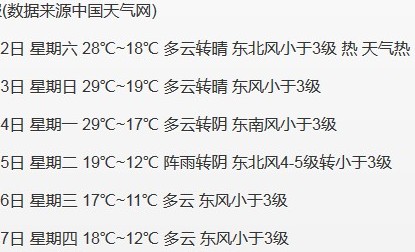
本文介绍如何在前端纯JavaScript环境中,通过jQuery的getJSON方法调用Yahoo YQL服务,进而请求中国天气网提供的免费JSON格式气象数据。示例展示了从杭州城市代码获取数据,解析JSON并动态渲染未来多日天气信息(温度、风力、日期等)的完整过程,无需后端支持。
前端纯JavaScript获取天气数据方案
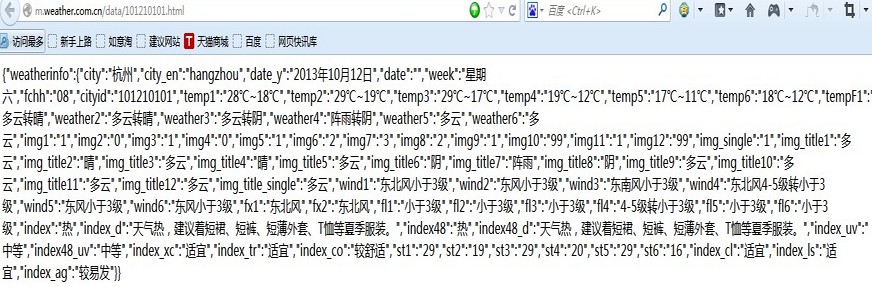
该方案完全无需后端开发语言(如.NET或Java)的支持。当前最具权威性的天气数据来源是中国天气网(http://www.weather.com.cn/),因其提供官方气象数据。除商业增值服务外,该网站还提供免费的JSON格式气象数据接口。以查询杭州天气为例,访问地址 http://m.weather.com.cn/data/101210101.html 即可获取数据,返回的JSON结构如所示。
YQL(Yahoo Query Language)服务支持对多种网络数据源进行查询、过滤和合并操作,其语法类似于SQL,具体使用地址为 http://developer.yahoo.com/yql/console/ 。执行查询时,YQL会访问网络数据源并传输数据,最终返回XML或JSON格式的结果。YQL支持的数据源类型广泛,包括Yahoo! Web Services、其他网络服务以及HTML、XML、RSS和Atom等网络数据类型。
jQuery与YQL结合实现代码
结合上述两项技术,可以开发天气预报功能。具体的JavaScript实现代码如下:
代码实现如下:
function getWeather() {
$.getJSON("http://query.yahooapis.com/v1/public/yql", {
q: "select * from json where url=\"http://m.weather.com.cn/data/101210101.html\"",
format: "json"
}, function (data) {
if (data.query.results) {
//$("#content").text(JSON.stringify(data.query.results));
var J_data = JSON.parse(JSON.stringify(data.query.results));
//alert(J_data.weatherinfo.city);
$("#content").append("<p>"+J_data.weatherinfo.city+"天气预报(数据来源中国天气网)"+"</p>");
$("#content").append("<p>"+J_data.weatherinfo.date_y+" "+J_data.weatherinfo.week+" "+J_data.weatherinfo.temp1+" "+J_data.weatherinfo.weather1+" "+J_data.weatherinfo.wind1+" "+J_data.weatherinfo.index+" "+J_data.weatherinfo.index_d+"</p>");
var t= J_data.weatherinfo.date_y;
t=t.replace("年","/");
t=t.replace("月","/");
t=t.replace("日","");
var tdy = new Date(t);
var t2 = new Date();
t2.setDate(tdy.getDate()+1);
$("#content").append("<p>"+ t2.Format("yyyy年MM月dd日")+" "+getweekdays(t2)+" "+J_data.weatherinfo.temp2+" "+J_data.weatherinfo.weather2+" "+J_data.weatherinfo.wind2+"</p>");
var t3 = new Date();
t3.setDate(tdy.getDate()+2);
$("#content").append("<p>"+t3.Format("yyyy年MM月dd日")+" "+getweekdays(t3)+" "+J_data.weatherinfo.temp3+" "+J_data.weatherinfo.weather3+" "+J_data.weatherinfo.wind3+"</p>");
var t4 = new Date();
t4.setDate(tdy.getDate()+3);
$("#content").append("<p>"+t4.Format("yyyy年MM月dd日")+" "+getweekdays(t4)+" "+J_data.weatherinfo.temp4+" "+J_data.weatherinfo.weather4+" "+J_data.weatherinfo.wind4+"</p>");
var t5 = new Date();
t5.setDate(tdy.getDate()+4);
$("#content").append("<p>"+t5.Format("yyyy年MM月dd日")+" "+getweekdays(t5)+" "+J_data.weatherinfo.temp5+" "+J_data.weatherinfo.weather5+" "+J_data.weatherinfo.wind5+"</p>");
var t6 = new Date();
t6.setDate(tdy.getDate()+5);
$("#content").append("<p>"+t6.Format("yyyy年MM月dd日")+" "+getweekdays(t6)+" "+J_data.weatherinfo.temp6+" "+J_data.weatherinfo.weather6+" "+J_data.weatherinfo.wind6+"</p>");
//alert(getweekdays(t2));
} else {
$("#content").text('no such code: ' + code);
}
});
//$.getJSON("http://m.weather.com.cn/data/101210101.html", null, function(json) { alert(json); });
}
function getweekdays(datey)
{
if(datey.getDay()==0)
{
return "星期日";
}
else if(datey.getDay()==1)
{
return "星期一";
}
else if(datey.getDay()==2)
{
return "星期二";
}
else if(datey.getDay()==3)
{
return "星期三";
}
else if(datey.getDay()==4)
{
return "星期四";
}
else if(datey.getDay()==5)
{
return "星期五";
}
else if(datey.getDay()==6)
{
return "星期六";
}
}最终实现的效果,如下图: