

本文详细解析JavaScript中setTimeout与setInterval的区别及适用场景,重点探讨在React项目中,页面路由切换时因异步接口请求导致的定时器无法清除问题。通过对比不同实现方式,提供基于全局路由监听与状态判断的解决方案,有效避免资源浪费及潜在的系统崩溃风险。
一、定时器的区别:
1、定时器分类:
JavaScript中主要包含两种定时器:setTimeout()和setInterval()。两者的核心区别在于执行机制:setTimeout()仅执行一次,而setInterval()则按指定周期循环执行。
(1)setTimeout()
该定时器仅执行一次,在指定的毫秒数到达后,定时器会自动停止,不再重复触发。
(2)setInterval()
无论前一次执行是否完成或是否发生错误,只要到达指定的毫秒间隔,定时器就会立即再次触发执行。
(3)举例:
例如,若需调用接口并每1秒刷新一次,但接口响应耗时2秒。此时若使用setInterval(),会在上一次请求尚未返回时再次发起新请求,导致交互体验差且影响性能。因此,在涉及接口定时调用的开发场景中,建议优先使用setTimeout()配合clearTimeout()。需注意三点:a. 避免将setTimeout写成死循环;b. 务必注意定时器的清除逻辑;c. 重点处理页面切换时的定时器清除问题,这也是下文要讨论的核心内容。
2、setInterval()的使用场景:
(1)适用于动画效果,例如闪烁特效等视觉表现。
(2)适用于不涉及异步操作或接口调用的其他场景(此为个人经验总结,可能存在局限)。
(3)若需停止执行,可调用clearInterval()或直接关闭窗口。
3、setTimeout()的使用场景
(1)仅执行一次的定时器场景(此类情况较少见,此处不再举例)。
(2)需要定时查询接口的场景,此类情况较为常见。例如天气查询功能,通常设置为每10秒刷新一次,在开发中应用广泛。
4、定时器遇到的问题(以下是我在做项目中遇到的问题及自己的一点想法)
(1)使用setTimeout实现定时查询,通常用于在方法中调用后台接口,待接口请求完成后,再执行下一次调用;而setInterval一般用于不涉及后台接口的场景。
(2)若使用setInterval调用后端接口,可能存在问题。例如设定2秒刷新,但接口响应需3秒。在等待本次结果期间,定时器再次触发查询,可能导致数据混乱。
(3)使用setTimeout时需注意:避免写成死循环;务必记得使用clearTimeout方法清除定时器。
(4)在使用React框架时,常遇到路由切换场景,有时会出现定时器无法被正确清除的情况。
例如在A页面使用了setTimeout但未清除定时器,当访问B页面时,A页面的定时器仍会执行,接口请求也会继续。因此,需在A页面切换到B页面时触发组件卸载方法(componentWillUnmount),并在其中调用清除定时器的方法(clearTimeout)。
然而,有时清除操作可能失败。例如,在组件卸载(componentWillUnmount)执行的同时,恰好代码也执行到定时器触发的接口调用中,此时接口仍在请求。当接口成功并尝试执行下一次定时器时,componentWillUnmount已清除了之前的定时器引用。由于该次调用中又再次使用了定时器,导致新的定时器无法被清除,从而引发问题(此问题在开发中较为常见)。
(5)上述问题的React示例代码及运行截图
测试页面1的代码:
import React, { Component } from 'react';
import { getRealtimeValueByCodeList } from '../../SVGManagementNew/services/index'; // 引用的查询实时值的接口

export default class TestPage1 extends Component {
    constructor(props) {
        super(props);

        this.state = {
            refreshTime: 500 // 500毫秒
        };

        this.timeout = null;
    }

    componentDidMount() {
        this.getRealValueFn();
    }

    componentWillUnmount() {
        clearTimeout(this.timeout);
    }

    // 获取实时值
    getRealValueFn = () => {
        getRealtimeValueByCodeList('CF159FCALT2DPU2A')
            .then((res) => {
                console.log(res);

                this.timeout = setTimeout(() => {
                    console.log('page1定时查询');

                    this.getRealValueFn();
                }, this.state.refreshTime);
            })
            .catch((e) => {
                console.log(e);
            });
    };

    render() {
        return <div>TestPage1</div>;
    }
}
测试页面2的代码:
import React, { Component } from ‘react’; import { getRealtimeValueByCodeList } from ‘…/…/SVGManagementNew/services/index’; // 引用的查询实时值的接口
export default class TestPage2 extends Component {
    constructor(props) {
        super(props);

        this.state = {
            refreshTime: 500 // 500毫秒
        };

        this.timeout = null;
    }

    componentDidMount() {
        this.getRealValueFn();
    }

    componentWillUnmount() {
        clearTimeout(this.timeout);
    }

    // 获取实时值
    getRealValueFn = () => {
        getRealtimeValueByCodeList('CF159FDRJ4_IDCS00116_R2')
            .then((res) => {
                console.log(res);

                this.timeout = setTimeout(() => {
                    console.log('page2定时查询');

                    this.getRealValueFn();
                }, this.state.refreshTime);
            })
            .catch((e) => {
                console.log(e);
            });
    };

    render() {
        return <div>TestPage1</div>;
    }
}
测试页面3的代码
import React, { useState, useRef, useEffect } from ‘react’; import PropTypes from ‘prop-types’; import { getRealtimeValueByCodeList } from ‘…/…/SVGManagementNew/services/index’; // 引用的查询实时值的接口
function TestPage3(props) {
    const [refreshTime, setRefreshTime] = useState(500);
    const timeout = useRef();

    const getRealValueFn = () => {
        getRealtimeValueByCodeList('CF159FDDM1_TEST_CTM')
            .then((res) => {
                console.log(res);
                timeout.current = setTimeout(() => {
                    console.log('page3定时查询');
                    getRealValueFn();
                }, refreshTime);
            })
            .catch((e) => {
                console.log(e);
            });
    };

    useEffect(() => {
        getRealValueFn();

        return () => {
            clearTimeout(timeout.current);
        };
    }, []);

    return <div>TestPage3</div>;
}

TestPage3.propTypes = {};

export default TestPage3;
配置三个路由并来回切换这三个页面,就会出现定时器清除不掉的情况,三个页面的定时器就会一直在刷新,这样就会造成资源上的浪费及占用内容,要是页面很多、定时刷新的接口很多、接口很耗费资源的话,那么这种情况就会影响整个程序的运行,有可能还会引起系统崩溃
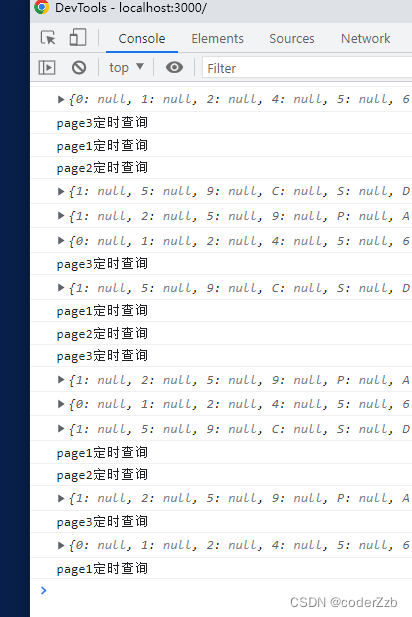
上图就是我在来回切换三个测试页面的时候,出现上述说的问题,可以自己把上述的代码试验下
5、解决上述遇到的第四个问题,即使用setTimeout页面切换时定时器无法清除的问题
a. 解决思路:
(1)从问题的根本出发,问题的根本就是在页面切换的时候,因为定时器缓存的问题,在切换到其他的页面后,无法清除,还会继续在缓存中继续执行;
(2)那么从这个思路上去想,在从A页面(有定时器)跳转到B页面的时候,A页面的定时器没有清除掉,那么是否是可以在A页面的定时器方法那定义个变量,然后在全局定义个变量,然后通过这两个变量来判断是否不执行定时器呢;
(3)根据这个思路去想,那么是否可以根据路由去判断,比如在访问到A页面的时候,在A页面的代码中记录下A页面的路由到一个参数中(该参数在定时器执行的时候,是一块保存到缓存中的,在切换路由的时候,并不会清除,这个是一个存在缓存中的变量),然后在路由切换的时候,监听路由的变化,记录最新访问的路由,保存到window对象中(因为window是全局的,在任何地方都可以使用);
(4)那么这两个变量都有了,然后根据这两个变量判断,如果相等的话,那说明正好是这个页面,可以执行定时器,如果不相等,那么当前访问的页面不是这个页面,那么定时器就不执行了
b. 实现步骤:
(1)在外部定义一个监控方法,可以在main.js中 也可以在index.js中,也可以在路由切换中的文件,把下面的代码加入进去,注意的是location的获取,有的js文件中可能获取不到
	window.onhashchange = () => {
        console.log('监听路由变化');
        // 获取当前变化的路由
        window.curPathName = this.props.location.pathname;
    };
下图是我自己添加的位置:
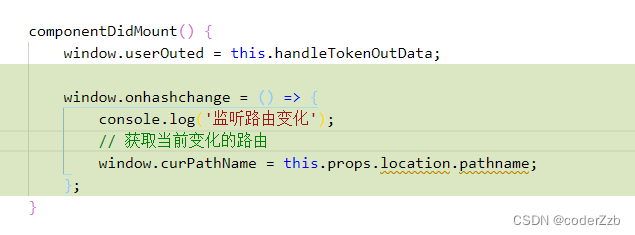
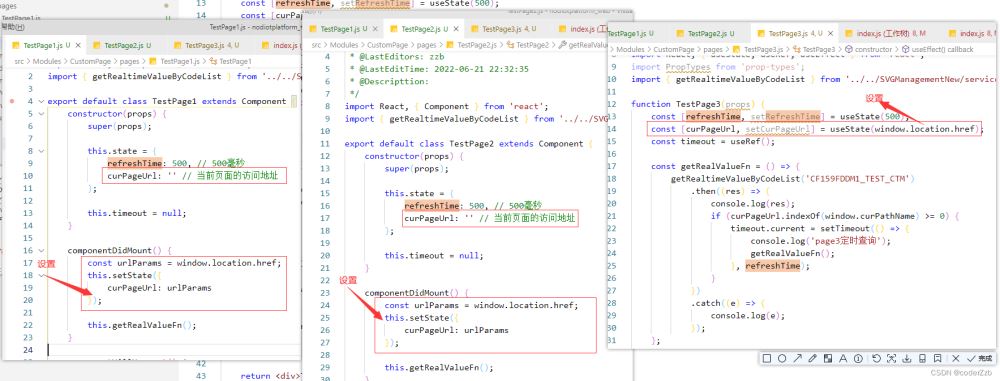
(2)在使用定时器的文件中,设置每个文件使用时访问的路由地址
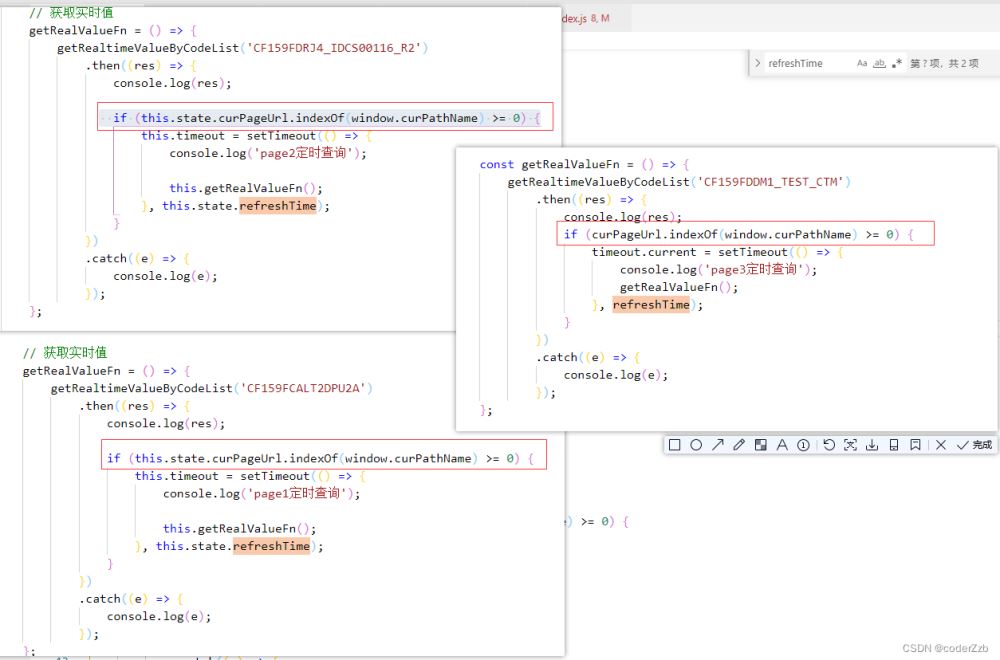
(3)判断是否加载定时器
c.完整的示例代码,可以正常清除定时器的
测试页面1的代码:
import React, { Component } from 'react';
import { getRealtimeValueByCodeList } from '../../SVGManagementNew/services/index'; // 引用的查询实时值的接口

export default class TestPage1 extends Component {
    constructor(props) {
        super(props);

        this.state = {
            refreshTime: 500, // 500毫秒
            curPageUrl: '' // 当前页面的访问地址
        };

        this.timeout = null;
    }

    componentDidMount() {
        const urlParams = window.location.href;
        this.setState({
            curPageUrl: urlParams
        });

        this.getRealValueFn();
    }

    componentWillUnmount() {
        clearTimeout(this.timeout);
    }

    // 获取实时值
    getRealValueFn = () => {
        getRealtimeValueByCodeList('CF159FCALT2DPU2A')
            .then((res) => {
                console.log(res);
                if (this.state.curPageUrl.indexOf(window.curPathName) >= 0 || !window.curPathName) {
                    this.timeout = setTimeout(() => {
                        console.log('page1定时查询');

                        this.getRealValueFn();
                    }, this.state.refreshTime);
                }
            })
            .catch((e) => {
                console.log(e);
            });
    };

    render() {
        return <div>TestPage1</div>;
    }
}
测试页面2的代码:
import React, { Component } from 'react';
import { getRealtimeValueByCodeList } from '../../SVGManagementNew/services/index'; // 引用的查询实时值的接口

export default class TestPage2 extends Component {
    constructor(props) {
        super(props);

        this.state = {
            refreshTime: 500, // 500毫秒
            curPageUrl: '' // 当前页面的访问地址
        };

        this.timeout = null;
    }

    componentDidMount() {
        const urlParams = window.location.href;
        this.setState({
            curPageUrl: urlParams
        });

        this.getRealValueFn();
    }

    componentWillUnmount() {
        clearTimeout(this.timeout);
    }

    // 获取实时值
    getRealValueFn = () => {
        getRealtimeValueByCodeList('CF159FDRJ4_IDCS00116_R2')
            .then((res) => {
                console.log(res);
                if (this.state.curPageUrl.indexOf(window.curPathName) >= 0 || !window.curPathName) {
                    this.timeout = setTimeout(() => {
                        console.log('page2定时查询');

                        this.getRealValueFn();
                    }, this.state.refreshTime);
                }
            })
            .catch((e) => {
                console.log(e);
            });
    };

    render() {
        return <div>TestPage1</div>;
    }
}
测试页面3的代码:
import React, { useState, useRef, useEffect } from 'react';
import PropTypes from 'prop-types';
import { getRealtimeValueByCodeList } from '../../SVGManagementNew/services/index'; // 引用的查询实时值的接口

function TestPage3(props) {
    const [refreshTime, setRefreshTime] = useState(500);
    const [curPageUrl, setCurPageUrl] = useState(window.location.href);
    const timeout = useRef();

    const getRealValueFn = () => {
        getRealtimeValueByCodeList('CF159FDDM1_TEST_CTM')
            .then((res) => {
                console.log(res);
                if (this.state.curPageUrl.indexOf(window.curPathName) >= 0 || !window.curPathName) {
                    timeout.current = setTimeout(() => {
                        console.log('page3定时查询');
                        getRealValueFn();
                    }, refreshTime);
                }
            })
            .catch((e) => {
                console.log(e);
            });
    };

    useEffect(() => {
        console.log(curPageUrl);

        getRealValueFn();

        return () => {
            clearTimeout(timeout.current);
        };
    }, []);

    return <div>TestPage3</div>;
}

TestPage3.propTypes = {};

export default TestPage3;
总结:
到此这篇关于JS中定时器的使用及页面切换时定时器无法清除问题的解决办法的文章就介绍到这了,更多相关JS定时器无法清除解决内容请搜索本站以前的文章或继续浏览下面的相关文章希望大家以后多多支持本站!