

本文详细解析JavaScript中call、apply和bind三个函数的核心用法与区别。通过流程图与代码示例,深入讲解如何手动模拟实现这三个方法,重点阐述它们对this指向的影响、参数传递方式以及返回值的差异,帮助开发者彻底掌握函数绑定的底层原理。
前言
在JavaScript中,通常会借助call / apply / bind方法来调整this的指向,具体细节可参考一文带你了解this指向,本文旨在探讨这三个方法的实现原理。
1. call
call()函数是什么?
call() 方法利用一个指定的 this 值和单独列出的一个或多个参数来调用函数。换言之,call() 在改变this指向的同时执行了函数。
1.1 语法
func.call(thisArg, arg1, arg2, ...)
// thisArg为在 func 函数运行时使用的 this 值
// arg1, arg2等为指定的参数列表
// 其返回值为调用有指定 this 值和参数的函数的结果
1.2 流程图
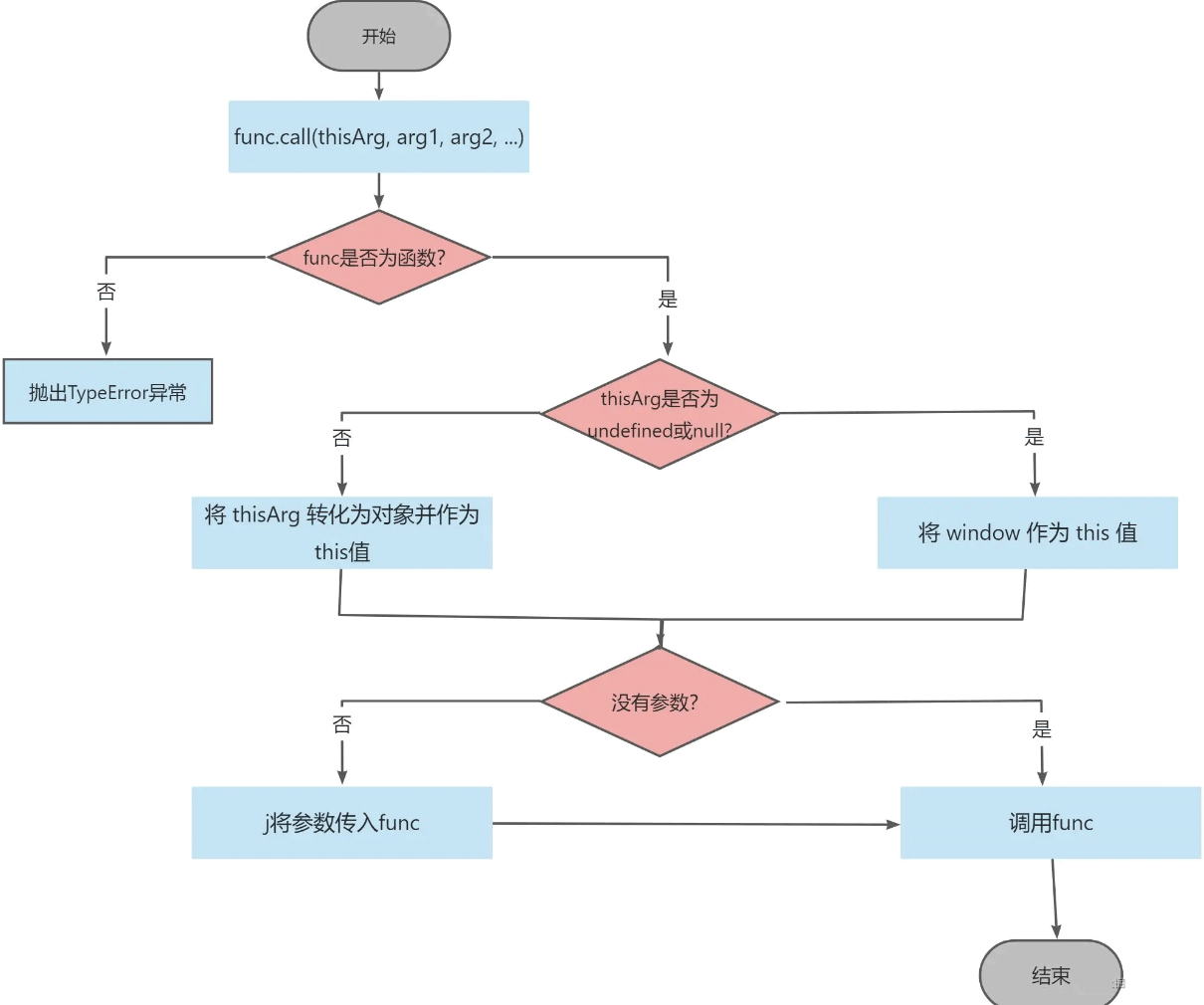
通常,模拟实现call可遵循以下步骤:
- 将函数设为对象的属性,若对象为null或undefined,则设为window对象
- 提取函数执行所需的参数,并执行该函数
- 若函数有返回值,在返回后删除该函数
以下是call()方法的实现流程图:
1.3 代码实现
Function.prototype.call = function (thisArg, ...argsArray) {
  if (typeof this !== "function") {
    throw new TypeError(
      "Function.prototype.call was called on which is not a function"
    );
  }

  if (thisArg === undefined || thisArg === null) {
    thisArg = window;
  } else {
    thisArg = Object(thisArg);
  }

  // 将 func 放入 thisArg 内,这样在调用 thisArg[func] 时 this 自然就指向了 thisArg
  const func = Symbol("func");
  thisArg[func] = this;

  let result;

  if (argsArray.length) {
    result = thisArg[func](...argsArray);
  } else {
    result = thisArg[func]();
  }

  delete thisArg[func];

  return result;
};
2. apply
apply()函数是什么?
apply() 方法调用一个具有给定 this 值的函数,并提供以数组(或类数组对象)形式存在的参数。与call()功能相同,即在改变this指向的同时执行函数。
2.1 语法
func.apply(thisArg, [argsArray]);
// thisArg为在 func 函数运行时使用的 this 值
// arg1, arg2等为指定的参数列表
// 其返回值为调用有指定 this 值和参数的函数的结果
2.2 流程图
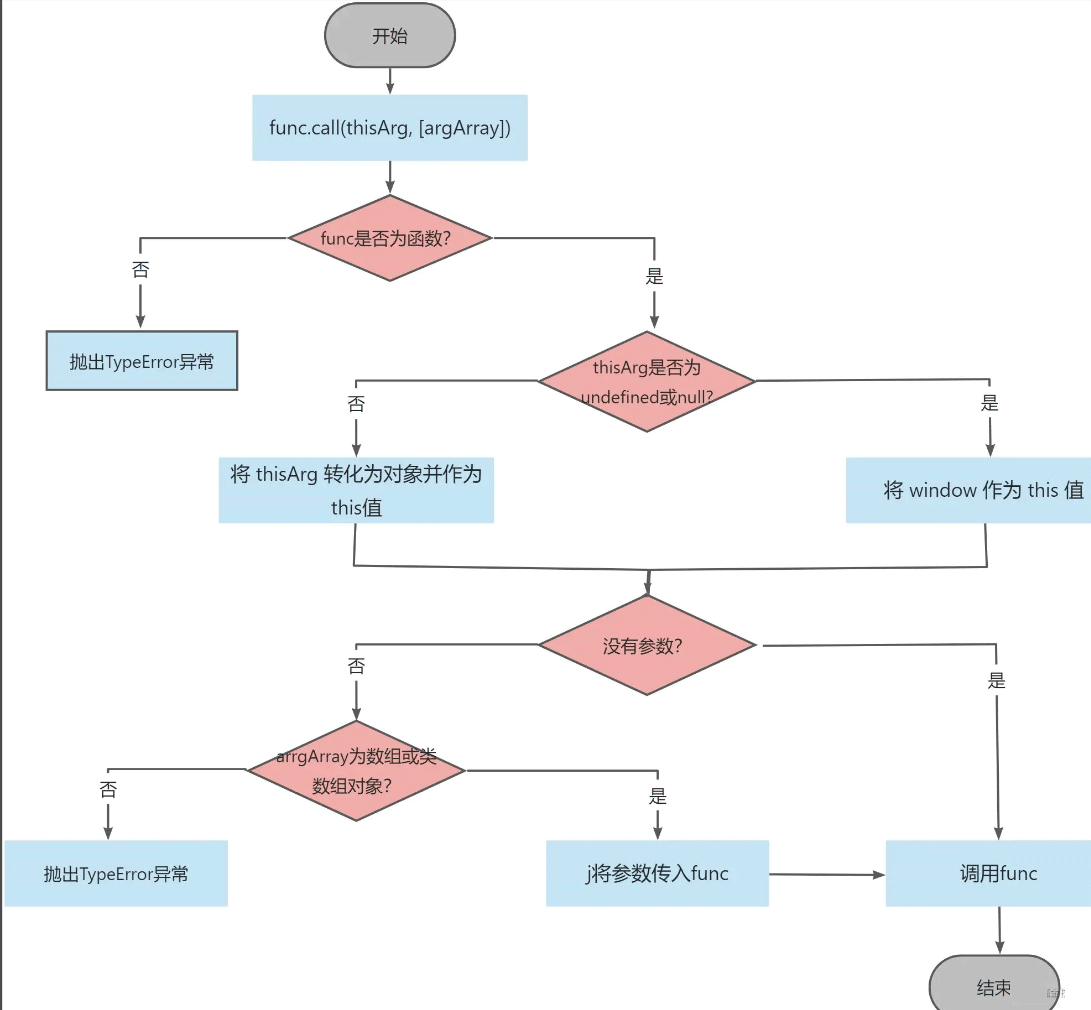
apply()方法的实现流程与call大致相同,仅需对函数参数数组进行判断和展开处理。
以下是apply()函数的流程图:
2.3 代码实现
Function.prototype.apply = function (thisArg, argsArray) {
  if (typeof this !== "function") {
    throw new TypeError(
      "Function.prototype.apply was called on which is not a function"
    );
  }

  if (thisArg === undefined || thisArg === null) {
    thisArg = window;
  } else {
    thisArg = Object(thisArg);
  }

  // 将 func 放入 thisArg 内,这样在调用 thisArg[func] 时 this 自然就指向了 thisArg
  const func = Symbol("func");
  thisArg[func] = this;

  let result;

  if (argsArray && typeof argsArray === "object" && "length" in argsArray) {
    // 此处使用 Array.from 包裹让其支持形如 { length: 1, 0: 1 } 这样的类数组对象,直接对 argsArray 展开将会执行出错
    result = thisArg[func](...Array.from(argsArray));
  } else if (argsArray === undefined || argsArray === null) {
    result = thisArg[func]();
  } else {
    throw new TypeError("CreateListFromArrayLike called on non-object");
  }
  delete thisArg[func];
  return result;
};
3. bind
💡bind() 函数是什么?
bind() 方法创建一个新的函数,当 bind() 被调用时,该新函数的 this 被指定为 bind() 的第一个参数,其余参数则作为新函数的参数供调用时使用。
3.1 语法
func.bind(thisArg[, arg1[, arg2[, ...]]])
// thisArg 为调用绑定函数时作为 this 参数传递给目标函数的值, 如果使用 new 运算符构造绑定函数,忽略该值
// arg1, arg2为当目标函数被调用时,被预置入绑定函数的参数列表中的参数。
// 其返回值为一个原函数的拷贝,并拥有指定的 this 值和初始参数
3.2 流程图
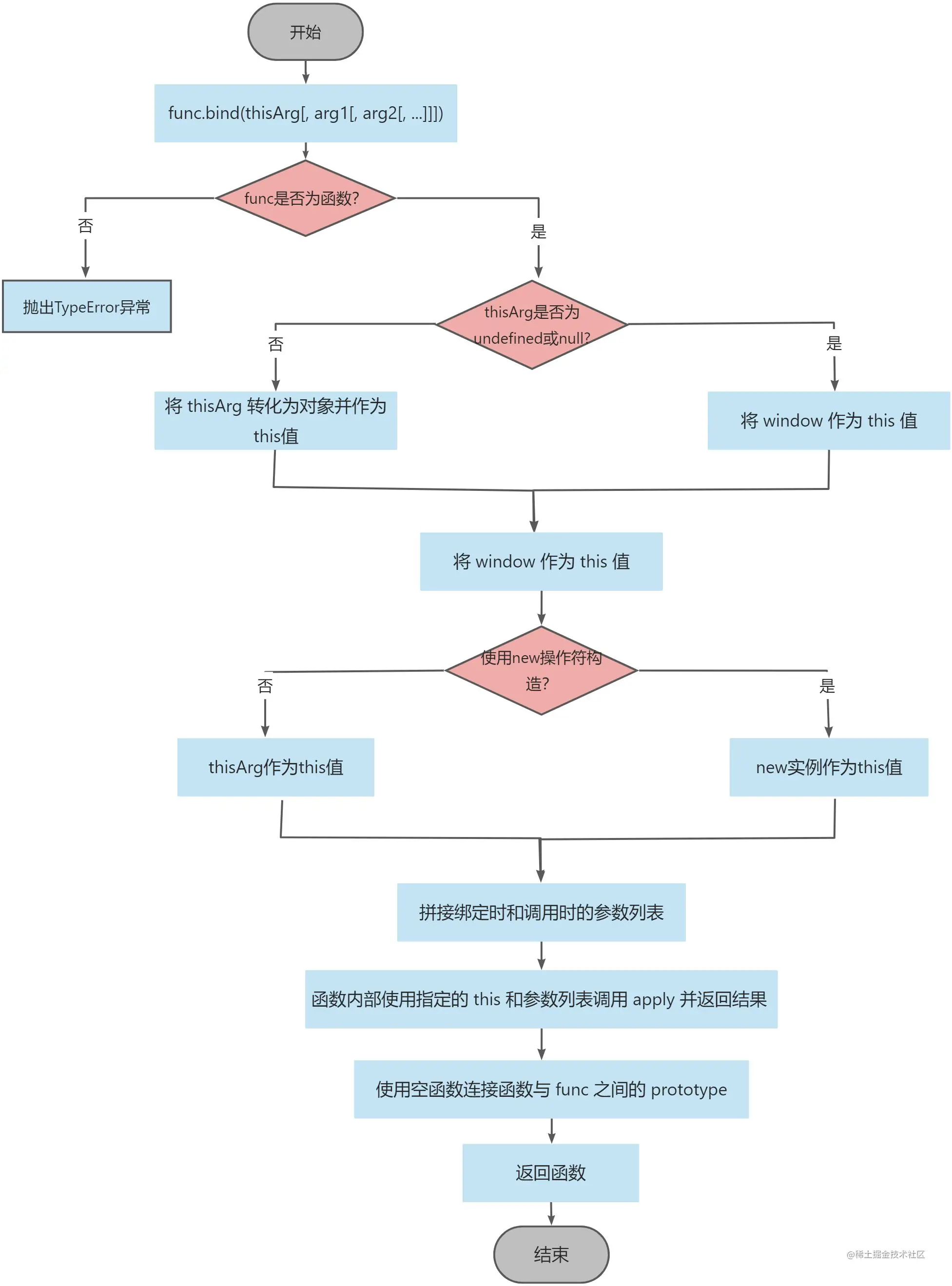
实现bind函数需具备两个特点:一是返回一个函数;二是支持传入参数。
因此,我们可以从以下几个方面入手:
- 利用`call`或`apply`实现 `this`的指定;
- 实现在`bind`时传参,并在执行返回函数时传参;
- 判断是否使用 `new`操作符以确定`this`指向。
接下来展示bind函数的流程图:
3.3 代码实现
Function.prototype.bind = function (thisArg, ...argsArray) {
  if (typeof this !== "function") {
    throw new TypeError(
      "Function.prototype.bind was called on which is not a function"
    );
  }
  if (thisArg === undefined || thisArg === null) {
    thisArg = window;
  } else {
    thisArg = Object(thisArg);
  }
  const func = this;
  const bound = function (...boundArgsArray) {
    let isNew = false;

    // 如果 func 不是构造器,直接使用 instanceof 将出错,所以需要用 try...catch 包裹
    try {
      isNew = this instanceof func;
    } catch (error) {}

    return func.apply(isNew ? this : thisArg, argsArray.concat(boundArgsArray));
  };

  const Empty = function () {};
  Empty.prototype = this.prototype;
  bound.prototype = new Empty();

  return bound;
};
4.全文总结
call、apply与bind有什么区别?
- calll、apply 与 bind 均用于
this绑定,但 call、apply 函数在改变this指向的同时会执行函数;而 bind 函数在改变this后返回一个全新的绑定函数。 - bind 属于硬绑定,返回的绑定函数的this指向无法再通过 bind、apply 或 call 修改,即
this被永久绑定;call 与 apply 仅适用于当前调用,一次调用后即结束。 - call 和 apply 功能完全相同,但call 从第二个参数后的所有参数均为原函数的参数;而 apply 仅接受两个参数,第二个参数必须是数组,该数组包含原函数的参数列表。
至此,关于一文了解JavaScript中call/apply/bind的使用的文章介绍完毕,更多相关JavaScript call,apply,bind内容请搜索本站以前的文章或继续浏览下面的相关文章,希望大家以后多多支持本站!