

本文展示了一个使用JavaScript和CSS构建的基础计算器项目。文章详细解析了从界面布局到核心运算逻辑的实现过程,包括HTML结构、CSS样式控制及JS事件处理。同时指出了基于JS内核的浮点数计算精度局限,适合前端初学者参考学习。
项目概述与功能范围
本文通过具体代码实例,展示了如何利用JavaScript和CSS技术实现一个计算器的基本功能,供读者参考学习。
当前版本仅实现了基础的算术运算功能。
由于底层依赖JavaScript的运算内核,部分涉及小数点的计算结果可能存在精度误差,本文暂未进行针对小数位数的特殊处理。
界面视图与实现思路
一、最终呈现的视图效果
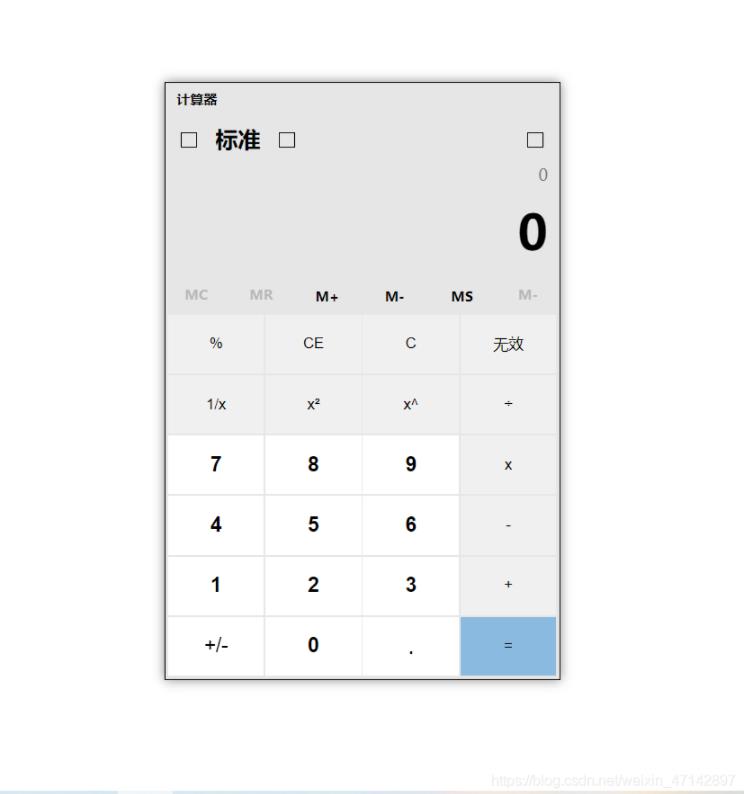
二、设计思路
代码篇幅较长,难以避免。该项目最初为随意尝试之作,缺乏预先的整体构思,导致后期代码结构逐渐变得冗杂。因不愿推倒重来,最终保留了现有实现。
核心代码逻辑分析
三、代码逻辑解析
<style>
        * {
            margin: 0;
            padding: 0;
        }

        .content {
            width: 350px;
            height: 530px;
            position: relative;
            background-color: #E6E6E6;
            border: 1px solid #000;
            margin: 100px auto;
            /* overflow: hidden; */
            box-shadow: 0px 0px 10px #888888;
        }
        .header {
            height: 30px;
            line-height: 30px;
            padding-left: 10px;
        }
        .header span {
            float: left;
            font-weight: 600;
            font-size: 12px
        }
        .tabNav {
            height: 28px;
            line-height: 28px;
            font-size: 12px;
            padding: 0 10px;
            background-color: #fff;
            border-radius: 6px;
            position: absolute;
            left: 53px;
            top: 2px;
            box-shadow: 0px 0px 10px #888888;
            display: none;
        }
        .tabNav2 {
            height: 28px;
            line-height: 28px;
            font-size: 12px;
            padding: 0 10px;
            background-color: #fff;
            border-radius: 6px;
            position: absolute;
            left: -50px;
            top: -30px;
            box-shadow: 0px 0px 10px #888888;
            display: none;
        }
        .pattern {
            display: flex;
            flex-wrap: nowrap;
            justify-content: space-between;
        }
        .pLeft {
            display: flex;
        }
        .pLeft>div,
        .pRight {
            width: 40px;
            height: 40px;
            line-height: 40px;
            text-align: center;
        }

        .pLeft>div>span,
        .pRight>span {
            display: inline-block;
            width: 12px;
            height: 12px;
            border: 1px solid #000;
        }
        #allView {
            width: 40px;
            height: 30px;
            line-height: 30px;
            text-align: center;
            display: none;
        }

        #allView span {
            display: inline-block;
            width: 12px;
            height: 12px;
            border: 1px solid #000;
        }

        .Mstyle {
            display: flex;
            flex-wrap: nowrap;
            justify-content: space-between;
            height: 32px;
            line-height: 32px;
            font-size: 12px;
            font-weight: bold;
            color: #B8B8B8;
            margin-bottom: 2px;

        }

        .Mstyle span {
            width: 15.66%;
            text-align: center;
        }

        .special {
            color: #000;
        }

        .list {
            list-style: none;
            /* background-color: #333; */
            width: 99%;
            height: 275px;
            margin: 0 auto;
            display: flex;
            flex-wrap: wrap;
            justify-content: space-around;
        }

        ul li {
            /* float: left; */
            width: 24.6%;
            height: 19%;
            margin-bottom: 1.5px;
        }

        button {
            border: none;
            width: 100%;
            height: 100%;
            background-color: #FAFAFA;
        }

        /*取消button点击的默认样式*/
        button:focus {
            border: 0 none;
            outline: none;
        }

        .view {
            height: 100px;
            /* line-height: 100px; */
            display: flex;
            flex-wrap: wrap;
            text-align: right;
            padding-right: 10px;
        }

        #calculation {
            font-size: 14px;
            color: #777;
            width: 100%;
        }

        #val {
            font-size: 43px;
            font-weight: bold;
            width: 100%;
        }

        .btn {
            background-color: #8abae0;
        }

        /* hover不同颜色值设置 */
        .colorChange {
            border: 1px solid #E6E6E6;
        }

        .newColor {
            background-color: #F0F0F0;
        }

        .ortherColor {
            font-weight: bold;
            font-size: 18px;
        }
</style>
<div class="content">
<div class="header">
<span>计算器</span>
</div>
<div class="tabNav">
保持在顶部 (Alt + Up)
</div>
<div class="tabNav2">
返回全视图 (Alt + Down)
</div>
<div class="pattern">
<div class="pLeft">
<div class="colorChange">
<span></span>
</div>
<div style="width:45px;font-size: 20px;font-weight: bold;">标准</div>
<!-- 懒得去找图片,手动画个正方形代替 -->
<div class="colorChange" id="keep">
<span></span>
</div>
</div>
<!-- 懒得去找图片,手动画个正方形代替 -->
<div class="pRight colorChange">
<span></span>
</div>
</div>
<!-- 全视图显示的操作按钮 -->
<div class="colorChange" id="allView" style="width: 40px;height:30px;line-height: 30px;text-align:center;">
<span></span>
</div>
<div class="view">
<span id="calculation"></span>
<span id='val'>0</span>
</div>
<div class="Mstyle">
<span>MC</span>
<span>MR</span>
<span class="special colorChange">M+</span>
<span class="special colorChange">M-</span>
<span class="special colorChange">MS</span>
<span>M-</span>
</div>
<ul class="list">
<li><button class="newColor">%</button></li>
<li><button class="newColor">CE</button></li>
<li><button id="c24" class="newColor">C</button></li>
<li><button class="newColor">无效</button></li>
<li><button class="newColor">1/x</button></li>
<li><button class="newColor">x²</button></li>
<li><button class="newColor">x^</button></li>
<li><button class="newColor" id="except">÷</button></li>
<li><button value="7" class="ortherColor">7</button></li>
<li><button value="8" class="ortherColor">8</button></li>
<li><button value="9" class="ortherColor">9</button></li>
<li><button id="ride" class="newColor">x</button></li>
<li><button value="4" class="ortherColor">4</button></li>
<li><button value="5" class="ortherColor">5</button></li>
<li><button value="6" class="ortherColor">6</button></li>
<li><button id="reduce" class="newColor">-</button></li>
<li><button value="1" class="ortherColor">1</button></li>
<li><button value="2" class="ortherColor">2</button></li>
<li><button value="3" class="ortherColor">3</button></li>
<li><button id="add" class="newColor">+</button></li>
<li><button style="font-size:18px;">+/-</button></li>
<li><button value="0" class="ortherColor">0</button></li>
<li><button id="spot" style="font-size: 20px;">.</button></li>
<li><button class="btn" id="equal">=</button></li>
</ul>
</div><script src="https://code.jquery.com/jquery-latest.min.js"></script>
<script>
// 鼠标事件
$('.colorChange').hover(function () {
console.log(window.event.clientX)
console.log(window.event.clientY)
if (this.id == 'keep') {
$('.tabNav').fadeIn(700)
} else if (this.id == 'allView') {
$('.tabNav2').fadeIn(700)
}
$(this).css('background-color', '#d7d7d7')
$(this).css('border', '1px solid #999')
}, function () {
$('.tabNav').fadeOut(100)
$('.tabNav2').fadeOut(100)
$(this).css('background-color', '#E6E6E6')
$(this).css('border', '1px solid #E6E6E6')
})
// 全视图操作
$('#allView').click(function () {
$('.header,.pattern,.Mstyle').show()
$('#allView').hide()
$('.content').css('height', '530px')
})
$("#keep").click(function () {
$('.header,.pattern,.Mstyle').hide()
$('#allView').show()
$('.content').css('height', '456px')
})
// 所有按钮的hover
$('button').hover(function () {
$(this).css('background-color', '#d7d7d7')
$(this).css('border', '1px solid #999')
}, function () {
if ($(this).attr('class') == 'newColor') {
$(this).css('background-color', '#F0F0F0')
$(this).css('border', 'none')
} else {
$(this).css('background-color', '#fff')
$(this).css('border', 'none')
}
})
// 鼠标放在等于号的事件
$(".btn").hover(function () {
$(".btn").css("background-color", "#4599db");
}, function () {
$(".btn").css("background-color", "#8abae0");
});
</script>
<script>
// 获取 dom
var listText = $('#calculation');
var inputValue = $('#val');
// 运算的第一个值
var first = 0;
// 运算的第二个值
var last = 0;
// 用来区分为第一个还是第二个赋值
var panduan = '1';
// 记录运算的符号
var sum = '';
// 记录是否为小数点状态
var isXiao = false;
// 用来阻止用户多次点击小数点
var dianNum = 0;
// 用来记录是否进行过计算
var isjisuan = false;
// 所有按钮的点击事件
$("button").click(function () {
var id = this.id
// 区分数字和运算符号
if (this.value) {
// 判断是否是经过计算后的
if (!isjisuan) {
} else {
inputValue.text(0)
listText.text(0)
// inputValue.value = 0
first = 0;
last = 0;
sum = '';
panduan = '1';
isXiao = false;
dianNum = 0;
isjisuan = false
}
// 判断是否是小数
if (isXiao) {
// 判断是否为第一个值
if (panduan == '1') {
if (first && first.indexOf('.') == -1) {
first = first + '.' + this.value
} else {
first += this.value
}
inputValue.text(Number(first))
} else {
if (last && last.indexOf('.') == -1) {
last = last + '.' + this.value
} else {
last += this.value
}
inputValue.text(Number(last))
inputValue.value = Number(last)
}
} else {
// 判断是否为第一个值
if (panduan == '1') {
first += this.value
inputValue.text(Number(first))
} else {
last += this.value
inputValue.text(Number(last))
}
}
} else {
isjisuan = false
// 判断具体是哪个运算符号的点击事件
if (id == 'equal') { // 等于事件
if (last) {
isjisuan = true
listText.text(Number(first) + sum + Number(last) + '= ')
inputValue.text(eval(Number(first) + sum + Number(last)))
} else {
inputValue.text(Number(first))
}
first = inputValue.text()
last = 0
panduan = '1';
sum = '';
} else if (id == 'add') { // 相加
operation('+')
} else if (id == 'reduce') { // 相减
// sum = '-'
operation('-')
} else if (id == 'ride') { // 相乘
// sum = '*'
operation('*')
} else if (id == 'except') { // 相除
// sum = '/'
operation('/')
} else if (id == 'spot') {
// 阻止多次点击小数点
if (dianNum >= 1) {
return
}
isXiao = true
dianNum = 1
} else if (id == 'c24') { // 清除所有的东西
inputValue.text(0)
listText.text(0)
// inputValue.value = 0
first = 0;
last = 0;
sum = '';
panduan = '1';
isXiao = false;
dianNum = 0;
isjisuan = false
}
}
})
// 用来处理多次点击运算符号的函数
function operation(sysbols) {
// 判断 值是否存在小数,若存在清一下小数点点击次数的状态
dianNum = 0
// 清一下为小数赋值的状态
isXiao = false
panduan = '2'
// 用来区分是否是连续点击运算符号
if (!last) {
listText.text(Number(first) + sysbols)
} else {
// 用来识别 储存运算符号的变量
console.log(listText.text(), '1')
first = eval(Number(first) + sum + Number(last))
last = 0
inputValue.text(first)
listText.text(first + sysbols)
}
sum = sysbols
}
</script>以上内容为本文的全部分享,希望能为读者的学习提供一定帮助,同时也欢迎大家继续支持本站。