

本文详细介绍如何使用 JavaScript 和 Canvas 实现动态点线连接效果。代码涵盖彩色随机点的生成、近距离点的自动连线、边界反弹运动以及鼠标拖动交互,提供完整实现步骤与核心代码解析。
JavaScript Canvas 动态点线交互效果实现
本文展示了一个使用 JavaScript 和 Canvas 实现的动态点线交互效果的具体代码示例,供开发者参考学习。
效果预览
效果预览
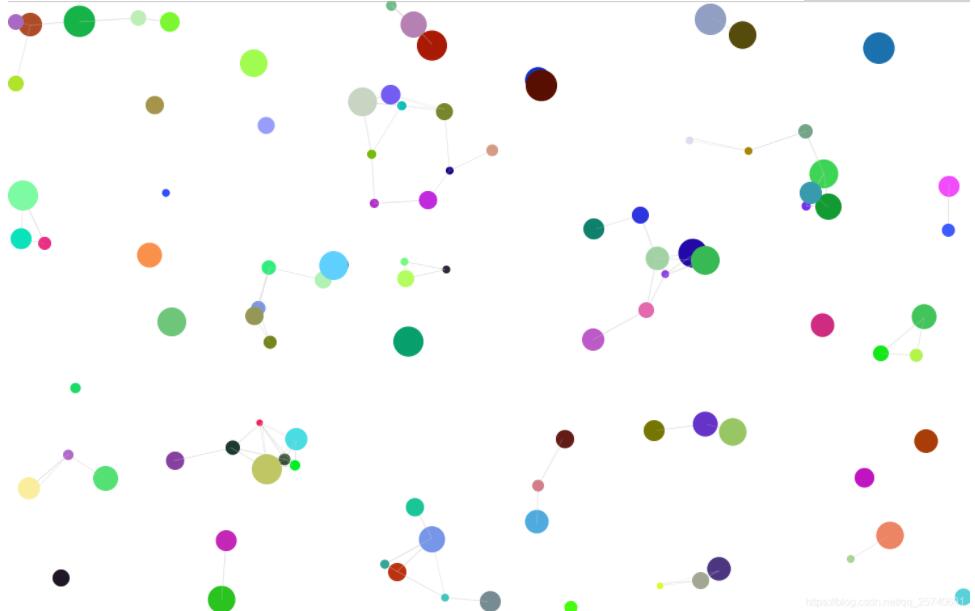
实现效果
1. 实现效果
- 绘制彩色圆点。
- 距离相近的点之间自动产生连线。
- 点与线进行运动,当触及画布边界时发生反弹。
- 支持选中圆点,并可拖动以改变其位置。
具体实现
2. 具体实现
初始化相关变量
初始化相关变量。
var c = document.getElementById("myCanvas");
      //设置canvas大小
      c.height = document.body.offsetHeight;
      c.width = document.body.offsetWidth;
      //canvas跟随窗口大小
      window.onresize = function() {
        c.height = document.body.offsetHeight;
        c.width = document.body.offsetWidth;
      };

      var theCanvas = c.getContext("2d");
      var pointList = []; //存储points
      var anim = null;
      var selectPoint = null;
构造对象存储相关点线数据
构造对象以存储相关的点线数据。
var PointLine = function(canvas, x, y, r, color) {
        this.theCanvas = canvas;
        this.x = x;
        this.y = y;
        this.r = r;
        this.color = color; //点颜色
        this.speed = 5; //点移动速度
        //移动方向
        this.direction = parseInt(Math.random() * 1000) % 4; //0 -x 1 x 2-y 3 y
        this.drawPoint = function() {
          this.theCanvas.beginPath();
          this.theCanvas.fillStyle = this.color;
          this.theCanvas.arc(this.x, this.y, this.r, 0, 360);
          this.theCanvas.fill();
        };
        //检查是否出界,若出界就改变为反方向
        this.checkX = function(x) {
          if (x - this.r <= 0) {
            this.x = this.r;
            this.direction = 1;
          } else if (x + this.r >= this.theCanvas.canvas.width) {
            this.x = this.theCanvas.canvas.width - this.r;
            this.direction = 0;
          } else this.x = x;
        };
        this.checkY = function(y) {
          if (y - this.r <= 0) {
            this.y = this.r;
            this.direction = 3;
          } else if (y + this.r >= this.theCanvas.canvas.height) {
            this.y = this.theCanvas.canvas.height - this.r;
            this.direction = 2;
          } else this.y = y;
        };
        //移动点
        this.movePoints = function() {
          if (this.direction == 0) {
            this.checkX(this.x - parseInt(Math.random() * this.speed));
          } else if (this.direction == 1) {
            this.checkX(this.x + parseInt(Math.random() * this.speed));
          } else if (this.direction == 2) {
            this.checkY(this.y - parseInt(Math.random() * this.speed));
          } else if (this.direction == 3) {
            this.checkY(this.y + parseInt(Math.random() * this.speed));
          }
        };
        return this;
      };
画两点间连线
绘制两点之间的连线。
//两点间连线
function drawLine(start, end) {
        theCanvas.strokeStyle = "rgba(204,204,204,0.5)";
        theCanvas.beginPath();
        theCanvas.moveTo(start.x, start.y);
        theCanvas.lineTo(end.x, end.y);
        theCanvas.stroke();
      }
      //两点之间距离
      function getDistance(p1, p2) {
        return Math.pow(p1.x - p2.x, 2) + Math.pow(p1.y - p2.y, 2);
      }
      var minDistance = parseInt(0.1 * theCanvas.canvas.height);
      minDistance = minDistance * minDistance; //连线的最短距离
      //一点与其他点连线
      function drawLinkLine(p1) {
        for (var j = 0; j < pointList.length; j++) {
          var p2 = pointList[j];
          if (p2.x == p1.x && p2.y == p1.y) continue;

          var line = getDistance(p1, p2);
          if (line < minDistance && line > 0) {
            drawLine(p1, p2);
          }
        }
      }
生成随机点
生成随机分布的点。
//生产随机颜色
      function randColor() {
        return (
          "rgb(" +
          [
            Math.floor(Math.random() * 255),
            Math.floor(Math.random() * 255),
            Math.floor(Math.random() * 255)
          ].join(",") +
          ")"
        );
      }
//生成随机点
      function createPoint() {
        var x = parseInt(Math.random() * theCanvas.canvas.width);
        var y = parseInt(Math.random() * theCanvas.canvas.height);
        var r = 5 + parseInt(Math.random() * 20);
        if (x - r < 0) x = r;
        else if (x + r > theCanvas.canvas.width) x = theCanvas.canvas.width - r;

        if (y - r < 0) x = r;
        else if (y + r > theCanvas.canvas.height)
          y = theCanvas.canvas.height - r;
        return new PointLine(theCanvas, x, y, r, randColor());
      }
      //生成100个随机点线
      for (var i = 0; i < 100; i++) {
        pointList.push(createPoint());
      }
兼容浏览器canvas动画帧
兼容浏览器的 Canvas 动画帧机制。
//启用动画
      function canvasAnimation() {
        return (
          window.requestAnimationFrame ||
          window.webkitRequestAnimationFrame ||
          window.mozRequestAnimationFrame ||
          window.msRequestAnimationFrame ||
          function(callback, element) {
            var self = this,
              start,
              finish;
            window.setTimeout(function() {
              start = +new Date();
              callback(start);
              finish = +new Date();
              self.timeout = 1000 / 60 - (finish - start);
            }, self.timeout);
          }
        );
      }
      //取消动画
      function canvasCancleAnim() {
        return (
          window.cancelAnimationFrame ||
          window.webkitCancelAnimationFrame ||
          window.mozCancelAnimationFrame ||
          window.mosCancelAnimationFrame ||
          window.clearTimeout
        );
      }
开始动画
启动动画循环。
//循环执行canvas动画
function start() {
        anim = canvasAnimation()(this.start);
        //清空canvas
        theCanvas.clearRect(
          0,
          0,
          theCanvas.canvas.width,
          theCanvas.canvas.height
        );
        //画点线
        for (var i = 0; i < this.pointList.length; i++) {
          var p = pointList[i];
          drawLinkLine(p);
          p.drawPoint();
          if (selectPoint && selectPoint == p) continue;
          p.movePoints();
        }
      }

      //开始动画
      start();
选中点进行拖动
实现选中点的拖动功能。
//px坐标转canvas坐标
function windowToCanvas(canvas, x, y) {
        var bbox = canvas.getBoundingClientRect();
        return {
          x: x - bbox.left * (canvas.width / bbox.width),
          y: y - bbox.top * (canvas.height / bbox.height)
        };
      }
      //设置动作,按下选中点

      theCanvas.canvas.onmousedown = function(e) {

        var loc = windowToCanvas(theCanvas.canvas, e.clientX, e.clientY);
        for (var i = 0; i < pointList.length; i++) {
          var p = pointList[i];

          if (getDistance(p, loc)<100) {
            selectPoint = p;
            break;
          }
        }
      };
      //移动点
      theCanvas.canvas.onmousemove = function(e) {
        if (selectPoint) {
          var loc = windowToCanvas(theCanvas.canvas, e.clientX, e.clientY);
          selectPoint.x = loc.x;
          selectPoint.y = loc.y;

        }
      };
      //取消选中点
      theCanvas.canvas.onmouseup = function(e) {
        selectPoint = null;

      };
以上就是本文的全部内容,希望对大家的学习有所帮助,也希望大家多多支持本站。