
将拖拽逻辑封装为 CustomDragger 类,通过 postMessage 实现跨窗口通信。子窗口捕获鼠标事件并计算位移,父窗口接收消息后执行实际的 DOM 变换。这种模式解决了 iframe 内部无法直接操作外部布局的问题。

当前位置:首页 > JavaScript DOM 与事件 > 正文
为什么iframe内的JS拖拽会失效?跨窗口拖拽解决方案
作者:窗边听雨
时间:2026-11-29
浏览:583
文章目录

iframe 与父窗口的通信机制
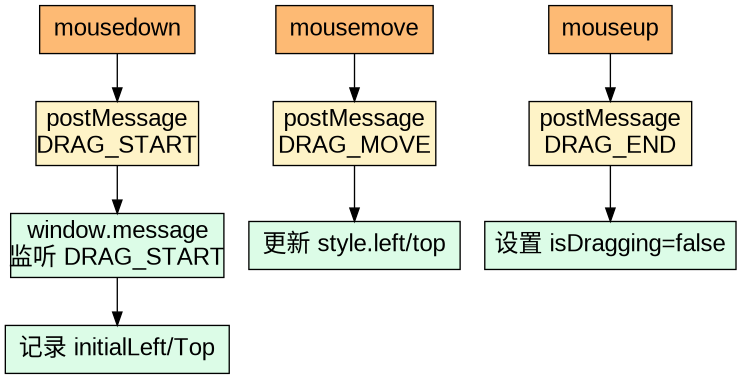
在跨窗口场景下,直接操作 DOM 的拖拽事件(如 mousedown、mousemove)受限于浏览器的同源策略或 iframe 的隔离环境。子窗口内的脚本无法直接修改父窗口的布局,反之亦然。因此,必须建立一种基于消息传递的协作模式:子窗口负责捕获原始输入并计算相对位移,父窗口负责执行实际的 DOM 变换。
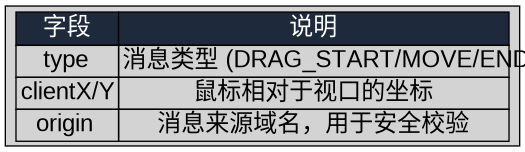
这种分离确保了即使 iframe 设置了 pointer-events: none 或处于不同的渲染线程,拖拽行为依然流畅。关键在于子窗口不直接改变自身位置,而是向父窗口发送“移动指令”,由拥有更高权限的父窗口统一处理视觉更新。
实现跨窗口拖拽的核心代码
以下是一个完整的示例,包含父页面和子页面的交互逻辑。请将此代码保存为两个文件:parent.html 和 child.html,并在本地服务器环境下运行(例如使用 VS Code 的 Live Server 插件),直接双击打开可能因 CORS 限制导致 postMessage 失败。
<!DOCTYPE html>
<html lang="en">
<head>
    <meta charset="UTF-8">
    <title>Parent Page</title>
    <style>
        body { margin: 0; overflow: hidden; }
        #draggable-container {
            position: absolute;
            top: 50px;
            left: 50px;
            width: 300px;
            height: 200px;
            border: 2px solid #ccc;
            background: #f0f0f0;
        }
        iframe { width: 100%; height: 100%; border: none; }
    </style>
</head>
<body>
    <div id="draggable-container">
        <iframe src="child.html" id="drag-frame"></iframe>
    </div>

    <script>
        const container = document.getElementById('draggable-container');
        let isDragging = false;
        let startX, startY, initialLeft, initialTop;

        window.addEventListener('message', (event) => {
            // 只接受来自特定源的消息,确保安全
            if (event.origin !== 'http://localhost:5500') return;

            const data = event.data;
            if (data.type === 'DRAG_START') {
                isDragging = true;
                startX = data.clientX;
                startY = data.clientY;
                initialLeft = parseInt(container.style.left || 0);
                initialTop = parseInt(container.style.top || 0);
            } else if (data.type === 'DRAG_MOVE' && isDragging) {
                const deltaX = data.clientX - startX;
                const deltaY = data.clientY - startY;
                container.style.left = `${initialLeft + deltaX}px`;
                container.style.top = `${initialTop + deltaY}px`;
            } else if (data.type === 'DRAG_END') {
                isDragging = false;
            }
        });
    </script>
</body>
</html>

<!DOCTYPE html>
<html lang="en">
<head>
    <meta charset="UTF-8">
    <title>Child Page</title>
    <style>
        body { margin: 0; cursor: move; user-select: none; }
        .handle { padding: 10px; background: #ddd; text-align: center; }
    </style>
</head>
<body>
    <div class="handle" id="drag-handle">Drag Me</div>

    <script>
        const handle = document.getElementById('drag-handle');
        let isDragging = false;

        handle.addEventListener('mousedown', (e) => {
            isDragging = true;
            parent.postMessage({
                type: 'DRAG_START',
                clientX: e.clientX,
                clientY: e.clientY
            }, '*');
        });

        window.addEventListener('mousemove', (e) => {
            if (!isDragging) return;
            parent.postMessage({
                type: 'DRAG_MOVE',
                clientX: e.clientX,
                clientY: e.clientY
            }, '*');
        });

        window.addEventListener('mouseup', () => {
            if (isDragging) {
                isDragging = false;
                parent.postMessage({ type: 'DRAG_END' }, '*');
            }
        });
    </script>
</body>
</html>
运行后,拖动子窗口中的 “Drag Me” 区域,父窗口中的灰色容器会跟随移动。注意观察控制台,如果跨域受限,需确保父子页面同源或使用通配符 '*'(生产环境建议指定具体域名)。该程序展示了从子窗口触发到父窗口响应的完整闭环。
解决鼠标坐标偏移问题
在实际使用中,一个常见的问题是拖拽起始点不准确,导致元素瞬间跳动。这是因为 clientX 和 clientY 是相对于视口的绝对坐标,而容器的位置是相对于其定位父级的偏移量。如果在 DRAG_START 时没有正确记录初始位置,后续的 deltaX 计算就会出错。上述代码通过在 DRAG_START 事件中同时发送当前鼠标坐标和容器当前的 left/top 值来解决这个问题。父窗口接收到消息后,立即计算出新的基准位置,从而保证拖拽的连续性。这种处理方式避免了在子窗口中计算复杂坐标转换的麻烦,因为子窗口并不清楚父窗口容器的具体布局上下文。
实用工具推荐
电子包浆
使用 ›绿化、压缩、噪点和虚拟水印,自由调节做旧程度。
图片压缩
使用 ›选择画质和输出格式,预览压缩前后的大小。
作者最新文章
相关文章