

使用 qrcode-generator 库的 createTableModule 方法,配合 requestIdleCallback 或 setTimeout 将批量生成任务拆分为多个微/宏任务,避免主线程阻塞和内存堆积。
JS批量生成二维码的性能优化与内存泄漏防范
作者:听澜
时间:2026-11-24
浏览:284
文章目录
二维码生成的内存瓶颈分析
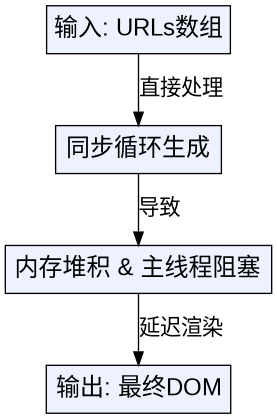
在浏览器环境中,一次性循环调用 QR 码生成函数会导致大量临时对象(如二维数组、字符串)无法及时被垃圾回收,引发内存泄漏和页面卡顿。

qrcode-generator 等库在每次调用时都会创建新的矩阵数据。如果在一个同步循环中处理数百个 URL,V8 引擎的堆内存会迅速增长,且由于主线程被长时间占用,用户交互会完全停滞。通过异步拆分,可以让出主线程时间片,触发浏览器的垃圾回收机制。
基于 requestIdleCallback 的异步分批处理
将以下代码保存为 qr-batch.html,直接在现代浏览器中打开即可运行。程序会自动将 100 个二维码请求拆分为每批 5 个,利用空闲回调逐步渲染。
<!DOCTYPE html>
<html lang="zh">
<head>
    <meta charset="UTF-8">
    <title>JS Batch QR Code Generator</title>
    <script src="https://cdn.jsdelivr.net/npm/qrcode-generator@1.4.4/qrcode.js"></script>
    <style>
        body { font-family: sans-serif; padding: 20px; }
        #container { display: flex; flex-wrap: wrap; gap: 10px; }
        .qr-item { border: 1px solid #ccc; padding: 5px; }
    </style>
</head>
<body>
    <div id="status">准备生成...</div>
    <div id="container"></div>

    <script>
        const urls = Array.from({ length: 100 }, (_, i) => `https://example.com/${i}`);
        const container = document.getElementById('container');
        const status = document.getElementById('status');
        let index = 0;
        const batchSize = 5;

        function generateQR(url) {
            // 使用 qrcode-generator 库生成表格模块
            const typeNumber = 0;
            const errorCorrectionLevel = 'L';
            const qr = qrcode(typeNumber, errorCorrectionLevel);
            qr.addData(url);
            qr.make();

            // 渲染为 SVG 或 Img (这里简化为 Img 基于 canvas 或直接文本)
            // 为演示简单性,我们使用库提供的 toSvg 或手动绘制
            // 注意:qrcode-generator 主要提供矩阵数据,需自行转为图像
            // 此处为了代码简洁,假设有一个辅助函数 renderToImg
            return createQRImage(qr);
        }

        function createQRImage(qrData) {
            const cellSize = 4;
            const moduleCount = qrData.getModuleCount();
            const size = moduleCount * cellSize;

            const canvas = document.createElement('canvas');
            canvas.width = size;
            canvas.height = size;
            const ctx = canvas.getContext('2d');
            ctx.fillStyle = '#fff';
            ctx.fillRect(0, 0, size, size);
            ctx.fillStyle = '#000';

            for (let row = 0; row < moduleCount; row++) {
                for (let col = 0; col < moduleCount; col++) {
                    if (qrData.isDark(row, col)) {
                        ctx.fillRect(col * cellSize, row * cellSize, cellSize, cellSize);
                    }
                }
            }
            return canvas.toDataURL();
        }

        function processBatch() {
            if (index >= urls.length) {
                status.textContent = '生成完成';
                return;
            }

            const end = Math.min(index + batchSize, urls.length);
            const fragment = document.createDocumentFragment();

            for (; index < end; index++) {
                const url = urls[index];
                const imgSrc = generateQR(url);

                const div = document.createElement('div');
                div.className = 'qr-item';
                const img = document.createElement('img');
                img.src = imgSrc;
                img.style.width = '60px';
                img.style.height = '60px';
                div.appendChild(img);
                fragment.appendChild(div);
            }

            container.appendChild(fragment);
            status.textContent = `已生成 ${index} / ${urls.length}`;

            // 递归调用,利用空闲时间
            if (typeof requestIdleCallback !== 'undefined') {
                requestIdleCallback(processBatch);
            } else {
                setTimeout(processBatch, 0);
            }
        }

        // 启动
        if (typeof requestIdleCallback !== 'undefined') {
            requestIdleCallback(processBatch);
        } else {
            setTimeout(processBatch, 0);
        }
    </script>
</body>
</html>
程序运行后,页面状态栏会显示进度。观察浏览器 DevTools 的 Memory 面板,可以看到内存曲线呈阶梯状上升而非直线飙升,证明垃圾回收正常工作。若将 batchSize 改为 100,会发现明显的卡顿,说明分批策略有效。
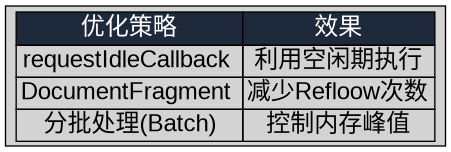
该实现使用了 requestIdleCallback API,它允许开发者在浏览器空闲时段执行低优先级任务。如果浏览器不支持该 API,则回退到 setTimeout。每个批次执行完毕后,前一批次的临时变量会被标记为可回收,从而有效控制内存峰值。
同一程序中的 DOM 节点复用优化
在上述程序中,直接操作 DOM 插入新元素会导致频繁的 Reflow 和 Repaint,进一步加剧性能问题。应改用 DocumentFragment 或先构建 HTML 字符串再一次性注入。
修改程序中的渲染逻辑,不再逐个 appendChild,而是收集当前批次的所有 img 标签到一个数组,接着通过 innerHTML 或 DocumentFragment 一次性追加。这样可以显著减少重排次数,提升批量渲染的流畅度。
实用工具推荐
电子包浆
使用 ›绿化、压缩、噪点和虚拟水印,自由调节做旧程度。
图片压缩
使用 ›选择画质和输出格式,预览压缩前后的大小。
作者最新文章
相关文章