
本教程详细讲解如何使用原生JavaScript与HTML5 Canvas从零构建完整的俄罗斯方块游戏,涵盖二维网格建模、七种方块矩阵定义、旋转算法、高精度主循环、碰撞检测、消行计分以及按键控制的全部实现细节。

当前位置:首页 > JavaScript 项目实战 > 正文
JavaScript实现俄罗斯方块:基于Canvas的完整开发教程
作者:页面旅途
时间:2026-11-20
浏览:89
文章目录
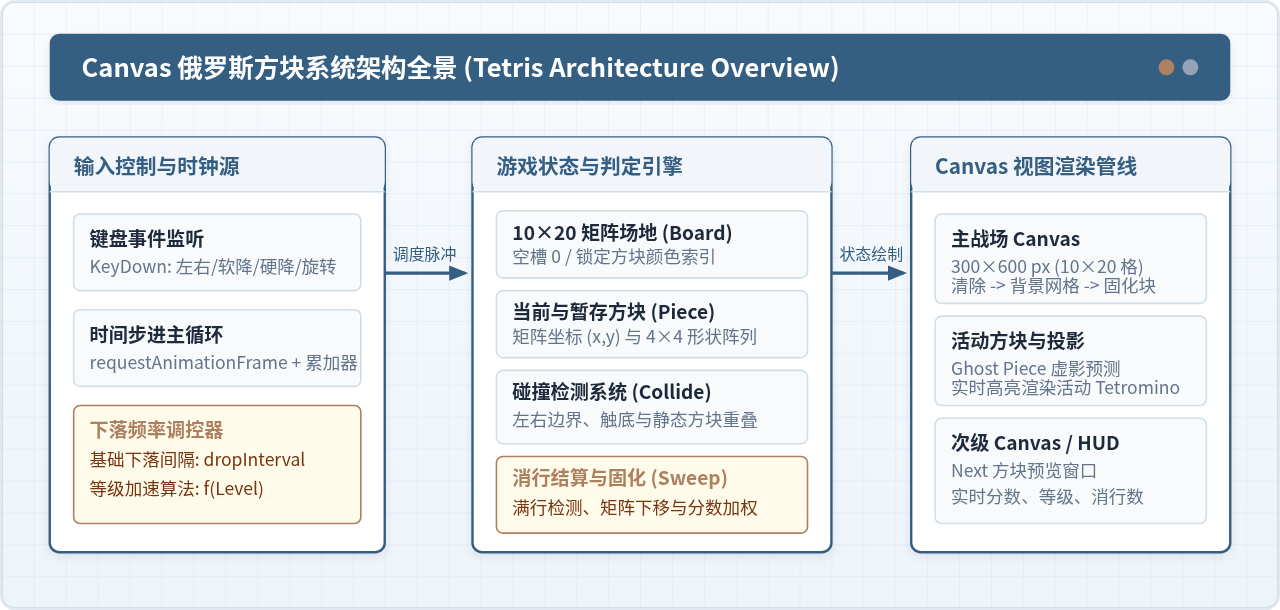
开发一款经典的俄罗斯方块游戏,核心在于将离散的二维方格逻辑与连续的图形渲染管线清晰解耦。本文将指导读者使用原生 HTML5 Canvas 与标准 JavaScript,通过搭建 10×20 矩阵网格系统、定义 7 种经典 Tetromino 骨架、编写矩阵旋转与碰撞检测算法、构建基于时间差的主循环,最终实现支持行消除、计分加成与侧边栏预览的完整游戏。
一、核心坐标系设计与数据结构抽象
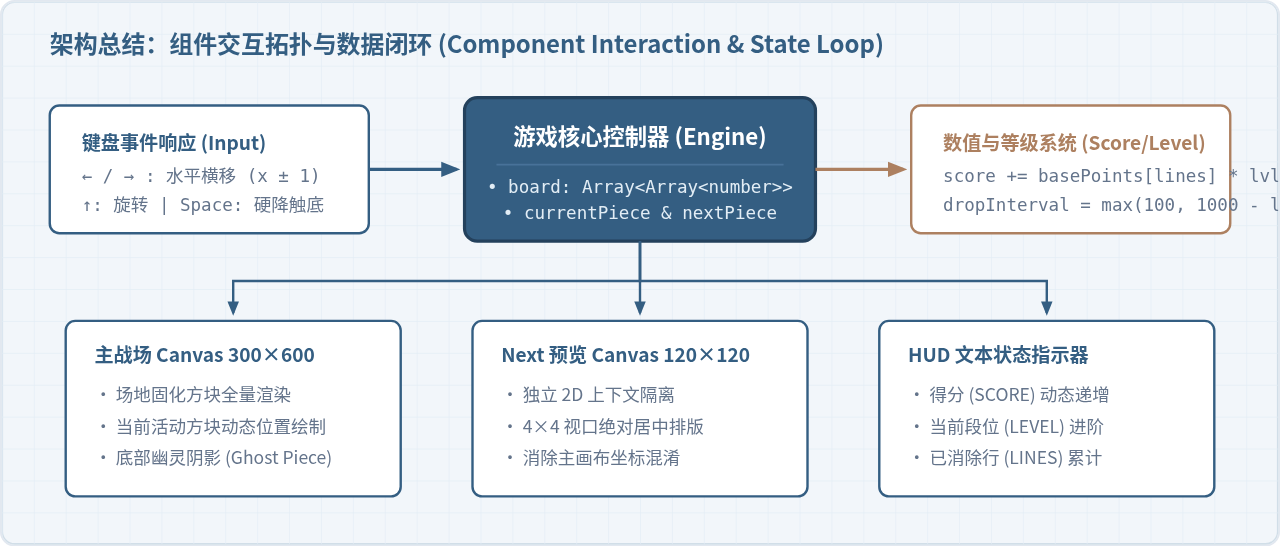
俄罗斯方块的世界本质是一个二维离散网格。标准俄罗斯方块场地包含 10 列(列宽 COLS = 10) 和 20 行(行高 ROWS = 20)。为了让 Canvas 的几何渲染与游戏逻辑无缝对接,我们需要定义固定单元格像素尺寸(通常取 BLOCK_SIZE = 30px),使得主画布呈现为 300px 宽、600px 高。
游戏场地可以使用一个一维长度为 20、每一项为长度 10 的数组(即 20 × 10 的二维矩阵)来表示。矩阵中 0 代表空单元格,非零正整数(或十六进制颜色字符串)代表已被堆叠固化的方块。
1.1 七种经典 Tetromino 矩阵定义
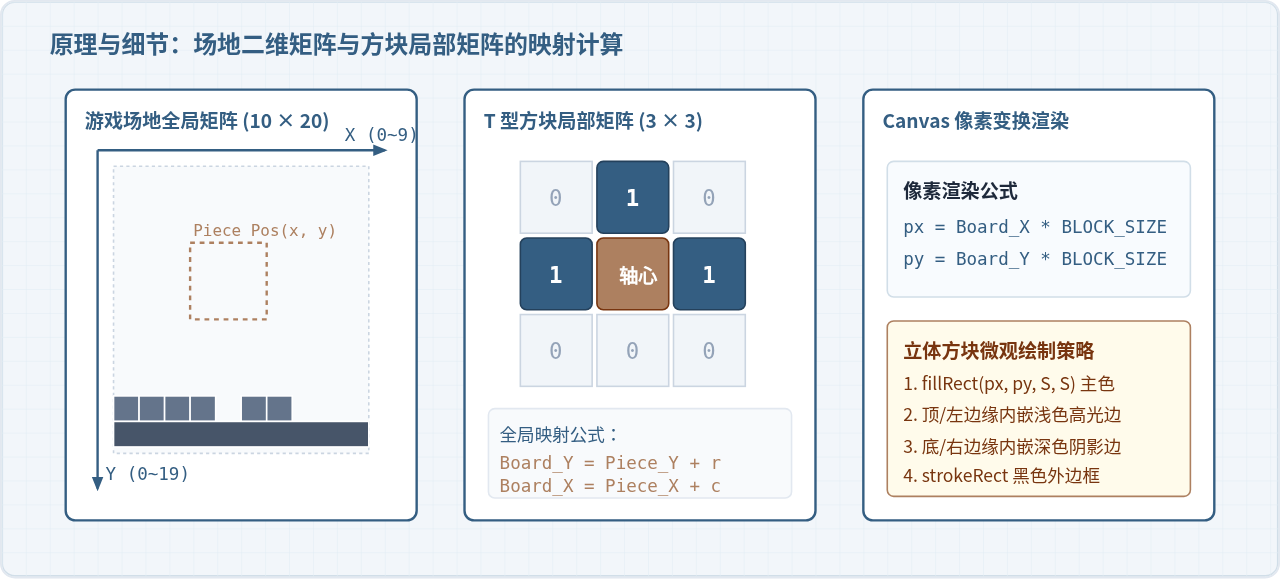
国际 Tetris 规范中一共有 7 种标准方块(I、J、L、O、S、T、Z)。在 JavaScript 中,推荐使用对称的二维正方形矩阵来承载这些形状(O 使用 2×2,I 使用 4×4,其余 5 种统一使用 3×3)。这样不仅语义明确,且能极大简化旋转运算的数学公式。
// 7种方块形状及其代表颜色
const SHAPES = {
  I: [
    [0, 0, 0, 0],
    [1, 1, 1, 1],
    [0, 0, 0, 0],
    [0, 0, 0, 0]
  ],
  J: [
    [1, 0, 0],
    [1, 1, 1],
    [0, 0, 0]
  ],
  L: [
    [0, 0, 1],
    [1, 1, 1],
    [0, 0, 0]
  ],
  O: [
    [1, 1],
    [1, 1]
  ],
  S: [
    [0, 1, 1],
    [1, 1, 0],
    [0, 0, 0]
  ],
  T: [
    [0, 1, 0],
    [1, 1, 1],
    [0, 0, 0]
  ],
  Z: [
    [1, 1, 0],
    [0, 1, 1],
    [0, 0, 0]
  ]
};

const COLORS = {
  I: '#00f0f0', // 青色
  O: '#f0f000', // 黄色
  T: '#a000f0', // 紫色
  S: '#00f000', // 绿色
  Z: '#f00000', // 红色
  J: '#0000f0', // 蓝色
  L: '#f0a000'  // 橙色
};
二、项目开发完整实施步骤
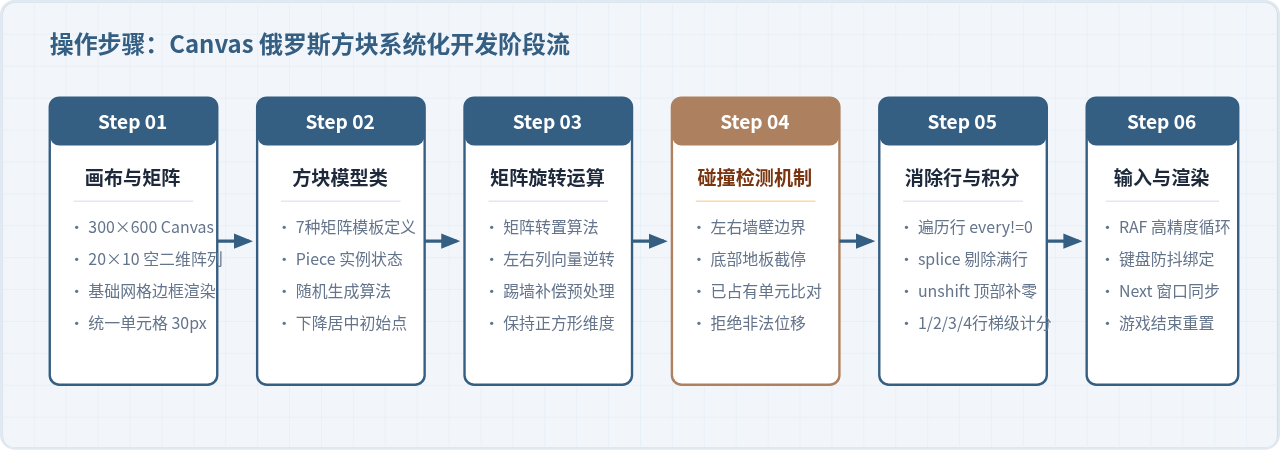
构建基于 Canvas 的游戏应当遵循明确的工程开发顺序:从基础容器与状态树初始化,到物理移动与碰撞运算,再到消除规则与交互输入。下图展示了从零开始实现本教程的标准化实施路径。
三、核心算法详解:矩阵旋转与碰撞判定
3.1 顺时针旋转算法(转置并翻转行)
对二维矩阵进行顺时针 90 度旋转在数学上有经典解法:先对矩阵进行主对角线转置(Transpose),再将转置后矩阵的每一行进行水平左右逆转(Reverse)。相比逐个索引手工硬编码映射,这种做法对于 2×2、3×3、4×4 甚至更高维度的正方形矩阵均完全通用。
// 顺时针旋转矩阵核心函数
function rotateMatrix(matrix) {
  const N = matrix.length;
  // 1. 转置矩阵:行与列互换 (row, col) => (col, row)
  const result = matrix.map((row, i) =>
    row.map((val, j) => matrix[j][i])
  );
  // 2. 将每一行内部元素左右翻转
  result.forEach(row => row.reverse());
  return result;
}
3.2 碰撞检测算法(Collision Detection)
当方块试图向左移、右移、下落或旋转时,我们不能直接修改其实际坐标,而必须预先推演(Pre-check)该操作是否合法。
遍历当前方块矩阵中的每一个单元格,若该单元格值为 1,则计算其落在全局场地的目标坐标 targetX = piece.x + col + offsetX 和 targetY = piece.y + row + offsetY。如果出现以下任意一种情况,即判定为发生碰撞:
targetX < 0或targetX >= 10(撞击左右墙壁边界);targetY >= 20(触底穿透地板);targetY >= 0且board[targetY][targetX] !== 0(撞击先前已被锁定的方块)。
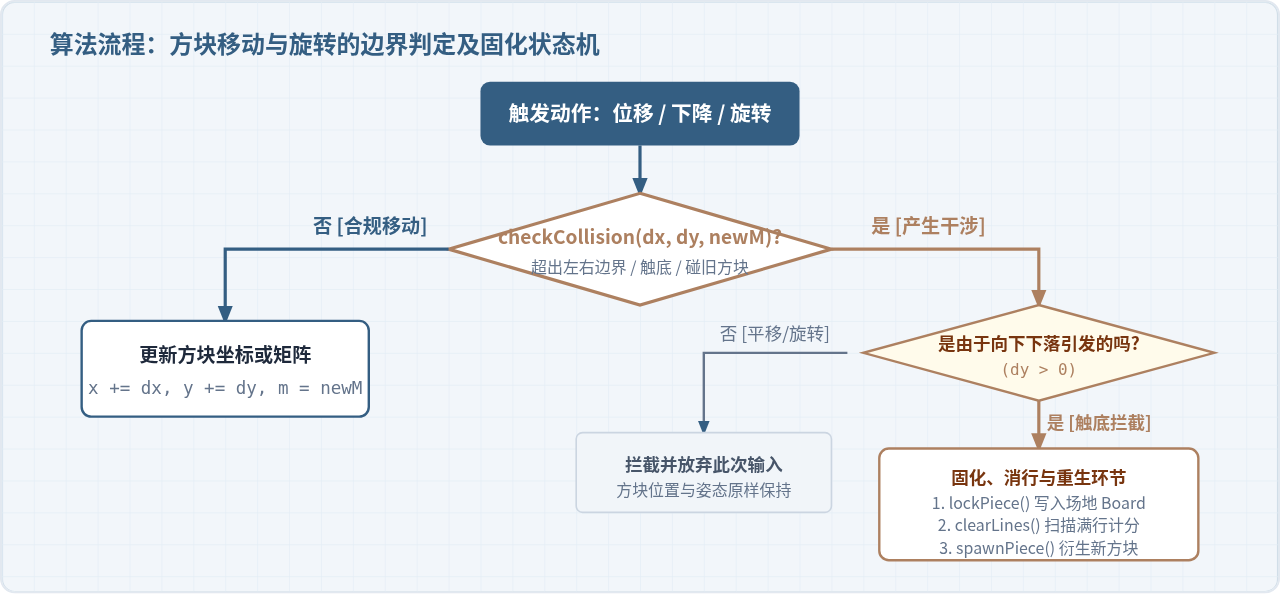
实现细节注意:如果在方块旋转时直接碰撞了侧面墙壁(例如 I 块靠墙旋转),简单的旋转会导致卡死。实用优化可以引入轻量踢墙(Wall Kick):当旋转检测到碰撞时,尝试让方块向左或向右微调 1 个单位(
offsetX = +1 或 -1),若能放入则完成旋转,否则回退旋转。
四、基于 requestAnimationFrame 的高精度主循环
初学者常使用 setInterval(drop, 1000) 来控制方块下落,但在实际浏览器运行环境下,setInterval 会受到宏任务队列阻塞及页面切台休眠的影响,且无法与屏幕刷新率对齐,导致画面撕裂或卡顿。
现代 Canvas 游戏开发必须使用 requestAnimationFrame 驱动主渲染循环,同时引入时间累加器(Accumulator)来分离渲染帧率(通常 60FPS/120FPS)与物理逻辑更新频率(如下落周期 800ms)。
let lastTime = 0;
let dropCounter = 0;
let dropInterval = 1000; // 默认 1000ms 下落一格

function gameLoop(time = 0) {
  const deltaTime = time - lastTime;
  lastTime = time;

  dropCounter += deltaTime;
  if (dropCounter > dropInterval) {
    playerDrop(); // 触发一次逻辑向下移动
    dropCounter = 0;
  }

  draw(); // 每帧清空并重绘画布
  if (!gameOver) {
    requestAnimationFrame(gameLoop);
  }
}
五、行消除(Line Clearing)与计分规则实现
当活动方块固化进矩阵后,系统应立即执行满行扫描。在 20×10 的矩阵中,从最底行(row = 19)向上逆序循环检测。
若某一行的所有元素均不等于 0(即 row.every(cell => cell !== 0) 为真),则表示该行已被完全填满。此时通过 Array.prototype.splice(r, 1) 剔除该行,并在矩阵的最顶部通过 Array.prototype.unshift(new Array(10).fill(0)) 插入一个全新空行。消除后,由于行索引发生了位移,循环指针 r 需自增 1 继续检测当前物理行。
| 单次消除行数 | 官方计分基数 | 等级系数加成 | 消除术语 |
|---|---|---|---|
| 1 行 | 100 分 | 100 × (Level + 1) | Single |
| 2 行 | 300 分 | 300 × (Level + 1) | Double |
| 3 行 | 500 分 | 500 × (Level + 1) | Triple |
| 4 行 | 800 分 | 800 × (Level + 1) | Tetris(满贯) |
六、可完整运行的工程实现代码
以下给出经过完整测试、可直接放入任意 HTML 文件中独立运行的代码。代码整合了双 Canvas 渲染、幽灵投影预测、硬降触底、音效预留槽位以及开局与结束状态机。
<!DOCTYPE html>
<html lang="zh-CN">
<head>
  <meta charset="UTF-8">
  <title>Canvas 俄罗斯方块</title>
  <style>
    body {
      background: #1e293b;
      color: #fff;
      font-family: sans-serif;
      display: flex;
      justify-content: center;
      align-items: center;
      min-height: 100vh;
      margin: 0;
    }
    .game-container {
      display: flex;
      gap: 24px;
      padding: 20px;
      background: #0f172a;
      border-radius: 12px;
      box-shadow: 0 10px 25px rgba(0,0,0,0.5);
    }
    canvas#board {
      background: #000;
      border: 2px solid #334155;
      border-radius: 4px;
    }
    .sidebar {
      display: flex;
      flex-direction: column;
      width: 150px;
    }
    .panel {
      background: #1e293b;
      padding: 12px;
      border-radius: 6px;
      margin-bottom: 16px;
    }
    .panel h3 {
      margin: 0 0 8px 0;
      font-size: 14px;
      color: #94a3b8;
    }
    .panel .val {
      font-size: 20px;
      font-weight: bold;
      color: #38bdf8;
    }
    button {
      background: #0284c7;
      color: white;
      border: none;
      padding: 10px;
      border-radius: 6px;
      font-weight: bold;
      cursor: pointer;
    }
    button:hover { background: #0369a1; }
  </style>
</head>
<body>

<div class="game-container">
  <canvas id="board" width="300" height="600"></canvas>
  <div class="sidebar">
    <div class="panel">
      <h3>NEXT</h3>
      <canvas id="next" width="120" height="120"></canvas>
    </div>
    <div class="panel">
      <h3>SCORE</h3>
      <div id="score" class="val">0</div>
    </div>
    <div class="panel">
      <h3>LINES</h3>
      <div id="lines" class="val">0</div>
    </div>
    <div class="panel">
      <h3>LEVEL</h3>
      <div id="level" class="val">1</div>
    </div>
    <button id="start-btn" onclick="startGame()">开始游戏</button>
  </div>
</div>

<script>
const COLS = 10, ROWS = 20, BLOCK_SIZE = 30;
const canvas = document.getElementById('board');
const ctx = canvas.getContext('2d');
const nextCanvas = document.getElementById('next');
const nextCtx = nextCanvas.getContext('2d');

const SHAPES = {
  I: [[0,0,0,0],[1,1,1,1],[0,0,0,0],[0,0,0,0]],
  J: [[1,0,0],[1,1,1],[0,0,0]],
  L: [[0,0,1],[1,1,1],[0,0,0]],
  O: [[1,1],[1,1]],
  S: [[0,1,1],[1,1,0],[0,0,0]],
  T: [[0,1,0],[1,1,1],[0,0,0]],
  Z: [[1,1,0],[0,1,1],[0,0,0]]
};
const COLORS = {
  I: '#06b6d4', J: '#3b82f6', L: '#f97316',
  O: '#eab308', S: '#22c55e', T: '#a855f7', Z: '#ef4444'
};
const KEYS = Object.keys(SHAPES);

let board = [];
let score = 0, lines = 0, level = 1;
let currentPiece = null, nextPiece = null;
let dropCounter = 0, dropInterval = 1000, lastTime = 0;
let gameOver = false, animationId = null;

function createPiece() {
  const type = KEYS[Math.floor(Math.random() * KEYS.length)];
  return {
    type,
    matrix: SHAPES[type],
    color: COLORS[type],
    x: Math.floor(COLS / 2) - Math.ceil(SHAPES[type][0].length / 2),
    y: 0
  };
}

function initBoard() {
  board = Array.from({ length: ROWS }, () => Array(COLS).fill(0));
}

function collide(piece, offsetX = 0, offsetY = 0, newMatrix = null) {
  const m = newMatrix || piece.matrix;
  for (let r = 0; r < m.length; r++) {
    for (let c = 0; c < m[r].length; c++) {
      if (m[r][c] !== 0) {
        const nx = piece.x + c + offsetX;
        const ny = piece.y + r + offsetY;
        if (nx < 0 || nx >= COLS || ny >= ROWS) return true;
        if (ny >= 0 && board[ny][nx] !== 0) return true;
      }
    }
  }
  return false;
}

function rotate(matrix) {
  const N = matrix.length;
  const res = matrix.map((row, i) => row.map((_, j) => matrix[j][i]));
  res.forEach(row => row.reverse());
  return res;
}

function playerRotate() {
  if (gameOver) return;
  const rotated = rotate(currentPiece.matrix);
  if (!collide(currentPiece, 0, 0, rotated)) {
    currentPiece.matrix = rotated;
  } else if (!collide(currentPiece, -1, 0, rotated)) { // 踢墙补偿(左)
    currentPiece.x -= 1;
    currentPiece.matrix = rotated;
  } else if (!collide(currentPiece, 1, 0, rotated)) {  // 踢墙补偿(右)
    currentPiece.x += 1;
    currentPiece.matrix = rotated;
  }
}

function lockPiece() {
  currentPiece.matrix.forEach((row, r) => {
    row.forEach((val, c) => {
      if (val !== 0) {
        const ny = currentPiece.y + r;
        const nx = currentPiece.x + c;
        if (ny >= 0) board[ny][nx] = currentPiece.color;
      }
    });
  });
  sweepLines();
  currentPiece = nextPiece;
  nextPiece = createPiece();
  drawNext();
  if (collide(currentPiece)) {
    gameOver = true;
    cancelAnimationFrame(animationId);
    alert('游戏结束!最终得分:' + score);
  }
}

function sweepLines() {
  let cleared = 0;
  for (let r = ROWS - 1; r >= 0; r--) {
    if (board[r].every(cell => cell !== 0)) {
      board.splice(r, 1);
      board.unshift(new Array(COLS).fill(0));
      cleared++;
      r++; // 重新检查当前行
    }
  }
  if (cleared > 0) {
    const points = [0, 100, 300, 500, 800];
    score += points[cleared] * level;
    lines += cleared;
    level = Math.floor(lines / 10) + 1;
    dropInterval = Math.max(120, 1000 - (level - 1) * 80);
    document.getElementById('score').innerText = score;
    document.getElementById('lines').innerText = lines;
    document.getElementById('level').innerText = level;
  }
}

function playerDrop() {
  if (gameOver) return;
  if (!collide(currentPiece, 0, 1)) {
    currentPiece.y++;
  } else {
    lockPiece();
  }
  dropCounter = 0;
}

function hardDrop() {
  if (gameOver) return;
  while (!collide(currentPiece, 0, 1)) {
    currentPiece.y++;
  }
  lockPiece();
}

function drawBlock(ctx, x, y, color, isGhost = false) {
  const px = x * BLOCK_SIZE;
  const py = y * BLOCK_SIZE;
  if (isGhost) {
    ctx.strokeStyle = color;
    ctx.lineWidth = 1.5;
    ctx.strokeRect(px + 1, py + 1, BLOCK_SIZE - 2, BLOCK_SIZE - 2);
    return;
  }
  ctx.fillStyle = color;
  ctx.fillRect(px, py, BLOCK_SIZE, BLOCK_SIZE);
  // 立体高光与阴影边
  ctx.fillStyle = 'rgba(255,255,255,0.25)';
  ctx.fillRect(px, py, BLOCK_SIZE, 3);
  ctx.fillRect(px, py, 3, BLOCK_SIZE);
  ctx.fillStyle = 'rgba(0,0,0,0.3)';
  ctx.fillRect(px, py + BLOCK_SIZE - 3, BLOCK_SIZE, 3);
  ctx.fillRect(px + BLOCK_SIZE - 3, py, 3, BLOCK_SIZE);
  ctx.strokeStyle = '#0f172a';
  ctx.strokeRect(px, py, BLOCK_SIZE, BLOCK_SIZE);
}

function drawGhost() {
  let ghostY = currentPiece.y;
  while (!collide(currentPiece, 0, ghostY - currentPiece.y + 1)) {
    ghostY++;
  }
  currentPiece.matrix.forEach((row, r) => {
    row.forEach((val, c) => {
      if (val !== 0) {
        drawBlock(ctx, currentPiece.x + c, ghostY + r, currentPiece.color, true);
      }
    });
  });
}

function draw() {
  ctx.clearRect(0, 0, canvas.width, canvas.height);
  // 绘制网格辅助背景
  ctx.strokeStyle = '#1e293b';
  for (let r = 0; r < ROWS; r++) {
    for (let c = 0; c < COLS; c++) {
      ctx.strokeRect(c * BLOCK_SIZE, r * BLOCK_SIZE, BLOCK_SIZE, BLOCK_SIZE);
    }
  }
  // 绘制固化方块
  board.forEach((row, r) => {
    row.forEach((val, c) => {
      if (val !== 0) drawBlock(ctx, c, r, val);
    });
  });
  // 绘制下落投影与当前活动方块
  if (currentPiece) {
    drawGhost();
    currentPiece.matrix.forEach((row, r) => {
      row.forEach((val, c) => {
        if (val !== 0) {
          drawBlock(ctx, currentPiece.x + c, currentPiece.y + r, currentPiece.color);
        }
      });
    });
  }
}

function drawNext() {
  nextCtx.clearRect(0, 0, nextCanvas.width, nextCanvas.height);
  const m = nextPiece.matrix;
  const size = 24;
  const offX = (nextCanvas.width - m[0].length * size) / 2;
  const offY = (nextCanvas.height - m.length * size) / 2;
  m.forEach((row, r) => {
    row.forEach((val, c) => {
      if (val !== 0) {
        nextCtx.fillStyle = nextPiece.color;
        nextCtx.fillRect(offX + c * size, offY + r * size, size, size);
        nextCtx.strokeStyle = '#0f172a';
        nextCtx.strokeRect(offX + c * size, offY + r * size, size, size);
      }
    });
  });
}

function gameLoop(time = 0) {
  const dt = time - lastTime;
  lastTime = time;
  dropCounter += dt;
  if (dropCounter > dropInterval) {
    playerDrop();
  }
  draw();
  if (!gameOver) {
    animationId = requestAnimationFrame(gameLoop);
  }
}

function startGame() {
  if (animationId) cancelAnimationFrame(animationId);
  initBoard();
  score = 0; lines = 0; level = 1; gameOver = false;
  dropInterval = 1000; dropCounter = 0; lastTime = performance.now();
  document.getElementById('score').innerText = '0';
  document.getElementById('lines').innerText = '0';
  document.getElementById('level').innerText = '1';
  currentPiece = createPiece();
  nextPiece = createPiece();
  drawNext();
  animationId = requestAnimationFrame(gameLoop);
}

document.addEventListener('keydown', e => {
  if (!currentPiece || gameOver) return;
  if (e.key === 'ArrowLeft' && !collide(currentPiece, -1, 0)) {
    currentPiece.x--;
  } else if (e.key === 'ArrowRight' && !collide(currentPiece, 1, 0)) {
    currentPiece.x++;
  } else if (e.key === 'ArrowDown') {
    playerDrop();
  } else if (e.key === 'ArrowUp') {
    playerRotate();
  } else if (e.code === 'Space') {
    e.preventDefault();
    hardDrop();
  }
});
</script>
</body>
</html>
七、开发中高频问题与调试要点
7.1 为什么方块靠墙旋转会偶尔“卡出视口”?
当长条 I 块或 L 块紧贴画布最左侧(x = 0)旋转时,部分单元格按旋转矩阵计算可能会出现 targetX = -1。如果直接应用旋转,方块就会被判定在画布外部或穿墙报错。解决办法即在旋转前后进行碰撞回滚或执行踢墙(Wall Kick)偏移尝试。正如代码所示,如果原地旋转失败,则自动尝试 x -= 1 或 x += 1,仅当所有补偿均发生重叠碰撞时才完全取消该次按键操作。
7.2 连续消行时的数组遍历跳行陷阱
使用循环删除数组元素时,如果不改变索引直接进行下一次自减,会导致紧邻的上一行满行被漏检。在 board.splice(r, 1) 之后,务必将指针 r++(配合逆序遍历 r--),使得下一次循环依然复检当前更新后的物理行。
7.3 空格键长按页面自动滚屏
在浏览器页面内监听 keydown 事件时,按下空格键(Space)的默认系统行为是纵向向下滚动窗口。在监听函数中必须针对空格键调用 e.preventDefault(),阻止视口抖动影响玩家游戏操作。
实用工具推荐
电子包浆
使用 ›绿化、压缩、噪点和虚拟水印,自由调节做旧程度。
图片压缩
使用 ›选择画质和输出格式,预览压缩前后的大小。
作者最新文章
相关文章