
深入讲解如何使用原生JavaScript从零搭建2D RPG游戏的核心架构,重点攻克多层瓦片地图(Tilemap)的异步解析与视口裁剪渲染管线,并构建基于单向数据流与观察者模式的集中式游戏状态管理与存档持久化系统。

当前位置:首页 > JavaScript 项目实战 > 正文
从零搭建JavaScript RPG游戏架构:地图加载与状态管理
作者:小圆点
时间:2026-11-18
浏览:362
文章目录
架构设计
JavaScript / HTML5 Canvas
Tilemap 渲染管线
状态机与持久化
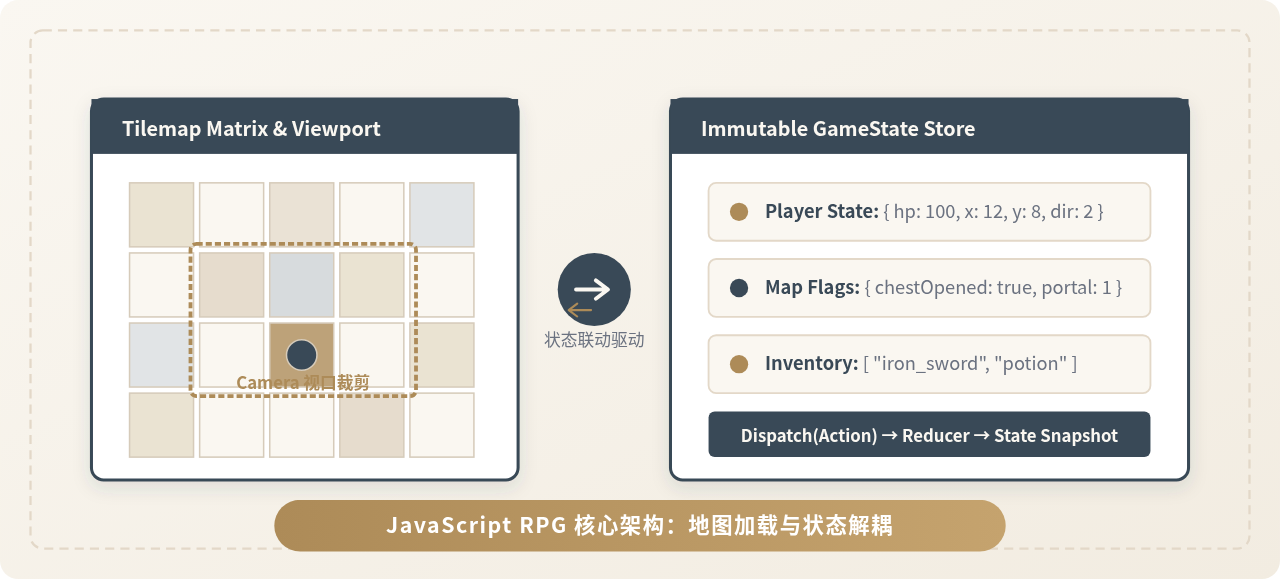
图 0:JavaScript 2D RPG 引擎核心枢纽 —— 地图加载器与游戏状态中心解耦协同
在纯 JavaScript 与 HTML5 Canvas 环境下开发 2D RPG 时,代码失控往往始于地图渲染与角色状态的紧密耦合。本文将从零构建一套具备工业级清晰度的轻量 RPG 核心架构,通过抽象出专职的瓦片地图异步加载管线与单一真理源状态机,彻底解决跨场景数据错乱、大地图掉帧以及存档序列化困难等核心技术瓶颈。
一、RPG 核心架构设计与目录分层
传统单文件 RPG 脚本经常把主角位置、按键监听、Canvas 绘制与背包逻辑混写在同一个函数内。一旦加入第二张地图或复杂的 NPC 任务,代码便会陷入网状相互调用。为了保障扩展性与维护性,必须在代码物理组织层面建立严格的边界。
游戏核心系统自下而上分为四个清晰层次:资产层(Assets)、数据与状态层(State Store)、空间与地图层(Tilemap System)以及视图表现层(Renderer & Input)。
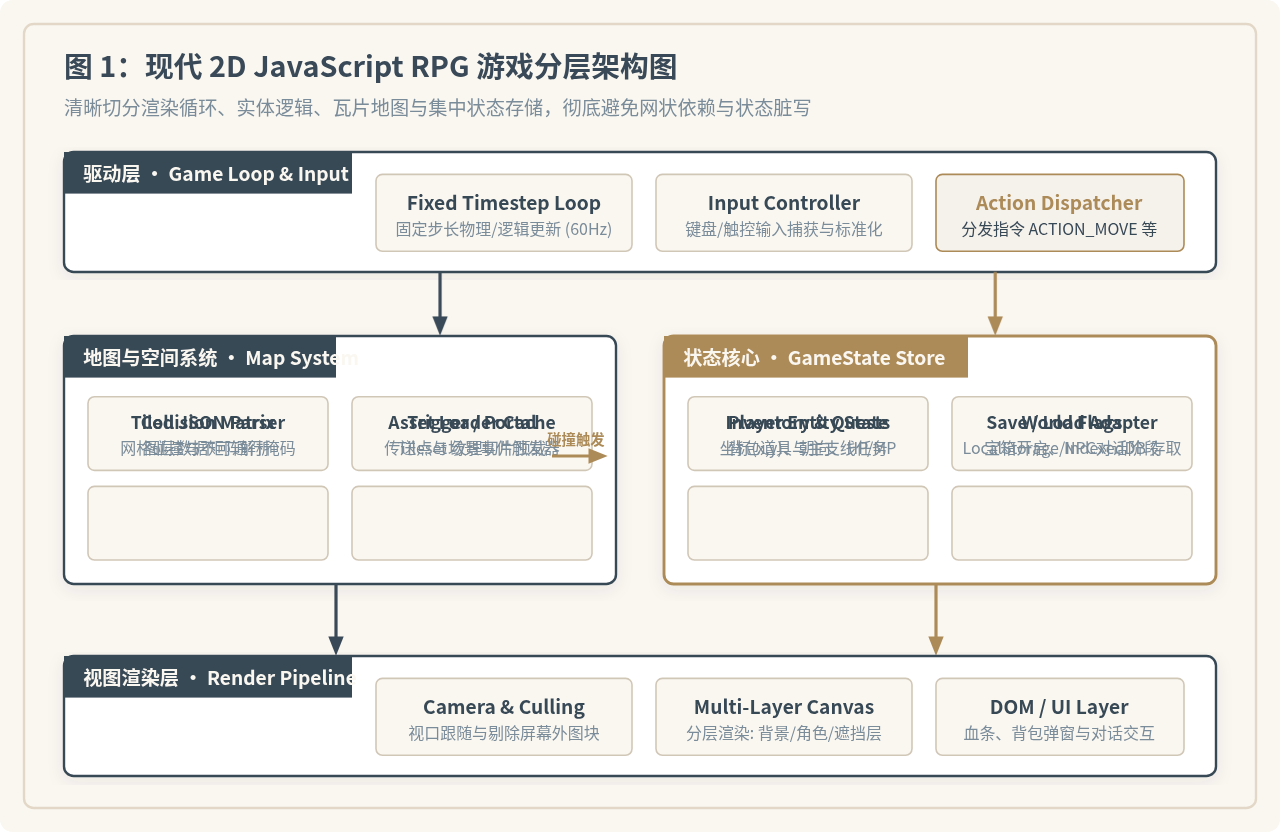
图 1:现代 2D JavaScript RPG 游戏分层架构图(模块依赖单向向下,状态变更统一由 Action 驱动)
推荐的工程目录结构如下所示:
/rpg-engine
  ├── index.html            // 页面挂载点与画布容器
  ├── /src
  │   ├── /core
  │   │   ├── Game.js       // 主循环与主控中枢
  │   │   ├── Loop.js       // 固定步长 requestAnimationFrame
  │   │   └── Input.js      // 统一按键与虚拟摇杆抽象
  │   ├── /map
  │   │   ├── AssetLoader.js// 图片与 JSON 异步加载器
  │   │   ├── TileMap.js    // 瓦片数据矩阵与图层切片
  │   │   └── Camera.js     // 摄像机视口追踪与裁剪
  │   ├── /state
  │   │   ├── Store.js      // 集中状态容器与发布订阅
  │   │   ├── Reducers.js   // 纯函数状态转移逻辑
  │   │   └── SaveManager.js// 存档序列化与 LocalStorage 存取
  │   └── /entities
  │       ├── EntityManager.js // 动态实体生命周期管理
  │       └── Player.js     // 玩家移动物理与动画驱动
驱动整个架构运行的核心是固定时间步长主循环(Fixed Timestep Loop)。如果直接使用无限制的 requestAnimationFrame 步长,不同刷新率显示器(如 60Hz 与 144Hz)上的角色移动速度将不一致,碰撞检测也会因步长过大产生“穿墙”穿透。因此逻辑更新应锁定在 60Hz(步长约 16.67ms),而渲染层则根据实际帧率平滑插值:
// /src/core/Loop.js
export class GameLoop {
  constructor(updateFn, renderFn, fps = 60) {
    this.update = updateFn;
    this.render = renderFn;
    this.timestep = 1000 / fps;
    this.accumulatedTime = 0;
    this.lastTime = 0;
    this.running = false;
  }

  start() {
    this.running = true;
    this.lastTime = performance.now();
    requestAnimationFrame(this.tick.bind(this));
  }

  tick(currentTime) {
    if (!this.running) return;
    const delta = currentTime - this.lastTime;
    this.lastTime = currentTime;
    this.accumulatedTime += Math.min(delta, 250); // 防止后台切回时产生螺旋更新

    while (this.accumulatedTime >= this.timestep) {
      this.update(this.timestep);
      this.accumulatedTime -= this.timestep;
    }

    this.render(this.accumulatedTime / this.timestep);
    requestAnimationFrame(this.tick.bind(this));
  }
}
二、瓦片地图(Tilemap)的数据结构与加载管线
2D RPG 通常借助专业地图编辑器(如 Tiled Map Editor)设计场景并导出为标准 JSON 文件。地图由图块集(Tileset)和若干二维矩阵图层叠加而成。在加载并绘制到画布前,需要经过异步下载、切片换算、碰撞掩码提取与视口过滤四道工序。
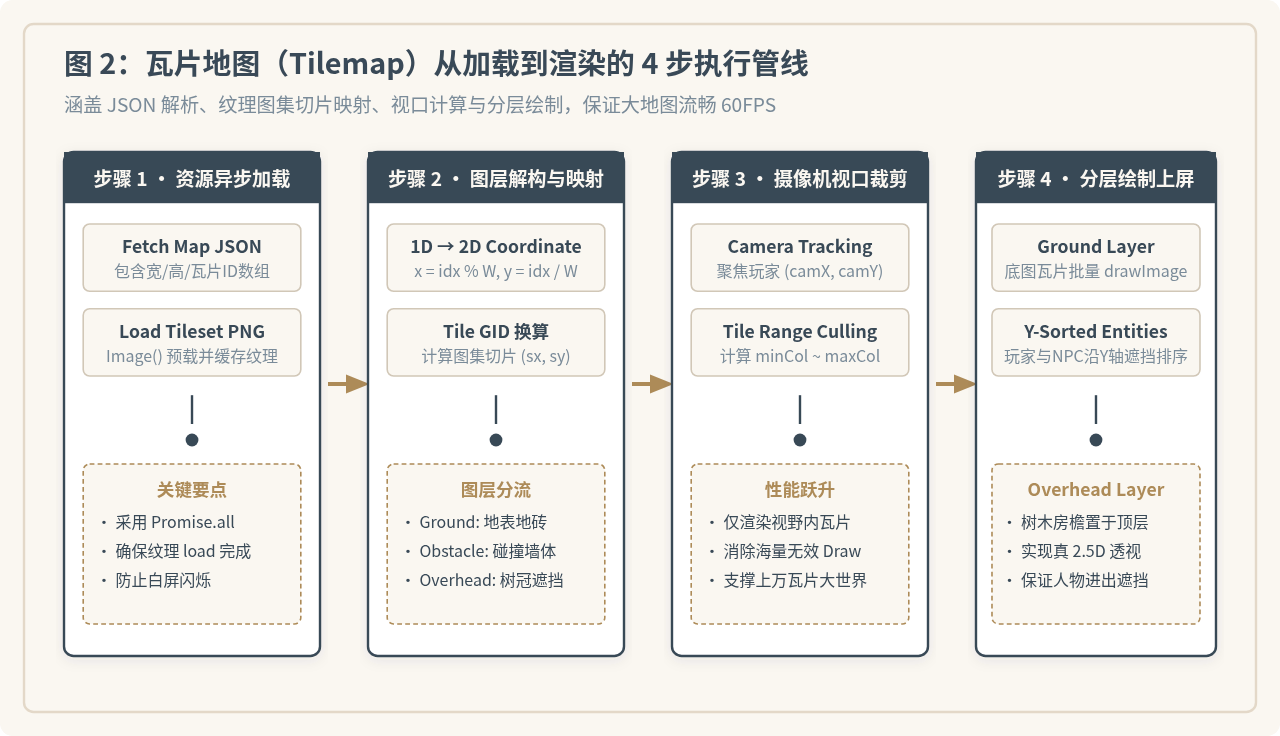
图 2:瓦片地图(Tilemap)从加载到渲染的 4 步执行管线
1. Tiled JSON 核心格式分析
导出的 JSON 核心字段包括地图全局宽高(width、height)、单块像素尺寸(tilewidth、tileheight)、图块集贴图信息(tilesets)及图层列表(layers)。图层的 data 是一个一维数组,里面存储每个格子的全局图块编号(GID):
{
  "width": 30,
  "height": 20,
  "tilewidth": 32,
  "tileheight": 32,
  "tilesets": [
    {
      "firstgid": 1,
      "image": "assets/tileset_world.png",
      "imagewidth": 256,
      "imageheight": 512,
      "tilewidth": 32,
      "tileheight": 32
    }
  ],
  "layers": [
    { "name": "Ground", "type": "tilelayer", "data": [1, 1, 2, 2, ...], "visible": true },
    { "name": "Collision", "type": "tilelayer", "data": [0, 1, 1, 0, ...], "visible": false },
    { "name": "Overhead", "type": "tilelayer", "data": [0, 0, 8, 9, ...], "visible": true }
  ]
}
2. 异步资源加载与切片坐标换算
必须使用 Promise.all 确保地图结构与贴图均已解码入内存。由 GID 索引到贴图切片时,公式为:
colsInTileset = imagewidth / tilewidth
tileIndex = GID - firstgid
sourceX = (tileIndex % colsInTileset) * tilewidth
sourceY = Math.floor(tileIndex / colsInTileset) * tileheight
// /src/map/TileMap.js
export class TileMap {
  constructor(mapData, tilesetImage) {
    this.width = mapData.width;
    this.height = mapData.height;
    this.tileWidth = mapData.tilewidth;
    this.tileHeight = mapData.tileheight;
    this.image = tilesetImage;
    this.tileset = mapData.tilesets[0];
    this.layers = mapData.layers;
    this.colsInSheet = Math.floor(this.tileset.imagewidth / this.tileWidth);

    // 预解析碰撞网格 (一维转二维布尔表)
    this.collisionGrid = this.buildCollisionGrid("Collision");
  }

  buildCollisionGrid(layerName) {
    const layer = this.layers.find(l => l.name === layerName);
    const grid = [];
    for (let y = 0; y < this.height; y++) {
      grid[y] = [];
      for (let x = 0; x < this.width; x++) {
        const gid = layer ? layer.data[y * this.width + x] : 0;
        grid[y][x] = gid > 0; // 大于0表示不可通行墙壁
      }
    }
    return grid;
  }

  isBlocked(x, y) {
    if (x < 0 || x >= this.width || y < 0 || y >= this.height) return true;
    return this.collisionGrid[y][x];
  }
}
三、视口裁剪(Viewport Culling)与分层渲染实现
如果一个大地图尺寸为 100×100 格(10,000 个瓦片),包含 3 个图层时每帧调用 ctx.drawImage 高达 30,000 次,在普通移动端和低配电脑上会引起严重掉帧。解决该问题的关键是视口裁剪(Viewport Culling):仅遍历落在摄像机视野矩形内的图块。
// /src/map/Camera.js
export class Camera {
  constructor(viewWidth, viewHeight, mapWidthPx, mapHeightPx) {
    this.x = 0;
    this.y = 0;
    this.width = viewWidth;
    this.height = viewHeight;
    this.mapWidthPx = mapWidthPx;
    this.mapHeightPx = mapHeightPx;
  }

  follow(targetX, targetY) {
    // 摄像机镜头居中对准目标,同时限制在地图物理边界内
    this.x = Math.max(0, Math.min(targetX - this.width / 2, this.mapWidthPx - this.width));
    this.y = Math.max(0, Math.min(targetY - this.height / 2, this.mapHeightPx - this.height));
  }
}
在渲染图层时,通过摄像机位置推导可见行列区间(minCol 到 maxCol,minRow 到 maxRow),并向外各扩充 1 个瓦片作为缓冲带,避免移动边缘产生残影:
// /src/map/TileMap.js 裁剪绘制方法
renderLayer(ctx, layerName, camera) {
  const layer = this.layers.find(l => l.name === layerName);
  if (!layer || !layer.visible) return;

  const minCol = Math.max(0, Math.floor(camera.x / this.tileWidth));
  const maxCol = Math.min(this.width - 1, Math.ceil((camera.x + camera.width) / this.tileWidth));
  const minRow = Math.max(0, Math.floor(camera.y / this.tileHeight));
  const maxRow = Math.min(this.height - 1, Math.ceil((camera.y + camera.height) / this.tileHeight));

  for (let r = minRow; r <= maxRow; r++) {
    for (let c = minCol; c <= maxCol; c++) {
      const gid = layer.data[r * this.width + c];
      if (gid === 0) continue;

      const idx = gid - this.tileset.firstgid;
      const sx = (idx % this.colsInSheet) * this.tileWidth;
      const sy = Math.floor(idx / this.colsInSheet) * this.tileHeight;

      const destX = Math.floor(c * this.tileWidth - camera.x);
      const destY = Math.floor(r * this.tileHeight - camera.y);

      ctx.drawImage(
        this.image,
        sx, sy, this.tileWidth, this.tileHeight,
        destX, destY, this.tileWidth, this.tileHeight
      );
    }
  }
}
渲染层级(Y-Sorting)原则
RPG 的深度遮挡至关重要。标准渲染顺序为:
- Ground 基础层:草地、道路、水面(无碰撞,纯底色)。
- Y 轴排序动态层:将玩家、怪物、NPC 与立桩障碍物根据底部
y坐标升序排列后统一绘制,实现角色绕到树后即被遮挡、走到树前则遮挡树干的立体透视效果。 - Overhead 高空遮罩层:屋顶瓦檐、树冠叶片(永恒覆盖在所有实体上方)。
四、游戏状态管理:集中式 Store 与单向数据流
在许多初学者编写的 RPG 中,玩家血量写在 player.hp,金币存在 window.gold,宝箱是否被开写在对应物体的局部变量里。这种分散管理会导致极其严重的缺陷:
- 跨地图切换时,地图重新加载会导致已开宝箱的状态被覆盖重置;
- UI 界面(如左上角血条、金币面板)无法得知数据何时变动,只能在
requestAnimationFrame中每帧高频执行 DOM 刷新; - 存档功能需要遍历内存中成百上千个对象手动拼凑 JSON,漏存极易引发逻辑坏档。
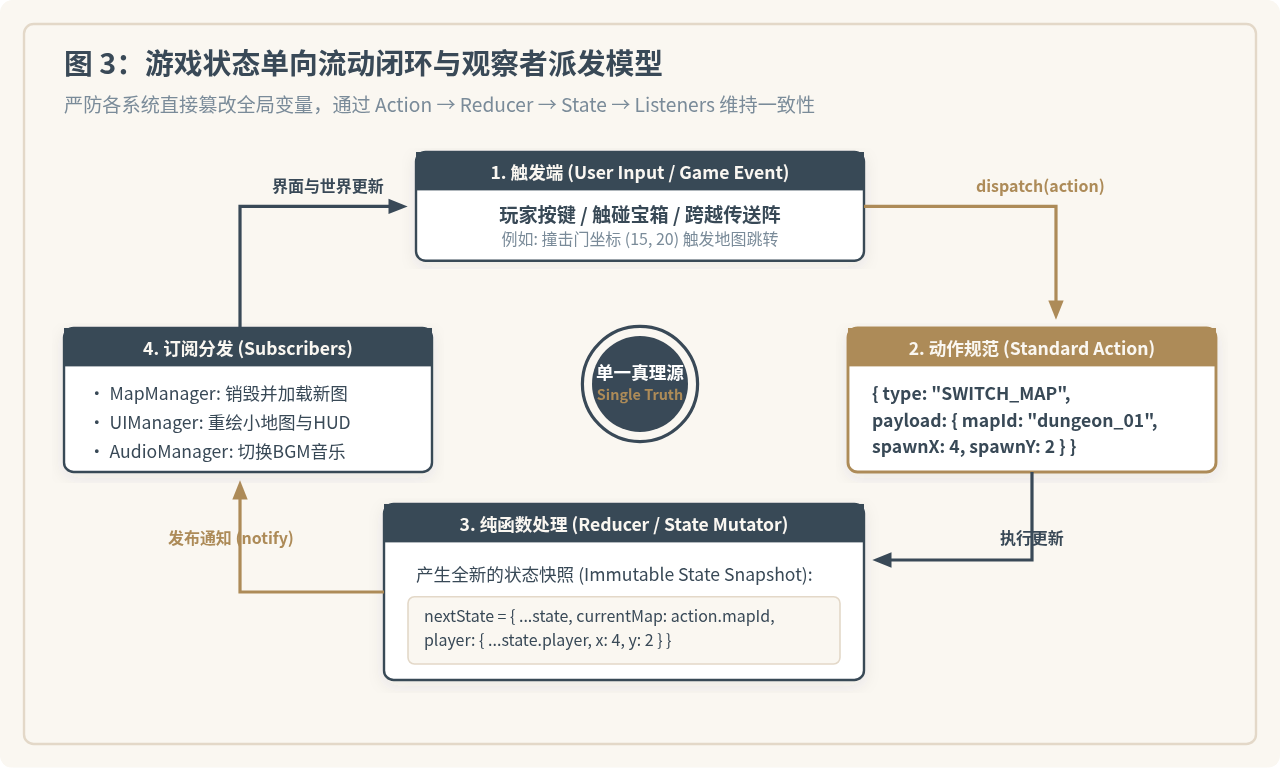
图 3:游戏状态单向流动闭环与观察者派发模型
1. 轻量响应式 Store 的实现
采用借鉴 Redux 思想的微型状态容器,所有业务变更必须由标准动作(Action)发起,经由纯函数更新,并通过事件总线通告订阅方:
// /src/state/Store.js
export class GameStore {
  constructor(initialState, reducer) {
    this.state = initialState;
    this.reducer = reducer;
    this.listeners = new Set();
  }

  getState() {
    return this.state;
  }

  dispatch(action) {
    const prevState = this.state;
    this.state = this.reducer(this.state, action);
    // 浅比较状态引用是否发生变更
    if (this.state !== prevState) {
      for (const listener of this.listeners) {
        listener(this.state, prevState, action);
      }
    }
  }

  subscribe(listener) {
    this.listeners.add(listener);
    return () => this.listeners.delete(listener); // 返回注销订阅回调
  }
}
2. 状态树定义与 Reducer 纯函数
// /src/state/Reducers.js
export const initialGameState = {
  currentMap: "town_main",
  player: {
    gridX: 10,
    gridY: 15,
    facing: "DOWN",
    hp: 100,
    maxHp: 100,
    gold: 50
  },
  mapFlags: {},    // 记录世界各处宝箱、机关状态,key形如 "town_main_chest_01"
  inventory: [],     // 背包物品
  questStage: 0      // 任务进度
};

export function gameReducer(state = initialGameState, action) {
  switch (action.type) {
    case "PLAYER_MOVE":
      return {
        ...state,
        player: {
          ...state.player,
          gridX: action.payload.x,
          gridY: action.payload.y,
          facing: action.payload.facing || state.player.facing
        }
      };

    case "OPEN_CHEST":
      return {
        ...state,
        mapFlags: {
          ...state.mapFlags,
          [action.payload.flagKey]: true
        },
        player: {
          ...state.player,
          gold: state.player.gold + (action.payload.goldReward || 0)
        },
        inventory: action.payload.item
          ? [...state.inventory, action.payload.item]
          : state.inventory
      };

    case "SWITCH_MAP":
      return {
        ...state,
        currentMap: action.payload.mapId,
        player: {
          ...state.player,
          gridX: action.payload.spawnX,
          gridY: action.payload.spawnY
        }
      };

    case "LOAD_SAVE":
      return { ...action.payload };

    default:
      return state;
  }
}
五、地图与状态的协同:碰撞、触发器与场景切换
当角色从当前格子尝试移向相邻格子时,必须先向 TileMap.isBlocked(targetX, targetY) 校验通行可行性;在通行判定通过后,再检测该格子是否包含传送点(Portal)或剧情触发区。
// /src/entities/Player.js
export class PlayerEntity {
  constructor(store, mapInstance) {
    this.store = store;
    this.map = mapInstance;
  }

  updateMap(newMap) {
    this.map = newMap;
  }

  tryMove(dirX, dirY, facing) {
    const currentPos = this.store.getState().player;
    const targetX = currentPos.gridX + dirX;
    const targetY = currentPos.gridY + dirY;

    // 1. 物理层障碍检测
    if (this.map.isBlocked(targetX, targetY)) {
      return false;
    }

    // 2. 状态分发:更新角色位置
    this.store.dispatch({
      type: "PLAYER_MOVE",
      payload: { x: targetX, y: targetY, facing }
    });

    // 3. 触发器检测(如传送阵)
    const trigger = this.map.getTriggerAt(targetX, targetY);
    if (trigger && trigger.type === "PORTAL") {
      this.store.dispatch({
        type: "SWITCH_MAP",
        payload: {
          mapId: trigger.targetMap,
          spawnX: trigger.targetX,
          spawnY: trigger.targetY
        }
      });
    }
    return true;
  }
}
在场景中放置的宝箱 NPC 也是根据 state.mapFlags[chestId] 动态渲染开箱或闭箱的切片纹理。即使玩家切换地图再返回,只要全局状态树中的 mapFlags 存在记录,宝箱便永不重置。
六、状态持久化与存档系统设计
由于将所有动态数据全部隔离到了 GameStore 内部,游戏存档不再需要反向侵入视图层,而只需对纯状态树进行 JSON 序列化。
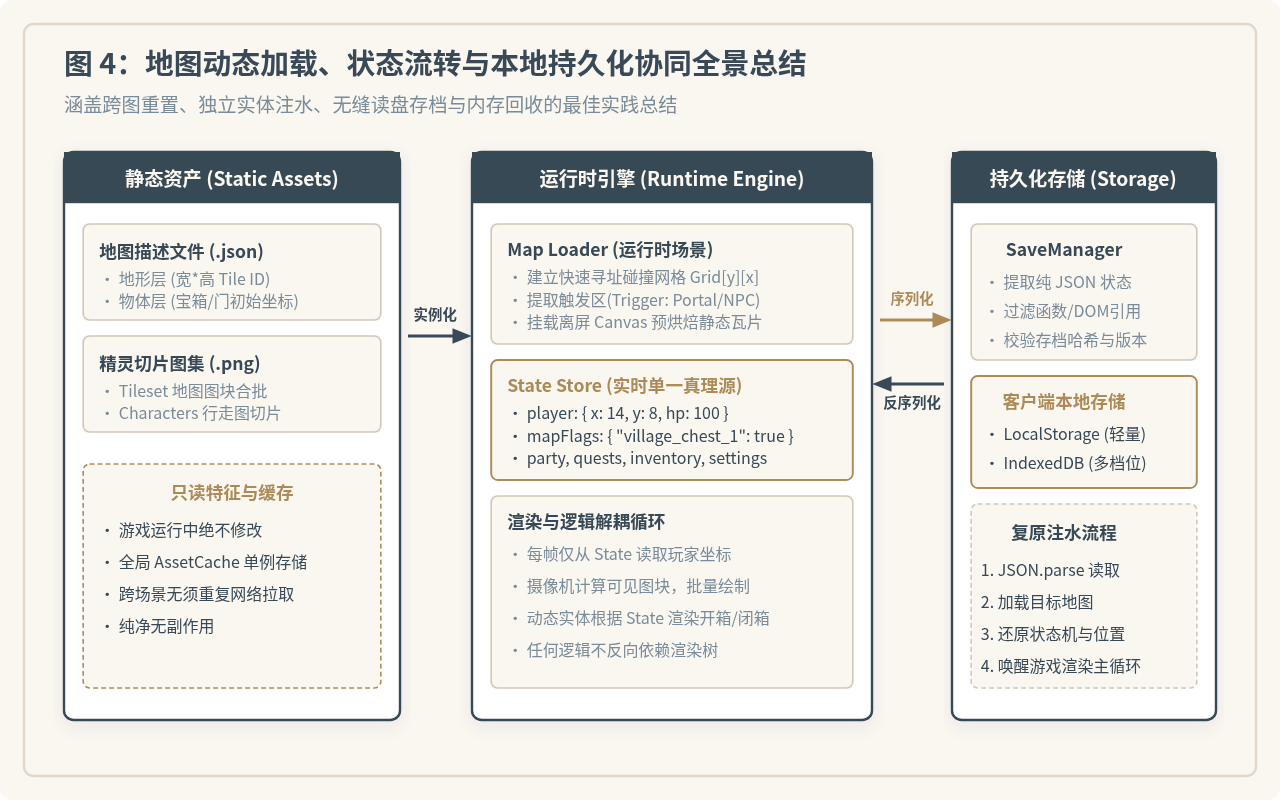
图 4:地图动态加载、状态流转与本地持久化协同全景总结
// /src/state/SaveManager.js
const SAVE_SLOT_KEY = "RPG_SAVE_SLOT_1";

export class SaveManager {
  static save(store) {
    try {
      const state = store.getState();
      const payload = {
        timestamp: Date.now(),
        version: "1.0.0",
        data: state
      };
      localStorage.setItem(SAVE_SLOT_KEY, JSON.stringify(payload));
      return true;
    } catch (err) {
      console.error("存档写入失败:", err);
      return false;
    }
  }

  static load(store, gameSceneManager) {
    try {
      const raw = localStorage.getItem(SAVE_SLOT_KEY);
      if (!raw) return false;

      const payload = JSON.parse(raw);
      // 1. 恢复状态机
      store.dispatch({ type: "LOAD_SAVE", payload: payload.data });

      // 2. 命令场景管理器按读取的 mapId 重建地图和摄像机
      gameSceneManager.changeScene(payload.data.currentMap);
      return true;
    } catch (err) {
      console.error("读档失败,存档可能损坏:", err);
      return false;
    }
  }
}
七、常见陷阱与性能优化注意事项
在实际落地 HTML5 瓦片地图与状态系统时,容易遇到以下典型问题:
| 常见问题表现 | 根本原因分析 | 标准修复方案 |
|---|---|---|
| 地图平移时图块间出现白色细黑闪烁接缝 | 摄像机坐标带有浮点小数,Canvas 开启亚像素平滑导致边缘像素采样泄露 | 在 ctx.drawImage 前使用 Math.floor() 强制像素对齐,或在 Canvas 上下文设置 imageSmoothingEnabled = false。 |
| 换图后按键反应迟钝、帧率每况愈下 | 上一个场景注册的按键监听器与 Store 订阅函数未在销毁时 unsubscribe |
在 Scene.destroy() 生命周期中集中注销所有监听器,并清空离屏缓冲 Canvas 引用。 |
| 大地图移动时 GPU 占用偏高 | 地面底层(Ground Layer)几乎无动态变动,但每帧仍重复切片贴图计算 | 可按块创建离屏 Canvas(例如 512×512 尺寸分块预渲染烘焙),主屏只需一次性 blit 整块大图。 |
架构落地总结
构建健壮 JavaScript RPG 的核心在于“职责单一”:
- TileMap 只负责空间几何与静态像素:提供网格碰撞布尔查询与可见范围切片渲染,绝不私自存贮金币、等级或剧情进度。
- Store 只负责纯净数据模型:单向接收指令、产出快照,通过单一真理源实现一键读写存档与热拔插调试。
- 主循环与摄像机连通二者:以稳定的 60Hz 步长驱动实体逻辑,使渲染层退化为只读的投影屏幕。
实用工具推荐
电子包浆
使用 ›绿化、压缩、噪点和虚拟水印,自由调节做旧程度。
图片压缩
使用 ›选择画质和输出格式,预览压缩前后的大小。
作者最新文章
相关文章