

本文介绍使用JavaScript实现动态时钟的方法。核心思路是调用时间库获取当前时间,并引入颜色数组。通过将时间显示嵌套在div中,利用随机数机制让颜色数组中的颜色随机变化,从而在时间更新时实现颜色的动态切换效果。
JavaScript实现动态变色时钟
本文分享使用JavaScript开发动态时钟的具体代码方案,供读者参考学习。
运行效果如图所示。
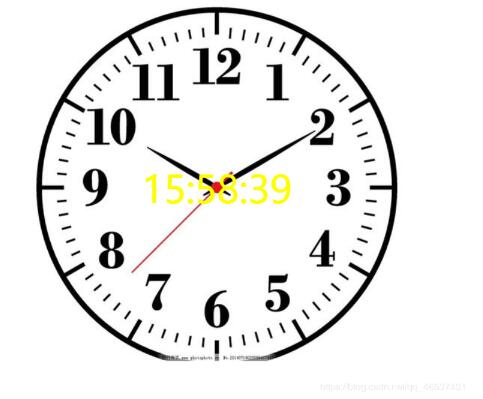
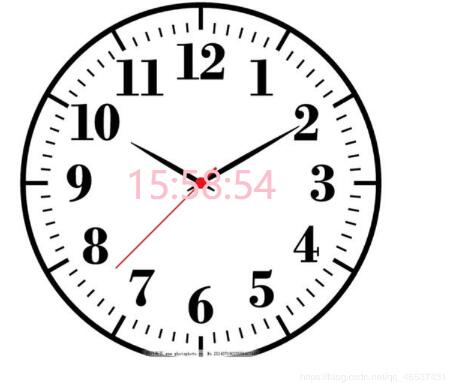
实现原理主要基于调用时间库获取数据,并额外添加一个颜色数组。将显示时间的文本嵌套在一个div容器中,通过算法从颜色数组中随机选取颜色并赋值给该div,从而在时间更新时实现颜色的随机变化效果。
完整源代码如下。
<!DOCTYPE html>
<html>
 <head>
 <meta charset="utf-8">
 <title>网页时钟</title>
 <style>

 </style>
 </head>
 <style>

 .center{
  background: url(img/shizhong.jpg) no-repeat center;
   font-size: 50px;
   height: 600px;
   line-height: 620px;
   text-align: center;
 }
 </style>
 <body>
 <div class="center" id = "spanTip"></div>
 </body>
 <script>
 //格式化时间 给前面加个0;
 function addZero(num){ return num < 10? '0' + num : num; }
 function genDate(){
 var date = new Date();
 //获取时间
 var dateStr =addZero(date.getHours()) +":"+addZero(date.getMinutes())+":"+addZero(date.getSeconds());
 var spanTip = document.getElementById("spanTip");
 spanTip.innerHTML = dateStr;
 //颜色数组
 var color = ['red', 'green', 'yellow', 'blue', 'black', 'gold', 'orange', 'gray', 'pink', 'maroon']; //钟表颜色数组
  var radom = Math.floor(Math.random() * color.length ); //随机数
  spanTip.style.color = color[radom]; //设置随机颜色
 }
 window.setInterval("genDate()",1000);
</script>
</html>
以上为本文全部内容,希望能为读者的学习提供协助,欢迎继续支持本站。