

本文提供基于HTML、CSS和JavaScript构建简易计算器的完整代码实例。内容涵盖HTML结构布局、CSS样式美化以及JS逻辑处理,通过具体代码展示如何实现基本的加减乘除及清除功能,适合前端初学者参考学习。
简易计算器实现概述
利用HTML、CSS和JavaScript技术,可以构建一个功能简单的计算器应用。
最终实现的界面效果如下图所示:
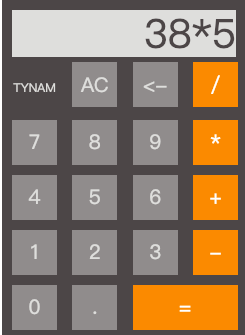
实现该计算器所需的HTML结构代码如下:
HTML结构代码
<!DOCTYPE html>
<html lang="en">
<head>
  <meta charset="UTF-8">
  <meta name="viewport" content="width=device-width, initial-scale=1.0">
  <meta http-equiv="X-UA-Compatible" content="ie=edge">
  <title>calculator</title>
  <link rel="stylesheet" type="text/css" href="style.css" rel="external nofollow" >
  <script type="text/javascript" src="contain.js"></script>
  <title>Document</title>
</head>
<body>
  <div class="calculator">
  <form name="calculator">
    <input type="text" id="display" value="">
      <br>
    <input type="button" class="btn number txt" value="TYNAM">
    <input type="button" id="clear" class="btn number" value="AC" onclick="cleardisplay();">
    <input type="button" class="btn number" value="<-" onclick="del();">
    <input type="button" class="btn operator" value="/" onclick="get(this.value);">
      <br>
    <input type="button" class="btn number" value="7" onclick="get(this.value);">
    <input type="button" class="btn number" value="8" onclick="get(this.value);">
    <input type="button" class="btn number" value="9" onclick="get(this.value);">
    <input type="button" class="btn operator" value="*" onclick="get(this.value);">
      <br>
    <input type="button" class="btn number" value="4" onclick="get(this.value);">
    <input type="button" class="btn number" value="5" onclick="get(this.value);">
    <input type="button" class="btn number" value="6" onclick="get(this.value);">
    <input type="button" class="btn operator" value="+" onclick="get(this.value);">
      <br>
    <input type="button" class="btn number" value="1" onclick="get(this.value);">
    <input type="button" class="btn number" value="2" onclick="get(this.value);">
    <input type="button" class="btn number" value="3" onclick="get(this.value);">
    <input type="button" class="btn operator" value="-" onclick="get(this.value);">
      <br>
    <input type="button" class="btn number" value="0" onclick="get(this.value);">
    <input type="button" class="btn number" value="." onclick="get(this.value);">
    <input type="button" class="btn operator equal" value="=" onclick="calculates();">
  </form>
  </div>
</body>
</html>
用于控制页面布局和样式的CSS代码如下:
CSS样式代码
* {
  border: none;
  font-family: 'Open Sans', sans-serif;
  margin: 0;
  padding: 0;
}

.calculator {
  background-color: #fff;
  height: 600px;
  margin: 50px auto;
  width: 600px;
}

form {
  background-color: rgb(75, 70, 71);
  padding: 5px 1px auto;
  width: 245px;
}
.btn {
  outline: none;
  cursor: pointer;
  font-size: 20px;
  height: 45px;
  margin: 5px 0 5px 10px;
  width: 45px;

}
.btn:first-child {
  margin: 5px 0 5px 10px;
}

#display {
  outline: none;
  background-color: #dededc;
  color: rgb(75, 70, 71);
  font-size: 40px;
  height: 47px;
  text-align: right;
  width: 224px;
  margin: 10px 10px auto;
}
.number {
  background-color: rgb(143, 140, 140);
  color: #dededc;
}

.operator {
  background-color: rgb(239, 141, 49);
  color: #ffffff;
}

.equal{
  width: 105px;
}

.txt{
  font-size:12px;
  background: none;
}
负责处理用户交互和计算逻辑的JavaScript代码如下:
JavaScript逻辑代码
/* display clear */
function cleardisplay() {
  document.getElementById("display").value = "";
}

/* del */
function del() {
  var numb = "";
  numb = document.getElementById("display").value;
  for(i=0;i<numb.length;i++)
  {
    document.getElementById("display").value = numb.substring(0,numb.length-1);
    if(numb == '')
    {
      document.getElementById("display").value = '';
    }
  }
}

/* recebe os valores */
function get(value) {
  document.getElementById("display").value += value;
}

/* calcula */
function calculates() {
  var result = 0;
  result = document.getElementById("display").value;
  document.getElementById("display").value = "";
  document.getElementById("display").value = eval(result);
};
上述内容即为本文分享的全部代码与实现细节,希望能为读者的学习提供便利,同时也欢迎读者继续支持本站。