

本文介绍了如何使用JavaScript实现一个简单的抽奖转盘效果。通过HTML构建转盘结构,CSS进行样式布局,并利用JS控制旋转动画及停止逻辑,帮助开发者快速掌握前端交互实现。
JS简单抽奖转盘实现
本文详细介绍如何利用JavaScript实现一个简易的抽奖转盘功能,供读者参考学习。
<!DOCTYPE html>
<html lang="en">
<head>
  <meta charset="UTF-8">
  <title>www.jb51.net JS抽奖转盘</title>
  <style>
  *{
    margin:0;
    padding:0;
    list-style: none;
  }
    .big{
      width: 318px;
      height: 318px;
      margin:100px auto;
    }
    .big>div{
      width: 100px;
      height: 100px;
      background: pink;
      float: left;
      line-height: 100px;
      text-align: center;
      border: solid;
    }
    .big>div:nth-of-type(5){
      background: yellow;
      cursor: pointer;
    }
    #act{
      background: red;
    }
  </style>
</head>
<body>
<div class="big">
  <div class="small" id="act">1</div>
  <div class="small">2</div>
  <div class="small">3</div>
  <div class="small">8</div>
  <div id="cj">点击抽奖</div>
  <div class="small">4</div>
  <div class="small">7</div>
  <div class="small">6</div>
  <div class="small">5</div>
</div>
<script>
  var arrDiv=document.getElementsByClassName("small");
  var oCj=document.getElementById("cj");
  var num=0;
  var shijian=Math.random()*5000+3200;
  oCj.onclick=function(){
    oTime=setInterval(dianji,200);
  }
  function dianji() {
    num=num+1;
    if (num>arrDiv.length-1){
      num=0
    }
    for(j=0;j<arrDiv.length;j++){
      arrDiv[j].id="";
    }
    arrDiv[num].id="act";
    setTimeout(tingzhi,shijian);
    function tingzhi() {
      clearInterval(oTime)
    }
   }
</script>
</body>
</html>
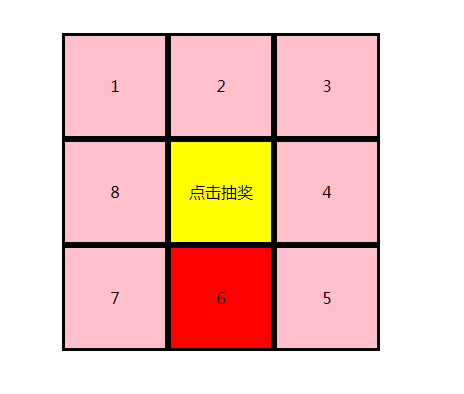
建议使用在线HTML/CSS/JavaScript代码运行工具(http://tools.jb51.net/code/HtmlJsRun)对上述代码进行测试,以查看实际运行效果。
如需深入了解JavaScript相关知识,可查阅本站专题,包括《JavaScript数学运算用法总结》、《JavaScript数据结构与算法技巧总结》、《JavaScript数组操作技巧总结》、《JavaScript排序算法总结》、《JavaScript遍历算法与技巧总结》、《JavaScript查找算法技巧总结》以及《JavaScript错误与调试技巧总结》。
期望本文提供的方案能对各位JavaScript程序员的开发工作有所助益。