

本文介绍JavaScript中Math.floor()函数的基本语法与功能。该函数接收一个数字参数,返回小于或等于该参数的最大整数。通过包含正数、负数及混合运算的代码示例,展示了其在实际开发中的具体应用效果。
Math.floor() 函数语法与功能
Math.floor() 函数的基本语法如下:
Math.floor( x ) ;其中 x 代表输入的数字,该函数会返回小于或等于 x 的最大整数值。
接下来通过具体示例进行说明。
参考以下代码实现:
代码示例与运行结果
<!DOCTYPE html>
<html>
 <head>
  <title></title>
 </head>
 <body>
<script type="text/javascript">
 document.write(Math.floor(-2)+"<br/>");
 document.write(Math.floor(-2.56)+"<br/>");
 document.write(Math.floor(2.56)+"<br/>");
  document.write(Math.floor(7.2+9.3));
</script>
 </body>
</html>
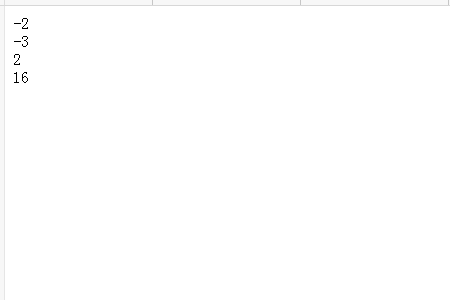
在浏览器中运行上述代码,输出结果均显示为小于或等于原数值的最大整数。
以上是关于 JavaScript 中 floor 函数的全部内容,感谢阅读。