

本文介绍如何在 Webpack 中使用 copy-webpack-plugin 插件,将项目中未引用的静态资源(如图片、文档)直接复制到指定输出目录。通过配置 from 和 to 参数,实现构建时自动保留并输出这些额外资源,适用于需要保留设计图或开发文档的场景。
目录结构
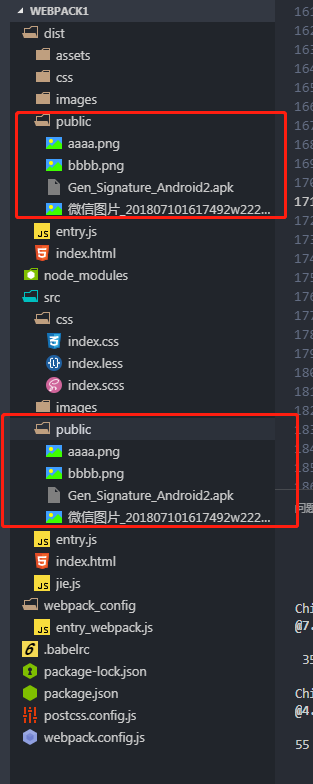
使用 copy-webpack-plugin 集中输出静态资源
copy-webpack-plugin
在实际开发中,往往存在一些已在项目中存在但未被代码直接引用的静态资源,例如设计稿图片或开发文档等。这些资源可能是文档形式,也可能是额外的图片文件。为了在构建过程中保留这些静态资源,我们需要将其直接打包到指定的文件夹中。
安装依赖
cnpm install copy-webpack-plugin --save-dev
webpack.config.js
- from 参数指定需要打包的静态资源源目录。此处使用的 __dirname 是 Node.js 提供的语法,用于直接定位到当前本机项目根目录。
- to 参数指定资源打包输出的目标文件夹路径,该路径需跟随 output 配置中的目录设置。因此,在配置 to 时无需再次添加 __dirname。
const copyWebpackPlugin = require('copy-webpack-plugin');
...
  plugins: [
    new copyWebpackPlugin([{
      from: __dirname + '/src/public',
      to:'./public'
    }])
  ],
打包,运行
npm run build
npm run server
webpack.config.js全部代码
const path = require('path');
const glob = require('glob');
const uglify = require('uglifyjs-webpack-plugin');
const htmlPlugin = require('html-webpack-plugin');
const ExtractTextPlugin = require("extract-text-webpack-plugin");
const PurifyCSSPlugin = require('purifycss-webpack');
const entry = require('./webpack_config/entry_webpack');
const webpack = require('webpack');
const copyWebpackPlugin = require('copy-webpack-plugin');
console.log(encodeURIComponent(process.env.type));
if (process.env.type == 'build') {
  var website = {
    publicPath: "http://pengrongjie.top:1717/"
  }
} else {
  var website = {
    publicPath: "http://192.168.1.9:1717/"
  }
}

module.exports = {
  // devtool: 'source-map',
  // 入口
  entry: {
    entry: './src/entry.js',
    jquery: 'jquery',
    vue:'vue'
  },
  // entry:entry.path,
  // 出口
  output: {
    //绝对路径
    path: path.resolve(__dirname, 'dist'),
    filename: '[name].js',
    publicPath: website.publicPath
  },
  // 模块
  module: {
    //规则
    rules: [
      // {
      //   test: /\.css$/,
      //   use: [
      //     {
      //       loader:'style-loader'
      //     }
      //   ]
      // },
      {
        test: /\.css$/,
        use: ExtractTextPlugin.extract({
          fallback: "style-loader",
          // use: "css-loader"
          use: [
            { loader: 'css-loader', options: { importLoaders: 1 } },
            'postcss-loader'
          ]
        })
      },
      {
        test: /\.(png|jpg|gif)/,
        use: [{
          loader: 'url-loader',
          options: {
            limit: 5000,
            outputPath: 'images/',
          }
        }]
      }, {
        test: /\.(htm|html)$/i,
        use: ['html-withimg-loader']
      },
      // {
      //   test: /\.less$/,
      //   use: [{
      //     loader: 'style-loader'
      //   }, {
      //     loader: 'css-loader'
      //   }, {
      //     loader: 'less-loader'
      //   }]
      // }
      {
        test: /\.less$/,
        use: ExtractTextPlugin.extract({
          use: [{
            loader: 'css-loader',
            options: { importLoaders: 1 }
          }, {
            loader: 'less-loader'
          },'postcss-loader'],
          fallback: 'style-loader'
        })
      },
      // {
      //   test: /\.scss$/,
      //   use: [{
      //     loader:'style-loader'
      //   },{
      //     loader:'css-loader'
      //   },{
      //     loader:'sass-loader'
      //   }]
      // },
      {
        test: /\.scss$/,
        use: ExtractTextPlugin.extract({
          use: [{
            loader: 'css-loader',
            options: { importLoaders: 1 }
          }, {
            loader: 'sass-loader'
            },
            'postcss-loader'],
          fallback: 'style-loader'
        })
      },
      // {
      //   test:/\.(js|jsx)$/,
      //   use:{
      //     loader:'babel-loader',
      //     options:{
      //       presets:[
      //         'es2015',
      //         'react'
      //       ]
      //     }
      //   },
      //   //过滤掉,不编译node_modules中的文件,
      //   exclude:/node_modules/
      // },
      {
        test:/\.(js|jsx)$/,
        use:{
          loader:'babel-loader',
        },
        //过滤掉,不编译node_modules中的文件,
        exclude:/node_modules/
      }

    ]
  },
  //插件
  plugins: [
    // new webpack.ProvidePlugin({
    //   $:'jquery'
    // }),
    // new uglify()
    new htmlPlugin({
      minify: {
        removeAttributeQuotes: true
      },
      hash: true,
      template: './src/index.html'
    }),
    new ExtractTextPlugin("css/index.css"),
    new PurifyCSSPlugin({
      paths:glob.sync(path.join(__dirname,'src/*.html')),
    }),
    new webpack.BannerPlugin('jie的注释'),
    // new webpack.optimize.CommonsChunkPlugin({
    //   name: 'jquery',
    //   filename: 'assets/js/jquery.min.js',
    //   minChunks:2
    // })
    new webpack.optimize.CommonsChunkPlugin({
      name: ['jquery','vue'],
      filename: 'assets/js/[name].js',
      minChunks:2
    }),
    new copyWebpackPlugin([{
      from: __dirname + '/src/public',
      to:'./public'
    }])
  ],
  //开发服务
  devServer: {
    contentBase: path.resolve(__dirname, 'dist'),
    host: '192.168.1.9',
    compress: true, //服务端是否启用压缩
    port: 1717
  },
  watchOptions: {
    //检测修改的时间,以毫秒为单位
    poll: 1000,
    //防止重复保存而发生重复编译错误。这里设置的500是半秒内重复保存,不进行打包操作
    aggregateTimeout: 500,
    //不监听的目录
    ignored:/node_modules/
  }
}
以上就是本文的全部内容,希望对大家的学习有所帮助,也希望大家多多支持本站。