

本文介绍如何利用jQuery.bigautocomplete插件在前端实现搜索框的模糊查询与下拉匹配效果。通过整合HTML结构、CSS样式及Bootstrap框架,配合JavaScript配置数据源与回调函数,实现用户输入时动态显示匹配关键词及结果数量,提升搜索交互体验。
功能概述
为了帮助用户更快速地定位特定关键词或商品,前端开发中常需实现模糊查询与下拉匹配功能。本文将直接展示具体实现方案,旨在为开发者提供实用参考。
以下是搜索框模糊查询及下拉匹配效果的HTML结构部分。
HTML结构实现
<!------------搜索框模糊查询带下拉匹配效果html---------------------->
<div class="gover_search">
  <div class="gover_search_form">
    <form action="#" method="post" name="searchform" id="searchform" class="searchinfo">
      <ul>
        <li>
          <input type="text" id="tt" value="" class="text" autocomplete="off" />
          <p class="search"><img src="img/search-1.png" alt=""></p>
          <p class="camera"><img src="img/camera.png" alt=""></p>
        </li>
        <li class="searchBtns-1"><img src="img/searchBtn.png" alt=""></li>
      </ul>
    </form>
  </div>
</div>
接下来是相关的CSS样式代码部分。
CSS样式配置
.fl {float: left;}
.fr {float: right;}
.clearfix:after {  content: '';
  display: block;
  clear: both;
  visibility: hidden;
  height: 0;
}
.clearfix { zoom: 1}
.mar0 { margin: 0 auto;}
.pos1 {position: relative;}
input {
  border: none;
  outline: none;
}
.w100 {width: 100%;}
.gover_search{
 width: 420px;
 position: relative;
 border-radius: 20px;
 height: 42px;
 border: 2px solid #fb6910;
 background:#fff;
 margin-top: 50px;
 margin-left: 90px;
}
.searchinfo ul{
 list-style: none;
}
.gover_search_form {
 height: 37px;
 width: 420px;
 position: relative;
}
/*输入框*/
.searchinfo .text{
 margin: 0;
 width: 334px;
 height: 38px;
 outline: none;
 vertical-align: middle;
 float: left;
 padding-left: 27px;
 line-height: 40px;
 margin-left: 16px;
}
/*搜索按钮*/
.searchinfo .button {
 width: 120px;
 height: 40px;
 border: none;
 background-color: #4b140d;
 color: #fff;
 font-size: 19px;
 font-weight: bold;
 outline: none;
 float: left;
}
/*<!--隐藏的搜索框下拉列表-->*/
.bigautocomplete-layout{
 position: absolute;
 z-index: 999;
 left: 0px;
 max-height: 260px;
 overflow-y: auto;
 overflow-x: hidden;
 top: 213px !important;
 width: 336px !important;
 border: 1px solid #ccc;
 border-top: none;
 display: none;
 color: #004080;
 background-color: #fff;
}
.bigautocomplete-layout table{
 width:336px !important;
}
.bigautocomplete-layout table tr{
 margin-bottom:5px !important;
 cursor:pointer;
}
.bigautocomplete-layout table tr td{
 height: 25px !important;
 width: 336px !important;
 padding:0 10px !important;
 line-height: 25px !important;
}
.bigautocomplete-layout table tr:hover{
 background-color:#fb6910 !important;
 color:#fff;
}
.bigautocomplete-layout table tr:hover td div{
 color:#fff;
}
.bigautocomplete-layout table tr:hover td div span{
 color:#fff;
}
/*搜索框下拉列表关键字数量*/
.keyRightSpan{
 float: right;
 display: block;
 width: auto;
 height: 25px !important;
 line-height: 25px !important;
 padding-right:8px
}
.ct{
 background-color: #fff;
}
/*关闭搜索框下拉列表按钮*/
.search {
 width: 22px;
 height: 22px;
 position: absolute;
 top: 9px;
 left: 12px;
 z-index: 2;
}
.search img {
 width: 100%;
 height: 100%;
}
.camera {
 width: 22px;
 height: 22px;
 position: absolute;
 top: 9px;
 right: 80px;
 z-index: 2;
}
.camera img {
 width: 100%;
 height: 100%;
}
.searchBtn {
 width: 70px;
 height: 40px;
 position: absolute;
 top: 0px;
 right: 0px;
 z-index: 2;
}
.searchBtn img {
 width: 100%;
 height: 100%;
}由于项目使用了Bootstrap框架,因此引入了<link rel="stylesheet" href="css/bootstrap.css" rel="external nofollow" >以应用其基础样式,开发者可根据实际需求进行微调。
在样式定义完成后,需通过JavaScript实现下拉匹配逻辑,核心在于引入jquery.bigautocomplete.js插件。
JavaScript逻辑与插件使用
<script src="js/jquery-3.1.1.js"></script>
<script src="js/index.js"></script>
<script src="js/jquery.bigautocomplete.js"></script>
以下是实现该效果所需的JavaScript代码部分。
// 隐藏的搜索框下拉列表
$(function () {
  var num = 0;
  $("#tt").bigAutocomplete({
    width: 543,
    data: [{title: "牛栏山<span class='keyRightSpan'>约5个结果</span>", result: {ff: "qq"}},
      {title: "郎酒<span class='keyRightSpan'>约2个结果</span>"},
      {title: "茅台<span class='keyRightSpan'>约4个结果</span>"},
      {title: "五粮液<span class='keyRightSpan'>约2个结果</span>"},
      {title: "水井坊<span class='keyRightSpan'>约7个结果</span>"},
      {title: "汾酒<span class='keyRightSpan'>约3个结果</span>"},
      {title: "洋府<span class='keyRightSpan'>约2个结果</span>"},
      {title: "董酒<span class='keyRightSpan'>约5个结果</span>"},
      {title: "剑南春<span class='keyRightSpan'>约2个结果</span>"},
      {title: "劲酒<span class='keyRightSpan'>约8个结果</span>"}],
    callback: function (data) {
      console.log(data.title);
    }
  });
})
效果展示与交互说明
下图展示了该功能的实际运行效果。
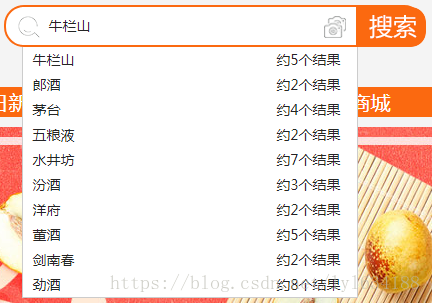
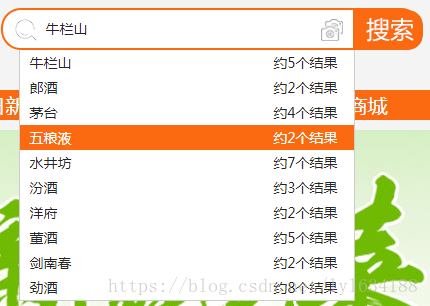
当鼠标悬浮在某个关键词上时,该选项会被高亮选中;点击后,其对应的值(value)将被填入input输入框中。
总结
总结
以上介绍了JS实现模糊查询带下拉匹配效果的具体方法,希望能为读者带来帮助。如有任何疑问,欢迎留言交流,小编将及时回复。感谢大家对本站的支持!