

本文详细介绍如何使用原生JavaScript开发一个功能完整的TodoList应用。项目涵盖DOM元素操控、事件触发逻辑、数据持久化存储及界面交互。通过具体代码示例,演示如何添加、编辑、删除待办事项,利用localStorage实现数据缓存,并支持分类管理与批量清除功能,帮助开发者掌握前端基础交互与状态管理的核心技巧。
项目概述与功能介绍
本项目旨在通过开发TodoList应用,深入练习JavaScript对DOM元素的操控、事件机制及其触发逻辑,同时掌握数据的本地缓存写入与读取方法。
主要功能包括:
- 接收用户输入,将其添加至待办事项列表。
- 支持对TodoList进行分类管理,用户可通过勾选操作将待办项标记为已完成,并归入已完成组。
- TodoList中的每一项均支持删除和编辑操作。
- 利用localStorage本地缓存技术,将用户输入的数据进行持久化保存,确保数据不丢失。
- 提供清除域名下本地缓存的功能,执行后可清空所有TodoList项。
功能实现细节
具体功能的实现细节如下:
HTML结构代码
HTML结构代码
<!DOCTYPE html>
<html lang="en">
<head>
 <meta charset="UTF-8">
 <title>todolist-prime</title>
 <link rel="stylesheet" href="yuansheng.css" rel="external nofollow" >
</head>
<body>

 <header>
  <section>
   <label for="add_list">My todolist</label>
   <input type="text" id="add_list" name="add_list" placeholder="type here" required>
  </section>
 </header>

 <div class="content">
  <h1>未完成<span id="todocount"></span></h1>
  <ol id="todolist">
  </ol>

  <h1>已完成<span id="donecount"></span></h1>
  <ol id="donelist">
  </ol>
 </div>

 <div id="clear">
 <span style="white-space:pre;">	</span><button id="clearbutton"><h3>全部清除</h3></button>
 </div>
 <script src="todolist-prime.js"></script>
</body>
</html>
JavaScript核心代码及逻辑分析
JavaScript核心代码及逻辑分析
首先创建一个数组对象用于存储用户输入的数据。数组中的每一项均为一个对象,其中“todo”属性保存用户输入的具体内容,“done”属性作为标签,用于对“todo”值进行分类管理。
每次用户完成数据输入后,系统需立即更新缓存,并重置输入框内容。
function addTodolist(e) {
 var obj_list = {
  todo: "", //用于存储用户输入的数据
  done: false  //初始化用户输入的数据属性,以便对用户待办事项进行分类
 };
 document.getElementById("add_list").value = document.getElementById("add_list").value.trim();
 if (document.getElementById("add_list").value.length === 0){
  alert("不能为空");
  return;
 }

 obj_list.todo = document.getElementById("add_list").value;
 todolist.push(obj_list);

 saveData(todolist);

 document.getElementById("add_list").value = "";  //初始化输入框
 load();  //将用户输入的数据添加至dom节点
 document.getElementById("add_list").focus();
}
将输入的数据渲染至DOM节点,并根据数据属性(“done”)的值进行分类展示。
<span style="font-size:14px;">function load(){
 var todo = document.getElementById("todolist"),
  done = document.getElementById("donelist"),
  todocount = document.getElementById("todocount"),
  donecount = document.getElementById("donecount"),
  todoString = "",
  doneString = "",
  todoCount = 0,
  doneCount = 0;
 document.getElementById("add_list").focus();

 todolist = loadData();

 //todolist数组对象里若包含用户输入数据,则将其添加至dom节点;若为空对象,则初始化页面。
 if (todolist != null){
  for (var i=0; i<todolist.length; i ++){
   if(!todolist[i].done){
    todoString += "<li>"
//通过onchange事件,复选框值有改变则调用update函数,并改变输入数据“done”属性的布尔值,这样
//下次load()后,这段数据会进入不同的分组,未完成的事项分入已完成事项组,已完成事项分入未完成事项组
//点击事项调用edit函数
//点击“-”,调用remove函数
     + "<input type='checkbox' onchange='update("+i+", \"done\", true)'>"
     + "<p id='p-"+i+"' onclick='edit("+i+")'>" + todolist[i].todo + "</p>" +
     "<a onclick='remove("+i+")'>-</a>" +
     "</li>"; //将每次用户输入的数据,通过节点<p>利用id标记,以便后续编辑功能定位
    todoCount ++;
   }
   else{
    doneString += "<li>"
     + "<input type='checkbox' "
     + "onchange='update("+i+", \"done\", false)' checked>"
     + "<p id='p-"+i+"' onclick='edit("+i+")'>" + todolist[i].todo + "</p>"
     + "<a onclick='remove("+i+")'>-</a>"
     + "</li>";
    doneCount ++;
   }
  }

  todo.innerHTML = todoString;
  done.innerHTML = doneString;
  todocount.innerHTML = todoCount;
  donecount.innerHTML = doneCount;
 }
 else {
  todo.innerHTML = "";
  done.innerHTML = "";
  todocount.innerHTML = 0;
  donecount.innerHTML = 0;
 }
}</span>
当用户点击事项触发编辑事件时,系统将可编辑的表单控件插入对应段落中。随后,通过update函数将用户输入的新值更新至TodoList数组中存储的数据。
function edit(i) {
 var p = document.getElementById('p-' + i),
  pContent = p.innerHTML,
  inputId;

//通过upadate函数对todolist数组相应项进行更新,将用户输入的内容写入到todolist数组相应项的todo属性中
 function confirm() {
  if (inputId.value.length === 0) {
   p.innerHTML = pContent;
   alert("内容不能为空");
  }
  else {
   update(i, "todo", inputId.value); //修改事项内容后,更新数组里对应项"todo"属性的值,以便更新dom节点
  }
 }

//结合keypress事件,按下enter键,调用confirm函数
 function enter(e) {
  if (e.keyCode == 13){
   confirm();
  }
 }

 p.innerHTML = "<input type='text' id='input-"+i+"' value='"+pContent+"'>";
 inputId = document.getElementById('input-'+i);
 inputId.focus();
 inputId.setSelectionRange(0, inputId.value.length);
 inputId.onblur = confirm; //表单控件失去焦点,调用confirm函数,即对页面内容进行更新
 inputId.onkeypress = enter;  //对按键事件进行监控
}
更新数组中相应项的属性(“todo”或“done”),并重新加载界面以反映变化。
function update(i, field, value) {
 todolist[i][field] = value;
 saveData(todolist);
 load();
}
执行删除相应项的操作,并刷新界面显示。
function remove(i) {
 todolist.splice(i, 1);

 saveData(todolist); //相同名称的缓存会覆盖,更新缓存

 load();
}
将用户数据保存至本地缓存中。
function saveData(data) {
 localStorage.setItem("mytodolist", JSON.stringify(data)); //JS对象转换成JSON对象存进本地缓存
}
从本地缓存中获取数据,若存在数据,则将其赋值给TodoList数组,从而实现页面刷新后用户数据依然保留的效果。
function loadData() {
 var hisTory = localStorage.getItem("mytodolist");
 if(hisTory !=null){
  return JSON.parse(hisTory);  //JSON对象转换为JS对象
 }
 else { return []; }
}
执行清除本地缓存的操作。
function clear() {
 localStorage.clear();
 load();
}
配置一系列事件监听器以响应用户交互。
window.addEventListener("load", load); //页面加载完毕调用load函数
document.getElementById("clearbutton").onclick = clear;
document.getElementById("add_list").onkeypress = function (event) {
 if(event.keyCode === 13){
  addTodolist();
 }
};
CSS样式代码
CSS样式代码
body {
  margin: 0px;
  padding: 0px;
  font-size: 16px;
  background-color: gainsboro;
}
header {
  height: 50px;
  background-color: cornflowerblue;
}
header section {
  margin: 0 auto;
  width: 40%;
}

header section label {
  float: left;
  line-height: 50px; /*设置line-height和包含块高度一致,以实现行内元素垂直居中*/
  font-size: 20px;
}

#add_list {
  float: right;
  margin-top: 11px;
  width: 60%;
  height: 24px;
  border-radius: 5px;
  box-shadow: 0 1px 0 black;
  font-size: 18px;
  text-indent: 10px;
}

h1 {
  position: relative;
}

h1 span {
  position: absolute;
  top: 1px;
  right: 5px;
  display: inline-block;
  width: 23px;
  height: 23px;
  border-radius: 23px;  /*创建圆形标记*/
  line-height: 23px;
  font-size: 18px;
  text-align: center;
  background: #E6E6FA;
}

.content {
  width: 40%;
  margin: 0 auto;
}

li {
  position: relative;
  margin-bottom: 10px;
  border-radius: 5px;
  padding: 0 10px;
  height: 32px;
  box-shadow: 0 1px 0 black;
  line-height: 32px;
  background-color: burlywood;
  list-style: none;
}

ol li input {
  position: absolute;
  top: 4px;
  left: 10px;
  width: 20px;
  height: 20px;
  cursor: pointer;
}
p{
  margin: 0;
}
ol li p {
  display: inline;
  margin-left: 35px;
}

ol li p input{
  top: 5px;
  margin-left: 35px;
  width: 70%;
  height: 14px;
  font-size: 14px;
  line-height: 14px;
}

ol li a {
  position: absolute;
  top: 8px;
  right: 10px;
  display: inline-block;
  border: 1px;
  border-radius: 50%;
  width: 16px;
  height: 16px;
  font-size: 32px;
  line-height: 10px;
  color: red;
  font-weight: bolder;
  cursor: pointer;
  background-color: gray;
}

#clear {
  width: 100px;
  margin: 0 auto;
}

#clearbutton {
  border-color: red;
  border-radius: 5px;
  box-shadow: 0 1px 0 yellow;
  cursor: pointer;
}

button h3{
  font-size: 13px;
  line-height: 13px;
}
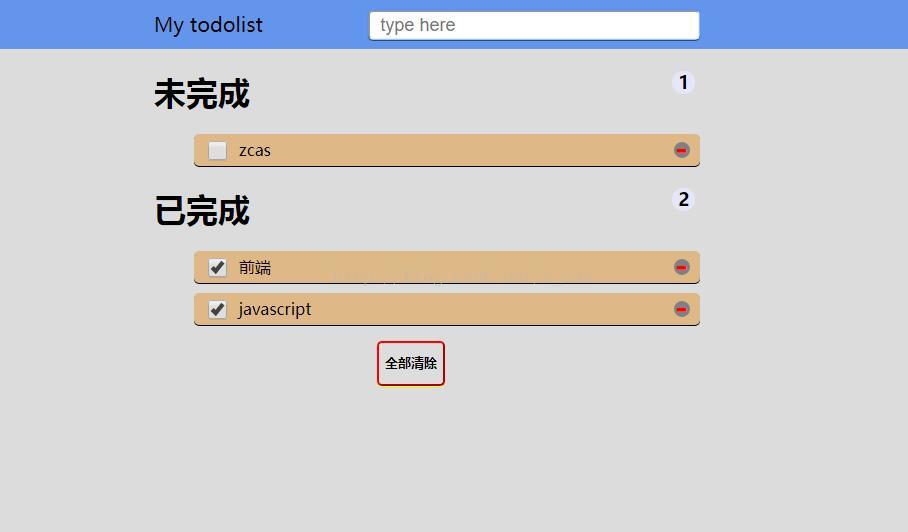
最终实现效果展示
最终实现效果展示
总结
总结
本项目参考了http://www.todolist.cn/,对代码进行了精简并添加了一些额外功能。在实现过程中,首先完成基本功能,随后逐步增加增强功能和界面美化。