

本文详解getBoundingClientRect方法获取HTML元素相对于视窗位置集合的功能,解析其返回的top、left、right、bottom属性含义,并针对IE6/7版本存在的偏移问题提供具体的兼容处理代码与修正方案。
getBoundingClientRect方法概述
1、getBoundingClientRect的作用
getBoundingClientRect方法用于获取页面中某个HTML元素相对于浏览器视窗的位置集合。
调用 object.getBoundingClientRect(); 后,会返回一个包含 top、right、bottom、left、width、height 属性的对象。
getBoundingClientRect()
该方法返回一个矩形对象,包含 left、top、right 和 bottom 四个属性,分别表示元素各边与页面左上角的距离。
属性值详解与图示
var box=document.getElementById('box'); // 获取元素

alert(box.getBoundingClientRect().top); // 元素上边距离页面上边的距离

alert(box.getBoundingClientRect().right); // 元素右边距离页面左边的距离

alert(box.getBoundingClientRect().bottom); // 元素下边距离页面上边的距离

alert(box.getBoundingClientRect().left); // 元素左边距离页面左边的距离
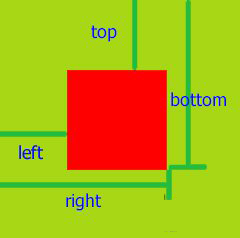
2.getBoundingClientRect上下左右属性值解释
其中 left 和 bottom 需要特别说明:left 指的是元素右边到页面最左边的距离,bottom 指的是元素底边到页面顶边的距离。
参考图示:
浏览器兼容性问题
3. 浏览器兼容性
IE5以上版本均支持此方法,但部分旧版浏览器存在细微差异需进行修正。
IE67的left、top会少2px,并且没有width、height属性。
4、利用getBoundingClientRect来写一个获取html元素相对于视窗的位置集合的方法
兼容处理代码实现
<div id="test" style="width: 100px; height: 100px; background: #ddd;"></div>
<script>
 function getObjXy(obj){
  var xy = obj.getBoundingClientRect();
  var top = xy.top-document.documentElement.clientTop+document.documentElement.scrollTop,//document.documentElement.clientTop 在IE67中始终为2,其他高级点的浏览器为0
   bottom = xy.bottom,
   left = xy.left-document.documentElement.clientLeft+document.documentElement.scrollLeft,//document.documentElement.clientLeft 在IE67中始终为2,其他高级点的浏览器为0
   right = xy.right,
   width = xy.width||right - left, //IE67不存在width 使用right - left获得
   height = xy.height||bottom - top;

  return {
   top:top,
   right:right,
   bottom:bottom,
   left:left,
   width:width,
   height:height
  }
 }

 var test = getObjXy(document.getElementById('test'));
 alert("top:" + test.top + ", right:" + test.right + ", bottom:" + test.bottom + ", left:" + test.left);
</script>
以上就是本文的全部内容,希望对大家的学习有所帮助,也希望大家多多支持本站。