

本文介绍使用 JavaScript 实现的一个简易四则运算计算器。通过 HTML 构建界面,利用 JS 处理按钮点击事件,将输入数字和运算符拼接至字符串,并在点击等号时调用 eval 方法计算最终结果。
JavaScript 简易四则运算计算器实现
本文通过一个具体实例,展示了如何使用 JavaScript 开发一个简单的四则运算计算器。该示例旨在为读者提供参考,便于在实际项目中借鉴应用。
首先,让我们查看一下计算器的实际运行效果。
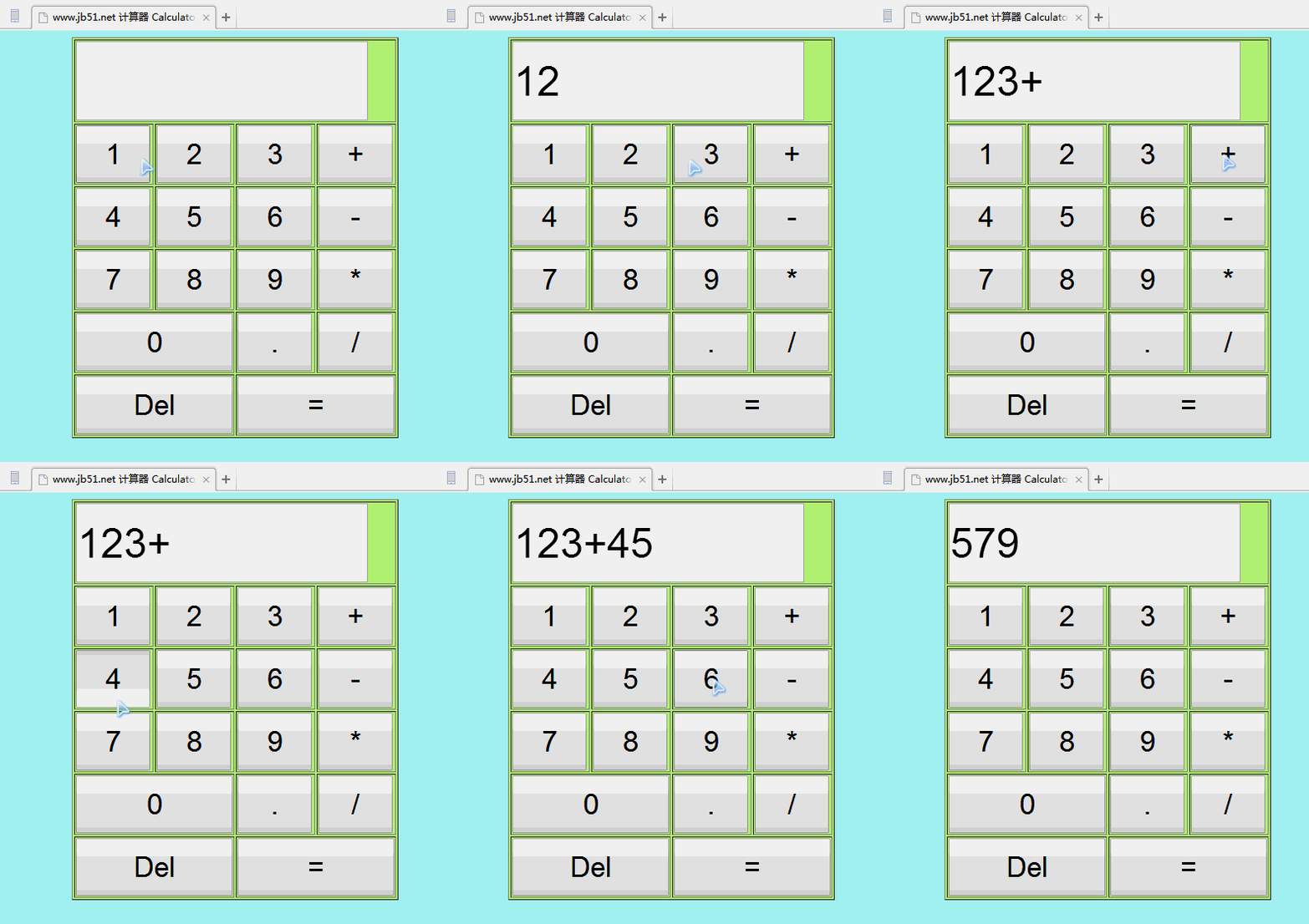
以下是实现该功能的具体代码。
<!DOCTYPE html>
<html>
<meta name="content-type" content="text/html; charset=UTF-8">
<head>
  <title>www.jb51.net 计算器 Calculator</title>
  <!--将按键内容以字符串形式存储在文字框中当按钮为“=”时,调用eval方法计算结果然后将结果输出文字框中-->
  <script type="text/javascript">
    var numresult;
    var str;
    function onclicknum(nums) {
      str = document.getElementById("nummessege");
      str.value = str.value + nums;
    }
    function onclickclear() {
      str = document.getElementById("nummessege");
      str.value = "";
    }
    function onclickresult() {
      str = document.getElementById("nummessege");
      numresult = eval(str.value);
      str.value = numresult;
    }
  </script>
</head>
<body bgcolor="affff" >
<!--定义按键表格,每个按键对应一个事件触发-->
<table border="1" align="center" bgColor="#bbff77"
    style="height: 350px; width: 270px">
  <tr>
    <td colspan="4">
      <input type="text" id="nummessege"
          style="height: 90px; width: 350px; font-size: 50px" />
    </td>
  </tr>
  <tr>
    <td>
      <input type="button" value="1" id="1" onclick="onclicknum(1)"
          style="height: 70px; width: 90px; font-size: 35px">
    </td>
    <td>
      <input type="button" value="2" id="2" onclick="onclicknum(2)"
          style="height: 70px; width: 90px; font-size: 35px">
    </td>
    <td>
      <input type="button" value="3" id="3" onclick="onclicknum(3)"
          style="height: 70px; width: 90px; font-size: 35px">
    </td>
    <td>
      <input type="button" value="+" id="add" onclick="onclicknum('+')"
          style="height: 70px; width: 90px; font-size: 35px">
    </td>
  </tr>
  <tr>
    <td>
      <input type="button" value="4" id="4" onclick="onclicknum(4)"
          style="height: 70px; width: 90px; font-size: 35px">
    </td>
    <td>
      <input type="button" value="5" id="5" onclick="onclicknum(5)"
          style="height: 70px; width: 90px; font-size: 35px">
    </td>
    <td>
      <input type="button" value="6" id="6" onclick="onclicknum(6)"
          style="height: 70px; width: 90px; font-size: 35px">
    </td>
    <td>
      <input type="button" value="-" id="sub" onclick="onclicknum('-')"
          style="height: 70px; width: 90px; font-size: 35px">
    </td>
  </tr>
  <tr>
    <td>
      <input type="button" value="7" id="7" onclick="onclicknum(7)"
          style="height: 70px; width: 90px; font-size: 35px">
    </td>
    <td>
      <input type="button" value="8" id="8" onclick="onclicknum(8)"
          style="height: 70px; width: 90px; font-size: 35px">
    </td>
    <td>
      <input type="button" value="9" id="9" onclick="onclicknum(9)"
          style="height: 70px; width: 90px; font-size: 35px">
    </td>
    <td>
      <input type="button" value="*" id="mul" onclick="onclicknum('*')"
          style="height: 70px; width: 90px; font-size: 35px">
    </td>
  </tr>
  <tr>
    <td colspan="2">
      <input type="button" value="0" id="0" onclick="onclicknum(0)"
          style="height: 70px; width: 190px; font-size: 35px">
    </td>
    <td>
      <input type="button" value="." id="point" onclick="onclicknum('.')"
          style="height: 70px; width: 90px; font-size: 35px">
    </td>
    <td>
      <input type="button" value="/" id="division"
          onclick="onclicknum('/')"
          style="height: 70px; width: 90px; font-size: 35px">
    </td>
  </tr>
  <tr>
    <td colspan="2">
      <input type="button" value="Del" id="clear"
          onclick="onclickclear()"
          style="height: 70px; width: 190px; font-size: 35px" />
    </td>
    <td colspan="2">
      <input type="button" value="=" id="result"
          onclick="onclickresult()"
          style="height: 70px; width: 190px; font-size: 35px" />
    </td>
  </tr>
</table>
</body>
</html>
此外,本文还推荐了几款实用的在线计算工具,供读者进一步参考和练习。
在线一元函数(方程)求解计算工具: http://tools.jb51.net/jisuanqi/equ_jisuanqi
科学计算器在线使用_高级计算器在线计算: http://tools.jb51.net/jisuanqi/jsqkexue
在线计算器_标准计算器: http://tools.jb51.net/jisuanqi/jsq
如果您对 JavaScript 的其他方面感兴趣,可以查阅本站的相关专题,包括《JavaScript数学运算用法总结》、《JavaScript数据结构与算法技巧总结》、《JavaScript数组操作技巧总结》、《JavaScript事件相关操作与技巧大全》、《JavaScript操作DOM技巧总结》以及《JavaScript字符与字符串操作技巧总结》。
希望上述内容能对您的 JavaScript 编程学习有所帮助。