

本文详细介绍webpack.config.js配置文件的创建与使用,重点讲解html-webpack-plugin插件的安装及配置方法。通过示例代码演示如何配置入口、输出路径及插件选项,并展示打包后生成的HTML与JS文件效果,帮助开发者快速掌握webpack基础配置流程。
安装html-webpack-plugin插件
首先需要安装html-webpack-plugin插件,该插件用于自动生成HTML入口文件。执行以下命令进行安装:
npm install html-webpack-plugin --save-dev在项目app目录下创建component.js文件,并写入以下代码:
export default (text='hello world')=>{
  const element=document.createElement('div');
  element.innerHTML=text;
  return element;
}
配置webpack.config.js
在项目根目录创建webpack.config.js配置文件。
const path=require('path');
const HtmlWebpackPlugin=require('html-webpack-plugin');

const PATHS={
 app:path.join(__dirname,'app'),
 build:path.join(__dirname,'build'),
};

module.exports = {
 entry: {
  app:PATHS.app,
 },
 output: {
  path:PATHS.build,
  filename: "[name].js"
 },

 plugins: [
  new HtmlWebpackPlugin({
   title: 'webpack demo',
  })
 ]
};
执行打包命令
打开命令行工具,切换到项目根目录,运行webpack命令进行打包。
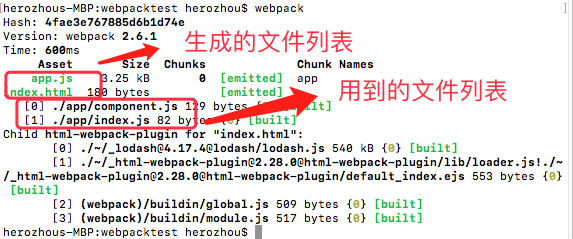
若看到相关提示,表示打包成功。此时检查项目目录,会发现多出了一个index.html文件。
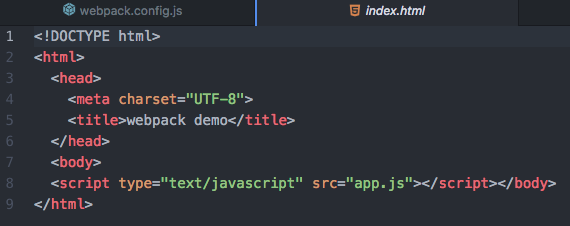
同样需要安装html-webpack-plugin插件,其功能是生成HTML入口文件。执行以下命令:
npm install html-webpack-plugin --save-dev在项目app目录下新建component.js文件,代码如下:
export default (text='hello world')=>{
  const element=document.createElement('div');
  element.innerHTML=text;
  return element;
}
在项目根目录创建webpack.config.js文件。
const path=require('path');
const HtmlWebpackPlugin=require('html-webpack-plugin');

const PATHS={
 app:path.join(__dirname,'app'),
 build:path.join(__dirname,'build'),
};

module.exports = {
 entry: {
  app:PATHS.app,
 },
 output: {
  path:PATHS.build,
  filename: "[name].js"
 },

 plugins: [
  new HtmlWebpackPlugin({
   title: 'webpack demo',
  })
 ]
};
打开命令行,进入项目目录,执行webpack命令。
这表明打包过程已完成,查看生成的index.html文件。
验证打包结果
检查build目录下的app.js文件。
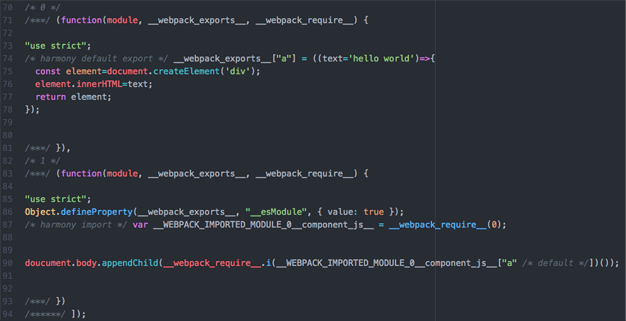
可以看到index.js和component.js的代码经过webpack处理后已打包。
使用浏览器打开index.html,页面显示如下效果:
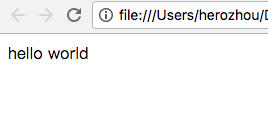
至此配置成功。
以上就是本文的全部内容,希望对您的学习有所帮助,欢迎继续支持本站。