

本文介绍如何在Web前端实现实时搜索功能。通过监听input框的oninput事件获取用户输入,利用正则表达式过滤非法字符后发送Ajax请求获取数据。同时结合localStorage实现搜索历史缓存,提升用户体验并减少重复请求。
前端实时搜索实现概述
绝大多数网页都包含搜索模块。在前端开发中,主要任务是接收用户输入并传递给后端,最终展示后端返回的数据。具体实现步骤如下:
基础界面布局设计
1.基础界面布局:
<div class="searcher">
 <p class="searcher-main">
 <i><img src="img/icon/icon-search-map.png"/></i>
 <input class="searcher-text" placeholder="请输入档口名称"></input>
 </p>
 <p class="searcher-cancel">取消</p>
</div>
此处涉及一个常见技术点:如何搜索图标嵌入到input输入框中。网络上已有相关教程,此处不再详细展开:
 .searcher {
 background: rgba(255, 255, 255, 0);
 position: fixed;
 z-index: 999;
 width: 100%;
 height: 6rem;
 text-align: center;
 font-size: 1.6rem;
 }

 .searcher-main {
 background: #F4F4F4;
 position: absolute;
 left: 50%;
 top: 1.2rem;
 margin-left: -45%;
 border-radius: 1.6rem;
 width: 80%;
 height: 3rem;
 line-height: 3rem;
 }

 .searcher-text {
 width: 80%;
 text-align: center;
 border: none;
 outline: none;
 background: #F4F4F4;
 }

 .searcher-cancel {
 position: absolute;
 width: 10%;
 height: 3rem;
 line-height: 3rem;
 color: #929292;
 top: 1.2rem;
 right: 1rem;
 }
JavaScript核心逻辑实现
2.第一步操作:

3.JavaScript代码部分
推荐使用IE9及以上版本支持的oninput事件
onchange事件仅在用户通过键盘或鼠标操作修改属性,且输入框失去焦点时才会触发,脚本动态修改属性不会触发该事件。 onkeydown、onkeypress和onkeyup在处理复制、粘贴、拖拽或长按键盘等复杂交互时存在局限性。 onpropertychange无需判断是否失去焦点,无论是JavaScript脚本修改还是用户手动操作,只要HTML元素属性发生变化即可立即捕获。但该事件仅适用于IE浏览器。
 //监听input框,实时渲染
 $('.searcher-text').on('input', function() {
 initSearchList();
 });
jQuery开发中常采用+=html拼接字符串的方式,虽然代码略显繁琐,但通过URL或标签属性传递参数的方式较为直观易懂。
 //渲染搜索列表
 function initSearchList() {
 var List = $('.searcher-land ul');
 var params = {};
 //搜索过滤字符
 var SEARCH_KEY = $('.searcher-text').val()
 params['action'] = 'get_search_key_list';
 params['market_iid'] = 1001;
 params['search_type'] = TYPE;
 params['search_key'] = replaceIllegalStr(SEARCH_KEY);

 epm.ajax(params, function(result) {
 console.log(result);
 console.log(TYPE)
 var html = '';
 List.html('');
 //有结果
 if(result.data.length > 0) {
  $.each(result.data, function(index, value) {
  goodName = value['goods_name'];
  shopName = value['shop_name'];
  //判断Name类型
  itemName = (goodName) ? goodName : shopName;
  html += '<li class="goods-list">' + itemName + '</li>'
  });
  $('.searcher-list').html(html);
 }
 //无结果
 else {
  html = '<div class="no-goods">暂时无法找到此选项~</div>';
  $('.searcher-list').html(html);
 }
 });
 }
注意代码中包含replaceIllegalStr()方法,其作用类似于正则匹配,旨在过滤掉无用符号,避免向后端传输数据时产生干扰。
function replaceIllegalStr(str) {
 var reg;
 var illegal_list = ["/", "\\",
 "[", "]",
 "{", "}",
 "<", ">",
 "<", ">",
 "「", "」",
 ":", ";",
 "、", "•",
 "^", "'", "\"",
 "\r", "\r\n", "\\n", "\n"];
 for (var i = 0; i < illegal_list.length; i++) {
 if (str.indexOf(illegal_list[i]) >= 0) {
 if (illegal_list[i] == '\\' || illegal_list[i] == '[') {
 reg = new RegExp('\\' + illegal_list[i], "g");
 } else {
 reg = new RegExp(illegal_list[i], "g");
 }
 str = str.replace(reg, '');
 }
 }
 return str.trim();
}
4.第二步操作:
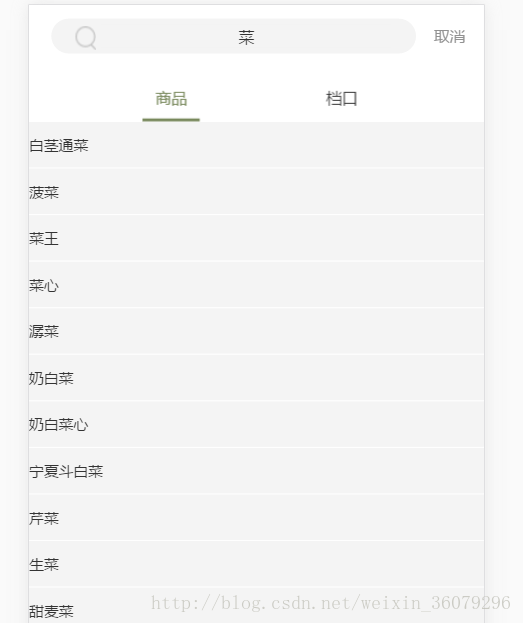
本地缓存与历史数据管理
5.数据缓存机制
将用户点击的历史数据保存至本地缓存,以便后续快速调用和展示: 注:epm为封装好的方法与属性对象
//设置缓存
 epm.setLocalItem = function(key, value) {
 if (window.localStorage) {
 localStorage.setItem(key, value);
 } else {
 //后备方案
 setCookie(key, value);
 }
 };
//提取缓存
 epm.getLocalItem = function(key) {
 if (window.localStorage) {
 return localStorage.getItem(key);
 } else {
 //后备方案
 return getCookie(key);
 }
 };
//删除缓存
 epm.removeLocalItem = function(key) {
 if (window.localStorage) {
 localStorage.removeItem(key);
 } else {
 //后备方案
 removeCookie(key);
 }
 };
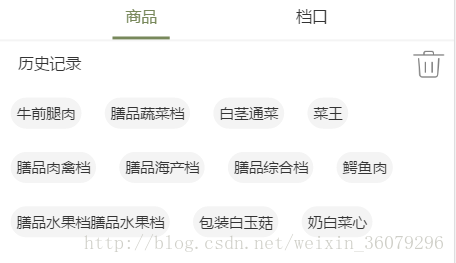
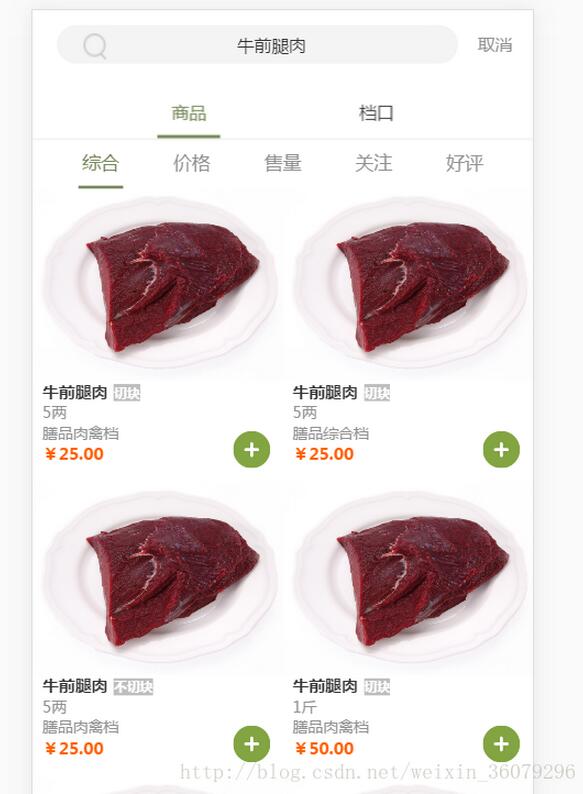
6.第三步操作
获取点击的历史缓存词对应的value值,再次发起Ajax请求:
如需了解更多搜索功能实现技巧,请点击专题:javascript搜索功能汇总 进行深入学习
以上就是本文的全部内容,希望能为各位的学习提供有益帮助,也欢迎大家继续支持本站。