
无需引入庞大的moment.js依赖,本文详细介绍如何使用现代浏览器与Node.js内置的原生Intl.DateTimeFormat与Intl.RelativeTimeFormat API高效格式化时间戳,覆盖常用场景、时区处理、自定义模板及性能优化。

当前位置:首页 > JavaScript 基础 > 正文
不用moment.js,怎么用原生JS Intl API格式化时间戳
作者:资源驿站
时间:2026-11-03
浏览:547
文章目录
核心方案速览:现代 JavaScript 原生提供了标准国际化对象
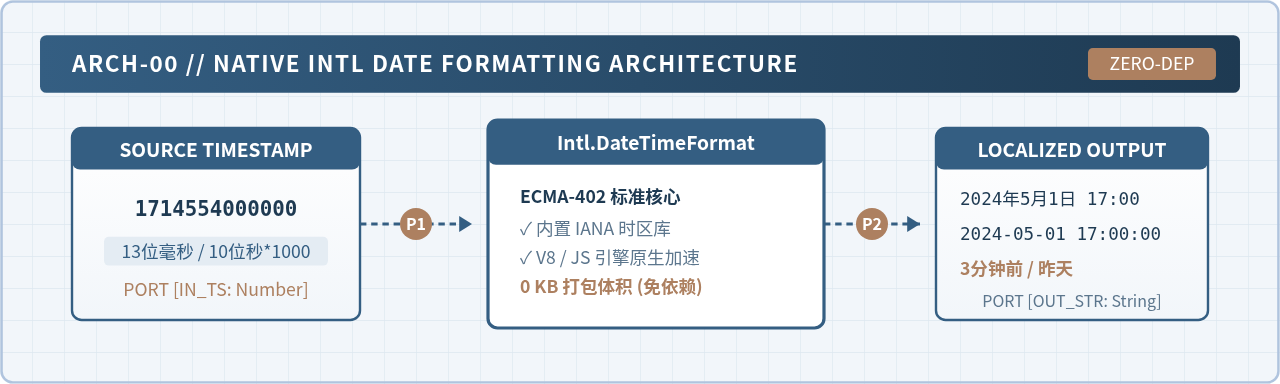
Intl.DateTimeFormat 与 Intl.RelativeTimeFormat,它们内置于所有主流浏览器和 Node.js 运行时中。格式化时间戳时,只需传入标准毫秒时间戳(13位数字)或 Date 对象,指定目标地区与显示选项,即可完成本地化日期、指定格式以及“几分钟前”等相对时间的转换,无需额外加载数十 KB 的 moment.js 库。
为什么应当放弃 moment.js 转用原生 Intl API
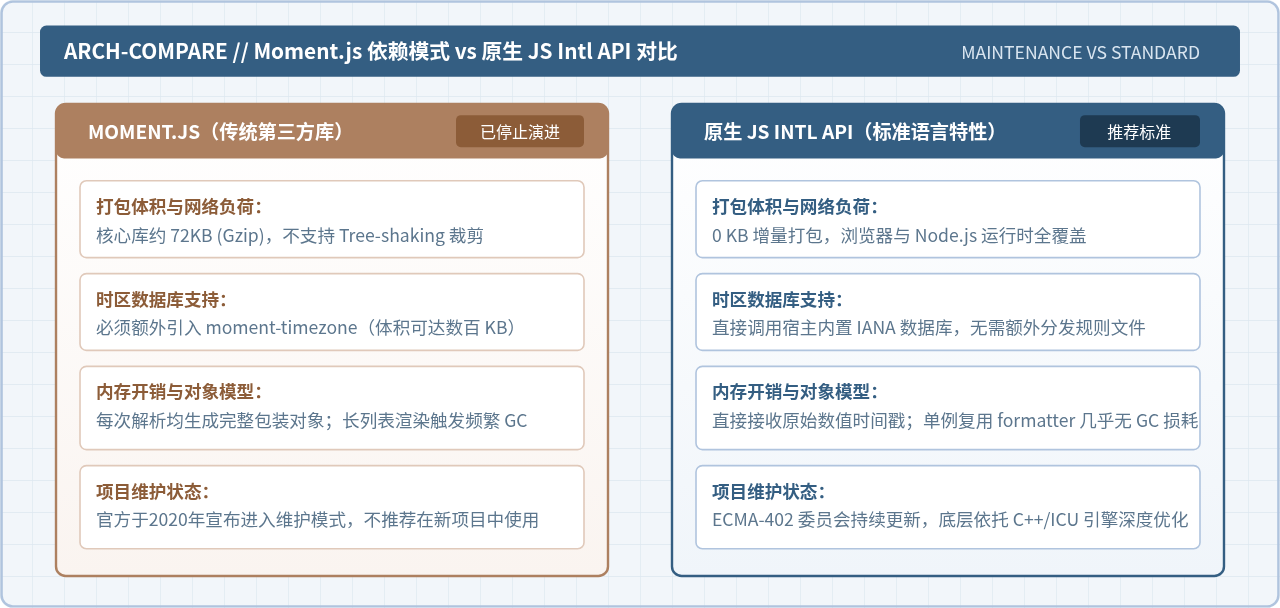
长期以来,moment.js 几乎是前端开发处理日期的默认选择。然而在现代前端工程中,moment.js 存在明显的性能与架构缺陷:核心库经过压缩后仍占用约 72KB 的体积,且不支持基于 ES Modules 的 Tree-shaking 裁剪;时区转换还需要额外加载庞大的 moment-timezone 数据包;其可变对象模型在处理表格等密集数据时会频繁生成中间实例,增加垃圾回收(GC)负担。Moment.js 官方团队早已宣布项目进入维护状态,明确建议在新项目中转用现代方案。
现代浏览器全面支持由 ECMA-402 规范定义的 Intl 国际化命名空间。其中负责时间处理的 API 具有零依赖打包体积、直接调用浏览器底层 C++(ICU)引擎、原生内置全球 IANA 时区库等显著优势。对于常见的时间戳格式化需求,原生 Intl.DateTimeFormat 完全能够满足且运行效率更高。
第一步:理解时间戳规格与基本调用流程
在后端接口与数据库存储中,时间戳通常分为两类:
- 10 位秒级时间戳(Unix Timestamp):单位为秒,例如
1714554000。 - 13 位毫秒级时间戳:单位为毫秒,例如
1714554000000。
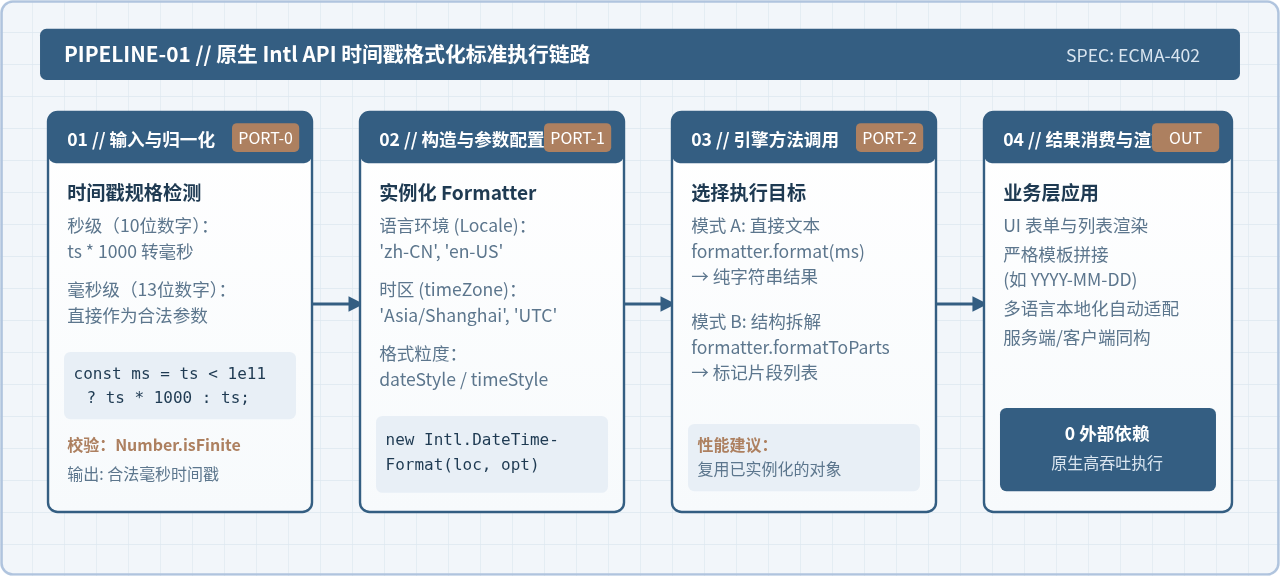
JavaScript 原生 Date 和 Intl API 处理时间时均以毫秒为基准。因此,在格式化之前,必须确保输入的数值为 13 位毫秒数。如果是 10 位时间戳,需先乘以 1000。
调用 Intl.DateTimeFormat 的基本语法非常精简,其实例的 .format() 方法既可以直接接收 Date 实例,也可以直接接收数字类型的时间戳,无需显式调用 new Date(ts) 产生多余的对象包装。
以下是基本调用的完整代码示例:
// 归一化时间戳为毫秒数值
function normalizeTimestamp(ts) {
  const num = Number(ts);
  if (!Number.isFinite(num)) {
    throw new TypeError('Invalid timestamp input');
  }
  // 小于 1000 亿的值判定为 10 位秒级时间戳
  return num < 1e11 ? num * 1000 : num;
}

// 基础调用示例
const rawSecTimestamp = 1714554000; // 2024-05-01 17:00:00 (UTC+8)
const ms = normalizeTimestamp(rawSecTimestamp);

// 创建中文环境的默认格式化器
const defaultFormatter = new Intl.DateTimeFormat('zh-CN');
const formattedText = defaultFormatter.format(ms);

console.log(formattedText);
2024/5/1
第二步:使用 dateStyle 与 timeStyle 快速本地化
大多数业务展示需求并不需要手动拼装各个日期分量,而是希望按照用户所在国家或地区的习惯快速输出可读文本。Intl.DateTimeFormat 提供了 dateStyle 与 timeStyle 预设选项,可选值包括 'full'、'long'、'medium' 和 'short'。
const timestamp = 1714554000000;

// 1. 完整长日期与时间
const fullFormatter = new Intl.DateTimeFormat('zh-CN', {
  dateStyle: 'full',
  timeStyle: 'long',
  timeZone: 'Asia/Shanghai'
});
console.log(fullFormatter.format(timestamp));

// 2. 中等长度日期与简短时间
const mediumFormatter = new Intl.DateTimeFormat('zh-CN', {
  dateStyle: 'medium',
  timeStyle: 'short',
  timeZone: 'Asia/Shanghai'
});
console.log(mediumFormatter.format(timestamp));

// 3. 英语环境下的短格式
const enFormatter = new Intl.DateTimeFormat('en-US', {
  dateStyle: 'medium',
  timeStyle: 'short',
  timeZone: 'Asia/Shanghai'
});
console.log(enFormatter.format(timestamp));
2024年5月1日星期三 GMT+8 17:00:00
2024年5月1日 17:00
May 1, 2024, 5:00 PM
注意事项:
dateStyle/timeStyle 与细粒度字段选项(如 year、month、day)属于互斥体系。当指定了 dateStyle 或 timeStyle 时,不能在同一个配置对象中再显式设置 year 或 hour 等选项,否则运行时会抛出 TypeError。
第三步:指定时间字段与时区精确控制
当需要更具体的控制时(例如强制使用 24 小时制、两位数月份补零、显示时区全称等),可以传入具体的字段配置对象。常用字段及配置取值如下:
| 配置属性 | 常用取值 | 说明与作用 |
|---|---|---|
year |
'numeric' | '2-digit' |
四位年份(如 2024)或两位缩写年份(如 24) |
month |
'2-digit' | 'numeric' | 'long' | 'short' |
两位补零(05)、一位数字(5)或文本(五月 / May) |
day |
'2-digit' | 'numeric' |
日期的两位补零(01)或单数字(1) |
hour12 |
false | true |
强制关闭 12 小时制,输出 24 小时制 |
hour / minute / second |
'2-digit' | 'numeric' |
时、分、秒格式,通常设为 '2-digit' |
timeZone |
合法 IANA 时区字符串,如 'Asia/Shanghai'、'UTC' |
强制指定时区,避免受宿主机器当前系统时区干扰 |
以下代码演示如何配置 24 小时制的年月日时分秒:
const ts = 1714554000000;

const preciseFormatter = new Intl.DateTimeFormat('zh-CN', {
  year: 'numeric',
  month: '2-digit',
  day: '2-digit',
  hour: '2-digit',
  minute: '2-digit',
  second: '2-digit',
  hour12: false,
  timeZone: 'Asia/Shanghai'
});

console.log(preciseFormatter.format(ts));
2024/05/01 17:00:00
第四步:用 formatToParts 组装任意自定义格式(如 YYYY-MM-DD HH:mm:ss)
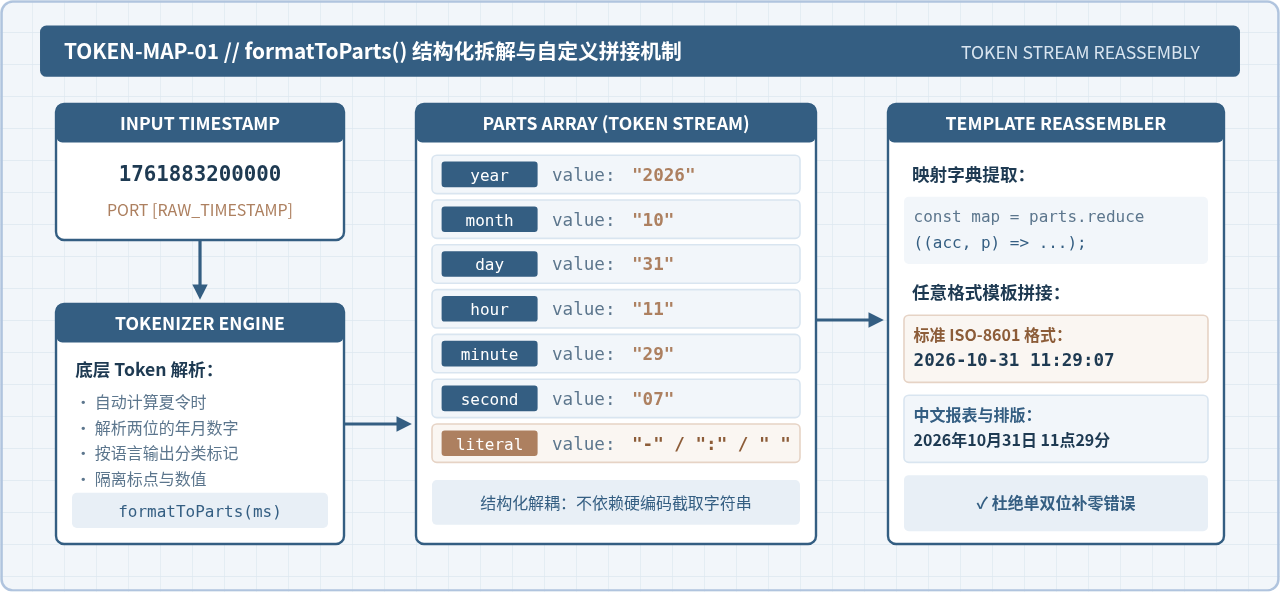
在中文系统和日常开发中,许多系统要求强制输出严格的 YYYY-MM-DD HH:mm:ss 格式(使用中划线连接而不是默认的斜线)。直接调用 format() 输出的字符连接符受区域语言包影响,不能保证在所有操作系统下都是中划线。
为了获得完全确定的自定义字符串,可以使用 Intl.DateTimeFormat.prototype.formatToParts()。该方法将时间戳解析成一个由 Token 对象组成的数组,每个对象包含 type(如 'year', 'month', 'day', 'literal')和 value。将这些 Token 映射为一个键值对字典后,即可像模板引擎一样拼接出任意字符格式。
基于 formatToParts 封装的高复用格式化函数如下:
// 预设高精度格式化解析器
const partFormatter = new Intl.DateTimeFormat('en-US', {
  year: 'numeric',
  month: '2-digit',
  day: '2-digit',
  hour: '2-digit',
  minute: '2-digit',
  second: '2-digit',
  hour12: false,
  timeZone: 'Asia/Shanghai'
});

/**
 * 将时间戳格式化为指定的自定义模板字符串
 * @param {number|Date} timestamp 时间戳或Date
 * @param {string} template 模板,如 'YYYY-MM-DD HH:mm:ss'
 */
function formatCustomPattern(timestamp, template = 'YYYY-MM-DD HH:mm:ss') {
  const ms = typeof timestamp === 'number' && timestamp < 1e11 ? timestamp * 1000 : timestamp;
  const parts = partFormatter.formatToParts(ms);

  // 将部件数组转为键值字典
  const map = {};
  for (const { type, value } of parts) {
    if (type !== 'literal') {
      map[type] = value;
    }
  }

  // 按照模板占位符替换对应字段
  return template
    .replace('YYYY', map.year)
    .replace('MM', map.month)
    .replace('DD', map.day)
    .replace('HH', map.hour)
    .replace('mm', map.minute)
    .replace('ss', map.second);
}

// 验证各种输出格式
const sampleTs = 1761883747000;
console.log(formatCustomPattern(sampleTs, 'YYYY-MM-DD HH:mm:ss'));
console.log(formatCustomPattern(sampleTs, 'YYYY/MM/DD'));
console.log(formatCustomPattern(sampleTs, 'HH时mm分ss秒 (YYYY年MM月)'));
2025-10-31 12:09:07
2025/10/31
12时09分07秒 (2025年10月)
第五步:用 Intl.RelativeTimeFormat 替代 moment.fromNow()
社交动态、论坛发帖和评论列表中经常需要显示“3分钟前”、“昨天”、“2个月后”等相对时间。在 moment.js 中通常使用 moment(ts).fromNow(),而在原生 JavaScript 中,可以使用 Intl.RelativeTimeFormat 完美达成这一效果。
Intl.RelativeTimeFormat 接收差值数值与时间单位(如 'second', 'minute', 'hour', 'day', 'month', 'year')。当配置项 numeric 设为 'auto' 时,它会自动将 -1 day 转换为“昨天”,将 -2 day 转换为“前天”,而不需要自行维护一套多语言词典。
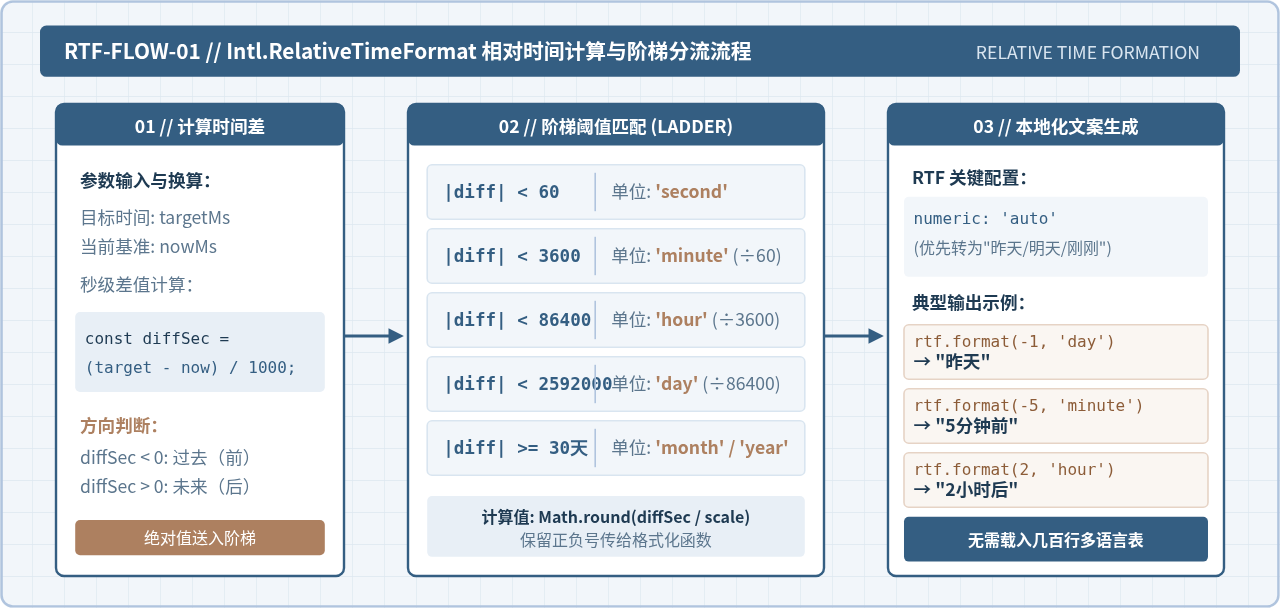
实现一个完整的相对时间格式化函数只需计算目标时间与当前时间的秒数差,并匹配对应的阶梯:
// 实例化中文相对时间格式化器
const rtf = new Intl.RelativeTimeFormat('zh-CN', { numeric: 'auto' });

// 阶梯单位阈值配置(以秒为单位)
const TIME_DIVISIONS = [
  { amount: 60, name: 'second' },
  { amount: 60, name: 'minute' },
  { amount: 24, name: 'hour' },
  { amount: 30, name: 'day' },
  { amount: 12, name: 'month' },
  { amount: Infinity, name: 'year' }
];

/**
 * 将时间戳转换为可读的相对时间文本
 * @param {number} timestamp 目标时间戳(秒或毫秒)
 * @param {number} baseTime 基准时间,默认当前系统时间
 */
function formatRelativeTime(timestamp, baseTime = Date.now()) {
  const targetMs = timestamp < 1e11 ? timestamp * 1000 : timestamp;
  let diffSeconds = (targetMs - baseTime) / 1000;

  // 极短时间差视作“刚刚”
  if (Math.abs(diffSeconds) < 5) {
    return '刚刚';
  }

  let duration = diffSeconds;
  for (const division of TIME_DIVISIONS) {
    if (Math.abs(duration) < division.amount) {
      return rtf.format(Math.round(duration), division.name);
    }
    duration /= division.amount;
  }
  return rtf.format(Math.round(duration), 'year');
}

// 验证相对时间输出
const now = Date.now();
console.log(formatRelativeTime(now - 1000 * 25));       // 25秒前
console.log(formatRelativeTime(now - 1000 * 60 * 18));   // 18分钟前
console.log(formatRelativeTime(now - 1000 * 3600 * 24)); // 1天前(昨天)
console.log(formatRelativeTime(now + 1000 * 3600 * 5));  // 5小时后
25秒前
18分钟前
昨天
5小时后
工程实践中的关键注意事项与性能建议
在实际生产环境中运用原生 Intl API 时,有以下两项关键要点:
1. 实例化复用(避免在循环中重复 new)
new Intl.DateTimeFormat() 和 new Intl.RelativeTimeFormat() 的构造过程需要初始化内部区域语言规则和时区上下文,其耗时远大于单次 .format() 调用。在处理长列表(例如在长表格中渲染上千条数据)时,切勿在循环体内部反复执行构造函数。
正确的做法是在模块级别或工具类中保持单例复用,或者使用简单的 Map 进行基于语言和配置签名的缓存:
// 推荐:模块级缓存单例
const listDateFormatter = new Intl.DateTimeFormat('zh-CN', {
  year: 'numeric',
  month: '2-digit',
  day: '2-digit',
  hour12: false
});

function renderList(records) {
  // 在遍历中仅调用已实例化的 format 方法
  return records.map(item => listDateFormatter.format(item.timestamp));
}
2. 服务端与客户端渲染的时区对齐(SSR 场景)
如果在 Node.js 服务端进行渲染(如 Next.js、Nuxt 等同构应用),若未显式指定 timeZone,Intl 会默认读取服务器所在的操作系统的系统时区(如 UTC 或云主机默认时区);而用户浏览器则会采用本地时区。这种差异会导致 SSR 水合(Hydration)不一致警告。因此,对于业务要求统一的时区展示,务必在 options 中显式传入 timeZone: 'Asia/Shanghai'。
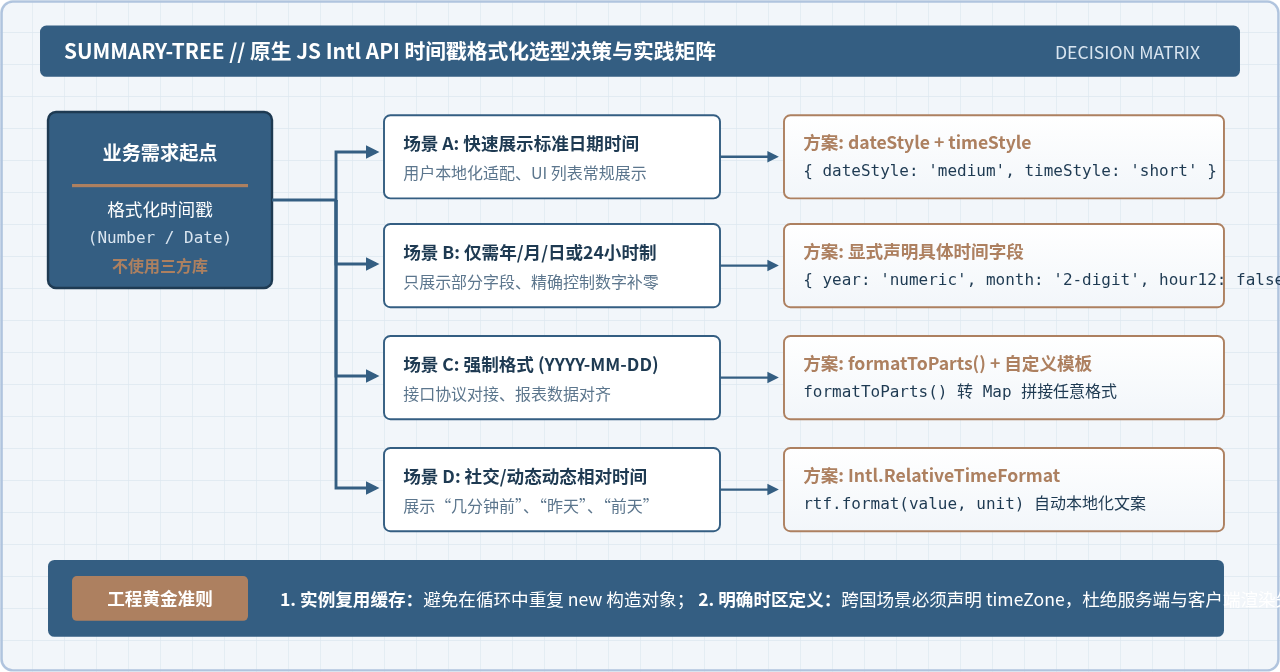
总结与选型参考
原生 Intl 系列 API 是现代前端处理时间戳的坚实基石:
- 对于常规的界面文本展示,直接搭配
dateStyle和timeStyle能够以极少代码实现完善的多语言自适应; - 对于严格规定的数据协议与后台表格,利用
formatToParts()可以零依赖实现任何格式的精准组装; - 对于动态交互的相对时间显示,
Intl.RelativeTimeFormat免去了引入数十行语言映射包的繁琐操作。
完全脱离外部日期库,依靠浏览器标准能力不仅可以有效降低应用打包体积,还能带来更加优异的运行时稳定性和性能表现。
实用工具推荐
电子包浆
使用 ›绿化、压缩、噪点和虚拟水印,自由调节做旧程度。
图片压缩
使用 ›选择画质和输出格式,预览压缩前后的大小。
作者最新文章
相关文章