
深入讲解 JavaScript 中多定时器的底层句柄机制、常见变量覆盖陷阱与幽灵定时器成因,提供基于数组容器、Map 具名映射以及面向对象 TimerManager 的管理与安全清除完整方案。

当前位置:首页 > JavaScript 异步编程 > 正文
JavaScript 中怎么正确清除和管理多个定时器
作者:青柠
时间:2026-11-03
浏览:149
文章目录
分类:前端开发工程化
适用环境:浏览器 / Node.js
核心概念:Timer ID · 句柄管理 · 内存防泄漏
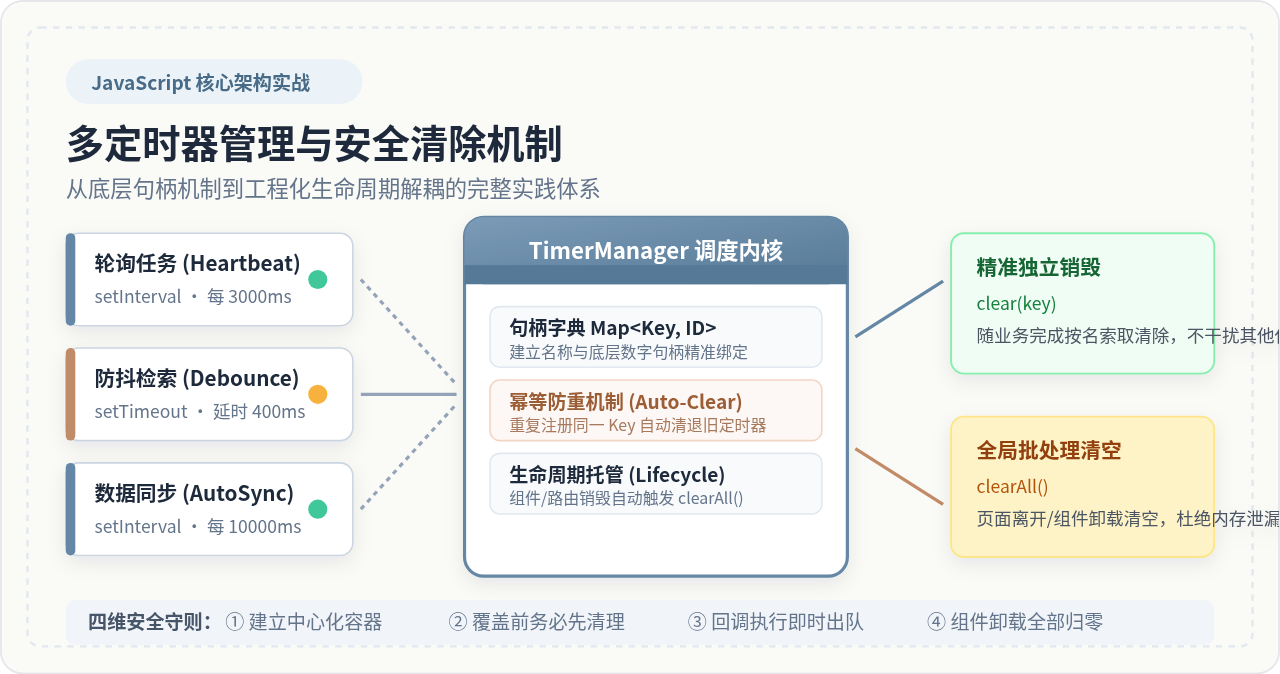
在 JavaScript 中清除定时器的底层方法非常直接:调用 clearTimeout(id) 或 clearInterval(id)。然而,一旦业务逻辑中存在多个并行的定时器(例如心跳轮询、防抖搜索、倒计时与自动同步),使用零散的单一变量保存句柄必然导致变量被新句柄覆盖,使旧定时器变成无法销毁的“幽灵定时器”并在后台默默消耗 CPU 和内存。正确管理多个定时器的核心策略在于:放弃零散单变量,建立中心化的集合(Set)或键值映射(Map)容器,严格遵守“覆盖前先清理、执行后即出队、组件卸载无遗漏清空”的原则。
一、底层原理:定时器句柄机制与单变量覆盖陷阱
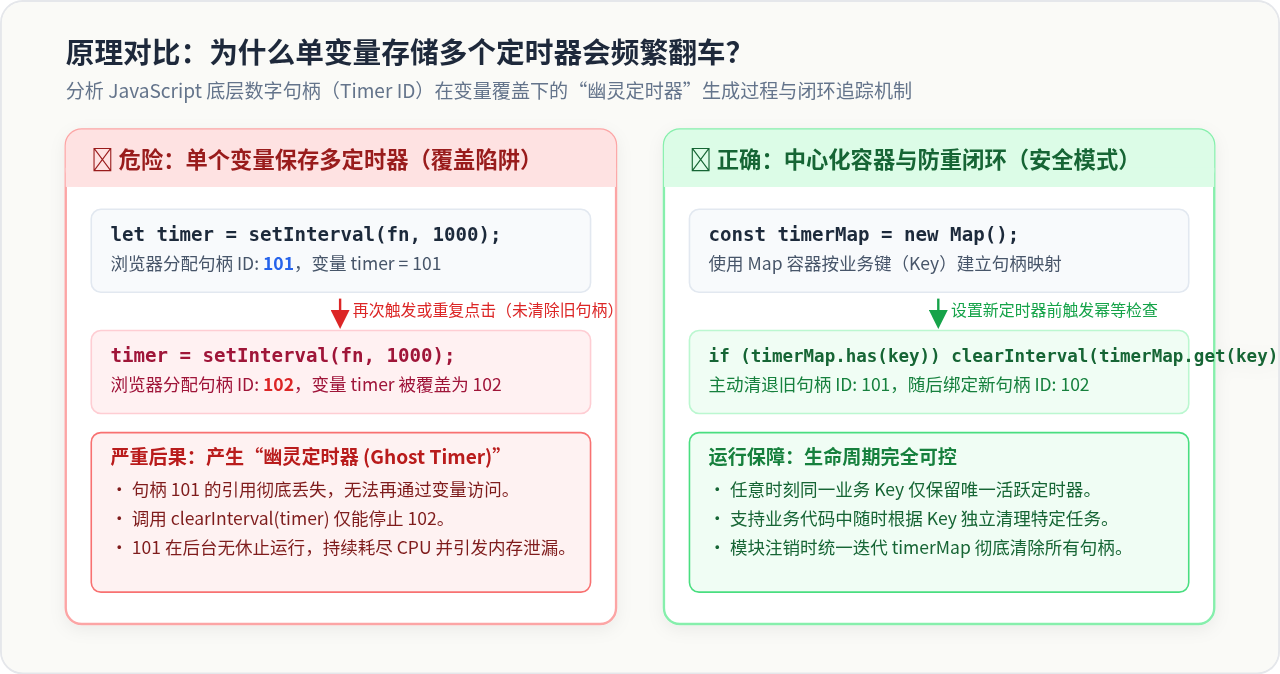
要彻底管理好定时器,必须先理解 JavaScript 运行时是如何分配和追踪它们的。在浏览器或 Node.js 环境中,调用 setTimeout 或 setInterval 时,运行时会在内部的定时器调度表注册一个任务,并同步返回一个正整数类型的句柄(Timer ID)。这个整数仅仅是底层的索引标志,定时器任务的实际生命周期由宿主环境(Web APIs / libuv)驱动,并不受 JavaScript 作用域变量是否丢失的约束。
许多初学者最常犯的错误,就是用同一个全局或组件级变量来承接多个定时器,如下面的代码所示:
// ❌ 严重隐患:单变量承接,多次调用引发幽灵定时器
let pollTimer = null;

function startPolling(taskId) {
  // 如果调用者快速连续触发两次 startPolling():
  // 第一次:pollTimer = 101
  // 第二次:pollTimer = 102(此时 101 被彻底覆盖!)
  pollTimer = setInterval(() => {
    console.log(`执行任务 ${taskId} 数据轮询`);
  }, 2000);
}

function stopPolling() {
  // 此时只能清除最后一次的 102,第一次的 101 已经在后台永久失控运行!
  clearInterval(pollTimer);
  pollTimer = null;
}
当 pollTimer 被赋予新值 102 时,数字 101 的引用即刻丢失。因为 JavaScript 引擎没有提供“获取当前所有活跃定时器列表”的公开 API,开发者将无法再对 101 执行 clearInterval。这不仅会导致接口重复请求、数据状态竞争错乱,还会因为定时器闭包持有外层作用域变量而造成严重的 DOM 节点泄漏。
⚠️ 规范提醒:不要混用 clearTimeout 与 clearInterval
虽然在目前绝大多数主流浏览器的底层实现中,setTimeout 与 setInterval 共享同一个整数自增 ID 池,使得 clearTimeout 也能停掉 setInterval,但这一行为未被各环境规范严格保证(例如在早期 Node.js 或特定嵌入式 JavaScript 运行时中返回的是 Timeout 对象而非数字)。在工程实践中务必保持对应:清除延时用 clearTimeout,清除周期用 clearInterval。
二、方案一:基于 Set / 数组的批量生命周期收集模式
在许多业务场景下,我们并不需要单独控制每一个定时器的启动与停止,而是希望某个模块或页面在活跃时开启多个定时器,在用户离开页面或关闭弹窗时统一销毁。
针对这种“同生共死”的同批次定时器,最简便可靠的方案是采用 ES6 的 Set 容器建立句柄收集池。相比普通数组,Set 具有元素天然唯一的特点,且在删除指定 ID 时拥有 $O(1)$ 的时间复杂度。
1. 批量定时器收集器实现
// 批量定时器收集池
class TimerBucket {
  constructor() {
    this.timerIds = new Set();
  }

  // 注册 setTimeout:执行后自动移出 Set,防止内存常驻
  setTimeout(handler, delay, ...args) {
    const id = window.setTimeout(() => {
      this.timerIds.delete(id); // 执行完成,自动出队
      handler(...args);
    }, delay);
    this.timerIds.add(id);
    return id;
  }

  // 注册 setInterval:周期任务直到被主动清理前始终保留
  setInterval(handler, interval, ...args) {
    const id = window.setInterval(handler, interval, ...args);
    this.timerIds.add(id);
    return id;
  }

  // 单独清除指定定时器
  clear(id) {
    if (this.timerIds.has(id)) {
      window.clearTimeout(id);
      window.clearInterval(id);
      this.timerIds.delete(id);
    }
  }

  // 核心:一键批量清除并清空集合
  clearAll() {
    for (const id of this.timerIds) {
      window.clearTimeout(id);
      window.clearInterval(id);
    }
    this.timerIds.clear();
  }

  // 获取当前存活定时器数量
  get activeCount() {
    return this.timerIds.size;
  }
}
2. 为什么 setTimeout 必须在回调中主动出队?
许多开发者在使用数组保存 setTimeout 句柄时,只往数组里 push,却从不清理已经执行完毕的 ID。随着用户在页面中的长时间停留,数组会膨胀至成千上万个失效的数字 ID。在上面的 TimerBucket 中,我们在 setTimeout 的外层包装了 this.timerIds.delete(id),一旦延时到达、回调触发,该句柄就自动出队,确保容器尺寸始终与当前真实的活跃定时器数量精准吻合。
三、方案二:基于 Map 的具名管理模式(防重与精准控制)
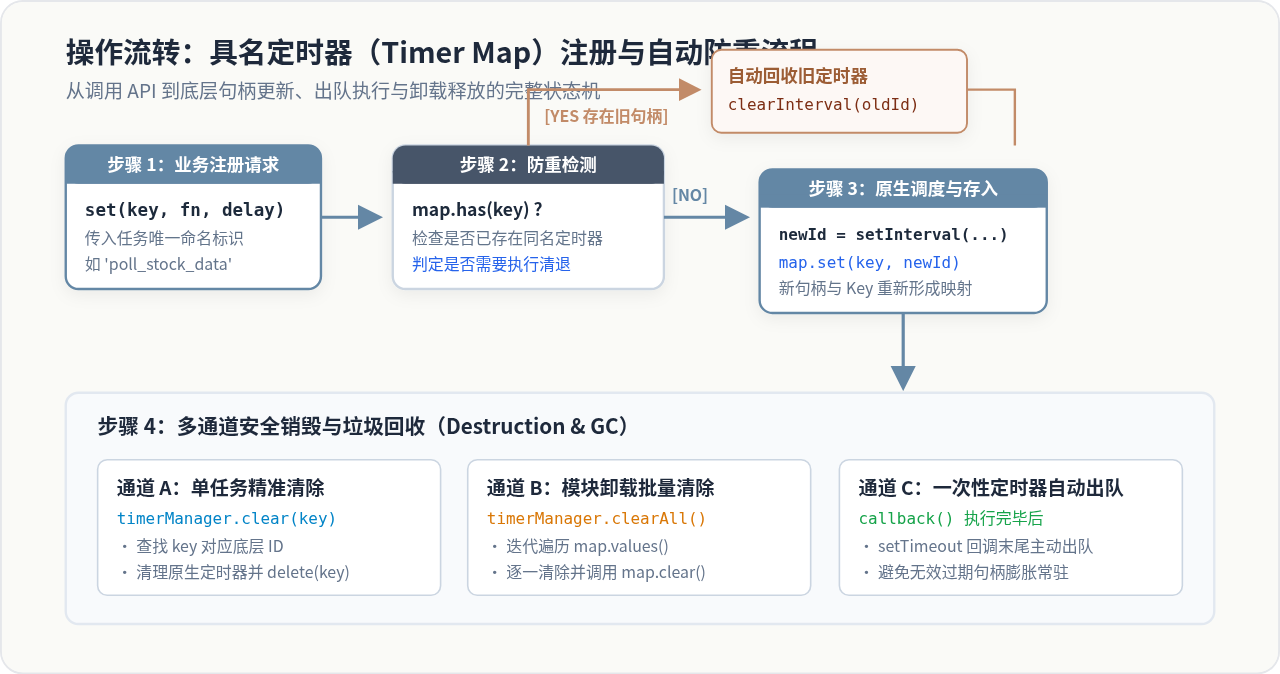
当一个复杂的业务模块中存在职责不同的定时器(例如定时上报日志的 report-metrics、防抖查询的 search-debounce、连接保活的 ws-ping),我们往往需要按业务名称独立控制其启停,并且必须严格防止同一名称被重复启动。
这时应当采用 Map<string, number> 结构,以业务 Key 作为索引进行具名管理。
1. 具名定时器注册器实现
class NamedTimerPool {
  constructor() {
    // 存储格式: key -> { id: number, type: 'timeout' | 'interval' }
    this.pool = new Map();
  }

  // 注册延时任务 (Timeout)
  setTimeout(key, fn, delay) {
    // 关键:若已存在同名任务,先将其清理,杜绝重复与覆盖泄漏
    this.clear(key);

    const id = window.setTimeout(() => {
      this.pool.delete(key); // 执行后自动从 Map 中移除
      fn();
    }, delay);

    this.pool.set(key, { id, type: 'timeout' });
    return id;
  }

  // 注册周期任务 (Interval)
  setInterval(key, fn, interval) {
    // 关键:防重清理
    this.clear(key);

    const id = window.setInterval(fn, interval);
    this.pool.set(key, { id, type: 'interval' });
    return id;
  }

  // 按 Key 精确清除单个定时器
  clear(key) {
    if (!this.pool.has(key)) return false;

    const { id, type } = this.pool.get(key);
    if (type === 'timeout') {
      window.clearTimeout(id);
    } else {
      window.clearInterval(id);
    }
    this.pool.delete(key);
    return true;
  }

  // 检查某任务是否仍在运行
  has(key) {
    return this.pool.has(key);
  }

  // 模块卸载时全部清空
  clearAll() {
    for (const [key, { id, type }] of this.pool.entries()) {
      if (type === 'timeout') {
        window.clearTimeout(id);
      } else {
        window.clearInterval(id);
      }
    }
    this.pool.clear();
  }
}
💡 核心优势:天然的幂等防重机制
在上述代码中,每次调用 setTimeout(key, ...) 或 setInterval(key, ...) 时,第一行都会无条件执行 this.clear(key)。这使得无论业务层由于频繁点击事件或并发逻辑调用了多少次注册,同一任务名永远只保留最后一次的最新定时器,旧的句柄必定被安全销毁,彻底根除了“幽灵定时器”的出现环境。
四、方案三:面向对象的通用 TimerManager 工程化封装
在大型项目或前端基础架构库中,为了让多定时器的管理更具鲁棒性,我们可以进一步扩展出支持命名空间隔离、执行错误防御与状态快照的通用管理器 TimerManager。
/**
 * 生产级通用定时器管理器 TimerManager
 */
class TimerManager {
  constructor(namespace = 'global') {
    this.namespace = namespace;
    this._registry = new Map();
  }

  /**
   * 注册定时器
   * @param {string} name 定时器标识
   * @param {Function} callback 回调函数
   * @param {number} delay 延迟/间隔毫秒
   * @param {'timeout' | 'interval'} type 定时器类型
   */
  set(name, callback, delay = 0, type = 'timeout') {
    if (typeof callback !== 'function') {
      throw new TypeError(`[TimerManager:${this.namespace}] 回调必须为函数`);
    }

    // 1. 先安全清理旧句柄
    this.clear(name);

    // 2. 包装错误捕获,避免单定时器异常阻断全局逻辑
    const safeCallback = () => {
      try {
        callback();
      } catch (err) {
        console.error(`[TimerManager:${this.namespace}] 定时器 '${name}' 执行报错:`, err);
      } finally {
        if (type === 'timeout') {
          this._registry.delete(name);
        }
      }
    };

    // 3. 调用底层 API 派发
    const id = type === 'interval'
      ? window.setInterval(safeCallback, delay)
      : window.setTimeout(safeCallback, delay);

    this._registry.set(name, {
      id,
      type,
      delay,
      createdAt: Date.now()
    });

    return id;
  }

  /**
   * 精确清除指定定时器
   */
  clear(name) {
    const item = this._registry.get(name);
    if (!item) return false;

    if (item.type === 'interval') {
      window.clearInterval(item.id);
    } else {
      window.clearTimeout(item.id);
    }
    this._registry.delete(name);
    return true;
  }

  /**
   * 批量清空当前命名空间下的全部定时器
   */
  clearAll() {
    for (const [name, item] of this._registry.entries()) {
      if (item.type === 'interval') {
        window.clearInterval(item.id);
      } else {
        window.clearTimeout(item.id);
      }
    }
    this._registry.clear();
  }

  /**
   * 检查是否存在活跃定时器
   */
  has(name) {
    return this._registry.has(name);
  }

  /**
   * 输出当前所有存活定时器的状态快照(便于调试排查)
   */
  dump() {
    const list = [];
    const now = Date.now();
    for (const [name, item] of this._registry.entries()) {
      list.push({
        name,
        type: item.type,
        delay: item.delay,
        runningTimeMs: now - item.createdAt
      });
    }
    return list;
  }
}
五、现代前端框架中的生命周期绑定实践(React / Vue)
在单页应用(SPA)中,组件会随着路由频繁挂载与卸载。80% 以上的前端定时器内存泄漏,都发生在组件已被销毁、但定时器回调仍在执行并试图更新组件状态的场景下。
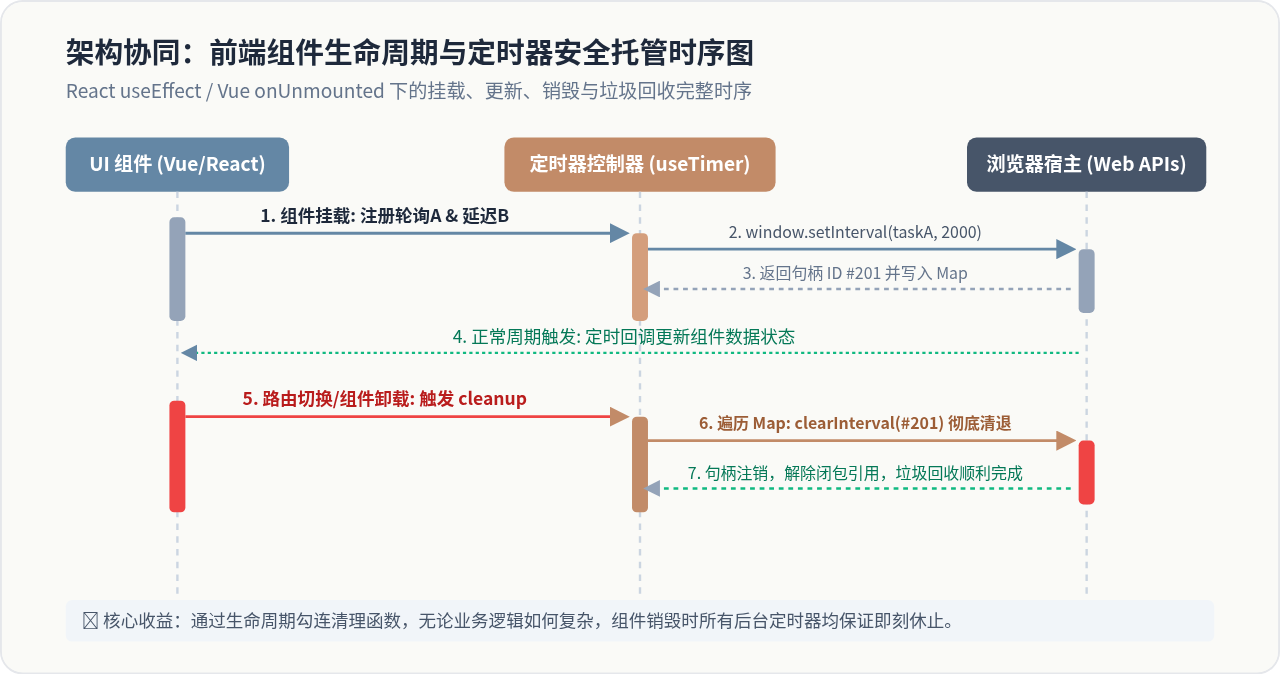
1. React 中的推荐实践:useRef + useEffect 清理函数
在 React 函数组件中,切忌将定时器 ID 存放在 useState 中,因为更新 ID 会引发无意义的重新渲染;应当将句柄或管理器挂载在 useRef 上:
import React, { useEffect, useRef } from 'react';

function DashboardCard() {
  // 利用 ref 持久化保留 TimerManager 实例,不随 re-render 重新生成
  const timerMgrRef = useRef(null);
  if (!timerMgrRef.current) {
    timerMgrRef.current = new TimerManager('DashboardCard');
  }

  useEffect(() => {
    const timerMgr = timerMgrRef.current;

    // 注册定时任务 A: 轮询订单数据
    timerMgr.set('poll-orders', () => {
      fetchLatestOrders();
    }, 5000, 'interval');

    // 注册定时任务 B: 延迟弹出通知
    timerMgr.set('welcome-toast', () => {
      showToast('欢迎回来!');
    }, 1000, 'timeout');

    // 关键:useEffect 的 return 清理函数在组件卸载时必定执行
    return () => {
      timerMgr.clearAll(); // 一键清空,彻底切断回调链
    };
  }, []);

  return <div className="card">数据看板内容</div>;
}
2. Vue 3 组合式 API:封装自定义 Hook (useTimers)
在 Vue 3 中,我们可以借助 onUnmounted 钩子将定时器管理器封装成即插即用的 Composable,使业务代码彻底告别手动清理的烦恼:
// composables/useTimers.js
import { onUnmounted } from 'vue';

export function useTimers() {
  const timers = new Map();

  const setTimer = (key, fn, delay, type = 'timeout') => {
    // 防重清理
    clearTimer(key);

    const id = type === 'interval'
      ? window.setInterval(fn, delay)
      : window.setTimeout(() => {
          timers.delete(key);
          fn();
        }, delay);

    timers.set(key, { id, type });
    return id;
  };

  const clearTimer = (key) => {
    if (!timers.has(key)) return;
    const { id, type } = timers.get(key);
    type === 'interval' ? window.clearInterval(id) : window.clearTimeout(id);
    timers.delete(key);
  };

  const clearAllTimers = () => {
    timers.forEach(({ id, type }) => {
      type === 'interval' ? window.clearInterval(id) : window.clearTimeout(id);
    });
    timers.clear();
  };

  // 关键:当前组件一旦卸载,自动批量清除所有定时器
  onUnmounted(() => {
    clearAllTimers();
  });

  return {
    setTimer,
    clearTimer,
    clearAllTimers
  };
}
六、不同管理方案的对比与技术选型
| 管理模式 | 底层数据结构 | 是否支持按名索取 | 防重启动能力 | 适用业务场景 |
|---|---|---|---|---|
| 零散单变量 | Number 局部变量 | 否 | 极差(易覆盖导致失控) | 极简单的单次短延时(1个任务以内) |
| 集合收集模式 | Set<number> |
否(仅记录 ID) | 一般(需外部手动比对) | 同批次启停、统一离开页面销毁的任务群 |
| 具名字典模式 | Map<string, number> |
是(按 Key 索取) | 优(通过 Key 自动清退旧句柄) | 页面内存在多个独立业务任务(轮询、防抖、倒计时) |
| 通用管理器类 | TimerManager (OOP) |
是(支持命名空间) | 极优(内置容错、出队与快照) | 中大型工程基础架构、公共组件与跨模块库 |
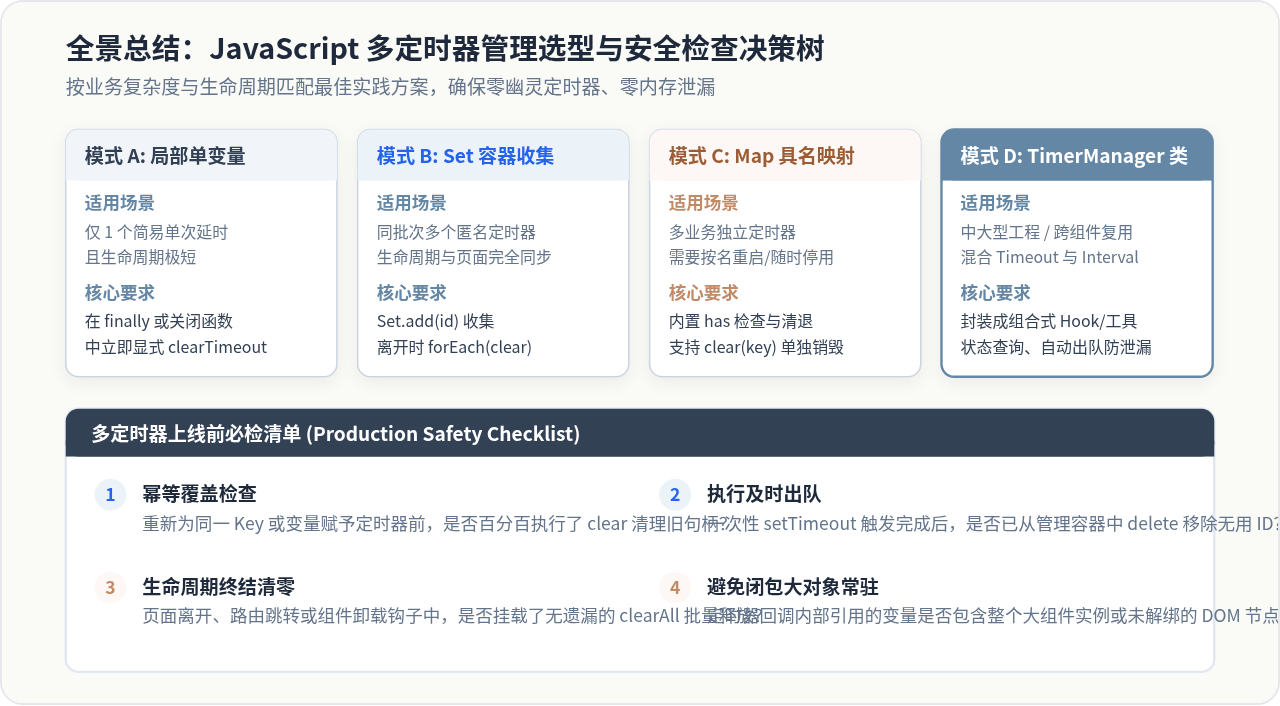
七、总结与安全检查决策树
正确清除和管理多个定时器,其技术核心并非某种复杂难懂的算法,而是一套严谨的工程规范与生命周期契约。归纳起来,只需牢记以下四项原则:
- 建立句柄中心容器:绝不使用多个松散孤立的单变量保存 ID,统一使用
Set或Map进行集中登记。 - 注册前强制防重清理:每次启动新定时器之前,如果该业务任务可能已存在旧句柄,必须无条件先调用对应的
clear函数。 - 一次性延时及时出队:
setTimeout在执行完毕时必须从管理容器中删除对应条目,避免容器内部存储过期的无效句柄。 - 生命周期终结无条件清空:无论在原生页面 unload、路由切换、还是 Vue/React 组件卸载阶段,都必须统一调用
clearAll()实施兜底清理。
实用工具推荐
电子包浆
使用 ›绿化、压缩、噪点和虚拟水印,自由调节做旧程度。
图片压缩
使用 ›选择画质和输出格式,预览压缩前后的大小。
作者最新文章
相关文章