

深入讲解在 React 与 Vue 前端框架中封装 Three.js 3D 组件的工程化实践,涵盖控制器解耦架构、生命周期精密管理、响应式状态增量同步与 WebGL 显存安全释放机制。
在 React 或 Vue 中封装 Three.js 组件的生命周期管理与状态同步
作者:状态漫游
时间:2026-10-30
浏览:148
文章目录
在单页应用(SPA)中开发 3D 页面(例如产品 3D 展示器、三维地图或数字孪生看板)时,前端开发者常遇到两类棘手问题:一是用户切换路由或频繁挂载组件后,浏览器内存占用直线上升,甚至抛出 WebGL context lost 崩溃错误;二是当外部 Props(如模型颜色、缩放比例、显示模式)发生变化时,如果组件无差别地重新执行初始化,会导致画面剧烈闪白与帧率暴跌。本文将以实用工程解法为核心,系统解析如何将 Three.js 正确集成至 React 或 Vue,构建清晰的生命周期闭环与高效的响应式状态同步管线。
一、核心痛点与分层解耦架构设计
React 与 Vue 的核心运作哲学是声明式与轻量 DOM Diff 机制:组件状态变更时,框架倾向于高频重新运行组件函数或派发渲染副作用。而 Three.js 是一个底层的命令式持久化图形引擎,包含了场景树(Scene Graph)、相机矩阵计算以及直连 GPU 的显存缓冲区(Vertex Buffer Objects、纹理贴图)。
若将 Three.js 所有的初始化命令直接塞入 useEffect 或 onMounted 回调中,会不可避免地导致 UI 逻辑与 3D 场景逻辑严重耦合。最佳的工程实践是采用桥接适配架构(Bridge / Controller 模式):
- UI 组件层(React / Vue):仅承担声明式外壳,提供容器 DOM 节点、捕获框架级 Props 变动,并将生命周期信号(挂载、销毁、尺寸改变)委托给底层。
- 场景控制中枢(ThreeSceneController):使用纯 JavaScript / TypeScript 编写的类,持有场景树、相机、渲染器与动画循环句柄,对外暴露确切的生命周期方法(
init、resize、updateProps、destroy)。
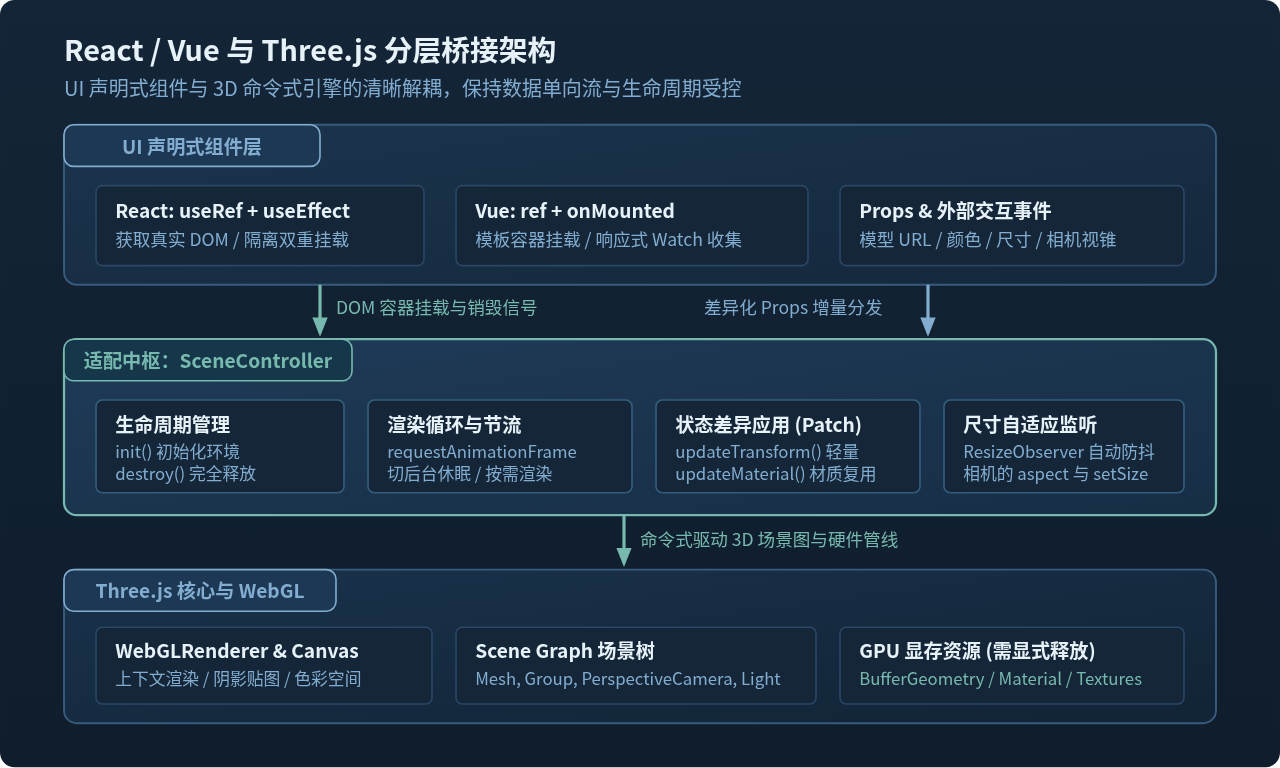
通过这一层抽象,Three.js 的内部细节完全独立于前端框架的虚拟 DOM 机制,既能复用于不同框架,又能在单元测试和热更新调试中保持极高的可靠性。
二、ThreeSceneController 核心控制类的实现
在编写具体框架组件之前,先构建一个标准化的 ThreeSceneController。它负责维护 WebGL 渲染管线、容器尺寸响应、动画帧调度以及安全的资源释放逻辑:
// ThreeSceneController.js
import * as THREE from 'three';
import { OrbitControls } from 'three/examples/jsm/controls/OrbitControls.js';

export class ThreeSceneController {
  constructor(container, options = {}) {
    this.container = container;
    this.options = options;

    // 核心实例引用
    this.scene = null;
    this.camera = null;
    this.renderer = null;
    this.controls = null;
    this.mesh = null;

    // 循环与监听句柄
    this.rafId = null;
    this.resizeObserver = null;
    this.isDestroyed = false;

    this.init();
  }

  init() {
    const width = this.container.clientWidth || 300;
    const height = this.container.clientHeight || 200;

    // 1. 初始化场景
    this.scene = new THREE.Scene();
    this.scene.background = new THREE.Color(0x142537);

    // 2. 初始化相机
    this.camera = new THREE.PerspectiveCamera(45, width / height, 0.1, 1000);
    this.camera.position.set(3, 3, 5);

    // 3. 初始化渲染器
    this.renderer = new THREE.WebGLRenderer({
      antialias: true,
      powerPreference: 'high-performance',
    });
    // 控制最大像素比,防止在 Retina 4K 屏上发生显存与算力过载
    this.renderer.setPixelRatio(Math.min(window.devicePixelRatio, 2));
    this.renderer.setSize(width, height);
    this.container.appendChild(this.renderer.domElement);

    // 4. 轨道控制器与光照
    this.controls = new OrbitControls(this.camera, this.renderer.domElement);
    this.controls.enableDamping = true;

    const ambientLight = new THREE.AmbientLight(0xffffff, 0.7);
    const dirLight = new THREE.DirectionalLight(0xffffff, 1.2);
    dirLight.position.set(5, 10, 7);
    this.scene.add(ambientLight, dirLight);

    // 5. 示例几何体(主体)
    const geometry = new THREE.BoxGeometry(1.5, 1.5, 1.5);
    const material = new THREE.MeshStandardMaterial({
      color: this.options.color || 0x83add0,
      wireframe: !!this.options.wireframe,
      roughness: 0.3,
      metalness: 0.2,
    });
    this.mesh = new THREE.Mesh(geometry, material);
    this.scene.add(this.mesh);

    // 6. 注册尺寸自适应与渲染循环
    this.setupResizeObserver();
    this.startLoop();
  }

  setupResizeObserver() {
    this.resizeObserver = new ResizeObserver((entries) => {
      for (const entry of entries) {
        const { width, height } = entry.contentRect;
        if (width > 0 && height > 0) {
          this.resize(width, height);
        }
      }
    });
    this.resizeObserver.observe(this.container);
  }

  resize(width, height) {
    if (!this.camera || !this.renderer) return;
    this.camera.aspect = width / height;
    this.camera.updateProjectionMatrix();
    this.renderer.setSize(width, height);
  }

  startLoop() {
    const animate = () => {
      if (this.isDestroyed) return;
      this.rafId = requestAnimationFrame(animate);

      // 控制器阻尼更新
      if (this.controls) {
        this.controls.update();
      }

      // 持续自转示例
      if (this.mesh && this.options.autoRotate) {
        this.mesh.rotation.y += 0.01;
      }

      this.renderer.render(this.scene, this.camera);
    };
    animate();
  }

  // 接收外部差异化 Props 增量更新
  updateProps(nextProps) {
    this.options = { ...this.options, ...nextProps };
    if (!this.mesh) return;

    if (nextProps.color !== undefined) {
      this.mesh.material.color.set(nextProps.color);
    }
    if (nextProps.wireframe !== undefined) {
      this.mesh.material.wireframe = Boolean(nextProps.wireframe);
    }
    if (nextProps.scale !== undefined) {
      const s = Number(nextProps.scale) || 1;
      this.mesh.scale.set(s, s, s);
    }
  }

  // 资源彻底释放
  destroy() {
    this.isDestroyed = true;

    // 1. 停止动画循环
    if (this.rafId) {
      cancelAnimationFrame(this.rafId);
      this.rafId = null;
    }

    // 2. 解绑尺寸监听
    if (this.resizeObserver) {
      this.resizeObserver.disconnect();
      this.resizeObserver = null;
    }

    // 3. 销毁控制器
    if (this.controls) {
      this.controls.dispose();
      this.controls = null;
    }

    // 4. 递归遍历释放场景中的几何体与材质纹理
    if (this.scene) {
      this.scene.traverse((obj) => {
        if (obj.isMesh) {
          if (obj.geometry) {
            obj.geometry.dispose();
          }
          if (obj.material) {
            if (Array.isArray(obj.material)) {
              obj.material.forEach((mat) => this.disposeMaterial(mat));
            } else {
              this.disposeMaterial(obj.material);
            }
          }
        }
      });
      this.scene.clear();
      this.scene = null;
    }

    // 5. 销毁渲染器并移除 DOM
    if (this.renderer) {
      this.renderer.dispose();
      if (this.renderer.domElement && this.renderer.domElement.parentNode) {
        this.renderer.domElement.parentNode.removeChild(this.renderer.domElement);
      }
      this.renderer = null;
    }
  }

  disposeMaterial(material) {
    // 遍历可能挂载在材质上的纹理并销毁
    const textureKeys = ['map', 'normalMap', 'roughnessMap', 'metalnessMap', 'aoMap', 'alphaMap', 'envMap'];
    for (const key of textureKeys) {
      if (material[key] && typeof material[key].dispose === 'function') {
        material[key].dispose();
      }
    }
    material.dispose();
  }
}
三、生命周期管理:容器挂载与运行时序
在 UI 框架中,生命周期管理的核心目标是:保证场景仅初始化一次、在 DOM 尺寸就绪时正确适配、在后台或隐藏时休眠、在组件注销时立即释放资源。
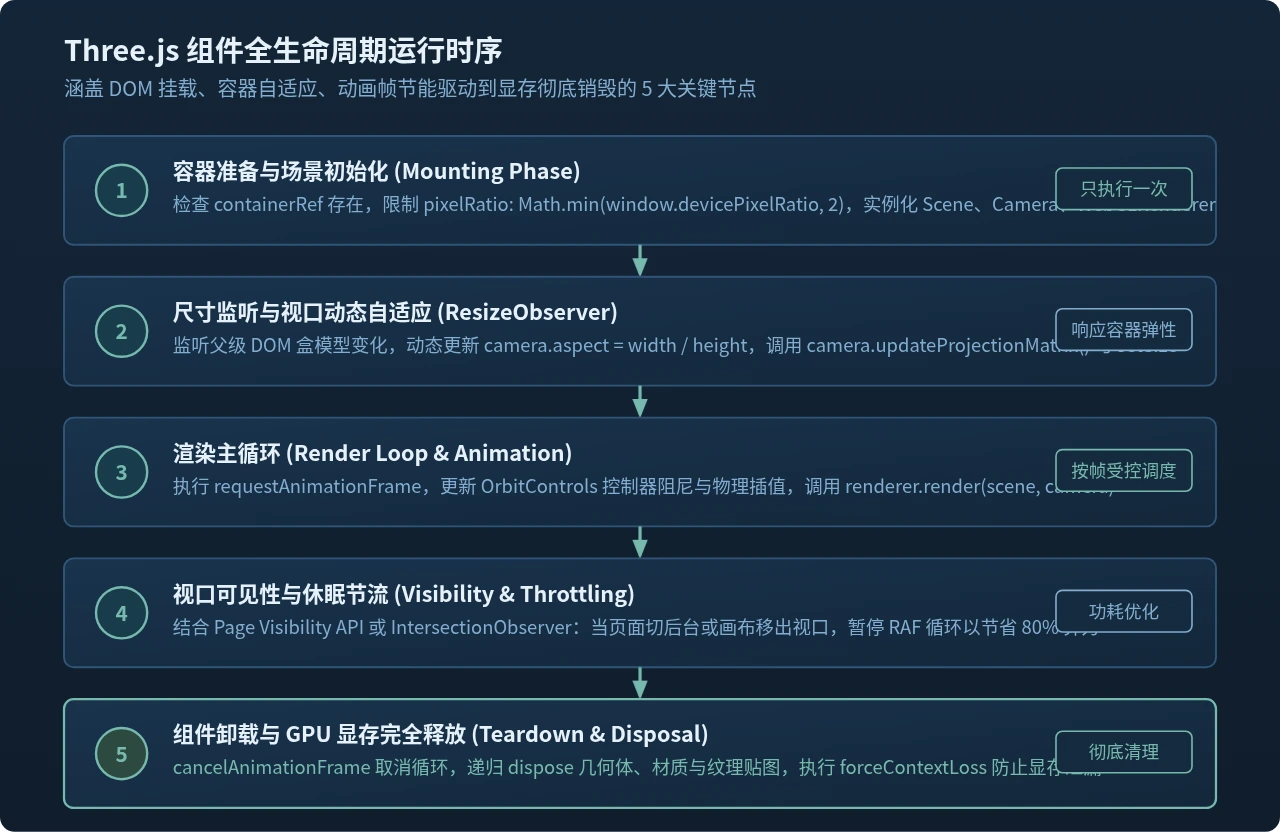
1. 容器 DOM 准备与尺寸自适应
很多开发者习惯监听 window.addEventListener('resize', ...),但在组件化布局(例如侧边栏收缩、弹窗展开、Flex/Grid 弹性伸缩)中,窗口尺寸并没有变化,而组件容器尺寸已发生改变。使用 ResizeObserver 监听具体的 containerRef 能够完美捕获容器尺寸变动。
避坑提示:像素比上限设置
移动端或高分屏的 window.devicePixelRatio 往往高达 3 或 4。如果不做限制直接传入 renderer.setPixelRatio,渲染像素总数将成倍暴增,导致 GPU 严重过热并出现断崖式掉帧。工程上务必使用 Math.min(window.devicePixelRatio, 2) 进行截断。
2. React 18 Strict Mode 的双重挂载陷阱
在 React 18 的开发模式(Development Mode)下,开启 <React.StrictMode> 会强制执行:Mount -> Cleanup -> Mount。如果组件在 cleanup 中没有彻底清理上一轮生成的 WebGL Canvas,或者未能取消已经派发的 requestAnimationFrame,页面上就会瞬间出现两个 Canvas,或者在隐藏的 Canvas 上持续进行无效绘制。采用标准控制器类的模式,在 useEffect 的返回函数中同步调用 controller.destroy(),能天然兼容严格模式的重挂载机制。
四、响应式状态同步策略(Props / State 到 3D 属性)
当父级组件的 Props 发生变化时,不能暴力推翻场景重建,而应根据属性的性质进行分级更新(Tiered Synchronization)。
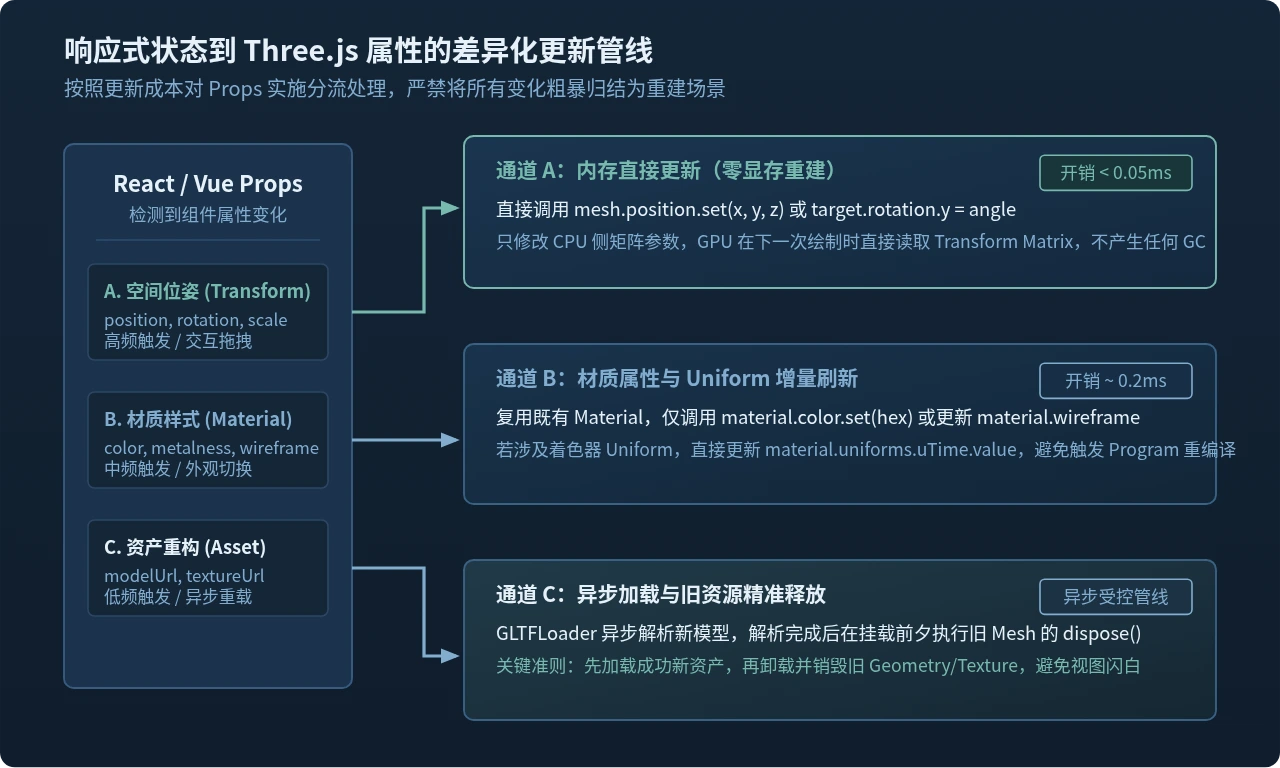
| 属性分类 | 典型 Props 示例 | 推荐同步方式 | 平均耗时与开销 |
|---|---|---|---|
| 空间变换 (Transform) | position, rotation, scale |
直接赋值 mesh.position.set(),不产生额外计算 |
< 0.05ms(极快) |
| 材质与 Uniforms | color, roughness, wireframe |
修改现有 Material 对象的属性,避免 new 材质 | ~ 0.2ms(无卡顿) |
| 相机与环境光 | fov, lightIntensity, background |
更新对应对象,并在相机改动后调用 updateProjectionMatrix() |
~ 0.5ms(平滑) |
| 资产重载 (Asset) | modelUrl, gltfPath, textureUrl |
异步加载新资产 -> 挂载新网格 -> 彻底销毁旧网格 | 视网络与模型大小而定 |
五、React 18 中的完整组件封装实现
在 React 中,利用 useRef 存储控制器实例与容器 DOM,利用细粒度的 useEffect 实现属性监听与同步:
// ThreeViewReact.jsx
import React, { useEffect, useRef } from 'react';
import { ThreeSceneController } from './ThreeSceneController';

export const ThreeView = ({
  color = '#83add0',
  wireframe = false,
  scale = 1,
  autoRotate = true,
  className = '',
  style = {},
}) => {
  const containerRef = useRef(null);
  const controllerRef = useRef(null);

  // 1. 生命周期管理:创建与销毁
  useEffect(() => {
    if (!containerRef.current) return;

    // 实例化控制器
    const controller = new ThreeSceneController(containerRef.current, {
      color,
      wireframe,
      scale,
      autoRotate,
    });
    controllerRef.current = controller;

    // 卸载或重挂载时同步销毁
    return () => {
      controller.destroy();
      controllerRef.current = null;
    };
  }, []); // 仅在挂载时运行一次

  // 2. 状态增量同步:监听特定 Props 变动
  useEffect(() => {
    if (controllerRef.current) {
      controllerRef.current.updateProps({
        color,
        wireframe,
        scale,
        autoRotate,
      });
    }
  }, [color, wireframe, scale, autoRotate]);

  return (
    <div
      ref={containerRef}
      className={className}
      style={{
        width: '100%',
        height: '400px',
        position: 'relative',
        overflow: 'hidden',
        ...style,
      }}
    />
  );
};
六、Vue 3 中的完整组件封装实现
在 Vue 3 中,利用 <script setup>、onMounted、onUnmounted 以及 watch 组合式 API 实现清晰的状态绑定:
<!-- ThreeViewVue.vue -->
<template>
  <div ref="containerRef" class="three-viewport" :style="customStyle"></div>
</template>

<script setup>
import { ref, onMounted, onUnmounted, watch } from 'vue';
import { ThreeSceneController } from './ThreeSceneController';

const props = defineProps({
  color: {
    type: String,
    default: '#83add0',
  },
  wireframe: {
    type: Boolean,
    default: false,
  },
  scale: {
    type: Number,
    default: 1,
  },
  autoRotate: {
    type: Boolean,
    default: true,
  },
  customStyle: {
    type: Object,
    default: () => ({ width: '100%', height: '400px' }),
  },
});

const containerRef = ref(null);
let controller = null;

// 1. 挂载时初始化控制器
onMounted(() => {
  if (!containerRef.value) return;
  controller = new ThreeSceneController(containerRef.value, {
    color: props.color,
    wireframe: props.wireframe,
    scale: props.scale,
    autoRotate: props.autoRotate,
  });
});

// 2. 监听 Props 增量同步
watch(
  () => [props.color, props.wireframe, props.scale, props.autoRotate],
  ([newColor, newWireframe, newScale, newAutoRotate]) => {
    if (controller) {
      controller.updateProps({
        color: newColor,
        wireframe: newWireframe,
        scale: newScale,
        autoRotate: newAutoRotate,
      });
    }
  }
);

// 3. 卸载时彻底清理显存
onUnmounted(() => {
  if (controller) {
    controller.destroy();
    controller = null;
  }
});
</script>

<style scoped>
.three-viewport {
  position: relative;
  overflow: hidden;
}
</style>
七、深度销毁与 WebGL 显存安全释放规范
在 JavaScript 中,普通的垃圾回收机制(Garbage Collection)只对堆内存中的 JS 对象有效,无法管理 GPU 端通过底层 WebGL API 开辟的帧缓冲区、顶点数组和贴图显存。如果仅仅是将 renderer.domElement 从页面中移除,GPU 显存仍旧处于被锁死状态。经过十几次路由切换后,浏览器标签页极易崩溃。
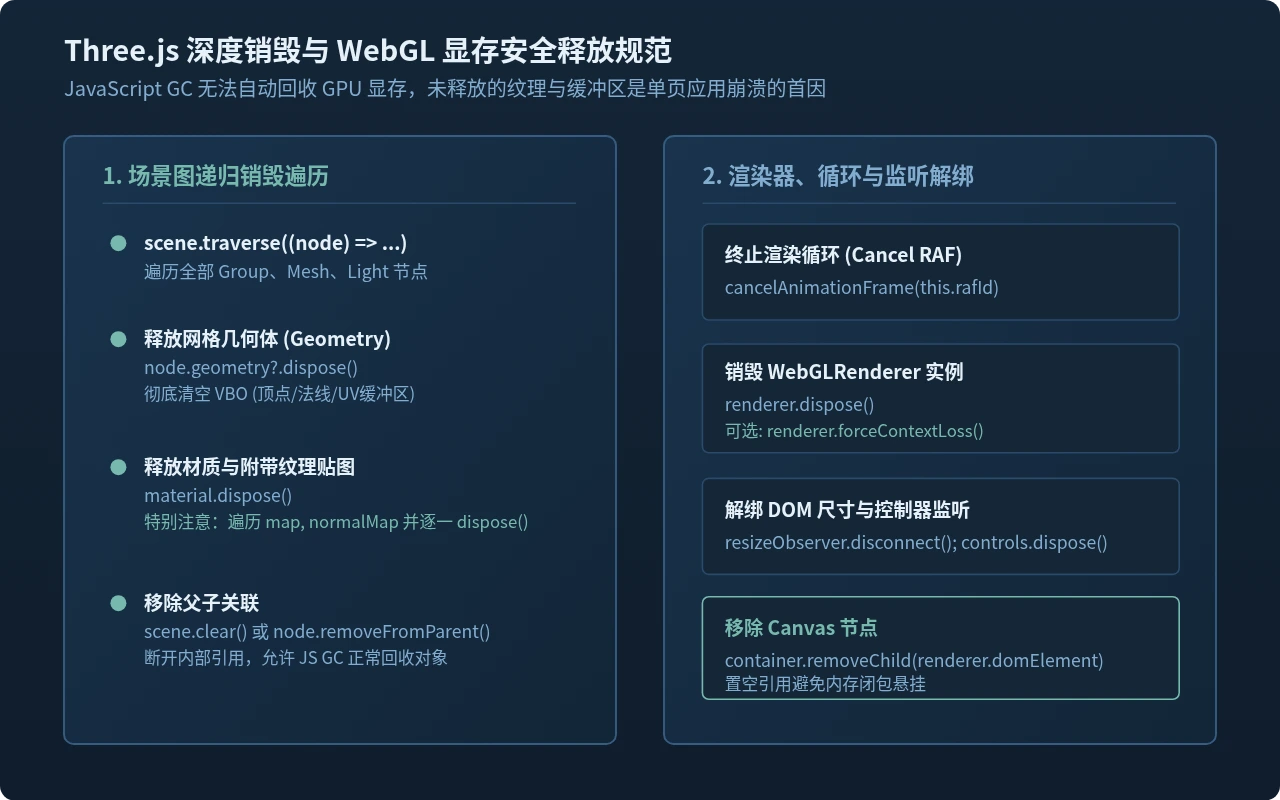
安全释放资源的五个黄金步骤包括:
- 取消动画循环:调用
cancelAnimationFrame(this.rafId),防止组件已卸载但在后台持续执行矩阵运算与渲染调用。 - 递归遍历场景树(Scene Traverse):调用
scene.traverse()对所有 Mesh 节点的geometry.dispose()和material.dispose()进行释放。 - 贴图纹理逐层释放:材质关联的
map、normalMap、roughnessMap等必须单独调用texture.dispose(),这是显存泄漏的高发地带。 - 销毁控制器与监听器:
OrbitControls.dispose()移除对全局 window/canvas 的鼠标与触控事件监听,断开ResizeObserver.disconnect()。 - 释放渲染器与上下文:调用
renderer.dispose(),必要时调用renderer.forceContextLoss()强制 WebGL 上下文释放底层显存。
八、生产环境实践总结与清单
生产环境关键检查清单
- 避免在 render 循环中创建对象:不要在
animate()函数中频繁调用new THREE.Vector3()、new THREE.Color()或new THREE.Raycaster(),请将其提升为 Controller 内部的复用私有变量,防止触发频繁的 JavaScript V8 垃圾回收卡顿(GC Trashing)。 - 按需渲染优化:若场景内容多为静态模型或仅在交互时发生变化,建议使用脏标记机制(Dirty Flag),只在 Props 变动或控制器触发
change事件时单次调用renderer.render(scene, camera),停止持续空转的 RAF 循环。 - 页面失焦休眠:结合浏览器的
document.addEventListener('visibilitychange', ...),当用户切到其他浏览器标签页时自动暂停渲染,切回时恢复,显著降低用户的电池与能耗负担。
在现代前端框架中封装 Three.js,核心在于用命令式的 Controller 承担 3D 渲染重任,用声明式的 React / Vue 组件管理外部输入与生命周期节点。通过确立容器尺寸监听、细粒度 Props 差异更新、以及贯穿递归释放的 Dispose 机制,即可兼顾工程组件化的灵活性与 WebGL 3D 运行时的高性能与显存安全性。
实用工具推荐
电子包浆
使用 ›绿化、压缩、噪点和虚拟水印,自由调节做旧程度。
图片压缩
使用 ›选择画质和输出格式,预览压缩前后的大小。
作者最新文章
相关文章