

本文深入解析 JavaScript 中 Object.entries() 方法的核心机制,展示如何将对象转换为键值对数组。通过过滤、映射、扁平化嵌套对象及构建查询字符串等实际案例,演示其在数据处理中的高效用法。同时对比 Object.keys/values,并探讨其与 Object.fromEntries 及 Map 的相互转换关系。
Object.entries() 是 JavaScript 中处理对象数据的重要工具,本节将介绍其基本概念与工作原理。
该方法的主要功能是将对象中可枚举的属性提取出来,并转换为一个二维数组结构。
生成的数组元素由对象自身的可枚举属性键值对组成,每个子数组包含两个部分:
- 第一个元素为属性名,类型为
字符串(或符号)。 - 第二个元素为对应的属性值,类型可以是
任何类型。
默认情况下,对象属性具有可枚举性,允许其在 for...in 循环中被遍历访问。若需调整属性的可枚举状态,可通过 Object.defineProperty 方法进行定义或修改。
以下是 Object.entries() 的基础调用方式示例:
- 基础调用示例展示。
const obj = { a: 1, b: 2, c: 3 };
const entries = Object.entries(obj);
console.log(entries);
// 输出: [['a', 1], ['b', 2], ['c', 3]]
- 针对空对象的处理情况:
const emptyObj = {};
const entries = Object.entries(emptyObj);
console.log(entries);
// 输出: []
- 与其他对象遍历方法的对比:
Object.keys(obj)仅返回可枚举属性名数组;Object.values(obj)仅返回可枚举属性值数组;而Object.entries(obj)则返回包含键值对的完整数组。
const obj = { a: 1, b: 2, c: 3 };

console.log(Object.keys(obj));
// 输出: ['a', 'b', 'c']

console.log(Object.values(obj));
// 输出: [1, 2, 3]

console.log(Object.entries(obj));
// 输出: [['a', 1], ['b', 2], ['c', 3]]
- 当传入非对象类型参数(如 null 或 undefined)时,
Object.entries会抛出 TypeError 错误。
try {
    console.log(Object.entries(null));
} catch (e) {
    console.error(e);
    // 输出: TypeError: Cannot convert undefined or null to object
}
- 结合 for…of 循环进行迭代:
Object.entries返回的数组结构非常适合使用for...of进行遍历操作。
const obj = { x: 10, y: 20, z: 30 };

for (const [key, value] of Object.entries(obj)) {
    console.log(`${key}: ${value}`);
}
// 输出:
// x: 10
// y: 20
// z: 30
接下来通过具体代码示例演示 Object.entries() 的实际应用场景。
场景一:利用 Object.entries 配合 filter 方法,筛选出符合特定条件的键值对。
通过 Object.entries 结合 filter 方法,筛选出满足特定条件的键值对。
const obj = { a: 1, b: 2, c: 3, d: 4 };

const filteredEntries = Object.entries(obj).filter(([key, value]) => value > 2);
console.log(filteredEntries);
// 输出: [['c', 3], ['d', 4]]
场景二:对象属性值的转换与重构。
使用 map 方法对对象属性值进行转换,然后重新构建对象。
const obj = { name: 'Alice', age: 25 };

const transformedEntries = Object.entries(obj).map(([key, value]) => {
    return [key, typeof value === 'string' ? value.toUpperCase() : value];
});

const newObj = Object.fromEntries(transformedEntries);
console.log(newObj);
// 输出: { name: 'ALICE', age: 25 }
场景三:嵌套对象的扁平化处理。
const nestedObj = {
    user: {
        name: 'Bob',
        age: 30
    },
    location: {
        city: 'New York',
        country: 'USA'
    }
};

const nestedEntries = Object.entries(nestedObj).flatMap(([key, value]) =>
    Object.entries(value).map(([subKey, subValue]) => [`${key}.${subKey}`, subValue])
);

console.log(nestedEntries);
// 输出: [['user.name', 'Bob'], ['user.age', 30], ['location.city', 'New York'], ['location.country', 'USA']]
场景四:动态构建对象。
const entries = [['a', 1], ['b', 2], ['c', 3]];

const obj = Object.fromEntries(entries);
console.log(obj);
// 输出: { a: 1, b: 2, c: 3 }
场景五:结合其他数组方法进行复杂数据处理。
使用 reduce 方法结合 Object.entries 对对象进行复杂的数据处理。
const obj = { apple: 10, banana: 20, cherry: 30 };

const total = Object.entries(obj).reduce((sum, [key, value]) => sum + value, 0);
console.log(total);
// 输出: 60
场景六:将对象转换为 URL 查询字符串。
const params = { name: 'Alice', age: 25, city: 'Wonderland' };

const queryString = Object.entries(params)
    .map(([key, value]) => `${encodeURIComponent(key)}=${encodeURIComponent(value)}`)
    .join('&');

console.log(queryString);
// 输出: 'name=Alice&age=25&city=Wonderland'
补充说明:Object.entries()、Object.fromEntries() 与 ES6 Map 之间的关联。
简要说明三者的作用,后续依次通过代码详细具体演示三者之间存在的联系。
Object.entries 传入一个对象,返回该对象的键值对的数组,即每个键和对应的值,转化为一个数组,以此类推,最后这些数组再被放到一个新数组中。
Object.fromEntries 传入一个数组,或者传入一个Map,数组最好是和Object.entries生成的数组结构一致,根据传入的返回一个对象。
Map ES6新增的数据结构,能够进行迭代,使用...展开运算符可将Map类型转化为Object.entries生成的数组对象 ,将Map传入Object.fromEntries能得到一个对象。
Object.entries和Object.fromEntries
const person = {
            name: '王二',
            age: 18,
            sex: '男',
            say() {
                console.log('说话');
            }
        }

        const obj1 = Object.entries(person)//返回对象的键值对数组
        const obj2 = Object.fromEntries(obj1);//通过上述的键值对数组,返回对应的对象
        console.log(obj1);
        console.log(obj2);
结果输出
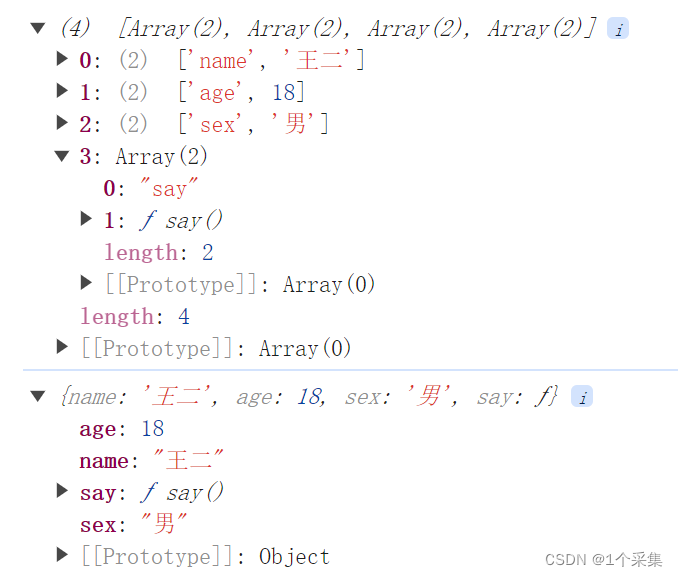
结果分析
上述可得,Object.entries和Object.fromEntries两个得到的结果可以相互转换。
前者通过对象可以得到键值对数组,后者可以将前者的数组,转化为对象。
个人猜测,可以实现深拷贝。
总结
到此这篇关于Js中的Object.entries()基本知识详细分析的文章就介绍到这了,更多相关Js中Object.entries()基本知识内容请搜索本站以前的文章或继续浏览下面的相关文章希望大家以后多多支持本站!