

本文详细梳理 npm 安装过程中常见的报错类型及排查步骤。涵盖从查看初始 error 定位依赖,到解决 Python、C++ 运行环境缺失问题;针对网络超时、404 链接失效及 GitHub 访问受限,提供代理配置、镜像设置及 SSH 密钥生成等具体解决方案,帮助开发者快速恢复依赖安装。
npm 安装报错初步排查
当 npm 安装过程中出现 error 时,首先应从 error1 处查看最初的报错内容,这通常能提供最准确的错误线索。
根据具体的 error 内容,定位是哪一个依赖项引发了错误。接着,检查 package.json 中该依赖的版本要求,并确认当前环境的 node.js 版本是否与之兼容。
运行环境缺失处理
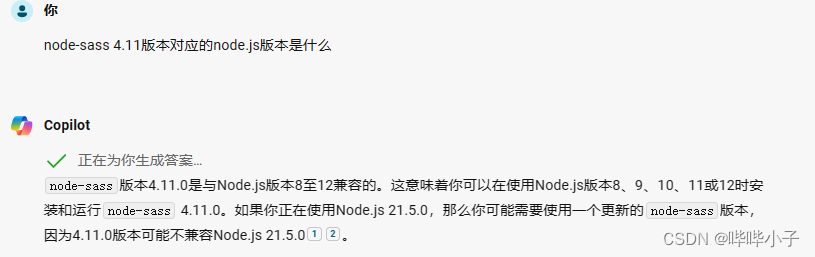
若报错提示缺少 C++ 或 Python 等运行环境,需根据缺失的具体项,安装对应的开发工具或运行库。
例如,日志中可能出现如下关于 Python 可执行文件的报错: npm ERR! gyp verb check python checking for Python executable "python2" in the PATH npm ERR! gyp verb `which` failed Error: not found: python2
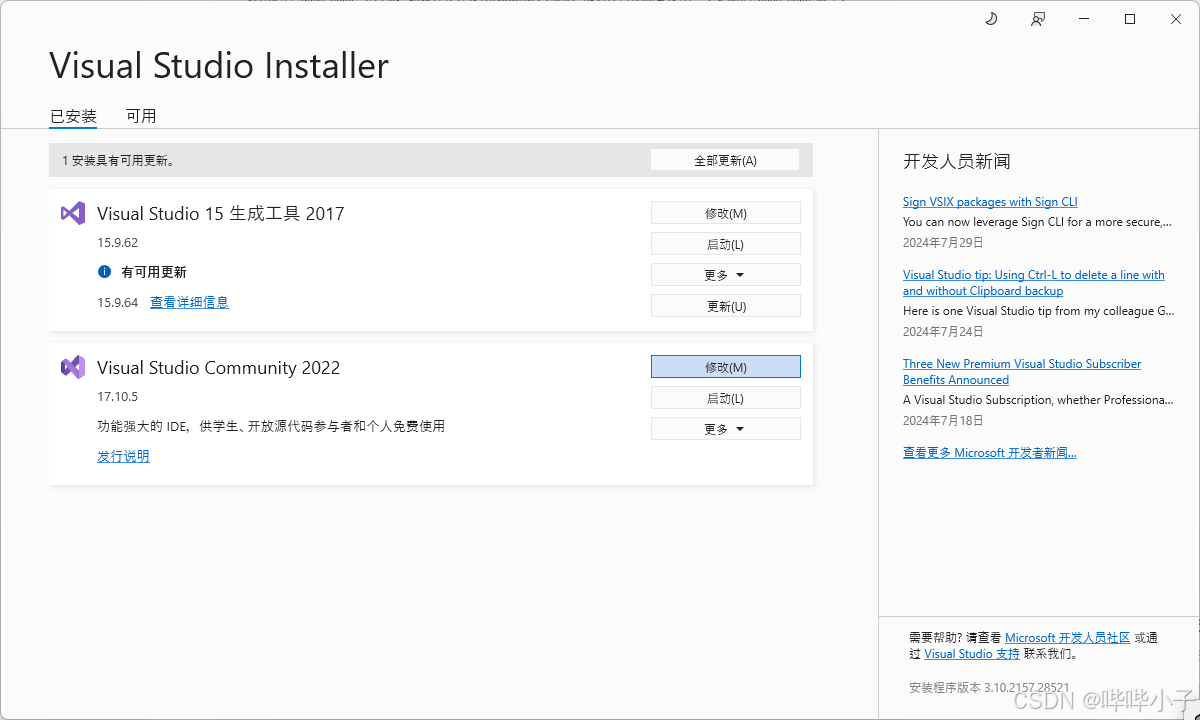
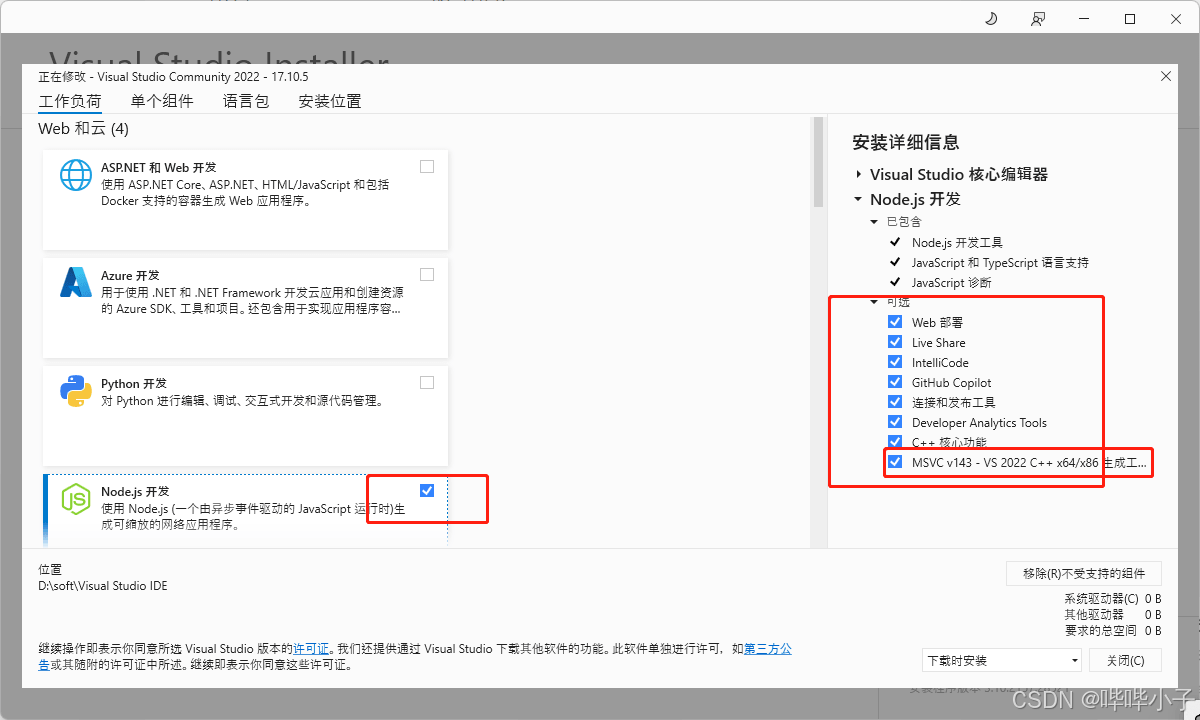
另一种常见情况是缺少微软 C++ 相关的开发库。
此时日志可能显示类似如下构建错误: gyp ERR! build error gyp ERR! stack Error: `C:\Program Files (x86)\Microsoft Visual Studio\2017\BuildTools\MSBuild\15.0\Bin\MSBuild.exe` failed with exit code: 1
关键字 Visual Studio 表明需要下载并安装相关的 Visual Studio 依赖组件。
依赖链接失效与网络代理
部分依赖的下载链接可能已经失效,导致安装失败并返回 404 错误。
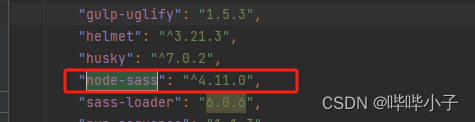
例如,当尝试安装 node-sass 时,可能会提示链接超时,且手动访问对应链接也会显示 404 页面。
具体报错信息可能包含如下内容: > node-sass@3.13.1 install D:\workspace\node_modules\node-sass > node scripts/install.js
系统尝试从 GitHub 下载二进制文件时失败: Downloading binary from https://github.com/sass/node-sass/releases/download/v3.13.1/win32-x64-64_binding.node Cannot download "https://github.com/sass/node-sass/releases/download/v3.13.1/win32-x64-64_binding.node":
连接超时错误: connect ETIMEDOUT 20.205.243.166:443
下载预构建二进制文件时超时: Timed out whilst downloading the prebuilt binary
提示信息指出,如果 github.com 在你所在区域无法访问,可以尝试通过 HTTP_PROXY 设置代理,例如:
export HTTP_PROXY=http://example.com:1234
或者通过 npm 配置代理:
npm config set proxy http://example.com:8080

可以尝试设置镜像(注意:淘宝镜像不一定对所有情况有效),或者单独安装失败的依赖(需确保链接可访问,旧链接往往已失效)。
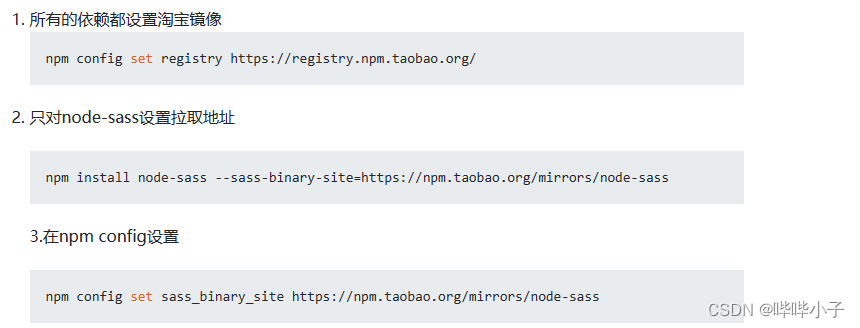
也可以直接使用命令安装对应的缺失版本。
例如,在 GitHub 上找到原来缺失的 sass 3.4.2 版本库文件后进行安装。
npm install git+https://github.com/sass/node-sass.git#v3.4.2 --saveGitHub SSH 密钥配置
部分依赖可能通过 SSH 协议从 GitHub 拉取,如果本地未配置 GitHub 的 SSH 密钥,操作会一直超时。配置完成后,若 git 能正常拉取,则说明配置成功。
安装过程可能在 checking installable status 处卡住并超时,报错内容中通常包含关键字 git 和 ssh。
日志可能显示如下警告: npm WARN deprecated domexception@1.0.1: Use your platform's native DOMException instead [ ...............] \ fetchMetadata: sill resolveWithNewModule camelcase@4.1.0
建议手动测试网络连接。
例如执行 ssh 测试: D:\workspace\git-test>ssh -T git@github.com ssh: connect to host github.com port 22: Connection timed out
尝试 git clone 时同样失败: D:\workspace\git-test>git clone ssh://git@github.com/sohee-lee7/Squire.git Cloning into 'Squire'... ssh: connect to host github.com port 22: Connection timed out fatal: Could not read from remote repository.
系统提示: Please make sure you have the correct access rights and the repository exists.
配置好 SSH 密钥后,再次执行 git clone 成功: D:\workspace\git-test>git clone ssh://git@github.com/sohee-lee7/Squire.git Cloning into 'Squire'... remote: Enumerating objects: 3598, done. remote: Total 3598 (delta 0), reused 0 (delta 0), pack-reused 3598 Receiving objects: 100% (3598/3598), 3.08 MiB | 1.59 MiB/s, done.
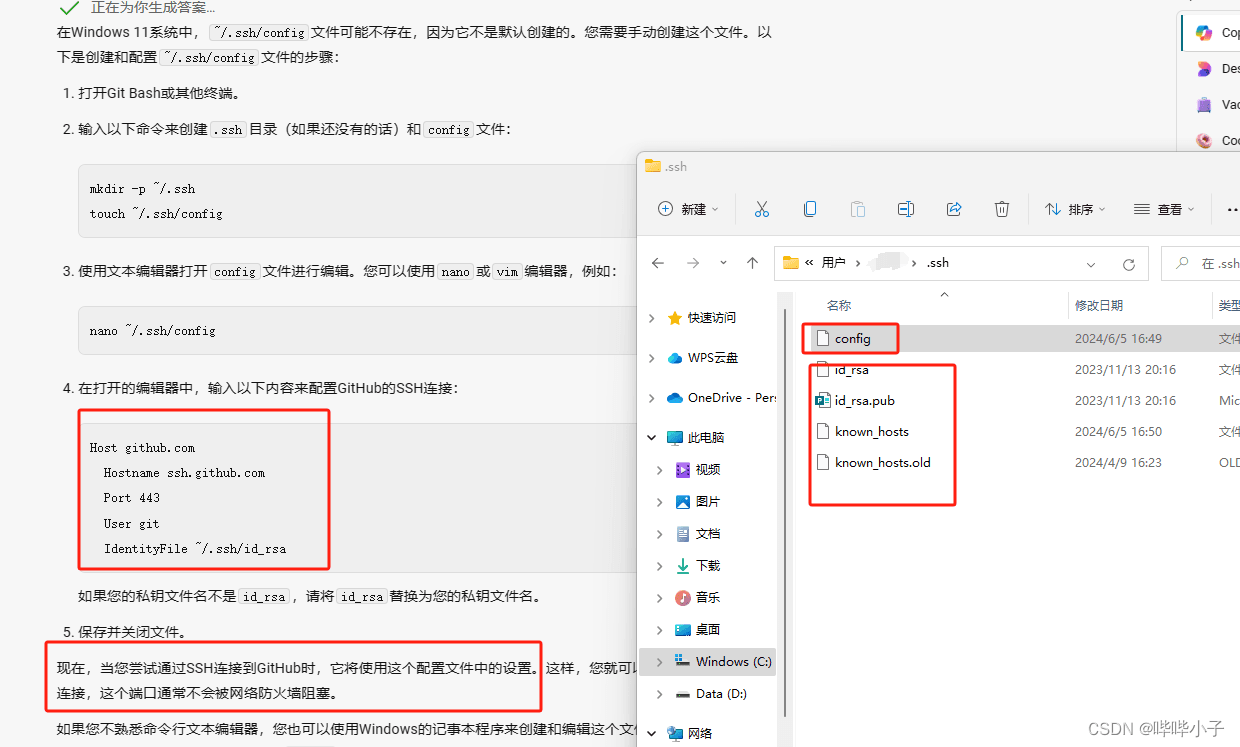
生成 GitHub 密钥后,会在当前 ~/ssh 目录下生成相关文件。还需要手动创建配置文件,使 git 的 SSH 设置生效。
HTTP 协议访问与临时代理
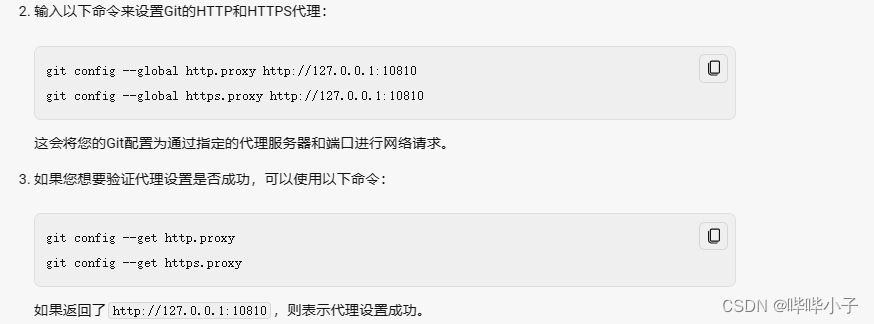
部分依赖可能通过 HTTP 协议从 GitHub 拉取。在国内网络环境下,HTTP 或 HTTPS 访问 GitHub 可能受阻,若本地有 VPN,需手动为 git 配置代理。
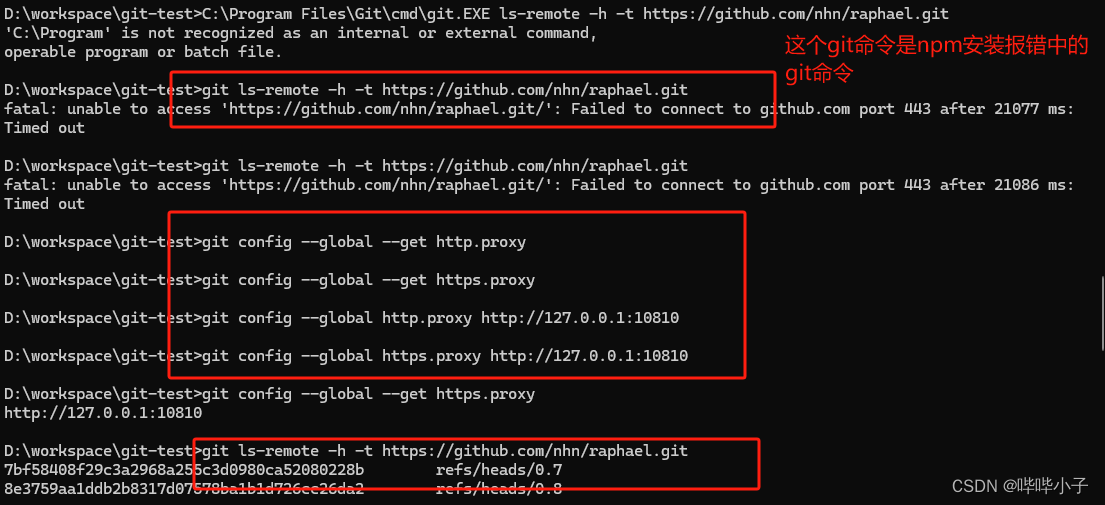
npm 报错中若出现类似 git.EXE ls-remote -h -t https://github.com/nhn/raphael.git 的行,手动测试发现拉取失败,则说明仍是 git 网络问题。
部分依赖可能以二进制流形式直接由 npm 下载。同理,npm 也需要配置代理。经测试,直接配置 npm 代理可能导致卡住,但可以在 cmd 窗口中配置临时代理(窗口关闭后失效),该方式对 npm 同样有效。
直接配置 npm 代理可能无效。
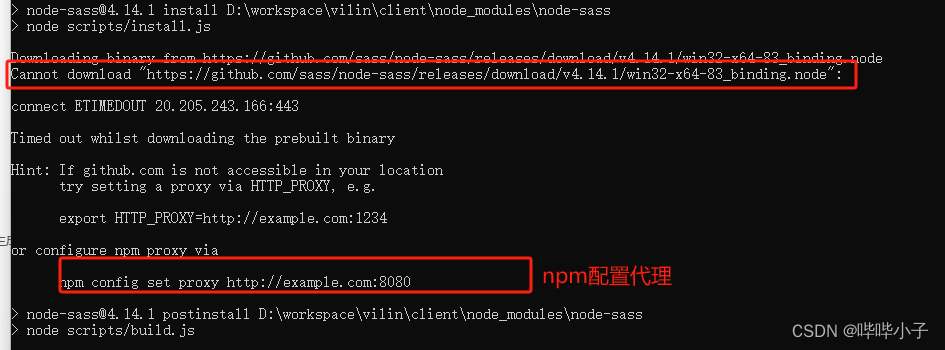
在临时 cmd 窗口中配置代理则有效。

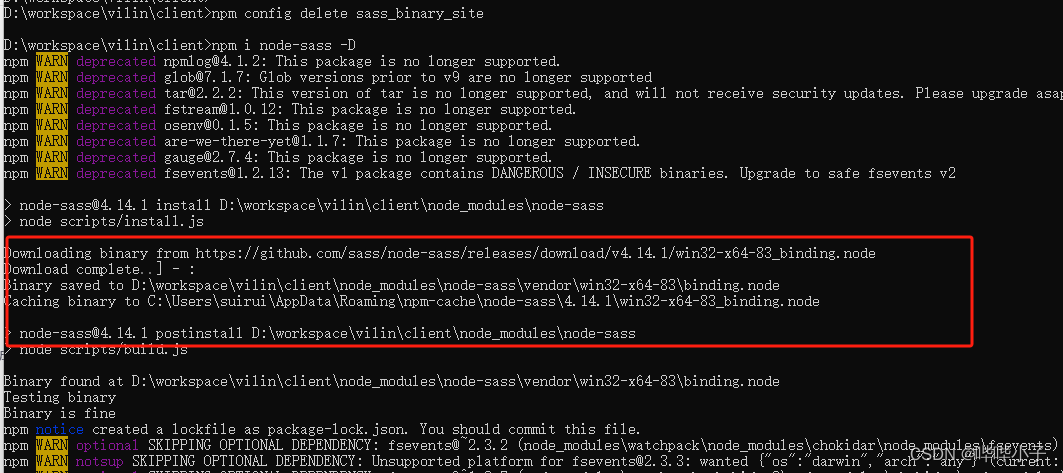
至此,关于 npm 安装时错误排查的方法介绍完毕。更多相关 npm 安装错误排查内容请搜索本站以前的文章或继续浏览下面的相关文章,希望大家以后多多支持本站!