

本文深入解析axios跨端架构的实现原理。通过源码分析,展示了axios如何利用适配器模式统一浏览器XMLHttpRequest与Node.js http模块。重点剖析dispatchRequest方法流程,以及getAdapter如何根据环境动态选择xhr或http适配器,确保跨平台请求的一致性。
介绍
axios 是一个跨平台的网络请求库,它在不同运行环境中采用不同的底层实现:在浏览器中封装 XMLHttpRequest API,而在 Node.js 环境中则调用 http/https 模块。axios 内部通过适配器模式将这两种实现统一,在屏蔽底层差异的同时,对外提供了一套标准化的请求接口。
本文将深入探讨 axios 跨端架构的具体实现机制。
从 axios 发送请求说起
首先分析 axios 发起请求的内部流程。
// 发送一个 GET 请求
axios({
  method: 'get',
  url: 'https://jsonplaceholder.typicode.com/comments'
  params: { postId: 1 }
})

// 发送一个 POST 请求
axios({
  method: 'post'
  url: 'https://jsonplaceholder.typicode.com/posts',
  data: {
    title: 'foo',
    body: 'bar',
    userId: 1,
  }
})
dispatchRequest() 方法
当调用 axios 发起请求时,实际逻辑由 Axios 实例的 .request() 方法处理。
// /v1.6.8/lib/core/Axios.js#L38
async request(configOrUrl, config) {
    try {
      return await this._request(configOrUrl, config);
    } catch (err) {}
}
_request() 方法内部首先对 configOrUrl 和 config 两个参数进行标准化处理,将其合并为统一的 config 对象。
// /v1.6.8/lib/core/Axios.js#L62
_request(configOrUrl, config) {
    if (typeof configOrUrl === 'string') {
      config = config || {};
      config.url = configOrUrl;
    } else {
      config = configOrUrl || {};
    }

    // ...
}
这一设计的目的是同时兼容以下两种调用方式:
// 调用方式一
axios('https://jsonplaceholder.typicode.com/posts/1')
// 调用方式二
axios({
  method: 'get',
  url: 'https://jsonplaceholder.typicode.com/posts/1'
})
这并非核心逻辑。在 _request() 方法执行完毕后,请求最终会交由 dispatchRequest() 处理。
// /v1.6.8/lib/core/Axios.js#L169-L173
try {
  promise = dispatchRequest.call(this, newConfig);
} catch (error) {
  return Promise.reject(error);
}
dispatchRequest() 是实际执行网络请求的入口,具体调用 XMLHttpRequest API(浏览器环境)还是 http/https 模块(Node.js 环境),需要进一步查看其内部实现。
// /v1.6.8/lib/core/dispatchRequest.js#L34
export default function dispatchRequest(config) { /* ... */ }
dispatchRequest() 接收上一步合并后的 config 参数,基于该参数即可发起网络请求。
跨端适配实现
// /v1.6.8/lib/core/dispatchRequest.js#L49
const adapter = adapters.getAdapter(config.adapter || defaults.adapter);
这里涉及 axios 内部使用的适配器模式。
axios 支持通过外部传入 adapter 参数来自定义请求逻辑,但这种情况较少见。在大多数场景下,系统使用内置的适配器实现。
defaults.adapter
defaults.adapter 的默认值定义如下:
// /v1.6.8/lib/defaults/index.js#L40
adapter: ['xhr', 'http'],
那么,adapters.getAdapter(['xhr', 'http']) 具体执行什么操作呢?
适配器实现
首先,adapters 模块位于 lib/adapters/adapters.js。
其目录结构如下所示:
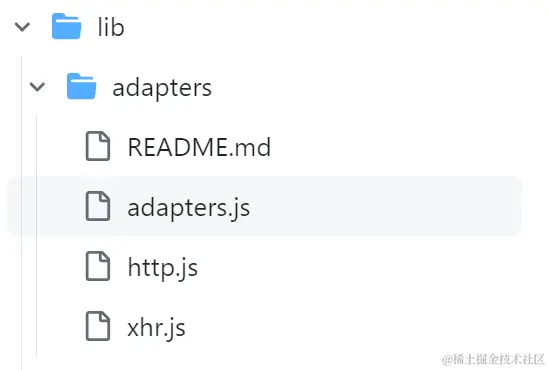
从目录结构可以看出,axios 针对浏览器和 Node.js 两个环境分别提供了适配支持:http.js 和 xhr.js。
adapters 模块的具体实现如下。
代码首先引入了两个内置的适配器文件。
// /v1.6.8/lib/adapters/adapters.js#L2-L9
import httpAdapter from './http.js';
import xhrAdapter from './xhr.js';

const knownAdapters = {
  http: httpAdapter,
  xhr: xhrAdapter
}
knownAdapters 对象的属性名与 defaults.adapter 的值 ['xhr', 'http'] 一一对应。
而 adapters.getAdapter(['xhr', 'http']) 的实现逻辑如下:
// /v1.6.8/lib/adapters/adapters.js#L27-L75
export default {
  getAdapter: (adapters) => {
    // 1)
    adapters = Array.isArray(adapters) ? adapters : [adapters];

    let nameOrAdapter;
    let adapter;

    // 2)
    for (let i = 0; i < adapters.length; i++) {
      nameOrAdapter = adapters[i];
      adapter = nameOrAdapter;

      // 3)
      if (!isResolvedHandle(nameOrAdapter)) {
        adapter = knownAdapters[String(nameOrAdapter).toLowerCase()];
      }

      if (adapter) {
        break;
      }
    }

    // 4)
    if (!adapter) {
      throw new AxiosError(
        `There is no suitable adapter to dispatch the request `,
        'ERR_NOT_SUPPORT'
      );
    }

    return adapter;
  }
}
该函数代码较长,我们将按照代码中的标准序号分四个部分进行讲解。
1)、这部分代码用于兼容调用 axios() 时传入自定义 adapter 参数的情况。
// `adapter` allows custom handling of requests which makes testing easier.
// Return a promise and supply a valid response (see lib/adapters/README.md).
adapter: function (config) {
  /* ... */
},
由于后续将 adapters 作为数组处理,因此在此场景下,我们将 adapter 封装为数组 [adapters]。
// /v1.6.8/lib/adapters/adapters.js#L28
adapters = Array.isArray(adapters) ? adapters : [adapters];
2)、接下来,遍历 adapters 数组以找到合适的适配器。
此时,adapters[i](即下面的 nameOrAdapter)可能是字符串('xhr' 或 'http'),也可能是函数(function (config) {})。
// /v1.6.8/lib/adapters/adapters.js#L37
let nameOrAdapter = adapters[i];
adapter = nameOrAdapter;
3)、因此,我们需要检查 nameOrAdapter 的类型。
// /v1.6.8/lib/adapters/adapters.js#L42-L48
if (!isResolvedHandle(nameOrAdapter)) {
  adapter = knownAdapters[(id = String(nameOrAdapter)).toLowerCase()];
}
isResolvedHandle() 是一个工具函数,用于判断是否需要从 knownAdapters 中获取适配器。
// /v1.6.8/lib/adapters/adapters.js#L24
const isResolvedHandle = (adapter) => typeof adapter === 'function' || adapter === null || adapter === false;
简单来说,只有当 adapter 是字符串('xhr' 或 'http')时,isResolvedHandle(nameOrAdapter) 才返回 false,从而从 knownAdapters 中获取对应的适配器。
typeof adapter === 'function' || adapter === null 这一判断条件较为直观,旨在排除自定义 adapter 参数(传入函数或 null)的情况。
而 adapter === false 又对应什么情况呢?
这是因为代码仅在浏览器或 Node.js 环境下运行。此时,httpAdapter 和 xhrAdapter 的返回值存在差异。
// /v1.6.8/lib/adapters/xhr.js#L48
const isXHRAdapterSupported = typeof XMLHttpRequest !== 'undefined';
export default isXHRAdapterSupported && function (config) {/* ...*/}

// /v1.6.8/lib/adapters/http.js#L160
const isHttpAdapterSupported = typeof process !== 'undefined' && utils.kindOf(process) === 'process';
export default isHttpAdapterSupported && function httpAdapter(config) {/* ... */}
具体而言:在浏览器环境中,httpAdapter 返回 false,xhrAdapter 返回函数;在 Node.js 环境中,xhrAdapter 返回 false,httpAdapter 返回函数。
因此,一旦 isResolvedHandle() 逻辑执行完毕。
if (!isResolvedHandle(nameOrAdapter)) {/* ... */}
系统会检查 adapter 变量的值,如果其有值(非 false)则说明已找到适配器,并结束遍历。
if (adapter) {
  break;
}
4)、最终在返回适配器前进行空值检查。
// 4)
if (!adapter) {
  throw new AxiosError(
    `There is no suitable adapter to dispatch the request `,
    'ERR_NOT_SUPPORT'
  );
}

return adapter;
至此,跨端架构的实现便完成了。
总结
本文讲解了 axios 的跨端架构原理。axios 内部实际发出请求是通过 dispatchRequest() 方法处理的,进一步深入则是通过适配器模式获取适应于当前环境的适配器函数。
axios 内置了两个适配器:httpAdapter 和 xhrAdapter。httpAdapter 用于 Node.js 环境,通过 http/https 模块实现;xhrAdapter 用于浏览器环境,通过 XMLHttpRequest API 实现。在 Node.js 环境中 xhrAdapter 返回 false,在浏览器环境中 httpAdapter 返回 false——这种机制确保了始终能返回正确的适配器。
以上就是详解axios跨端架构是如何实现的的详细内容,更多关于axios跨端架构的资料请关注本站其它相关文章!