

本文介绍前端将远程图片URL转换为File对象并上传的两种JavaScript实现方式。第一种利用Fetch API配合后端CORS配置,直接获取Blob生成File,性能较好;第二种通过Canvas绘制图片转为Base64后转换,虽能绕过部分跨域限制但存在性能损耗。文章对比了两种方案的优缺点及适用场景。
前言
近期,我在实际业务中遇到了一个图片转存的场景。
需求背景是:接口返回的图片列表数据包含完整路径,但域名属于其他系统。为确保其他系统删除图片不影响当前业务,需要在用户选择图片时,将图片重新转存至自有系统。
该需求逻辑合理。
然而,作为前端开发人员,面对此类涉及跨域和资源处理的复杂场景,难免产生担忧。
通常建议此类资源处理由后端完成,前端直接询问后端是否可行。
后端反馈前端应具备处理能力。
前端指出可能存在跨域问题。
后端表示已配置请求头 'Access-Control-Allow-Origin': '*' 以解决跨域限制。
确认后,开始着手实现。
方案一(推荐)
在确认后端支持跨域的前提下,前端可通过以下代码实现图片转存,逻辑较为简洁:
async function imageToStorage(path) {
  // 获取文件名
  const startIndex = path.lastIndexOf('/');
  const endIndex = path.indexOf('?');
  const imgName = path.substring(startIndex + 1, endIndex);
  // 获取图片的文件流对象
  const file = await getImgToFile(path, imgName);
  // TODO: 将File对象上传到其他接口中
}

/**
 * @name 通过fetch请求文件,将文件转成文件流对象
 * @param { string } path 文件路径全路径
 * @param { string } fileName 文件名
 * @returns { File | undefined }
 */
function getImgToFile(path, fileName) {
  const response = await fetch(path);
  if (response) {
    const blob = await response.blob();
    const file = new File([blob], fileName, { type: blob.type });
    return file;
  }
}
上述方式在跨域配置正确的情况下运行稳定,是较为推荐的方案。
但在实际测试中,首次编码仍遇到了跨域报错。

经排查,确认为后端尚未完成部署配置。
后端确认稍后部署,建议再次测试。
等待部署期间,继续探索其他方案。
方案二
在等待过程中,找到另一种实现方式,代码如下:
/** @name 将图片的网络链接转成base64 **/
function imageUrlToBase64(imageUrl: string, fileName: string): Promise<File> {
    return new Promise(resolve => {
      const image = new Image();
      // 让Image元素启用cors来处理跨源请求
      image.setAttribute('crossOrigin', 'anonymous');
      image.src = imageUrl + '&v=' + Math.random();
      image.onload = () => {
        const canvas = document.createElement('canvas');
        canvas.width = image.width;
        canvas.height = image.height;
        const context = canvas.getContext('2d')!;
        context.drawImage(image, 0, 0, image.width, image.height);
        // canvas.toDataURL
        const imageBase64 = canvas.toDataURL('image/jpeg', 1); // 第二个参数是压缩质量
        // 将图片的base64转成文件流
        const file = base64ToFile(imageBase64, fileName);
        resolve(file);
      };
    });
  }
  /** @name 将图片的base64转成文件流 **/
function base64ToFile(base64: string, fileName: string) {
    const baseArray = base64.split(',');
    // 获取类型与后缀名
    const mime = baseArray[0].match(/:(.*?);/)![1];
    const suffix = mime.split('/')[1];
    // 转换数据
    const bstr = atob(baseArray[1]);
    let n = bstr.length;
    const u8arr = new Uint8Array(n);
    while (n--) {
      u8arr[n] = bstr.charCodeAt(n);
    }
    // 生成文件流
    const file = new File([u8arr], `${fileName}.${suffix}`, {
      type: mime,
    });
    return file;
}
该方案需先将图片绘制到 canvas 元素,再转换为 base64 格式,最后生成文件流。经 console.time 性能测试,每次转换耗时数百毫秒,且图片体积越大耗时越长,对性能有一定影响。
综合考虑,仍推荐方案一;若条件允许,由后端处理最为稳妥。
网上常有观点认为方案二可直接绕过跨域限制,对此存在诸多讨论。
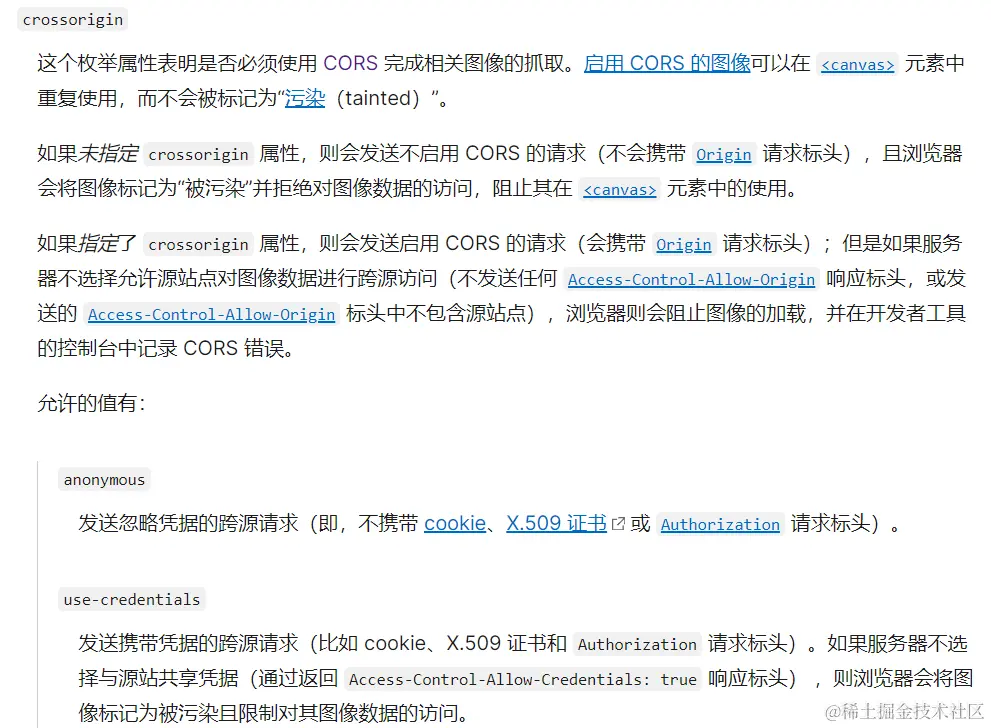
关键在于 crossOrigin 属性。参考 MDN 官方解释
其原理是通过 CORS 机制处理跨源请求。
也可参考其他相关技术文章:传送门
本文介绍了 JavaScript 实现图片地址转文件流并上传的两种方法,更多相关内容可搜索往期文章或继续浏览后续内容,感谢支持。