

本文深入解析如何利用JavaScript实现比纯CSS更灵活的文本溢出与展开收起功能。通过参考Vant4的TextEllipsis组件,文章详细讲解了如何计算最大高度、使用递归算法精准截断文本,以及通过克隆节点避免渲染干扰。结合具体代码示例,展示了如何处理省略号后的交互文字,确保多行文本在展开与收起状态下的完美显示。
文本省略是前端开发中常见的处理手段,尤其在需要展示额外说明文字的场景下应用广泛。
单纯依赖CSS往往难以兼顾兼容性与交互流畅度。以Vant4的TextEllipsis组件为例,其实现思路值得借鉴。
本文将以Vant4的TextEllipsis组件为案例进行剖析,便于理解核心逻辑(嫌麻烦可直接参考后续代码)。
代码的核心在于tail和middleTail等关键逻辑,这里重点解析tail方法,即如何在文本末尾追加内容。
基础CSS隐藏方案
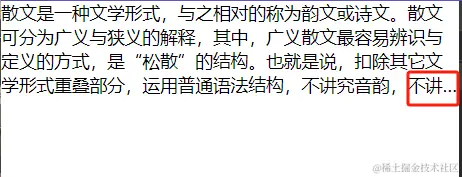
编写CSS省略文本的代码并不陌生。例如,限制文本显示四行,可使用如下CSS代码:
隐藏为四行
overflow: hidden;
display: -webkit-box;
-webkit-box-orient: vertical;
-webkit-line-clamp: 4; /* 控制显示行数 */
CSS方案的局限性
尽管简单,但该方法存在明显局限:
- 如何在省略号后添加展开、收起等文字?
- 添加后,如何保证文字与省略号在同一行?
- 展开后,如何保证文字在合适位置显示?
纯CSS虽能实现,但实际开发中复杂度较高。
鉴于CSS方案的不足,采用JavaScript实现是更优选择。
首先进行逻辑分析:
- 收起时保留的高度是多少?
- 如何截取超出高度的文字内容?
- 如何确保截取后的文字内容不影响原来的渲染和展示?
解决上述三点,即可完成功能开发。
逻辑分析
<div class="root">
    散文是一种文学形式,与之相对的称为韵文或诗文。散文可分为广义与狭义的解释,其中,广义散文最容易辨识与定义的方式,是“松散”的结构。也就是说,扣除其它文学形式重叠部分,运用普通语法结构,不讲究音韵,不讲究排比,没有任何束缚及限制的文字梳理方式,都可称为散文。除此,狭义散文是单指文学范畴内,结构松散之非韵文作品。文学专指的散文,历代作品有着各时代不同流变的脉络,而正因为松散带来的自由,散文作品表达出的思想通常有着丰富与圆满的特色
</div>
<style>
  .root {
    line-height: 1.6;
    overflow-wrap: break-word;
    word-break: break-all;
  }
</style>
首要问题是:收起状态下需要保留的高度是多少?
假设设定保留4行:
需设置文本限高 : line-height: 1.6;
row = 4
const maxHeight = Math.ceil(
    (Number(rows) + 0.5) * pxToNum(lineHeight) + "一些其他的容器高度:比如padding"
);
公式中的0.5为调整值,用于在计算最大高度时考虑行数不确定性。该值旨在确保即使行数计算略超预期,也能提前截断文本,防止超出容器高度限制。
确定高度后,如何切割文字?
注意:tail() 函数是一个递归函数,用于在给定容器高度限制下计算文本截断位置。详细解析 tail() 函数的工作原理如下:
const tail = (left, right) => {

    if (right - left <= 1) {
      return content.slice(0, left) + dots;
    }

    const middle = Math.round((left + right) / 2);
    container.innerText = content.slice(0, middle) + dots + actionText;

    if (container.offsetHeight > maxHeight) {
      return tail(left, middle);
    }
    return tail(middle, right);
  };

  container.innerText = tail(0, end);
递归结束时,函数返回最终截断位置,即最佳截断点。
递归均有结束判断,此处的结束条件为right - left <= 1,
计算中间位置 middle ,并将文本内容从左边界到中间位置加上省略符号,然后设置到容器元素中
检查容器元素的高度是否超过指定的最大高度限制。若超过,说明当前截断位置过早,需继续向左边界靠近截断;否则,说明截断位置过晚,需继续向右边界靠近截断。
最终找到合适的middle值,并返回 content.slice(0, left) + dots 作为结点的 innerText 文字。
期间,即使高度相同也在收缩右边界的内容, right - left <= 1 的作用是实现刚好满足给定最大高度限制的截断位置,确保不超出限制。
总结:该 tail() 函数使用递归方式,根据容器高度限制计算文本截断位置。递归结束判断在 right - left <= 1,通过不断调整 middle 的值,最终找到合适截断位置以满足最大高度限制,不超出限制。
切割后,如何保证文字内容不影响原来的渲染展示?
为避免影响原文本渲染,采用克隆节点方式。此处参考Vant代码并做了适当修改。
修改为更适合JavaScript开发的代码结构。
const rootNode = document.querySelector(".root");

const cloneContainer = () => {
  // cloneContainer就是为了得到文本的高度
  if (!rootNode || !rootNode.isConnected) return;

  const originStyle = window.getComputedStyle(rootNode);
  const container = document.createElement('div');
  const styleNames= Array.prototype.slice.apply(originStyle);

  styleNames.forEach((name) => {
    container.style.setProperty(name, originStyle.getPropertyValue(name));
  });

  container.style.position = 'fixed'; // 不在文档流中
  container.style.zIndex = '-9999'; // 看不到
  container.style.top = '-9999px'; // 看不到
  container.style.height = 'auto';
  container.style.minHeight = 'auto';
  container.style.maxHeight = 'auto';

  container.innerText = content;
  document.body.appendChild(container);

  return container;
};
解析:window.getComputedStyle 是用于获取指定元素所有计算样式的方法。它返回一个 CSSStyleDeclaration 对象,包含指定元素的所有计算样式属性及其对应值。
实现效果
实例代码
html
<style>
  .root {
    padding: 12px;
    line-height: 1.6;
    overflow-wrap: break-word;
    word-break: break-all;
  }
</style>

<body>
  <div class="root">
    散文是一种文学形式,与之相对的称为韵文或诗文。散文可分为广义与狭义的解释,其中,广义散文最容易辨识与定义的方式,是“松散”的结构。也就是说,扣除其它文学形式重叠部分,运用普通语法结构,不讲究音韵,不讲究排比,没有任何束缚及限制的文字梳理方式,都可称为散文。除此,狭义散文是单指文学范畴内,结构松散之非韵文作品。文学专指的散文,历代作品有着各时代不同流变的脉络,而正因为松散带来的自由,散文作品表达出的思想通常有着丰富与圆满的特色
  </div>
</body>
<script src="TextEllipsis.js"> </script>
JS代码
document.addEventListener("DOMContentLoaded", function() {

let expanded =true;
let collapseText = "收起";
let expandText = "展开";
const rows = 3;
let actionText = expanded ? collapseText : expandText;
let hasAction = false;
const rootNode = document.querySelector(".root");
const content = rootNode.innerText;
let text = "";
const dots = "...";

const pxToNum = (value) => {
  if (!value) return 0;
  const match = value.match(/^\d*(\.\d*)?/);
  return match ? Number(match[0]) : 0;
};

const cloneContainer = () => {
  // cloneContainer就是为了得到文本的高度
  if (!rootNode || !rootNode.isConnected) return;

  const originStyle = window.getComputedStyle(rootNode);
  const container = document.createElement('div');
  const styleNames= Array.prototype.slice.apply(originStyle);

  styleNames.forEach((name) => {
    container.style.setProperty(name, originStyle.getPropertyValue(name));
  });

  container.style.position = 'fixed';
  container.style.zIndex = '-9999';
  container.style.top = '-9999px';
  container.style.height = 'auto';
  container.style.minHeight = 'auto';
  container.style.maxHeight = 'auto';

  container.innerText = content;
  document.body.appendChild(container);

  return container;
};

const calcEllipsised = () => {
  const calcEllipsisText = (
    container,
    maxHeight
  ) => {
    const end = content.length;

    const calcEllipse = () => {
      const tail = (left, right) => {

        if (right - left <= 1) {
          return content.slice(0, left) + dots;
        }

        const middle = Math.round((left + right) / 2);

        container.innerText = content.slice(0, middle) + dots + actionText;

        if (container.offsetHeight > maxHeight) {
          return tail(left, middle);
        }

        return tail(middle, right);
      };

      container.innerText = tail(0, end);
    };

    calcEllipse();

    return container.innerText;
  };

  const container = cloneContainer();

  if (!container) {
    needRecalculate = true;
    return;
  }

  let { paddingBottom, paddingTop, lineHeight } = container.style;

  const maxHeight = Math.ceil(
    (Number(rows) + 0.5) * pxToNum(lineHeight) +
      pxToNum(paddingTop) +
      pxToNum(paddingBottom),
  );

  if (maxHeight < container.offsetHeight) {
    hasAction = true;
    text = calcEllipsisText(container, maxHeight);
  } else {
    hasAction = false;
    text = content;
  }

  document.body.removeChild(container);
};

const toggle = (isExpanded = !expanded) => {
  expanded = isExpanded;
  actionText = expanded ? collapseText : expandText;
};


const renderAction = () => {
  calcEllipsised();
  const container = document.createElement('span');
  container.classList.add("expend_txt");
  container.addEventListener('click',()=>{
    toggle();
    container.innerText = hasAction ? actionText : null;
    rootNode.innerText = expanded ? content : text;
    rootNode.appendChild(container);
  });
  container.innerText = hasAction ? actionText : null;;
  rootNode.appendChild(container);
}

renderAction()

})
以上就是使用JavaScript实现文本收起展开(省略)功能的详细内容,更多关于JavaScript文本展开收起的资料请关注本站其它相关文章!