

本文介绍了在JavaScript中操作元素类名的两种主要方式:直接修改className属性和使用classList对象。className通过字符串赋值实现类名的增删,而classList提供了add、remove等更规范的方法,支持同时处理多个类名。
使用className属性操作类名
第一种方式是通过className属性来添加或删除类名。
添加类名时,可以将获取元素.className = "类名1 类名2 ..."。如果需要移除类名,只需将属性值设置为空字符串,即获取元素名.className = " "。
使用classList对象操作类名
第二种方式是利用classList对象来管理类名。
添加单个类名时,使用获取元素名.classList.add("类名");。若要同时添加多个类名,需以逗号分隔传入,如获取元素名.classList..add("类名1","类名2","类名3",...);,注意每个类名都必须用引号包裹。移除单个类名使用获取元素名.classList.remove("类名");,而移除多个类名则参考获取元素名.classList.remove("类名1","类名2","类名3",...);,同样要求每个类名用引号包裹。
以下是一个具体的应用示例。
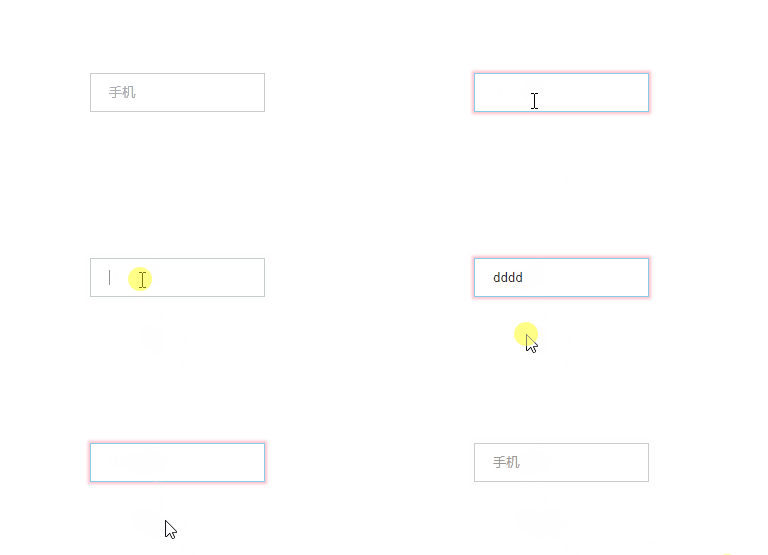
<style>
        input {
            outline: none;
            height: 35px;
            line-height: 35px;
            border: 1px solid #ccc;
            color: #999;
            text-indent: 1rem;
            display: inline-block;
            transition: all .3s;
        }
        .active {
            border: 1px solid skyblue;
            color: #333;
        }
        .active2 {
            box-shadow: 0 0 3px 2px pink;;
        }
    </style>
<input type="text" value="手机">
<script>
window.onload = function () {
document.querySelector('input').onfocus = function () {
this.value = ""
// 方法一:
// this.style.color = "#333"
// this.style.border = "1px solid skyblue"
// 方法二:
this.classList.add("active", "active2");
// 方法三:
// this.className = "active active2"
}
// trim() 去除空格
document.querySelector('input').onblur = function () {
if (this.value.trim() == "") {
this.value = "手机"
// 方法一:
// this.style.color = "#999"
// this.style.border = "1px solid #ccc"
// 方法二:
this.classList.remove("active", "active2");
// 方法三:
// this.className = ""
}
}
}
</script>以上就是关于JavaScript中添加类名的两种方法的介绍,更多相关JS添加类名内容请搜索本站以前的文章或继续浏览下面的相关文章,希望大家以后多多支持本站!