本文介绍 Ionic JS 中 $ionicModal 服务的使用。该模态框可覆盖用户主界面内容,通过 fromTemplate 或 fromTemplateUrl 初始化,并支持 show、hide、remove 等方法控制显示状态。示例展示了 HTML 模板嵌入、Controller 注入及完整源码结构,帮助开发者实现自定义模态交互。
Ionic JS $ionicModal 模态框遮罩主界面内容详解
Ionic 框架中的模态组件
$ionicModal 服务
该模态组件能够覆盖并遮挡用户主界面的内容区域。
你可以在 index 文件或其他相关文件中嵌入如下代码,具体代码可根据实际业务需求进行调整。
<script id="my-modal.html" type="text/ng-template">
<ion-modal-view>
<ion-header-bar>
<h1 class="title">My Modal title</h1>
</ion-header-bar>
<ion-content>
Hello!
</ion-content>
</ion-modal-view>
</script>
随后在 Controller 中注入 $ionicModal 服务,并调用之前定义的模板进行初始化,参考以下代码示例:
angular.module('testApp', ['ionic'])
.controller('MyController', function($scope, $ionicModal) {
$ionicModal.fromTemplateUrl('my-modal.html', {
scope: $scope,
animation: 'slide-in-up'
}).then(function(modal) {
$scope.modal = modal;
});
$scope.openModal = function() {
$scope.modal.show();
};
$scope.closeModal = function() {
$scope.modal.hide();
};
//Cleanup the modal when we're done with it!
$scope.$on('$destroy', function() {
$scope.modal.remove();
});
// Execute action on hide modal
$scope.$on('modal.hidden', function() {
// Execute action
});
// Execute action on remove modal
$scope.$on('modal.removed', function() {
// Execute action
});
});
相关方法
fromTemplate(templateString, options)
| 参数 | 类型 | 详情 |
|---|---|---|
| templateString | 字符串 |
模板的字符串作为模型的内容。 |
| options | 对象 |
options 会传递到 ionicModal#initialize方法中。
|
返回一个ionicModal控制器的实例对象。
fromTemplateUrl(templateUrl, options)
| 参数 | 类型 | 详情 |
|---|---|---|
| templateUrl | 字符串 |
载入模板的url。
|
| options | 对象 |
通过ionicModal#initialize方法传递对象。
|
返回一个 promise 对象。Promises 对象是 CommonJS 工作组提出的一种规范,旨在为异步编程提供统一的接口标准。
ionicModal 实例
通过 $ionicModal 服务进行实例化创建。
提示:在不再需要某个模态框时,务必调用 remove() 方法进行清理,以防止内存泄漏。
注意:模态框从其初始作用域广播 'modal.shown' 和 'modal.hidden' 事件,并将自身作为参数传递。
可用方法
initialize(可选)
用于创建一个新的模态控制器实例。
| 参数 | 类型 | 详情 |
|---|---|---|
| options | 对象 |
一个选项对象具有一下属性:
|
show()
显示当前的模态实例。
返回值:promise 对象,在模态动画完成后被解析。
hide()
隐藏模态框。
返回值:promise 对象,在模态动画完成后被解析。
remove()
从 DOM 中移除模态实例并执行清理操作。
返回值:promise 对象,在模态动画完成后被解析。
isShown()
返回布尔值,用于判断当前模态是否处于显示状态。
具体示例
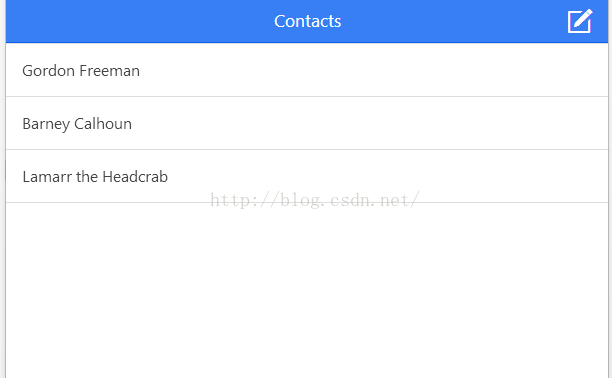
HTML 结构代码
<html ng-app="ionicApp">
<head>
<meta charset="utf-8">
<meta name="viewport" content="initial-scale=1, maximum-scale=1, user-scalable=no, width=device-width">
<title>菜鸟教程(runoob.com)</title>
<link href="http://www.runoob.com/static/ionic/css/ionic.min.css" rel="stylesheet">
<script src="http://www.runoob.com/static/ionic/js/ionic.bundle.min.js"></script>
</head>
<body ng-controller="AppCtrl">
<ion-header-bar class="bar-positive">
<h1 class="title">Contacts</h1>
<div class="buttons">
<button class="button button-icon ion-compose" ng-click="modal.show()">
</button>
</div>
</ion-header-bar>
<ion-content>
<ion-list>
<ion-item ng-repeat="contact in contacts">
{{contact.name}}
</ion-item>
</ion-list>
</ion-content>
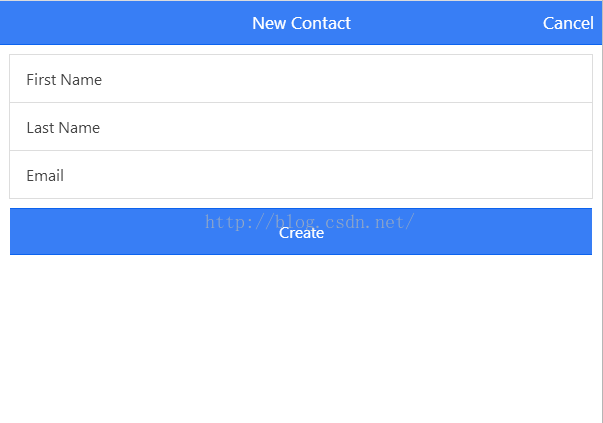
<script id="templates/modal.html" type="text/ng-template">
<ion-modal-view>
<ion-header-bar class="bar bar-header bar-positive">
<h1 class="title">New Contact</h1>
<button class="button button-clear button-primary" ng-click="modal.hide()">Cancel</button>
</ion-header-bar>
<ion-content class="padding">
<div class="list">
<label class="item item-input">
<span class="input-label">First Name</span>
<input ng-model="newUser.firstName" type="text">
</label>
<label class="item item-input">
<span class="input-label">Last Name</span>
<input ng-model="newUser.lastName" type="text">
</label>
<label class="item item-input">
<span class="input-label">Email</span>
<input ng-model="newUser.email" type="text">
</label>
<button class="button button-full button-positive" ng-click="createContact(newUser)">Create</button>
</div>
</ion-content>
</ion-modal-view>
</script>
</body>
</html>
CSS 样式代码
body {
cursor: url('http://www.runoob.com/try/demo_source/finger.png'), auto;
}
JavaScript 逻辑代码
angular.module('ionicApp', ['ionic'])
.controller('AppCtrl', function($scope, $ionicModal) {
$scope.contacts = [
{ name: 'Gordon Freeman' },
{ name: 'Barney Calhoun' },
{ name: 'Lamarr the Headcrab' },
];
$ionicModal.fromTemplateUrl('templates/modal.html', {
scope: $scope
}).then(function(modal) {
$scope.modal = modal;
});
$scope.createContact = function(u) {
$scope.contacts.push({ name: u.firstName + ' ' + u.lastName });
$scope.modal.hide();
};
});
完整源代码如下:
<html ng-app="ionicApp">
<head>
<meta charset="utf-8">
<meta name="viewport" content="initial-scale=1, maximum-scale=1, user-scalable=no, width=device-width">
<title></title>
<link href="http://cdn.bootcss.com/ionic/1.0.1/css/ionic.min.css" rel="stylesheet">
<script src="http://cdn.bootcss.com/ionic/1.0.1/js/ionic.bundle.min.js"></script>
<style>
body {
cursor: url('http://ionicframework.com/img/finger.png'), auto;
}
</style>
<script>
angular.module('ionicApp', ['ionic']
.controller('AppCtrl', function($scope, $ionicModal) {
$scope.contacts = [
{ name: 'Gordon Freeman' },
{ name: 'Barney Calhoun' },
{ name: 'Lamarr the Headcrab' },
];
$ionicModal.fromTemplateUrl('templates/modal.html', {
scope: $scope
}).then(function(modal) {
$scope.modal = modal;
});
$scope.createContact = function(u) {
$scope.contacts.push({ name: u.firstName + ' ' + u.lastName });
$scope.modal.hide();
};
});
</script>
</head>
<body ng-controller="AppCtrl">
<ion-header-bar class="bar-positive">
<h1 class="title">Contacts</h1>
<div class="buttons">
<button class="button button-icon ion-compose" ng-click="modal.show()">
</button>
</div>
</ion-header-bar>
<ion-content>
<ion-list>
<ion-item ng-repeat="contact in contacts">
{{contact.name}}
</ion-item>
</ion-list>
</ion-content>
<script id="templates/modal.html" type="text/ng-template">
<ion-modal-view>
<ion-header-bar class="bar bar-header bar-positive">
<h1 class="title">New Contact</h1>
<button class="button button-clear button-primary" ng-click="modal.hide()">Cancel</button>
</ion-header-bar>
<ion-content class="padding">
<div class="list">
<label class="item item-input">
<span class="input-label">First Name</span>
<input ng-model="newUser.firstName" type="text">
</label>
<label class="item item-input">
<span class="input-label">Last Name</span>
<input ng-model="newUser.lastName" type="text">
</label>
<label class="item item-input">
<span class="input-label">Email</span>
<input ng-model="newUser.email" type="text">
</label>
<button class="button button-full button-positive" ng-click="createContact(newUser)">Create</button>
</div>
</ion-content>
</ion-modal-view>
</script>
</body>
</html>