

本文分享了一款使用原生JavaScript结合HTML5 Canvas技术实现的连连看游戏。内容包含完整的效果展示、核心实现代码及源码下载链接,旨在为前端开发者提供游戏开发实例参考,助力掌握Canvas绘图与游戏逻辑构建。
Canvas连连看游戏实现概述
本文详细介绍并提供了使用原生JavaScript结合Canvas技术实现的连连看游戏的具体代码,供开发者参考与学习。
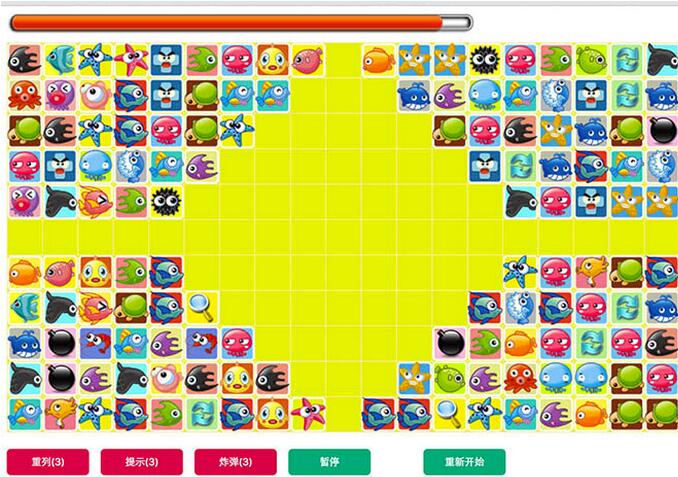
游戏运行效果如下图所示:
具体实现代码如下:
核心代码实现
<!DOCTYPE html>
<html>
 <head>
 <meta charset="UTF-8">
 <title></title>
 <style>
 #box{
 /*border: 1px solid #D1D1D1; */
 overflow: hidden;
 position: relative;
 padding-bottom: 60px;
 }
 #bg{
 background-color: rgba(254,195,89,.2);
 }
 #mycanvas{
 position: absolute;
 top: 36px; left: 0;
 }
 #toolsbar{
 width: 100%;
 position: absolute;
 bottom: 10px;
 left: 0;
 overflow: hidden;
 }
 button{
 outline: none;
 border: none;
 width: 100px;
 height: 32px;
 background-color: #d80049;
 color: #FFFFFF;
 border-radius: 5px;
 margin-right: 10px;
 cursor: pointer;
 }
 #timeline{
 height: 26px;
 width: 568px;
 padding-bottom: 10px;
 background: url(images/time_slot-hd.png) no-repeat;
 overflow: hidden;
 }
 #timeline span{
 display: block;
 width: 100%;
 height: 100%;
 display: flex;
 overflow: hidden;
 }
 #timeline span:before,
 #timeline span:after{
 display: block;
 content: "";
 height: 26px;
 background: url(images/time_bars-hd.png) no-repeat;
 }
 #timeline span:before{
 width: 12px;
 }
 #timeline span:after{
 /*width: 100%;*/
 background-position: right top;
 -webkit-flex: 1;
 /*margin-top: -26px;*/
 }
 </style>
 </head>
 <body>
 <div id="box">
 <div id="timeline"><span></span></div>
 <div id="toolsbar">
 <button class="resort">重列(3)</button>
 <button class="tip">提示(3)</button>
 <button class="boom">炸弹(3)</button>
 <button class="parse" style=" background-color: #00AA79;">暂停</button>
 <button class="restart" style="margin-left: 50px; background-color: #00AA79;">重新开始</button>
 </div>
 <canvas id="bg" width="818" height="474px"></canvas>
 <canvas id="mycanvas" width="818" height="474px">

 </canvas>
 </div>

 </body>
</html>
<script type="text/javascript" src="../../public/js/jquery-1.11.2.min.js" ></script>
<script type="text/javascript" src="control.js" ></script>
<script type="text/javascript" src="matrix.js" ></script>
<script type="text/javascript" src="draw.js" ></script>
<script type="text/javascript" src="map.js" ></script>
<script type="text/javascript" >
$(function(){
 var matrix = MAP_ARR[parseInt(Math.random()*MAP_ARR.length)];
 window._Matrix = new Matrix(matrix,36);

 window.draw = new Draw({
 id : "mycanvas",
 step : 42,
 matrix : _Matrix.matrix,
 dir : "images/",
 speed : 300
 });
 var controller = new control({
 step : 42,
 col : 19,
 row : 11,
 id : "bg",
 time : 90000,
 draw : draw,
 _Matrix : _Matrix,
 times : 3
 });

 $("#mycanvas").on("click",function(e){
 var x = e.offsetX,
 y = e.offsetY;
 var _x = Math.floor((x-1)/43),
 _y = Math.floor((y-1)/43);
 controller.click(_x,_y);
 });
 $(".resort").on("click",function(){
 var count = parseInt($(this).text().match(/\d+/)[0]);
 if(count){
 count--;
 $(this).text("重列("+ count +")");
 }
 controller.resort();
 });
 var tiped = false,tips;
 $(".tip").on("click",function(){
 var count = parseInt($(this).text().match(/\d+/)[0]);
 if(count){
 count--;
 $(this).text("提示("+ count +")");
 }
 controller.gettips();
 });
 $(".boom").on("click",function(){
 var count = parseInt($(this).text().match(/\d+/)[0]);
 if(count){
 count--;
 $(this).text("炸弹("+ count +")");
 }
 controller.boom();
 });
 $(".restart").on("click",function(){
 controller.restart();
 });
 $(".parse").on("click",function(){
 var bool = $(this).text() == "暂停";
 $(this).text(bool ? "继续" : "暂停")
 controller.parse();
 });
 controller.watch(function(percent){
 $("#timeline span").width(percent+"%");
 });
});
</script>
源码获取与扩展学习
如需获取完整项目文件,可点击链接下载连连看游戏源码。
此外,还有更多JavaScript游戏开发实例可供参考,建议查阅《javascript经典小游戏汇总》专题以获取更多学习资源,希望本文内容能对您的学习有所帮助。