

本文提供了一套完整的JavaScript选项卡实现方案,包含HTML结构、CSS样式及JS交互逻辑。通过原生JS操作DOM元素,实现点击切换不同内容面板的功能,代码简洁易懂,适合前端初学者参考学习。
JavaScript选项卡实现方案
本文分享了一个使用JavaScript实现选项卡功能的具体代码示例,供读者参考学习。
<!doctype html>
<html lang="en">
  <head>
   <meta charset="UTF-8">
   <title>选项卡</title>
  </head>
  <style>
    /*复位*/
  *{padding:0;margin:0;}
    div#tabs{
      width:600px;
      height:400px;
      margin:100px auto;
      position:relative;
    }
    .tab{
      width:100px;
      height:50px;
      position:absolute;
      top:0;
    }
    input.tab{
      z-index:11;
      opacity:0;
      cursor:pointer;
    }
    a.tab{
       z-index:10;
       text-align:center;
       line-height:50px;
       text-decoration:none;
       color:black;
       font-size:30px;
    }
    .tab1{
      left:0px;
    }
    .tab2{
      left:100px;
    }
    .tab3{
      left:200px;
    }
    /*鼠标滑过*/
    input.tab:hover+a{
     background-color:#ccc;
    }
    /*鼠标点击*/
    input.tab:checked+a{
      border:1px solid #ccc;
      border-bottom:none;
      background-color:white;
    }

    /*scroll设置*/
    div#scroll{
      position:absolute;
      top:50px;
      width:100%;
      height:350px;
      border:1px solid #ccc;
      overflow:hidden;
    }
    div#scroll>div.content{
      width:100%;
      height:100%;
      position:absolute;
      top:0;
      left:100%;
      padding:15px;
      transition:all 0.6s linear;
    }
    input.tab1:checked~div#scroll>div.content1,
    input.tab2:checked~div#scroll>div.content2,
    input.tab3:checked~div#scroll>div.content3{
      left:0%;
    }
  </style>
 <body>
  <div id="tabs">
   <input type="radio" name="tab" class="tab tab1" checked />
   <a href="#" class="tab tab1">选项一</a>
   <input type="radio" name="tab" class="tab tab2"/>
   <a href="#" class="tab tab2">选项二</a>
   <input type="radio" name="tab" class="tab tab3"/>
   <a href="#" class="tab tab3">选项三</a>
   <div id="scroll">
     <div class="content content1">
      哈哈111<br/>
      哈哈111<br/>
      哈哈111<br/>
      哈哈111<br/>
      哈哈111<br/>
     </div>
     <div class="content content2">
      哈哈222<br/>
      哈哈222<br/>
      哈哈222<br/>
      哈哈222<br/>
      哈哈222<br/>
     </div>
     <div class="content content3">
      哈哈333<br/>
      哈哈333<br/>
      哈哈333<br/>
      哈哈333<br/>
      哈哈333<br/>
     </div>
   </div>
  </div>
 </body>

</html>
最终实现的视觉效果如下图所示:
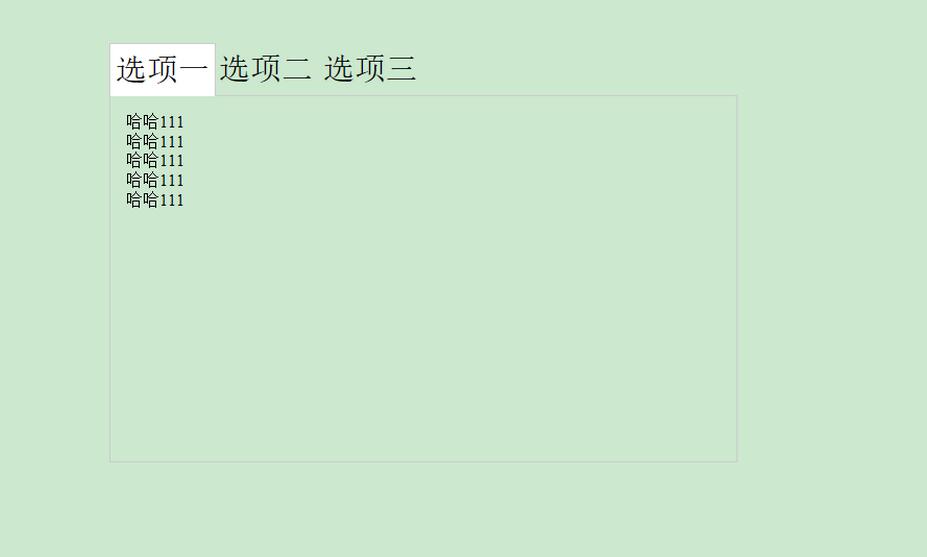
以上就是关于JavaScript选项卡制作的完整内容,希望这些代码能帮助大家更好地掌握相关技术。如果您觉得有用,欢迎继续支持本站。