

本文提供了一段JavaScript实现年月日与星期级联选择的完整代码。通过监听年份和月份下拉框的变化,动态生成日期选项,并根据选定的年月日自动计算并显示对应的星期几。
JavaScript年月日星期级联选择实现
本文分享了一个关于JavaScript时间操作的示例,重点演示了如何实现日期选择的级联功能,供读者参考学习。
效果展示如下:
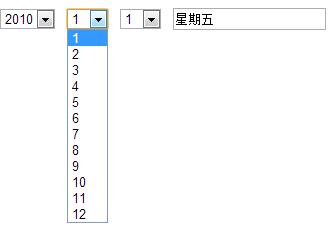
具体实现代码如下:
<html>
  <head>
    <meta http-equiv="Content-Type" content="text/html; charset=GB2312">
    <title>年月日星期级联</title>
  </head>

  <body topmargin="10" leftmargin="0">
    <form>
      <select id=year onchange="toDate();">
        <script>for(i=1970;i<=2010;i++)document.write("<option>"+i+"</option>")</script>
      </select>
      <select id=month onchange="toDate();">
        <script>for(i=1;i<=12;i++)document.write("<option>"+i+"</option>")</script>
      </select>
      <select id=day onchange="toDay();"></select>
      <input name=weekday>
    </form>
    <script type="text/javascript">
      var arr="日一二三四五六".split("")
      function toDate(){
        with(document.all){
          vYear=parseInt(year.options[year.selectedIndex].text)
          vMonth=parseInt(month.options[month.selectedIndex].text)
          day.length=0;
          for(i=0;i<(new Date(vYear,vMonth,0)).getDate();i++){day.options[day.length++].value=day.length;day.options[day.length-1].text=day.length;}
        }
        toDay();
      }
      function toDay(){
        vDay=parseInt(document.all.day.options[document.all.day.selectedIndex].value)
        document.all("weekday").value="星期"+arr[new Date(vYear,vMonth-1,vDay).getDay()]
      }
      window.onload=toDate;
    </script>
  </body>
</html>
希望这段代码能帮助大家更好地掌握JavaScript程序设计中的日期处理技巧。