

本文介绍如何利用AngularJS的双向数据绑定特性,在不直接操作DOM的情况下实现列表的全选、反选及批量删除功能。通过ng-model和ng-click指令配合控制器逻辑,简单高效地完成多选操作。
AngularJS实现全选与反选功能示例
AngularJS旨在弥补HTML在构建动态应用时的局限性。HTML作为静态文本展示语言表现优异,但在开发Web应用时显得力不从心。为此,作者通过一些技巧(或称为“小把戏”)让浏览器能够执行预期的交互逻辑。
本例核心运用了AngularJS的四大特性之一:双向数据绑定。
值得注意的是,整个过程中并未编写任何原生DOM操作代码。这正是AngularJS的优势所在,即便使用Bootstrap进行布局,JavaScript代码也仅用于创建模块和控制器,保持了代码的简洁性。
运行效果如下:
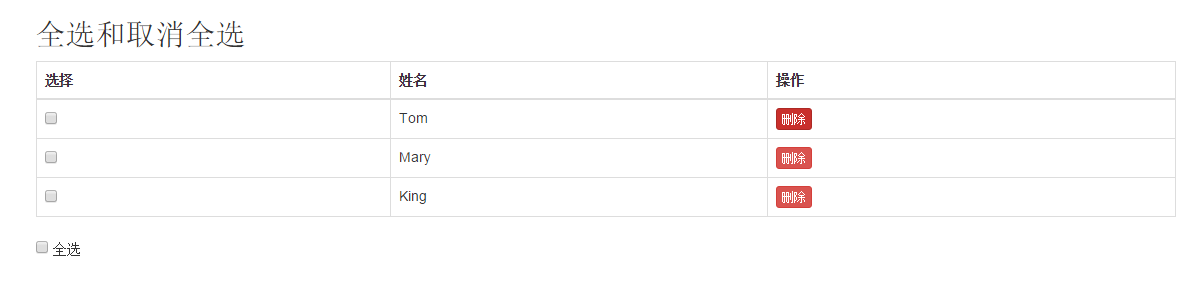
HTML页面结构
<!DOCTYPE html>
<html lang="en" ng-app="myModule5"><!--3、ng-app="myModule5"启动ng并调用模块-->
<head>
<meta charset="UTF-8">
<link rel="stylesheet" href="css/bootstrap.css">
<title>全选/取消全选</title>
</head>
<body>
<div class="container" ng-controller="myCtrl5"><!--4、ng-controller="myCtrl5"启用控制器-->
<h2>全选和取消全选</h2>
<table class="table table-bordered">
<thead>
<tr>
<th>选择</th>
<th>姓名</th>
<th>操作</th>
</tr>
</thead>
<tbody>
<tr>
<td>
<input ng-checked="selectAll" type="checkbox">
</td>
<td>Tom</td>
<td>
<button class="btn btn-danger btn-xs">删除</button>
</td>
</tr>
<tr>
<td>
<input ng-checked="selectAll" type="checkbox">
</td>
<td>Mary</td>
<td>
<button class="btn btn-danger btn-xs">删除</button>
</td>
</tr>
<tr>
<td>
<input ng-checked="selectAll" type="checkbox">
</td>
<td>King</td>
<td>
<button class="btn btn-danger btn-xs">删除</button>
</td>
</tr>
</tbody>
</table>
<input type="checkbox" ng-model="selectAll">
<span ng-hide="selectAll">全选</span>
<span ng-show="selectAll">取消全选</span>
</div>
<script src="js/angular.js"></script><!--1、引入angularJS-->
<script>
//2、创建自定义模块和控制器
angular.module('myModule5', ['ng']).
controller('myCtrl5', function($scope){
});
</script>
</body>
</html>
补充说明:这是AngularJS实现全选与多选操作的简易方案。
在进行增删改查(CRUD)操作时,批量处理数据往往需要多选功能的支持。
以下是AngularJS的具体实现方式(当然,存在更优化的方案,此处仅展示基础实现)。
HTML结构如下:
前端模板代码
<section>
<pre>{{choseArr}}</pre>
全选: <input type="checkbox" ng-model="master" ng-click="all(master,tesarry)">
<div ng-repeat="z in tesarry">
<input id={{z}} type="checkbox" ng-model="x" ng-checked="master" ng-click="chk(z,x)">{{z}}
</div>
<a href="#" class="btn btn-danger" ng-click="delete()" > 删除</a>
</section>
页面显示效果(采用Bootstrap样式):

JavaScript代码逻辑:
JavaScript控制逻辑
$scope.tesarry=[‘1‘,‘2‘,‘3‘,‘4‘,‘5‘];//初始化数据
$scope.choseArr=[];//定义数组用于存放前端显示
var str="";//
var flag=‘‘;//是否点击了全选,是为a
$scope.x=false;//默认未选中
$scope.all= function (c,v) {//全选
if(c==true){
$scope.x=true;
$scope.choseArr=v;
}else{
$scope.x=false;
$scope.choseArr=[""];
}
flag=‘a‘;
};
$scope.chk= function (z,x) {//单选或者多选
if(flag==‘a‘) {//在全选的基础上操作
str = $scope.choseArr.join(‘,‘) + ‘,‘;
}
if (x == true) {//选中
str = str + z + ‘,‘;
} else {
str = str.replace(z + ‘,‘, ‘‘);//取消选中
}
$scope.choseArr=(str.substr(0,str.length-1)).split(‘,‘);
};
$scope.delete= function () {// 操作CURD
if($scope.choseArr[0]==""||$scope.choseArr.length==0){//没有选择一个的时候提示
alert("请至少选中一条数据在操作!")
return;
};
for(var i=0;i<$scope.choseArr.length;i++){
//alert($scope.choseArr[i]);
console.log($scope.choseArr[i]);//遍历选中的id
}
};