

本文介绍利用jQuery实现连续动画效果的方法。通过预先设置动画序列,使元素依次执行多个动作。该方法适用于网页游戏及前端设计,提供了完整的HTML、CSS及JavaScript代码示例,帮助开发者掌握这一基础技巧。
jQuery连续动画效果实现教程
本文通过具体实例,详细解析了使用jQuery实现连续动画效果的实现方式。内容旨在为相关开发者提供参考与借鉴。
该方法的核心在于预先定义好一系列动画动作,随后借助jQuery的功能,使这些动画按顺序依次执行。这种“一个接一个”的动画生成技巧,虽然是网页游戏开发中的基础环节,但对于前端设计而言,掌握这一技术至关重要。
具体的运行效果如下图所示:
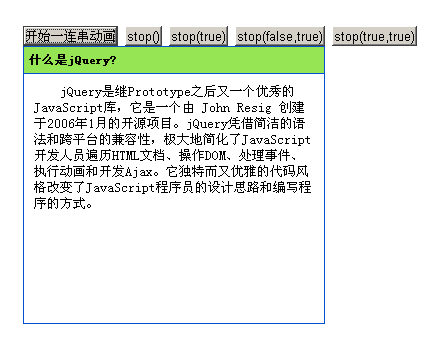
如需查看实际运行效果,可访问以下在线演示地址:
http://demo.jb51.net/js/2015/jquery-lx-animate-style-demo/
实现该效果的具体代码如下:
<!DOCTYPE html PUBLIC "-//W3C//DTD XHTML 1.0 Transitional//EN"
"http://www.w3.org/TR/xhtml1/DTD/xhtml1-transitional.dtd">
<html xmlns="http://www.w3.org/1999/xhtml">
<head>
<meta http-equiv="Content-Type" content="text/html; charset=utf-8" />
<title>jQuery实现连续的动画效果</title>
<style type="text/css">
*{margin:0;padding:0;}
body { font-size: 13px; line-height: 130%; padding: 60px }
#panel { width: 60px; border: 1px solid #0050D0 ;height:22px;overflow:hidden;}
.head { padding: 5px; background: #96E555; cursor: pointer;width: 300px;}
.content { padding: 10px; text-indent: 2em; border-top: 1px solid #0050D0;display:block; width:280px;}
</style>
<script type="text/javascript" src="jquery1.3.2.js"></script>
<script type="text/javascript">
$(function(){
  $("button:eq(0)").click(function () {
   $("#panel")
   .animate({height : "150" } , 1000 )
   .animate({width : "300" } , 1000 )
   .hide(2000)
   .animate({height : "show" , width : "show" , opacity : "show" } , 1000 )
   .animate({height : "500"} , 1000 );
  });
  $("button:eq(1)").click(function () {
   $("#panel").stop();//停止当前动画,继续下一个动画
  });
  $("button:eq(2)").click(function () {
   $("#panel").stop(true);//清除元素的所有动画
  });
  $("button:eq(3)").click(function () {
   $("#panel").stop(false,true);//让当前动画直接到达末状态 ,继续下一个动画
  });
  $("button:eq(4)").click(function () {
   $("#panel").stop(true,true);//清除元素的所有动画,让当前动画直接到达末状态
  });
})
</script>
</head>
<body>
 <button>开始一连串动画</button>
 <button>stop()</button>
 <button>stop(true)</button>
 <button>stop(false,true)</button>
 <button>stop(true,true)</button>
<div id="panel">
 <h5 class="head">什么是jQuery?</h5>
 <div class="content">
  jQuery是继Prototype之后又一个优秀的JavaScript库,它是一个由 John Resig 创建于2006年1月的开源项目。jQuery凭借简洁的语法和跨平台的兼容性,极大地简化了JavaScript开发人员遍历HTML文档、操作DOM、处理事件、执行动画和开发Ajax。它独特而又优雅的代码风格改变了JavaScript程序员的设计思路和编写程序的方式。
 </div>
</div>
</body>
</html>
希望本文提供的代码与解析,能对各位在jQuery程序设计方面的学习与应用有所帮助。