

本文分享一段使用 JavaScript 实现的文字球状放大特效代码。通过调整 DOM 元素的位置与样式,使页面中的文字围绕中心点呈球体分布并产生动态视觉效果。提供完整的 HTML、CSS 及 JS 源码,开发者可直接复制运行或在此基础上进行二次开发与创新。
文字球状放大特效介绍
展示一种极具视觉冲击力的文字放大镜效果,体验感出色。
首先预览最终呈现的视觉效果:
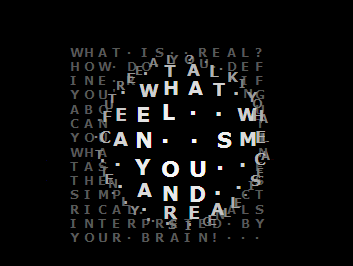
大家先运行代码试一试-------------------------------------效果演示-------------------------------------------
详细的实现代码如下所示。
完整代码实现
<html>
<head>
<title>JS文字球状放大效果</title>
<meta http-equiv="imagetoolbar" content="no">
<style type="text/css">
 body {cursor:crosshair;margin:0; padding:0; position:absolute; overflow:hidden; background:#000; left:0; top:0; width:100%; height:100%;}
 span {position:absolute;font-family: verdana; font-weight: bold;}
</style>

<script type="text/javascript"><!--

T = "What is real?How do you define real? Ifyou're talkingabout what youcan feel whatyou can smellwhat you cantaste and seethen real issimply electrical signalsinterpreted byyour brain! ";
I = 0;
o = new Array();
xm = -1000;
ym = -1000;
///////////////
rad = 80;
dim = 200;
///////////////
W = 0;
H = 0;
NX = 14;
NY = 14;
var nx;
var ny;

document.onmousemove = function(e){
 if (window.event) e = window.event;
 xm = (e.x || e.clientX) - (nx * .5) + dim * .5;
 ym = (e.y || e.clientY) - (ny * .5) + dim * .5;
}

function resize() {
 nx = document.body.offsetWidth;
 ny = document.body.offsetHeight;
}
onresize = resize;

function CObj(N,i,j,c){
 this.obj = document.createElement("span");
 this.obj.innerHTML = c;
 DOOT.appendChild(this.obj);
 this.N = N;
 this.To = 16;
 this.x0 = i*2*W;
 this.y0 = j*2*H;
 this.anim = true;

 this.mainloop = function(){
 with (this) {
 dx = xm - x0;
 dy = ym - y0;
 dist = Math.sqrt(dx * dx + dy * dy);
 if (dist < rad) {
 anim = true;
 M = Math.cos(.5 * Math.PI * Math.abs(dist / rad));
 c = Math.round(84 + M * 171);
 with(obj.style){
 left = x0 - dx * M;
 top = y0 - dy * M;
 zIndex = Math.round(100 + M);
 fontSize = 8 + M * W * 2;
 color = "RGB("+c+","+c+","+c+")";
 }
 } else {
 if(anim){
 with(obj.style){
 left = x0;
 top = y0;
 zIndex = 0;
 fontSize = 8;
 color = "RGB(88,88,88)";
 }
 anim = false;
 }
 }
 }
 }
}
function run(){
 for(i in o)o[i].mainloop();
 setTimeout(run,16);
}

onload = function (){
 DOOT = document.getElementById("doot");
 with(DOOT.style){
 left = -dim/2;
 top = -dim/2;
 width = dim;
 height = dim;
 }
 resize();
 W = (dim / NX) / 2;
 H = (dim / NY) / 2;
 K = 0;
 for(var j=0;j<NY;j++){
 for(var i=0;i<NX;i++){
 c=T.charAt((I++)%T.length).toUpperCase();
 if(c==" ")c="·";
 o[K] = new CObj(K++,i,j,c);
 }
 }
 run();
}
//-->
</script>
</head>

<body>
<span style="position:absolute;left:50%;top:50%">
 <span id="doot"></span>
</span>

</body>
</html>
若希望复现这一炫酷的交互效果,可直接复制上述代码并在浏览器中运行。欢迎尝试在此基础上进行个性化修改或创新拓展。
以上即为 JavaScript 文字球状放大效果的完整代码分享,希望该方案能满足您的需求。