

本文介绍一种基于jQuery和Ajax实现的无刷新柱状图投票特效。点击投票按钮时,柱状图以动画形式增长,类似进度条。在Firefox或Chrome中显示圆角效果,IE8不支持圆角。
jQuery Ajax带动画柱状图投票实现
本文实例展示了利用jQuery结合Ajax技术实现的带有动画效果的无刷新柱状图投票功能。该示例供读者参考学习。
此jQuery Ajax投票特效包含动画效果,呈现为类似进度条风格的柱状图。示例以“你最喜欢的编程语言是哪一种?”为主题演示投票过程。通过Ajax方式实现无刷新投票,每次点击后,横向柱状图会增长一节。在Firefox或Chrome浏览器中,柱状图横条显示为圆角;而在IE8浏览器中,则不具备圆角效果。
运行效果截图如下:
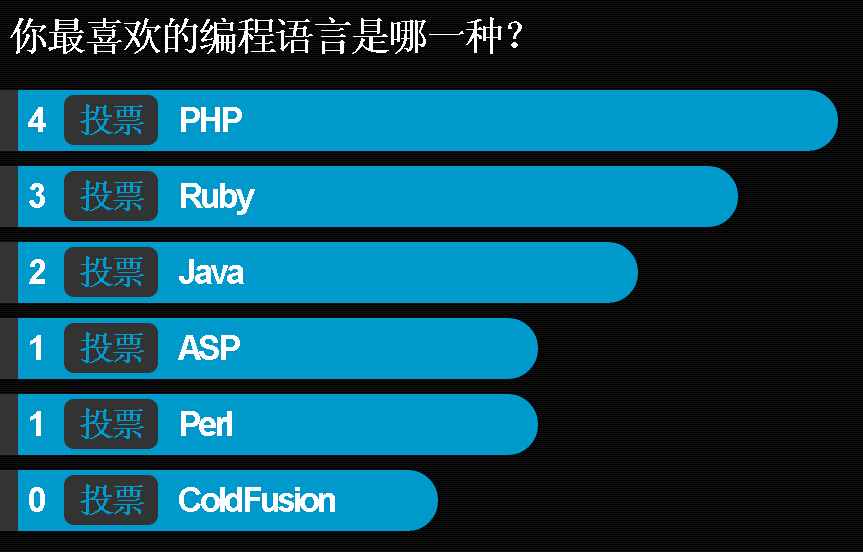
具体代码如下:
<!DOCTYPE html>
<html>
<head>
<title>jQuery ajax投票特效,带动画效果 柱状图</title>
<script type="text/javascript" src="jquery-1.6.2.min.js"></script>
<script type="text/javascript">
$(document).ready(function() {
 $("#container div a").click(function() {
  $(this).parent().animate({
   width: '+=100px'
  }, 500);
  $(this).prev().html(parseInt($(this).prev().html()) + 1);
  return false;
 });
});
</script>
<style type="text/css">
* {
 font-family: Arial, "Free Sans";
}
#container {
 margin-top: 20px;
 color: #fff;
}
#container #question {
 display: block;
 padding: 20px;
 font-weight: bold;
 letter-spacing: -3px;
 margin-bottom: 20px;
 padding: 10px;
 font-size: 40px;
}
#container div {
 font-weight: bold;
 letter-spacing: -3px;
 background: #0099cc;
 margin-bottom: 15px;
 padding: 10px;
 font-size: 34px;
 color: #ffffff;
 border-left: 20px solid #333;
 width: 400px;
 -webkit-border-radius: 0.5em;
 -moz-border-radius: 0 0.5em 0.5em 0;
 border-radius: 0 1.5em 1.5em 0;
}
#container div a {
 border-radius: 0.3em;
 text-decoration: none;
 color: #0099cc;
 padding: 5px 15px;
 background: #333;
 margin: 0 20px;
}
#container div a:hover {
 color: #fff;
}
#main {
 background: #0099cc;
 margin-top: 0;
 padding: 2px 0 4px 0;
 text-align: center;
}
#main a {
 color: #ffffff;
 text-decoration: none;
 font-size: 12px;
 font-weight: bold;
 font-family: Arial;
}
#main a:hover {
 text-decoration: underline;
}
body {
 margin: 0;
 padding: 0;
 background: #ffffff url('//img.jbzj.com/file_images/article/201508/2015810110844109.gif') repeat right top;
}
#text {
 margin: 0 auto;
 width: 500px;
 font-size: 12px;
 color: #0099cc;
 font-weight: bold;
 text-align: center;
 margin-top: 20px;
}
</style>
<meta http-equiv="Content-Type" content="text/html; charset=utf-8"></head>
<body>
 <div id="container">
  <span id="question">你最喜欢的编程语言是哪一种?</span>
  <div><span>0</span><a href="">投票</a>PHP</div>
  <div><span>0</span><a href="">投票</a>Ruby</div>
  <div><span>0</span><a href="">投票</a>Java</div>
  <div><span>0</span><a href="">投票</a>ASP</div>
  <div><span>0</span><a href="">投票</a>Perl</div>
  <div><span>0</span><a href="">投票</a>ColdFusion</div>
 </div>
</body>
</html>
希望本文所述对大家的jquery程序设计有所帮助。